mcp-apple-notes
Pesquisa semânt
Documentação
MCP Apple Notes

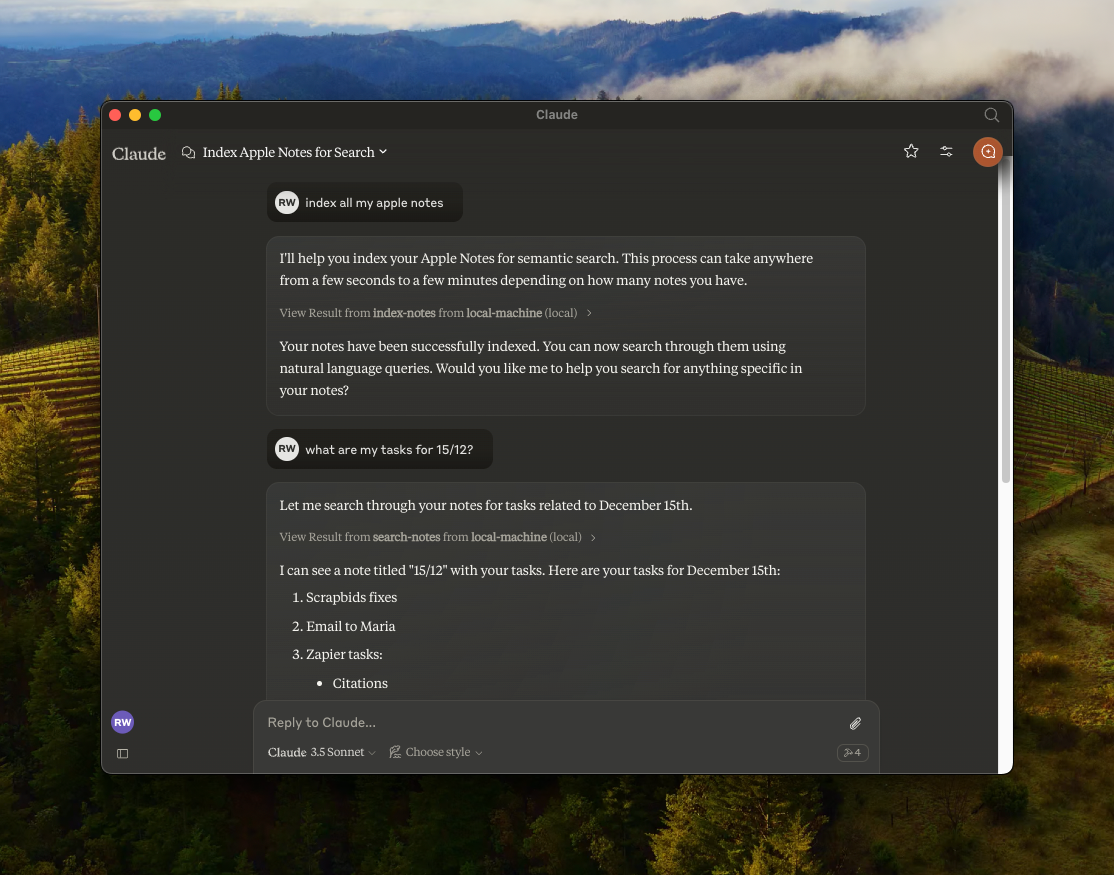
Um servidor Model Context Protocol (MCP) que permite busca semântica e RAG (Geração Aumentada por Recuperação) sobre suas Notas do Apple. Funciona com qualquer cliente compatível com MCP — Claude Desktop, Cursor, Windsurf, Cline e outros.
Recursos
- 🔍 Busca semântica sobre Notas do Apple usando o modelo de embeddings no dispositivo
all-MiniLM-L6-v2 - 📝 Recursos de busca em texto completo
- 📂 Suporte a pastas — listar pastas, navegar por pasta, filtrar busca por pasta
- 📊 Armazenamento vetorial usando LanceDB
- 🤖 Funciona com qualquer cliente compatível com MCP (Claude, Cursor, Windsurf, Cline, etc.)
- 🍎 Integração nativa com Notas do Apple via JXA
- 🔒 Modo somente leitura opcional para exploração segura
- 🏃♂️ Execução totalmente local — sem necessidade de chaves de API
Segurança e Transparência
Como este servidor interage com suas Notas do Apple privadas, ele foi projetado com transparência absoluta em mente. Ele roda 100% localmente no seu Mac.
- Sem Nuvem, Sem Telemetria — Sem chaves de API, nenhum dado sai da sua máquina.
- JXA Nativo do Apple — Usa a ponte de script oficial JavaScript for Automation da Apple.
- Embeddings no dispositivo — O modelo
all-MiniLM-L6-v2roda localmente via@huggingface/transformers. - Verificável — Você é altamente incentivado a ler cada linha de código (especialmente
index.ts) antes de tocar em suas notas. - Lançamentos do GitHub incluem somas de verificação SHA-256 para que você possa verificar os artefatos baixados.
Instalação e Configuração
Escolha o método de instalação que se adequa ao seu fluxo de trabalho.
Método 1: Instalar a partir do código-fonte (recomendado)
Ao clonar o repositório localmente, você pode inspecionar o código-fonte e saber exatamente o que está sendo executado na sua máquina.
Pré-requisitos: Node.js (v18+) ou Bun
Usando Bun?
git clone https://github.com/Dan8Oren/mcp-apple-notes && cd mcp-apple-notes && bun install
{
  "mcpServers": {
    "apple-notes": {
      "command": "bun",
      "args": ["run", "/path/to/mcp-apple-notes/index.ts"]
    }
  }
}
Usando NPM:
git clone https://github.com/Dan8Oren/mcp-apple-notes && cd mcp-apple-notes && npm install
Em seguida, adicione o servidor à configuração do seu cliente MCP. Substitua /path/to/mcp-apple-notes pelo local onde você clonou o repositório:
{
  "mcpServers": {
    "apple-notes": {
      "command": "npx",
      "args": ["tsx", "/path/to/mcp-apple-notes/index.ts"]
    }
  }
}
Dica: Quer experimentar sem risco? Ative o modo somente leitura para bloquear todas as operações de escrita enquanto explora.
"env": { "MCP_APPLE_NOTES_READ_ONLY": "1" }
Método 2: Início rápido via npx
Se você preferir uma abordagem sem configuração e confiar no pacote npm publicado, basta adicionar isso diretamente à sua configuração MCP:
{
  "mcpServers": {
    "apple-notes": {
      "command": "npx",
      "args": ["-y", "@dan8oren/mcp-apple-notes"]
    }
  }
}
Após a configuração, reinicie seu cliente e peça ao seu assistente de IA para "indexar minhas notas" para começar.
Instruções por cliente
Claude Desktop
- Abra Configurações → Desenvolvedor → Editar Configuração
- Cole a configuração JSON escolhida em
claude_desktop_config.json - Reinicie o Claude Desktop
Logs:
tail -n 50 -f ~/Library/Logs/Claude/mcp-server-apple-notes.log
Claude Code
# npm version:
claude mcp add apple-notes npx -- -y @dan8oren/mcp-apple-notes
# or from source:
claude mcp add apple-notes npx -- tsx /path/to/mcp-apple-notes/index.ts
Cursor
Adicione a configuração JSON a ~/.cursor/mcp.json (global) ou .cursor/mcp.json na raiz do seu projeto.
Windsurf
Adicione a configuração JSON a ~/.windsurf/mcp.json.
Ferramentas Disponíveis
| Ferramenta | Descrição |
|---|---|
index-notes | Indexe todas as notas para busca semântica. Execute isso primeiro |
list-folders | Liste todas as pastas de Notas do Apple com caminhos completos e contagens de notas |
list-notes | Liste notas com metadados. Filtro opcional path, flag includeContent e contentPreviewChars (pré-visualização por nota sem HTML truncada em N caracteres — uma chamada rápida, evita o limite de tokens de resposta ao listar o conteúdo de muitas notas) |
search-notes | Busca semântica + texto completo com filtro de caminho e limite opcionais |
get-note | Obtenha o conteúdo completo por noteId ou título. Retorna candidatos em caso de ambiguidade |
create-note | Crie uma nova nota com conteúdo markdown, opcionalmente em uma pasta |
edit-note | Edite o título e/ou conteúdo (markdown) de uma nota existente |
append-to-note | Acrescente conteúdo markdown a uma nota existente |
move-note | Mova uma nota para uma pasta diferente |
delete-note | Exclua uma nota (move para Excluídos Recentemente) |
Verifique Antes de Confiar
Cada operação de Notas do Apple é uma chamada JXA que você pode inspecionar em index.ts. Sem solicitações de rede, sem sincronização em segundo plano — apenas chamadas locais de ponte de script.
Modo somente leitura
Quer uma rede de segurança? Ative o modo somente leitura para bloquear todas as operações de escrita — apenas as ferramentas de busca, listagem e leitura estarão disponíveis:
{
  "mcpServers": {
    "apple-notes": {
      "command": "npx",
      "args": ["-y", "@dan8oren/mcp-apple-notes"],
      "env": { "MCP_APPLE_NOTES_READ_ONLY": "1" }
    }
  }
}
Quando ativado, apenas estas ferramentas estão disponíveis: index-notes, list-folders, list-notes, search-notes, get-note.
Modo verboso
Ative o registro verboso para ver cada chamada JXA antes de executar (registrado em stderr):
Flag de CLI — adicione --verbose aos argumentos de configuração do seu cliente MCP:
{
  "mcpServers": {
    "apple-notes": {
      "command": "npx",
      "args": ["--verbose", "-y", "@dan8oren/mcp-apple-notes"]
    }
  }
}
Variável de ambiente — para clientes que suportam env:
{
  "mcpServers": {
    "apple-notes": {
      "command": "npx",
      "args": ["-y", "@dan8oren/mcp-apple-notes"],
      "env": { "MCP_APPLE_NOTES_VERBOSE": "1" }
    }
  }
}
Referência de operações JXA
| Operação | Tipo | O que faz |
|---|---|---|
getNotes | Leitura | Lista todas as notas (id, título, caminho da pasta) |
getFolders | Leitura | Lista todas as pastas com caminhos e contagens de notas |
getNotesByPath | Leitura | Obtém notas em uma pasta específica |
getNoteDetailsById | Leitura | Obtém o conteúdo completo de uma nota por ID |
createNote | Escrita | Cria uma nova nota com título e conteúdo |
appendToNote | Escrita | Acrescenta conteúdo HTML a uma nota existente |
editNote | Escrita | Atualiza o título e/ou conteúdo de uma nota |
moveNote | Escrita | Move uma nota para uma pasta diferente |
deleteNote | Destrutivo | Move uma nota para Excluídos Recentemente |
Todas as operações passam pela ponte de script JXA da Apple (Application('Notes')). Sem acesso direto ao sistema de arquivos, sem chamadas de rede. A operação delete não é permanente — as notas vão para Excluídos Recentemente e podem ser recuperadas em até 30 dias.
Formato de Resposta
As respostas das ferramentas são objetos JSON em um envelope consistente:
- Sucesso:
{ "ok": true, "data": ... } - Erro:
{ "ok": false, "error": { "type": "...", "message": "..." } }
A maioria das respostas orientadas a notas agora inclui o id estável das Notas do Apple para que os clientes possam rastrear notas com segurança em renomeações e movimentações.
Comunidade e Suporte
Relatórios de bugs, ideias, perguntas e demonstrações têm um lugar — use o canal que se adequar:
- 🐛 Encontrou um bug? → Abra uma issue
- 💡 Tem uma ideia de recurso? → Inicie um tópico em Ideias
- ❓ Precisa de ajuda com configuração ou integração? → Pergunte em Q&A
- 🛠 Construiu algo legal com isso? → Compartilhe em Mostre e conte
- 📣 Acompanhe as atualizações → Anúncios
PRs são bem-vindos. Para mudanças não triviais, abra uma issue ou discussão primeiro para alinharmos a direção antes de você investir tempo.
Agradecimentos
Originalmente baseado em RafalWilinski/mcp-apple-notes.