Cookbook Directory
Encontre, crie e modifique receitas
Documentação
O que o Claude pode fazer com suas receitas
Uma vez conectado, o Claude se torna um assistente de culinária que realmente conhece sua biblioteca.
Pesquise suas receitas
Peça ao Claude para encontrar receitas por ingrediente, técnica, culinária ou necessidade alimentar. Ele pesquisa em toda a sua biblioteca privada em linguagem natural.
Leia os detalhes das receitas
O Claude pode ler qualquer receita por completo — ingredientes, método, notas e harmonizações — para que possa responder perguntas contextuais enquanto você cozinha.
Crie novas receitas
Descreva o que você deseja e o Claude criará uma receita estruturada na sua biblioteca, pronta para cozinhar ou refinar.
Revise e adapte
Peça ao Claude para criar uma nova revisão de uma receita existente — convertendo unidades, ajustando porções ou adaptando para necessidades alimentares — mantendo a original intacta.
Configuração em três etapas
Funciona diretamente no claude.ai — basta um token de API e a URL do servidor. Nenhum software adicional é necessário.
1
Gere um token de API
Vá em Configurações → Tokens de API e crie um novo token. Copie-o — você só o verá uma vez.
2
Adicione o Cookbook Directory ao Claude
Conecte-se via claude.ai em Configurações → Integrações, ou use o trecho de configuração do Claude Desktop abaixo.
3
Comece a cozinhar com o Claude
Abra uma nova conversa no Claude. Peça para "encontrar uma receita de massa" ou "criar uma receita de sopa de abóbora" e veja-o buscar na sua biblioteca.
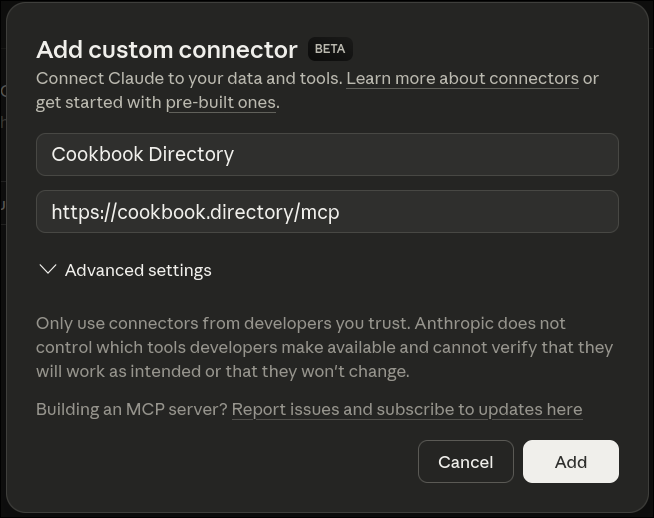
Configuração no claude.ai
Adicione o Cookbook Directory como uma integração diretamente nas suas configurações do Claude — sem necessidade de instalar software.
- 1Vá em claude.ai → Configurações → Integrações
- 2Clique em Adicionar integração e insira a URL do servidor:
https://cookbook.directory/mcp - 3Insira seu token de API de Configurações → Tokens de API quando solicitado
Configuração do Claude Desktop
Se você preferir o Claude Desktop, adicione isto ao seu claude_desktop_config.json. Substitua YOUR_API_TOKEN pelo seu token das Configurações.
{
  "mcpServers": {
    "cookbook": {
      "command": "npx",
      "args": [
        "mcp-remote",
        "https://cookbook.directory/mcp",
        "--header",
        "Authorization:Bearer YOUR_API_TOKEN"
      ]
    }
  }
}
O arquivo de configuração geralmente está em ~/Library/Application Support/Claude/claude_desktop_config.json no macOS, ou %APPDATA%\Claude\claude_desktop_config.json no Windows.
Suas receitas, dentro de cada conversa do Claude
Pare de copiar e colar receitas em janelas de chat. Conecte-se uma vez e o Claude poderá pesquisar, ler e desenvolver toda a sua biblioteca.