Deskbrid
HAL de desktop Linux para agentes de IA.
Documentação
deskbrid






mcp-name: io.github.coe0718/deskbrid
📖 Documentação | Referência da API | Arquitetura | Notas de lançamento v1.0.0
A HAL que faltava para seus agentes de desktop Linux.
Deskbrid é um único binário Rust que detecta automaticamente seu ambiente de desktop e o encapsula em um protocolo JSON sobre socket Unix. GNOME, Hyprland, KDE, COSMIC, Sway, Niri, Wayfire, Labwc, Cinnamon, MATE — um daemon, um protocolo, um binário.
# Human
deskbrid windows list
deskbrid clipboard read

# Agent (same socket)
{"action": "windows.list"}  →  [{"title": "VS Code", "app_id": "code", ...}]
Sumário
- Por que Deskbrid
- Desktops suportados
- Instalação
- Início rápido
- Recursos
- Protocolo
- Cliente Python
- Integração MCP
Por que Deskbrid
Todos os grandes laboratórios de IA estão correndo para lançar agentes de desktop. AppleScript dá aos agentes macOS controle nativo. Windows tem UI Automation. Linux tem xdotool — que quebra no Wayland, o protocolo de exibição padrão de todas as principais distribuições.
Deskbrid preenche essa lacuna. Ele detecta automaticamente seu compositor e carrega o backend correto — GNOME (Mutter RemoteDesktop DBus), Hyprland (hyprctl + ydotool + grim), KDE (KWin D-Bus + ydotool + spectacle), compositores estilo wlroots ou X11 compartilhado. Mesmo binário, mesmo protocolo, mesmo socket.
Painel de controle
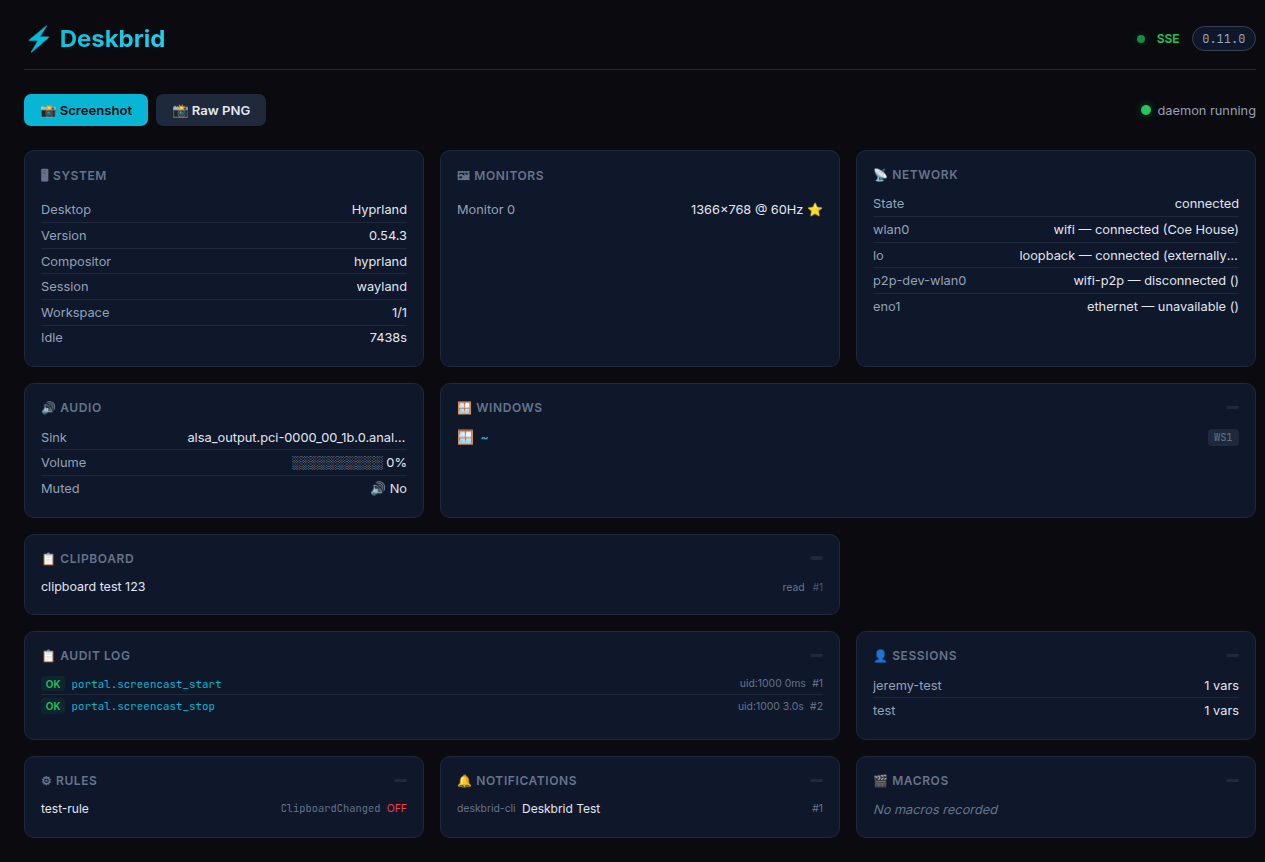
Deskbrid vem com um painel web integrado em localhost:20129 — informações do sistema, monitores, janelas, rede, áudio, área de transferência e um registro de auditoria das ações do agente, tudo ao vivo:
Desktops suportados
| Desktop | Sessão | Status | Backend |
|---|---|---|---|
| GNOME 46–50 | Wayland | ✅ Núcleo | Mutter RemoteDesktop + Extensão de Shell |
| KDE Plasma | Wayland | ✅ Núcleo | KWin D-Bus + ydotool + spectacle |
| Hyprland | Wayland | ✅ Núcleo | hyprctl + ydotool + grim |
| Sway | Wayland | ✅ Núcleo | swaymsg + ydotool + grim |
| Labwc | Wayland | ⚠️ Parcial | wlrctl + ydotool + grim + wlr-randr |
| COSMIC | Wayland | ⚠️ Parcial | cosmic-helper + cosmic-randr + ydotool + grim |
| Niri | Wayland | 🔲 Não testado | niri msg + ydotool + grim + wlr-randr |
| Wayfire | Wayland | 🔲 Não testado | wf-ipc + ydotool + grim + wlr-randr |
| Cinnamon | X11 | 🔲 Não testado | xdotool + wmctrl + xclip + import |
| MATE | X11 | 🔲 Não testado | xdotool + wmctrl + xclip + import |
| X11 (genérico) | X11 | 🔲 Não testado | xdotool + wmctrl + xclip + import |
Cobertura honesta: Deskbrid funciona bem em GNOME, KDE, Hyprland e Sway — testado em hardware real (Turtle, um laptop Haswell de 2014). Os outros sete backends têm código, mas zero verificação em tempo de execução. Mesmo dentro dos backends principais, o suporte é desigual: Hyprland não tem
windows.minimizeemonitor.set_primary, COSMIC não tem mover/redimensionar janelas nem tiling, Labwc não tem mover/redimensionar, minimizar, tile nem controle de monitor primário. Ações simuladas (ui.tree.get,ui.element.click,bluetooth.pair) retornam "não suportado". Isso é automação de desktop Linux ampla, porém parcial, não controle universal entre desktops. Veja a Matriz de Testes DE completa para detalhes por ação e por compositor.
Instalação
Instalação em uma linha (recomendada):
bash <(curl -fsSL https://deskbrid.patchhive.dev/install.sh)
Detecta automaticamente sua distribuição e ambiente de desktop, instala dependências, configura uinput e baixa o binário.
Instalação manual:
Baixe o tarball da versão mais recente na página de releases:
ARCH=$(uname -m)
case "$ARCH" in x86_64) ARCH="x86_64-unknown-linux-gnu";; aarch64|arm64) ARCH="aarch64-unknown-linux-gnu";; esac
curl -LO "https://github.com/coe0718/deskbrid/releases/latest/download/deskbrid-${ARCH}.tar.gz"
curl -LO "https://github.com/coe0718/deskbrid/releases/latest/download/deskbrid-${ARCH}.tar.gz.sha256"
sha256sum -c "deskbrid-${ARCH}.tar.gz.sha256"
tar -xzf "deskbrid-${ARCH}.tar.gz"
sudo mv deskbrid /usr/local/bin/
chmod +x /usr/local/bin/deskbrid
Ou compile a partir do código-fonte:
git clone https://github.com/coe0718/deskbrid
cd deskbrid
cargo build --release
sudo cp target/release/deskbrid /usr/local/bin/
Configuração do desktop
GNOME:
sudo apt install -y grim wl-clipboard python3-gi gstreamer1.0-tools gstreamer1.0-pipewire
deskbrid setup
Hyprland (e outros compositores Wayland independentes — Sway, Niri, Wayfire, Labwc):
sudo pacman -S grim wl-clipboard ydotool
echo 'KERNEL=="uinput", GROUP="input", MODE="0660"' | sudo tee /etc/udev/rules.d/99-input.rules
sudo usermod -aG input $USER
⚠️ Compositores Wayland independentes não incluem um daemon de notificação. O
notify senddo Deskbrid ficará travado sem um. Instale dunst, mako ou swaync e adicione-o à inicialização automática do seu compositor.
KDE Plasma:
sudo apt install spectacle imagemagick wl-clipboard ydotool
Início rápido
deskbrid daemon &

deskbrid windows list          # List open windows
deskbrid clipboard read        # Read clipboard
deskbrid screenshot            # Take screenshot
deskbrid system info           # Get system info
deskbrid windows focus --app code  # Focus VS Code
deskbrid input keyboard type "Hello!"  # Type text
Recursos
Janelas e espaços de trabalho
| Ação | Descrição |
|---|---|
windows.list | Listar todas as janelas abertas |
windows.focus | Focar uma janela por app_id ou título |
windows.get | Obter detalhes de uma janela específica |
windows.close | Solicitar fechamento de janela |
windows.minimize/maximize | Controle de estado da janela |
windows.move_resize | Mover e redimensionar janelas |
windows.tile | Tile para regiões da tela |
windows.activate_or_launch | Focar ou iniciar aplicativo |
workspaces.* | Gerenciamento de espaços de trabalho |
layout_profiles.* | Salvar/restaurar layouts |
Entrada e área de transferência
| Ação | Descrição |
|---|---|
input.keyboard type | Digitar texto |
input.keyboard key | Enviar tecla |
input.keyboard combo | Enviar combinações de teclas |
input.mouse.* | Controle do mouse |
clipboard.read/write | Acesso à área de transferência |
clipboard.history | Histórico da área de transferência |
Capturas de tela e mídia
| Ação | Descrição |
|---|---|
screenshot | Captura de tela |
screenshot.ocr | Extrair texto via Tesseract |
screenshot.diff | Comparar capturas de tela |
mpris.* | Controle do player de mídia |
color.pick | Amostrar cores de pixels |
Sistema e serviços
| Ação | Descrição |
|---|---|
system.info | Informações do desktop |
system.battery | Status da bateria |
system.idle | Detecção de inatividade |
system.power | Gerenciamento de energia |
service.* | Unidades systemd |
journal.query | Inspeção de logs |
terminal.* | Sessões PTY |
monitor.* | Controle de exibição |
Rede e Bluetooth
| Ação | Descrição |
|---|---|
network.* | Status/conexão WiFi |
bluetooth.* | Pareamento/controle de dispositivos |
Fala e saída de áudio
| Ação | Descrição |
|---|---|
speech.speak | Falar texto em voz alta (spd-say / espeak-ng) |
speech.stop | Cancelar falas em andamento |
speech.voices | Listar vozes disponíveis |
Protocolo
Deskbrid usa JSON sobre socket Unix. Veja PROTOCOL.md para a especificação completa.
→ {"action": "windows.list"}
← {"type": "response", "status": "ok", "data": [{"title": "VS Code", ...}]}

→ {"action": "windows.focus", "window_id": "code"}
← {"type": "response", "status": "ok"}
Eventos
Assine atualizações em tempo real:
{"action": "subscribe", "events": ["file.*"]}
Cliente Python
from deskbrid import Deskbrid

client = Deskbrid()

# List and focus VS Code
windows = client.windows_list()
code_window = next((w for w in windows if w.app_id == 'code'), None)
if code_window:
    client.focus_window(app_id='code')
    client.type_text("Fixed the bug!\n")

# Subscribe to events
@client.on("file.*")
def on_file_change(event):
    print(f"File changed: {event['path']}")
Integração MCP
Deskbrid expõe um servidor completo de Model Context Protocol para ferramentas de codificação com IA:
deskbrid mcp
Agente Hermes (habilidade integrada)
Deskbrid inclui uma habilidade Hermes para configuração em um comando. Em qualquer sessão Hermes:
/deskbrid-hermes-mcp
Ou pelo terminal:
hermes mcp add deskbrid --command "deskbrid mcp"
hermes mcp test deskbrid
# → ✓ deskbrid: connected
Após reiniciar a sessão (/reset), o agente ganha mais de 100 ferramentas de controle de desktop Linux.
Claude Desktop
~/.config/Claude/claude_desktop_config.json:
{
  "mcpServers": {
    "deskbrid": {
      "command": "/usr/local/bin/deskbrid",
      "args": ["mcp"]
    }
  }
}
Codex / Cursor / qualquer cliente MCP
Configure o servidor MCP com o comando deskbrid mcp — o protocolo é JSON-RPC padrão sobre stdio.
Ferramentas MCP disponíveis (mais de 100 em 20 categorias): janelas, entrada, área de transferência, capturas de tela, sistema, acessibilidade AT-SPI, PTY de terminal, arquivos, áudio, rede, MPRIS, impressão, notificações, keyring, regras, confirmação, mensagens de agente, busca, macros, capacidades, fala.
Comparação com alternativas
| Ferramenta | Wayland | Nativo para agentes | JSON | Janelas | Entrada | Área de transferência | Captura de tela | Bluetooth | Áudio |
|---|---|---|---|---|---|---|---|---|---|
| deskbrid | ✅ | ✅ | ✅ | ✅ | ✅ | ✅ | ✅ | ✅ | ✅ |
| xdotool | ❌ | ❌ | ❌ | ✅ | ✅ | ❌ | ❌ | ❌ | ❌ |
| ydotool | ✅ | ❌ | ❌ | ❌ | ✅ | ❌ | ❌ | ❌ | ❌ |
| grim | ✅ | ❌ | ❌ | ❌ | ❌ | ❌ | ✅ | ❌ | ❌ |
| wl-clipboard | ✅ | ❌ | ❌ | ❌ | ❌ | ✅ | ❌ | ❌ | ❌ |
Licença
MIT
Como tudo começou
Deskbrid começou com Tuck — um agente autônomo que precisava controlar um desktop Linux real. Quando a comunidade pediu suporte ao Hyprland, Tuck pediu a Jeremy uma máquina Arch Linux básica com SSH e sudo. Ele mesmo instalou o Hyprland e construiu o backend de dentro do ambiente que acabara de configurar.
A primeira demonstração funcional foi uma mensagem do Telegram: Tuck focou uma janela e digitou "Hello from the other side" em menos de 60 segundos. Aquele momento — um agente controlando um desktop real através de um socket Unix — tornou-se o Deskbrid. Ele é construído para agentes em primeiro lugar: mesmo protocolo para humanos na CLI, mesmo socket para IAs, um binário que funciona em qualquer lugar.