Appwrite
Interaja com a API do Appwrite para gerenciar bancos de dados, usuários, armazenamento e muito mais. Requer configuração por meio de variáveis de ambiente.
Documentação
Servidor MCP Appwrite

Um servidor Model Context Protocol para Appwrite. Ele expõe a API do Appwrite — bancos de dados, usuários, funções, equipes, armazenamento e mais — como ferramentas que seu cliente MCP pode chamar.
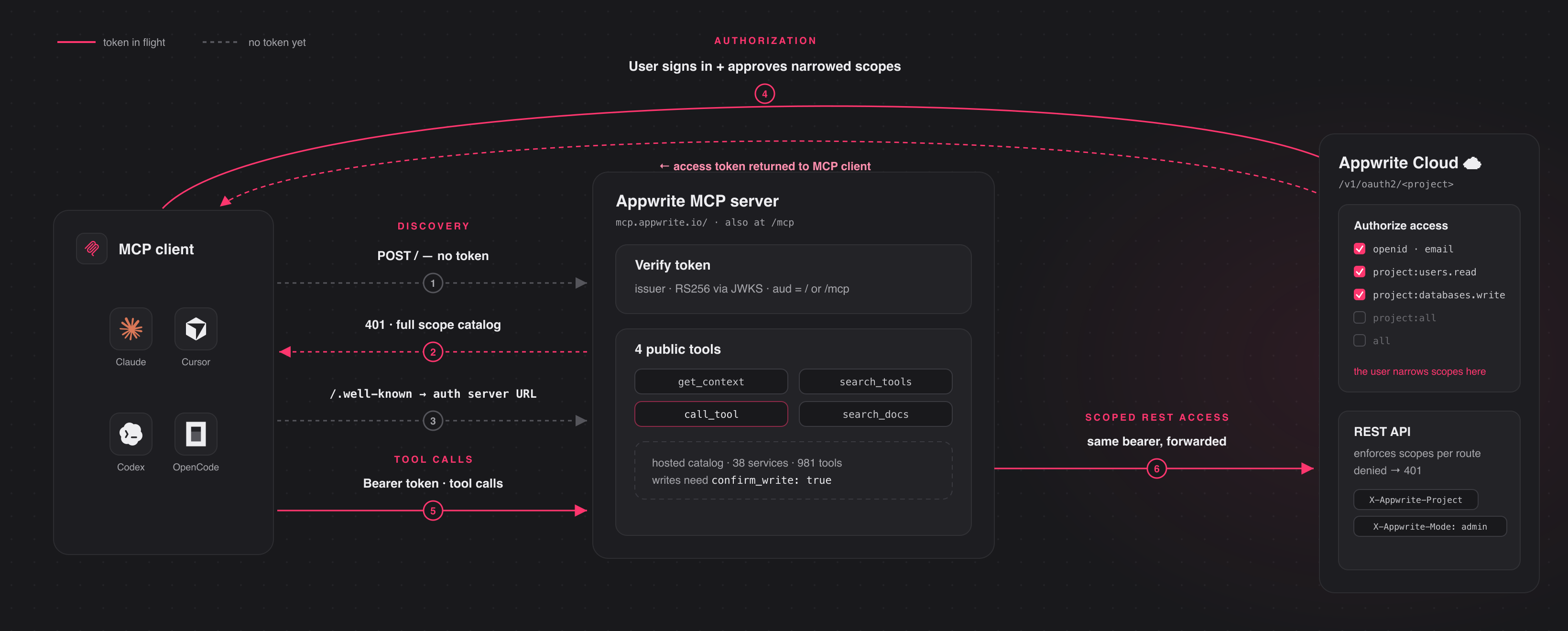
Conecte-se ao servidor hospedado em https://mcp.appwrite.io/ e autentique-se
através do seu navegador. Na primeira conexão, seu cliente abre uma tela de
consentimento do Appwrite; aprove os escopos e você estará conectado. Não há chaves para
copiar. A URL convencional https://mcp.appwrite.io/mcp também é suportada e
conecta ao mesmo servidor.
Conecte seu cliente
Escolha seu cliente abaixo. Cada um adiciona o servidor hospedado Appwrite Cloud.
Claude Code
claude mcp add --transport http appwrite https://mcp.appwrite.io/
Em seguida, dentro de uma sessão do Claude Code, execute /mcp, selecione appwrite e siga
o prompt do navegador para autenticar.
Claude Desktop
Vá para Configurações → Conectores → Adicionar conector personalizado e cole
https://mcp.appwrite.io/. Disponível nos planos Pro e Max; nos planos
Team e Enterprise, apenas um Proprietário da organização pode adicionar conectores personalizados.
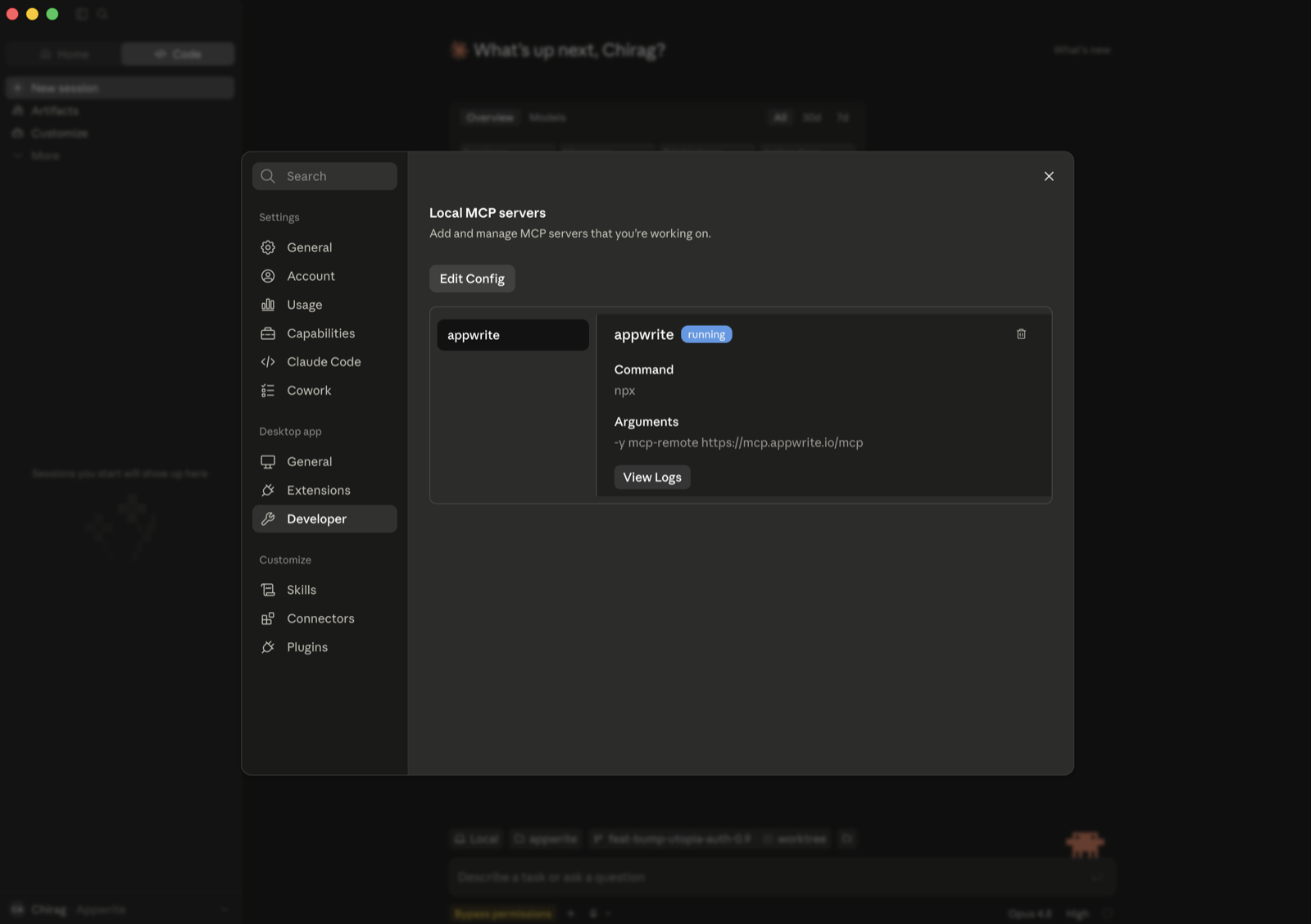
Se você não vir essa opção (plano gratuito, ou membro Team/Enterprise), faça a ponte do servidor remoto via stdio (requer Node.js). Vá para Configurações → Desenvolvedor → Servidores MCP locais, clique em Editar Configuração e adicione:
{
  "mcpServers": {
    "appwrite": {
      "command": "npx",
      "args": ["-y", "mcp-remote", "https://mcp.appwrite.io/"]
    }
  }
}
Reinicie o Claude Desktop; o servidor aparece em Servidores MCP locais e uma janela do navegador abre para autenticar.
Cursor
Edite ~/.cursor/mcp.json (global) ou .cursor/mcp.json (projeto).
{
  "mcpServers": {
    "appwrite": {
      "url": "https://mcp.appwrite.io/"
    }
  }
}
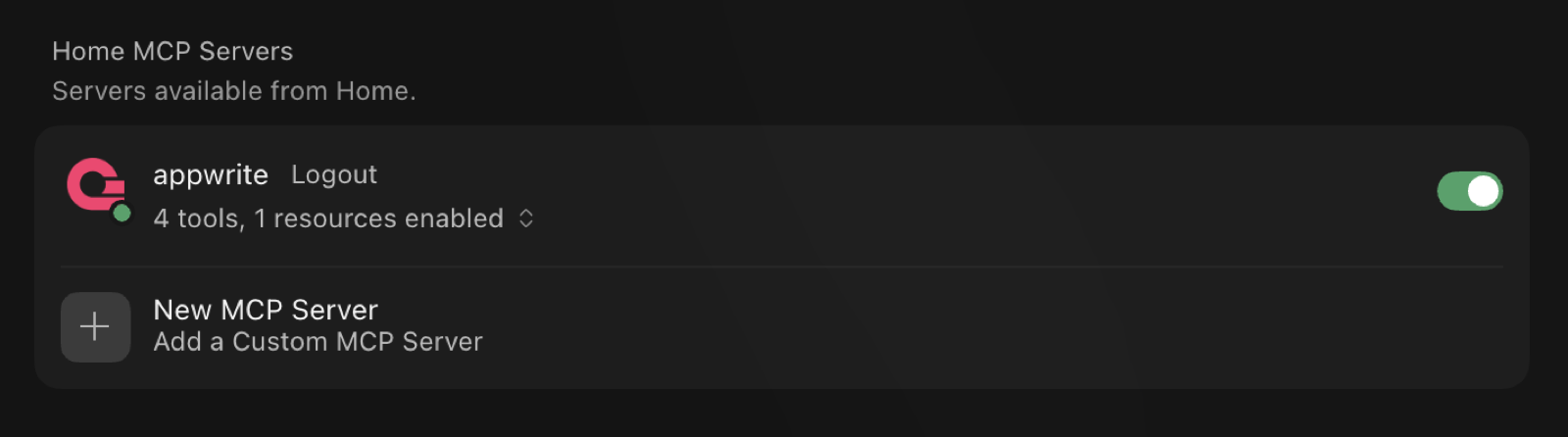
O Cursor solicita que você faça login através do navegador; o servidor então aparece em Configurações → MCP com suas ferramentas habilitadas.
VS Code (GitHub Copilot)
Edite .vscode/mcp.json (workspace) ou sua configuração de usuário via Paleta de
Comandos → MCP: Abrir Configuração do Usuário.
{
  "servers": {
    "appwrite": {
      "type": "http",
      "url": "https://mcp.appwrite.io/"
    }
  }
}
Codex
Edite ~/.codex/config.toml.
[mcp_servers.appwrite]
url = "https://mcp.appwrite.io/"
Em seguida, autentique-se a partir do terminal:
codex mcp login appwrite
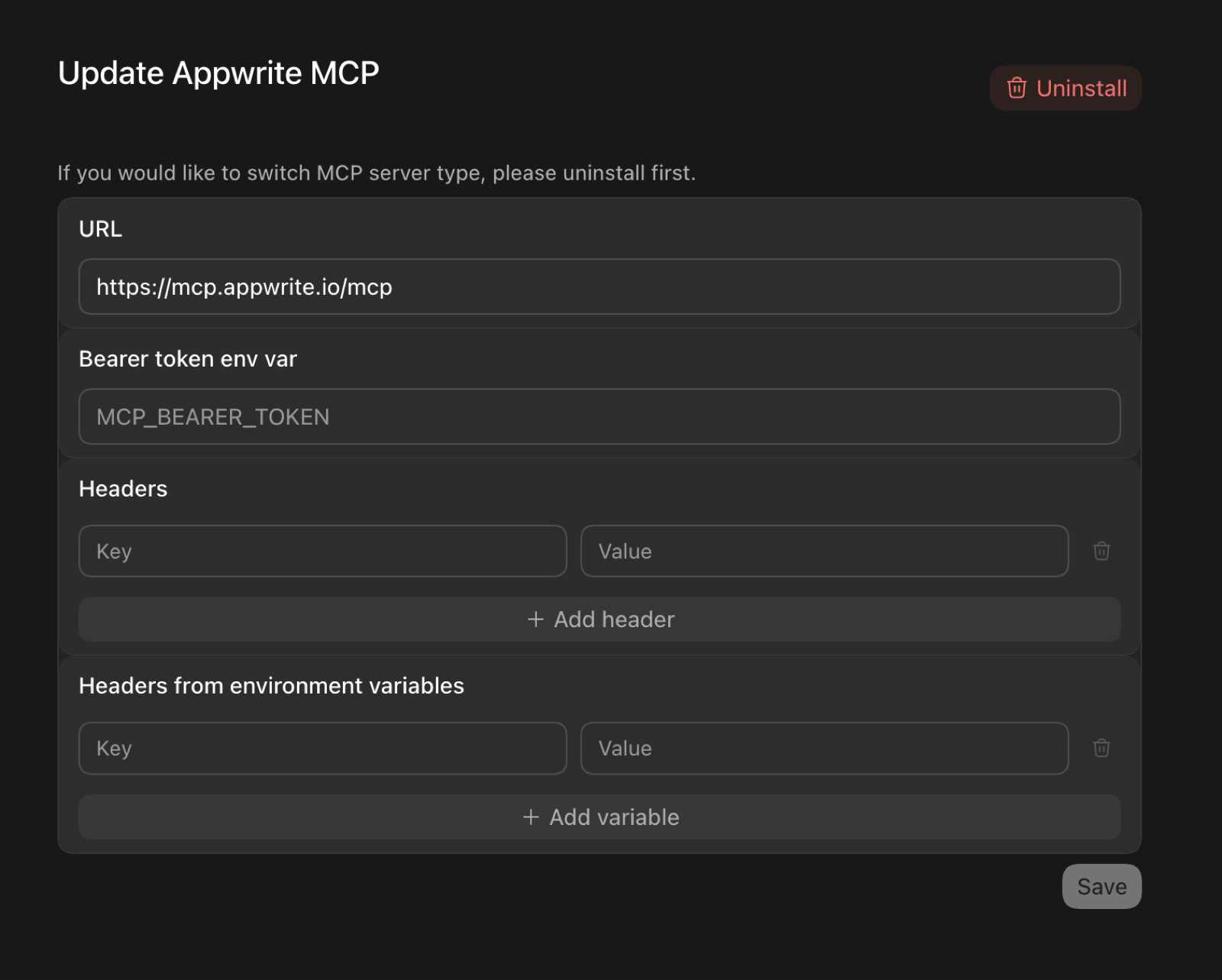
Na interface gráfica do Codex, você pode adicionar o servidor pelas configurações de MCP —
defina a URL para https://mcp.appwrite.io/ e deixe os campos de token e cabeçalho
vazios (a autenticação acontece através do navegador):
OpenCode
Edite opencode.json (projeto) ou ~/.config/opencode/opencode.json (global).
{
  "$schema": "https://opencode.ai/config.json",
  "mcp": {
    "appwrite": {
      "type": "remote",
      "url": "https://mcp.appwrite.io/",
      "enabled": true
    }
  }
}
Windsurf
Edite ~/.codeium/windsurf/mcp_config.json.
{
  "mcpServers": {
    "appwrite": {
      "serverUrl": "https://mcp.appwrite.io/"
    }
  }
}
Gemini CLI
gemini mcp add --transport http appwrite https://mcp.appwrite.io/
Ou edite ~/.gemini/settings.json (observe que a chave é httpUrl, não url):
{
  "mcpServers": {
    "appwrite": {
      "httpUrl": "https://mcp.appwrite.io/"
    }
  }
}
O Gemini CLI abre o fluxo OAuth do navegador automaticamente na primeira conexão. Para
reautenticar, execute /mcp auth appwrite dentro de uma sessão.
Antigravity (CLI & 2.0)
Edite ~/.gemini/config/mcp_config.json (global) ou .agents/mcp_config.json (workspace do projeto).
{
  "mcpServers": {
    "appwrite": {
      "serverUrl": "https://mcp.appwrite.io/"
    }
  }
}
⚠️ Nota: O Antigravity exige estritamente a chave
serverUrlpara transporte remoto. Usar campos legados comourlouhttpUrlfará com que o registro de ferramentas falhe silenciosamente.
O Antigravity abre o fluxo OAuth do navegador automaticamente na primeira conexão. Se você editar manualmente o arquivo JSON, navegue até Configurações → Personalizações → Servidores MCP Instalados e clique em Atualizar para recarregar as definições de ferramentas.
GitHub Copilot CLI
copilot mcp add --transport http appwrite https://mcp.appwrite.io/
Ou execute /mcp add dentro de uma sessão, ou edite ~/.copilot/mcp-config.json:
{
  "mcpServers": {
    "appwrite": {
      "type": "http",
      "url": "https://mcp.appwrite.io/"
    }
  }
}
Uma janela do navegador abre para autenticar na primeira conexão. Verifique o status com
/mcp.
Zed
Vá para Configurações → IA → Servidores MCP → Adicionar Servidor → Adicionar Servidor Remoto, ou adicione
ao seu settings.json (zed: open settings):
{
  "context_servers": {
    "appwrite": {
      "url": "https://mcp.appwrite.io/"
    }
  }
}
O Zed solicita que você autentique através do navegador na primeira conexão.
Warp
Vá para Configurações → Agentes → Servidores MCP → + Adicionar, escolha o tipo de servidor
baseado em URL e insira https://mcp.appwrite.io/.
O Warp abre uma janela do navegador para autenticar na primeira conexão.
JetBrains AI Assistant / Junie
As IDEs JetBrains ainda não suportam OAuth para servidores MCP remotos, então faça a ponte via stdio (requer Node.js). Vá para Configurações → Ferramentas → AI Assistant → Model Context Protocol (MCP) → Adicionar, alterne para a visualização JSON e cole:
{
  "mcpServers": {
    "appwrite": {
      "command": "npx",
      "args": ["-y", "mcp-remote", "https://mcp.appwrite.io/"]
    }
  }
}
Uma janela do navegador abre para autenticar na primeira conexão.
Cline
O Cline ainda não suporta OAuth para servidores MCP remotos, então faça a ponte via stdio (requer Node.js). No painel do Cline, abra o ícone Servidores MCP → aba Configurar → Configurar Servidores MCP, e adicione:
{
  "mcpServers": {
    "appwrite": {
      "command": "npx",
      "args": ["-y", "mcp-remote", "https://mcp.appwrite.io/"]
    }
  }
}
Uma janela do navegador abre para autenticar na primeira conexão.
Appwrite auto-hospedado
Executando sua própria instância do Appwrite? Execute o servidor MCP localmente via stdio e
autentique-se com uma chave de API do projeto. Veja docs/self-hosted.md
para configuração por cliente.
Documentação
- Superfície de ferramentas — as ferramentas expostas ao modelo e o catálogo interno do Appwrite.
- Como funciona a autenticação Cloud — o fluxo OAuth 2.1.
- Busca na documentação — a ferramenta
appwrite_search_docsem processo e como reconstruir seu índice. - Appwrite auto-hospedado — execute o servidor localmente com uma chave de API do projeto.
- Desenvolvimento local — executar, testar e depurar o servidor localmente.
- AGENTS.md — guia completo para contribuidores e checklist pré-PR.
Licença
Este servidor MCP é licenciado sob a Licença MIT. Veja o arquivo LICENSE para detalhes.