Chargebee
oficialServidor MCP que conecta agentes de IA à plataforma Chargebee.
O que você pode fazer com Chargebee MCP?
- Pesquise a documentação do Chargebee — Faça perguntas sobre APIs, recursos ou conceitos de faturamento e obtenha respostas da documentação oficial por meio de
chargebee_documentation_search. - Gere esboços de código de integração — Solicite planos de código estruturados e trechos de exemplo para sua integração com o Chargebee usando
chargebee_code_planner. - Consulte notas de versão e perguntas frequentes — Recupere as últimas atualizações do produto, perguntas frequentes e outros conteúdos da base de conhecimento.
Documentação
Servidor do Protocolo de Contexto de Modelo (MCP) Chargebee


⚠️ Aviso de Descontinuação
Este pacote está descontinuado e não receberá mais atualizações ou suporte. Migre para nosso novo Servidor MCP KnowledgeBase, que oferece capacidades aprimoradas e maior precisão. Saiba mais e atualize aqui: Documentação do Servidor MCP Chargebee
O Protocolo de Contexto de Modelo (MCP) é um protocolo padronizado projetado para gerenciar o contexto entre grandes modelos de linguagem (LLMs) e sistemas externos.
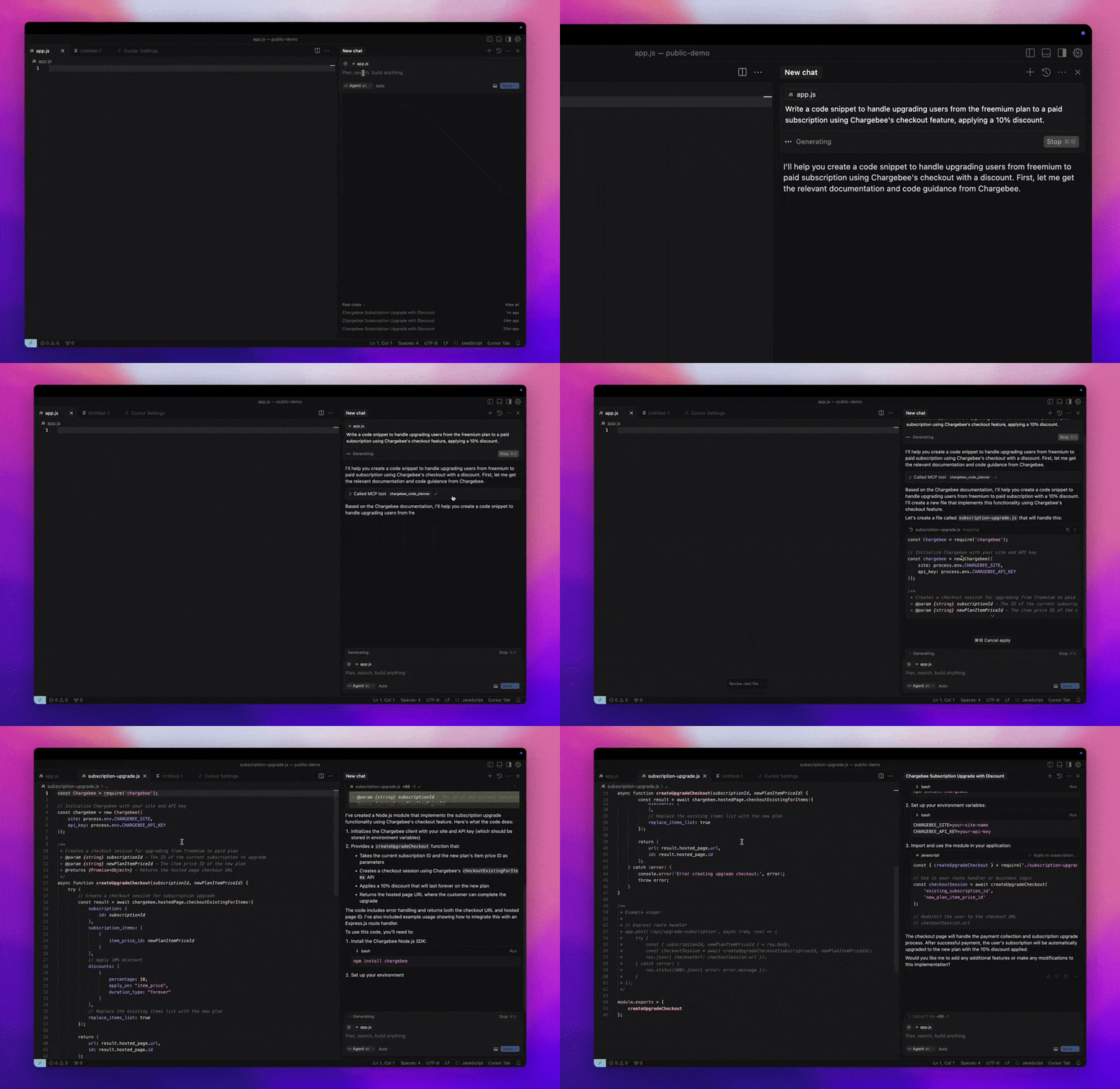
O Servidor MCP Chargebee oferece um conjunto robusto de ferramentas para melhorar a eficiência do desenvolvedor. Ele se integra a editores de código com IA, como Cursor, Windsurf e Cline, bem como a ferramentas de uso geral, como o Claude Desktop. É compatível com qualquer Cliente MCP.
Com este Servidor MCP, você pode:
-
Obter respostas imediatas sobre os produtos e serviços de API da Chargebee.
-
Receber trechos de código sensíveis ao contexto, adaptados às suas necessidades de integração.
-
Acessar a base de conhecimento da Chargebee, incluindo:
- Documentação
- Perguntas Frequentes (FAQs)
- Notas de versão
- E muito mais
Pré-requisitos
- Node.js LTS - O servidor MCP Chargebee requer a versão LTS do Node.js para funcionar corretamente.
Configuração
Para executar o servidor MCP Chargebee usando Node.js npx, execute o seguinte comando:
npx -y @chargebee/mcp@latest
Ferramentas Disponíveis
| Ferramenta | Descrição |
|---|---|
chargebee_documentation_search | Pesquise a documentação da Chargebee para obter informações detalhadas e guias de uso. |
chargebee_code_planner | Gere esboços de código estruturados e exemplos de código para integrar as APIs e recursos da Chargebee. |
Instalação
Cursor
Para adicionar este servidor ao Cursor IDE:
- Navegue até
Cursor Settings>MCP. - Clique em
+ Add new Global MCP Server. - Adicione a seguinte configuração ao seu arquivo global
.cursor/mcp.json:
{
  "mcpServers": {
    "chargebee": {
      "command": "npx",
      "args": [
          "-y",
          "@chargebee/mcp"
      ]
    }
  }
}
Consulte a documentação do Cursor para obter detalhes adicionais. Nota: Você também pode adicionar isso à configuração do Cursor específica do seu projeto (suportado no Cursor 0.46+).
Windsurf
Para configurar o MCP com o Cascade:
- Abra o Windsurf e navegue até
Settings>Advanced Settingsou use a Paleta de Comandos >Open Windsurf Settings Page. - Role até a seção Cascade para adicionar um novo servidor, visualizar servidores existentes ou acessar o arquivo de configuração JSON bruto em
mcp_config.json. - Clique em “Adicionar servidor personalizado +” para incluir o servidor MCP Chargebee diretamente em
mcp_config.json:
{
  "mcpServers": {
    "chargebee": {
      "command": "npx",
      "args": [
          "-y",
          "@chargebee/mcp"
      ]
    }
  }
}
Consulte a documentação do Windsurf para mais informações.
VS Code
Instale o servidor MCP Chargebee no VS Code usando um destes botões:

Alternativamente, você pode instalar o servidor MCP Chargebee usando a CLI do VS Code:
# For VS Code
code --add-mcp '{"name":"chargebee","command":"npx","args":["-y","@chargebee/mcp"]}'
# For VS Code Insiders
code-insiders --add-mcp '{"name":"chargebee","command":"npx","args":["-y","@chargebee/mcp"]}'
Após a instalação, o servidor MCP Chargebee estará disponível para uso com seu agente GitHub Copilot no VS Code.
Claude
Adicione a seguinte configuração ao seu arquivo claude_desktop_config.json. Consulte a documentação do Claude Desktop para mais detalhes:
{
  "mcpServers": {
    "chargebee": {
      "command": "npx",
      "args": [
          "-y",
          "@chargebee/mcp"
      ]
    }
  }
}
Cline
Adicione manualmente o seguinte JSON ao seu arquivo cline_mcp_settings.json através das configurações do Servidor MCP Cline:
{
  "mcpServers": {
    "chargebee": {
      "command": "npx",
      "args": [
          "-y",
          "@chargebee/mcp"
      ]
    }
  }
}
Roo Code
Acesse as configurações do MCP selecionando Edit MCP Settings nas configurações do Roo Code ou usando o comando Roo Code: Open MCP Config na paleta de comandos do VS Code:
{
  "mcpServers": {
    "chargebee": {
      "command": "npx",
      "args": [
          "-y",
          "@chargebee/mcp"
      ]
    }
  }
}
Contribuição
Para contribuir com este projeto, consulte o guia de contribuição.