Raymon
Ingestão HTTP com estado + servidor MCP + interface de terminal para logs no estilo Ray.
Documentação
raymon





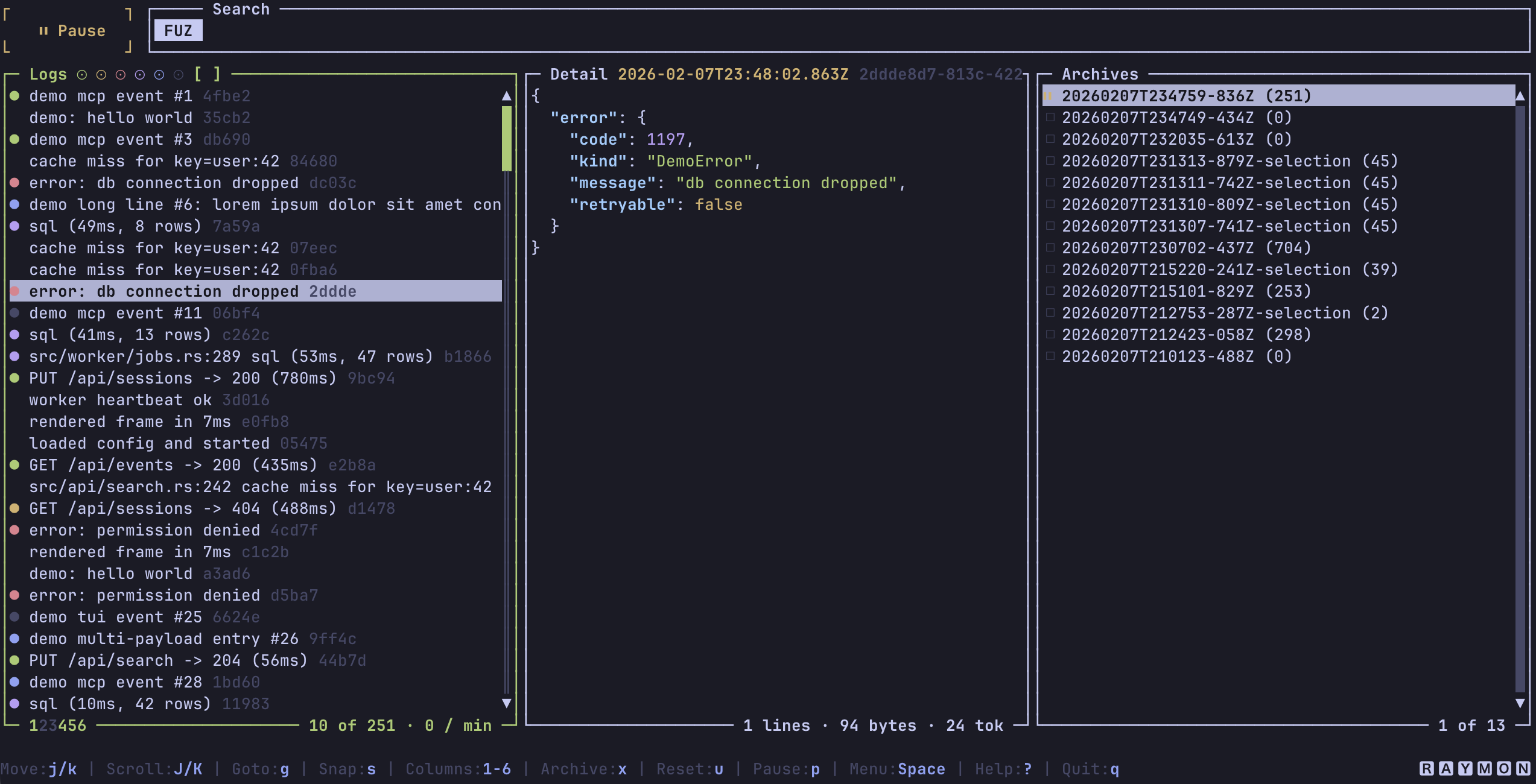
Raymon é um receptor de logs estilo Ray local-first com um endpoint de ingestão HTTP, um servidor MCP HTTP Streamable, armazenamento JSONL durável e uma interface de terminal Ratatui.
Use o Raymon quando quiser que dumps compatíveis com Ray do seu aplicativo fiquem visíveis em um terminal e pesquisáveis por agentes de IA via MCP.
O que o Raymon oferece
| Superfície | O que faz |
|---|---|
| Ingestão HTTP | Aceita envelopes JSON estilo Ray em POST /. |
| Servidor MCP | Expõe raymon.search e raymon.get_entries em POST /mcp. |
| Interface de terminal | Navega por logs ao vivo, filtra por tela/tipo/cor, abre payloads, copia detalhes e gerencia arquivos JSONL. |
| Armazenamento | Persiste entradas em data/entries.jsonl sob a raiz de armazenamento ativa. |
| API da crate Rust | Expõe raymon::run() além dos módulos públicos raymon_core, raymon_ingest, raymon_storage, raymon_mcp e raymon_tui para incorporação e testes. |
Raymon escuta na porta padrão do Ray, 23517, então muitas bibliotecas cliente do Ray podem usá-lo com pouca ou nenhuma configuração.
Início rápido
Pré-requisitos
- Um binário do Raymon do Cargo, Homebrew, GitHub Releases ou uma compilação local a partir do código-fonte.
- Um terminal. O modo de execução padrão abre a TUI.
Executar com eventos gerados
Inicie o Raymon no modo demo:
raymon --demo
Resultado esperado: a TUI abre e eventos demo começam a aparecer. Pressione ? para ajuda ou q para parar o Raymon.
Executar sem a TUI e enviar um evento
Inicie o Raymon em um terminal:
RAYMON_NO_TUI=1 raymon
Envie um evento estilo Ray de outro terminal:
curl -sS http://127.0.0.1:23517/ \
  -H 'content-type: application/json' \
  -d '{
    "uuid": "readme-demo-1",
    "payloads": [
      {
        "type": "log",
        "content": {
          "message": "hello from Raymon",
          "color": "green"
        },
        "origin": {
          "hostname": "local",
          "fileName": "README.md",
          "lineNumber": 1
        }
      }
    ],
    "meta": {
      "project": "raymon-readme",
      "host": "local",
      "screen": "readme"
    }
  }'
A saída esperada contém:
{"ok":true,"error":null}
Pare o servidor com Ctrl+C.
Instalação
Cargo
Raymon requer Rust 1.89 ou mais recente.
cargo install raymon
Homebrew
brew install bnomei/raymon/raymon
GitHub Releases
Baixe um arquivo pré-compilado de GitHub Releases, extraia-o e coloque raymon no seu PATH.
A partir do código-fonte
git clone https://github.com/bnomei/raymon.git
cd raymon
cargo build --release
O binário é gravado em target/release/raymon.
Enviando logs
Raymon armazena entradas de log estilo Ray. Gere-as com uma biblioteca compatível com Ray no seu aplicativo e aponte essa biblioteca para o host e a porta do Raymon.
Integrações Ray conhecidas incluem PHP, JavaScript, Bash, Ruby, Python, Go, Dart e Rust. Para payloads nativos em Rust, veja ray-dbg.
O endpoint local padrão é:
http://127.0.0.1:23517/
Se o seu remetente usa os padrões do desktop Ray, o Raymon geralmente funciona iniciando raymon antes de você emitir logs.
Envelopes recebidos devem incluir um uuid não vazio, pelo menos um payload, um payloads[*].type não vazio e um payloads[*].origin.hostname não vazio. Quando o mesmo UUID é ingerido mais de uma vez, o Raymon mescla os payloads em uma única entrada e armazena a entrada mesclada antes de publicar o estado ao vivo ou eventos.
Modos de execução
TUI local
raymon
Isso inicia o endpoint de ingestão HTTP, o endpoint MCP e a TUI em 127.0.0.1:23517.
Servidor local headless
RAYMON_NO_TUI=1 raymon
Use isso para logging em segundo plano, fluxos de trabalho somente MCP ou testes.
Servidor remoto com autenticação
export RAYMON_AUTH_TOKEN="change-me"
RAYMON_ALLOW_REMOTE=1 \
RAYMON_HOST=0.0.0.0 \
RAYMON_NO_TUI=1 \
raymon
Raymon recusa binds não-loopback a menos que RAYMON_ALLOW_REMOTE=1 esteja definido. Se o endereço de bind for não-loopback, o Raymon também exige RAYMON_AUTH_TOKEN a menos que você defina explicitamente RAYMON_ALLOW_INSECURE_REMOTE=1.
Referência da CLI
raymon [OPTIONS]
| Opção | Significado |
|---|---|
--host <HOST> | Substitui o host de bind HTTP. |
--port <PORT> | Substitui a porta de bind HTTP. |
--config <PATH> | Carrega um arquivo de configuração JSON específico em vez de procurar por ray.json. |
--ide <COMMAND> | Comando usado pela TUI para abrir arquivos de origem. |
--editor <COMMAND> | Comando usado pela TUI para abrir payloads de detalhes selecionados em um arquivo temporário. |
--jq <COMMAND> | Comando jq usado para buscas no painel de detalhes. |
--tui | Habilita a TUI. |
--no-tui | Desabilita a TUI. |
--demo | Gera eventos demo locais. |
-v, --verbose | Habilita logging de info. Use -vv para logging de debug. |
-h, --help | Imprime ajuda da CLI. |
-V, --version | Imprime a versão do Raymon. |
A precedência de configuração é:
- Padrões.
ray.json.- Variáveis de ambiente.
- Flags da CLI.
Configuração
Raymon procura por ray.json a partir do diretório atual para cima. Se encontrar um, o diretório que contém esse arquivo se torna a raiz de armazenamento. Sem ray.json, o diretório de trabalho atual é a raiz de armazenamento.
Exemplo de ray.json:
{
  "host": "127.0.0.1",
  "port": 23517,
  "tui": true,
  "max_entries": 10000,
  "storage_max_entries": 100000,
  "mcp_redact_payloads": false
}
As variáveis de ambiente usam os mesmos conceitos com nomes RAYMON_:
| Variável | Padrão | Significado |
|---|---|---|
RAYMON_ENABLED | true | Habilita ou desabilita o Raymon. |
RAYMON_HOST | 127.0.0.1 | Endereço de bind HTTP. |
RAYMON_PORT | 23517 | Porta de bind HTTP. |
RAYMON_TUI | true | Habilita a TUI. |
RAYMON_NO_TUI | false | Desabilita a TUI. Tem precedência sobre RAYMON_TUI. |
RAYMON_IDE | code | Comando da IDE usado para saltos em arquivos de origem. Para saltos de linha no VS Code, use code --goto. |
RAYMON_EDITOR | VISUAL/EDITOR/vim | Comando do editor usado para payloads de detalhes selecionados. |
RAYMON_JQ | jq | Comando jq usado para busca de detalhes. |
RAYMON_MAX_BODY_BYTES | 1048576 | Tamanho máximo do corpo da solicitação HTTP e tamanho da entrada armazenada mesclada. |
RAYMON_MAX_QUERY_LEN | 265 | Comprimento máximo de busca, comando, seletor e consulta MCP em bytes. |
RAYMON_MAX_ENTRIES | 10000 | Máximo de entradas mantidas em memória para MCP e ressincronização ao vivo. 0 desabilita a evicção em memória. |
RAYMON_STORAGE_MAX_ENTRIES | 100000 | Máximo de entradas distintas mantidas em data/entries.jsonl. 0 desabilita a retenção de armazenamento. |
RAYMON_JQ_TIMEOUT_MS | 10000 | Tempo limite de jq para busca de detalhes em milissegundos. |
RAYMON_ALLOW_REMOTE | false | Permite bind em endereços não-loopback. |
RAYMON_ALLOW_INSECURE_REMOTE | false | Permite bind não-loopback sem autenticação. Evite isso a menos que aceite o risco de exposição. |
RAYMON_INSECURE_REMOTE | não definido | Alias para RAYMON_ALLOW_INSECURE_REMOTE. |
RAYMON_ALLOW_MCP_SHUTDOWN | false | Permite que os métodos personalizados MCP ray/quit, ray/exit, raymon/quit e raymon/exit parem o Raymon. |
RAYMON_MCP_REDACT_PAYLOADS | false | Redige campos de payload com aparência sensível nos resultados MCP e notificações de eventos. |
RAYMON_AUTH_TOKEN | não definido | Exige Authorization: Bearer <token> ou x-raymon-token: <token> para todas as solicitações HTTP. |
RAYMON_TOKEN | não definido | Alias para RAYMON_AUTH_TOKEN. |
RAYMON_TUI_PALETTE | não definido | Substitui a paleta da TUI com 18 cores separadas por vírgula. |
RAYMON_PALETTE | não definido | Alias para RAYMON_TUI_PALETTE. |
RAYMON_LOG | não definido | Filtro de tracing. Usa RUST_LOG como fallback quando não definido. |
RAYMON_TUI_PALETTE espera:
fg,bg,black,red,green,yellow,blue,magenta,cyan,white,bright_black,bright_red,bright_green,bright_yellow,bright_blue,bright_magenta,bright_cyan,bright_white
Cada cor pode ser #RRGGBB, rgb:RR/GG/BB ou rgb:RRRR/GGGG/BBBB.
Armazenamento
Raymon armazena entradas como JSON delimitado por novas linhas em:
data/entries.jsonl
O diretório data/ é criado sob a raiz de armazenamento ativa. A TUI também grava arquivos de sessão em:
data/archives/
Na inicialização, o Raymon restaura as entradas armazenadas no estado principal para que a busca MCP possa ver os logs persistidos. A TUI começa com uma visão ao vivo limpa e permite navegar pelos arquivos de arquivo no painel de arquivos.
A retenção mantém os UUIDs distintos mais recentes. Durante a restauração, o Raymon ignora linhas JSONL corrompidas e entradas blob legadas em vez de abortar a inicialização.
API HTTP
| Método e caminho | Propósito |
|---|---|
POST / | Endpoint de ingestão Ray para envelopes de payload Ray. |
POST /mcp | Endpoint MCP Streamable HTTP. Prefira este caminho para clientes MCP. |
POST / também aceita solicitações MCP JSON-RPC como fallback de compatibilidade quando o parsing de ingestão rejeita o corpo e o JSON parece MCP JSON-RPC. Prefira /mcp para novos clientes MCP.
Quando RAYMON_AUTH_TOKEN está definido, toda solicitação deve incluir um destes cabeçalhos:
Authorization: Bearer <token>
x-raymon-token: <token>
As respostas de ingestão usam códigos de status HTTP:
| Status | Significado |
|---|---|
200 | O envelope foi armazenado e publicado. |
400 | O corpo da solicitação era JSON inválido. |
413 | A entrada mesclada excedeu RAYMON_MAX_BODY_BYTES. |
422 | O envelope estava sem campos obrigatórios ou tinha dados inválidos. |
500 | Falha no armazenamento, estado ou manipulação do barramento de eventos. |
Configuração do MCP
Adicione um servidor MCP Raymon local ao Codex:
codex mcp add raymon --url http://127.0.0.1:23517/mcp
Configuração remota com autenticação por token bearer:
codex mcp add raymon \
  --url http://<host>:23517/mcp \
  --bearer-token-env-var RAYMON_AUTH_TOKEN
JSON MCP equivalente:
{
  "mcpServers": {
    "raymon": {
      "url": "http://127.0.0.1:23517/mcp"
    }
  }
}
JSON MCP remoto com autenticação:
{
  "mcpServers": {
    "raymon": {
      "url": "http://<host>:23517/mcp",
      "headers": {
        "Authorization": "Bearer ${RAYMON_AUTH_TOKEN}"
      }
    }
  }
}
Ferramentas MCP
Raymon expõe duas ferramentas somente leitura.
raymon.search
Busca entradas armazenadas e retorna resumos compactos.
Entrada:
{
  "query": "string (optional; plain text or /regex/)",
  "types": ["string"],
  "colors": ["string"],
  "screen": "string (optional)",
  "project": "string (optional)",
  "host": "string (optional)",
  "limit": "number (optional)",
  "offset": "number (optional)"
}
types e colors também aceitam strings separadas por vírgula:
{ "types": "error,exception", "colors": "red" }
Resultado:
{
  "entries": [
    {
      "uuid": "string",
      "received_at": 0,
      "project": "string",
      "host": "string",
      "screen": "string",
      "payload_count": 1,
      "payload_types": ["log"]
    }
  ],
  "count": 1,
  "limit": 100,
  "offset": 0,
  "scan_limit": 5000
}
Padrões e limites:
| Campo | Padrão | Limite |
|---|---|---|
limit | 100 | 500 |
offset | 0 | 5000 |
scan_limit | 5000 | Janela fixa de varredura das entradas mais recentes |
query | não definido | RAYMON_MAX_QUERY_LEN bytes |
raymon.get_entries
Busca entradas completas por UUID.
Entrada:
{
  "uuids": ["<uuid>"],
  "redact": false
}
Aliases de entrada suportados:
{ "uuid": "<uuid>" }
{ "uuids": "<uuid-1>,<uuid-2>" }
redacted e redact_payloads são aliases para redact. Quando a redação está habilitada, o Raymon substitui campos de payload com aparência sensível, como senhas, tokens, chaves de API, cookies e segredos.
Resultado:
{
  "entries": [
    {
      "uuid": "string",
      "received_at": 0,
      "project": "string",
      "host": "string",
      "screen": "string",
      "session_id": null,
      "payloads": [
        {
          "type": "log",
          "content": {},
          "origin": {
            "project": "string",
            "host": "string",
            "screen": "string",
            "session_id": null,
            "function_name": null,
            "file": null,
            "line_number": null
          }
        }
      ]
    }
  ]
}
Limites:
| Limite | Valor |
|---|---|
| UUIDs por solicitação | 100 |
| Bytes por UUID | 265 |
| Resultado da ferramenta serializado | 1048576 bytes |
Peers MCP conectados recebem notificações ray/event para eventos inseridos, atualizados, limpos e atrasados. Se um cliente receber uma notificação de atraso, ele deve atualizar com raymon.search.
TUI
A TUI é focada em teclado e tem ajuda integrada. Pressione ? para o mapa de teclas completo.
| Tecla | Ação |
|---|---|
? | Abrir atalhos de teclado. |
q | Sair do Raymon e parar o servidor HTTP/MCP. |
Space | Abrir o menu seletor. |
/ ou f | Pesquisar mensagens e caminhos de arquivo com busca difusa. |
r | Iniciar uma busca por regex. |
: | Pesquisar dentro do payload de detalhes selecionado. Usa jq para consultas JSON quando disponível. |
j/k, setas | Mover no painel focado. |
h/l, setas esquerda/direita | Mover o foco para a esquerda ou direita. |
J/K, PageUp/PageDown | Rolar o painel de detalhes. |
Tab, Shift+Tab | Mover o foco entre logs, detalhes e arquivos. |
g | Ir para uma posição de log. |
G | Pular para o último log. |
s | Ajustar filtros de cor e tipo à entrada de log selecionada. |
u | Redefinir busca e filtros. |
p | Pausar ou retomar atualizações ao vivo. |
a | Alternar o painel de arquivos. |
x | Arquivar a visualização atual em um arquivo JSONL. |
Enter | Carregar o arquivo selecionado quando o painel de arquivos estiver focado. |
n | Renomear o arquivo selecionado. Arquivos ao vivo não podem ser renomeados. |
d | Excluir o arquivo selecionado após confirmação. Arquivos ao vivo não podem ser excluídos. |
y | Copiar a entrada de lista selecionada. |
Y | Copiar o payload de detalhes selecionado. |
z | Alternar renderização JSON expandida. |
Z | Alternar renderização JSON bruta. |
m | Alternar payloads de estilo e metadados no painel de detalhes. |
1 até 6 | Alternar colunas da lista: ponto de cor, timestamp, rótulo de tipo, arquivo, mensagem, UUID. |
o | Abrir o arquivo de origem na IDE configurada. |
e | Abrir o payload de detalhes selecionado no editor configurado. |
Ctrl+l | Limpar a lista de logs ao vivo sem excluir entradas armazenadas. |
Ctrl+c | Sair de qualquer lugar. |
O suporte a mouse está habilitado: clique para focar ou selecionar e use a roda para percorrer o painel sob o ponteiro.
O Raymon usa a paleta ANSI do terminal por padrão, portanto herda temas de terminal claros, escuros e estilo base16. Use RAYMON_TUI_PALETTE quando precisar de uma paleta fixa.
Skill para agentes
Este repositório inclui um runbook voltado para IA em skills/raymon/SKILL.md. Ele ensina agentes a:
- Gerar eventos no estilo Ray com integrações Ray comuns.
- Adicionar o Raymon como servidor MCP local ou remoto.
- Usar
raymon.searchantes deraymon.get_entriespara inspecionar logs com eficiência.
A skill é documentação para agentes. Não é código de execução.
Estrutura do código-fonte
| Caminho | Finalidade |
|---|---|
src/cli.rs | Ciclo de vida do runtime, configuração, restauração de armazenamento, modo demo e orquestração TUI/servidor. |
src/cli/http.rs | Roteador Axum, autenticação, limites de corpo, limites de concorrência, ingestão e montagem MCP. |
src/raymon_core.rs | Tipos de domínio sem IO, filtros, eventos e normalização de envelope Ray. |
src/raymon_ingest.rs | Análise de ingestão HTTP, validação, mesclagem de UUID duplicado, armazenamento e emissão de eventos. |
src/raymon_mcp.rs | Ferramentas MCP, notificações, limites de consulta, limites de resultado e hooks de desligamento. |
src/raymon_mcp/schema.rs | Esquemas de solicitação e resposta MCP. |
src/raymon_storage/ | Persistência JSONL, indexação, listagem e retenção. |
src/raymon_tui.rs | Estado da TUI, renderização, busca, filtragem, manipulação de teclas, integração com editor e fluxos de arquivamento. |
tests/ray_php_local.rs | Teste de integração PHP/Ray local ignorado. |
Desenvolvimento
Execute a suíte de testes Rust:
cargo test --all-targets
Execute verificações de formatação e clippy:
cargo fmt --all -- --check
cargo clippy --all-targets --all-features -- -D warnings
Execute hooks de pre-commit quando prek estiver instalado:
prek validate-config prek.toml
prek run --all-files
prek install
Execute o teste de integração PHP Ray somente local após instalar o helper global PHP ray():
cargo test --test ray_php_local -- --ignored ray_php_local_integration
Compile e empacote artefatos de release:
TARGET=x86_64-apple-darwin scripts/build-release.sh
VERSION=0.7.0 TARGET=x86_64-apple-darwin scripts/package-release.sh
O fluxo de release compila alvos Linux musl (x86_64, aarch64), macOS (x86_64, aarch64) e Windows MSVC (x86_64). Artefatos Unix são arquivos .tar.gz, artefatos Windows são arquivos .zip e cada pacote recebe um arquivo .sha256.
Licença
MIT. Consulte LICENSE.