Nereid - Mermaid charts
Crie e explore diagramas Mermaid em colaboração com agentes de IA
Documentação
nereid





Nereid é um espaço de trabalho focado em terminal para diagramas baseados em Mermaid. Ele combina uma TUI ratatui, um servidor de Protocolo de Contexto de Modelo (MCP), persistência de sessão baseada em pastas e renderizações de texto determinísticas para que humanos e agentes de IA possam inspecionar e atualizar a mesma sessão de diagrama.
Use o Nereid quando quiser:
- navegar e editar diagramas de sequência, fluxograma, classe, entidade-relacionamento (ER) e Gantt a partir de um terminal,
- manter diagramas, walkthroughs, referências cruzadas, seleções e estado ativo em uma pasta de sessão local,
- expor ferramentas MCP tipadas para navegação de diagramas, mutação estruturada (incluindo blocos de sequência), xrefs, walkthroughs e consultas de grafo,
- substituir fontes Mermaid com reconciliação que preserva identidade quando as impressões digitais ainda correspondem,
- exportar fontes Mermaid além de pré-visualizações de texto para fluxos de trabalho revisáveis e baseados em arquivos.
Nereid é de código-fonte disponível apenas para uso não comercial. Uso comercial, uso em produtos, uso em serviços pagos, uso interno em negócios, redistribuição, sublicenciamento ou distribuição modificada requer permissão escrita separada. Veja Licença.
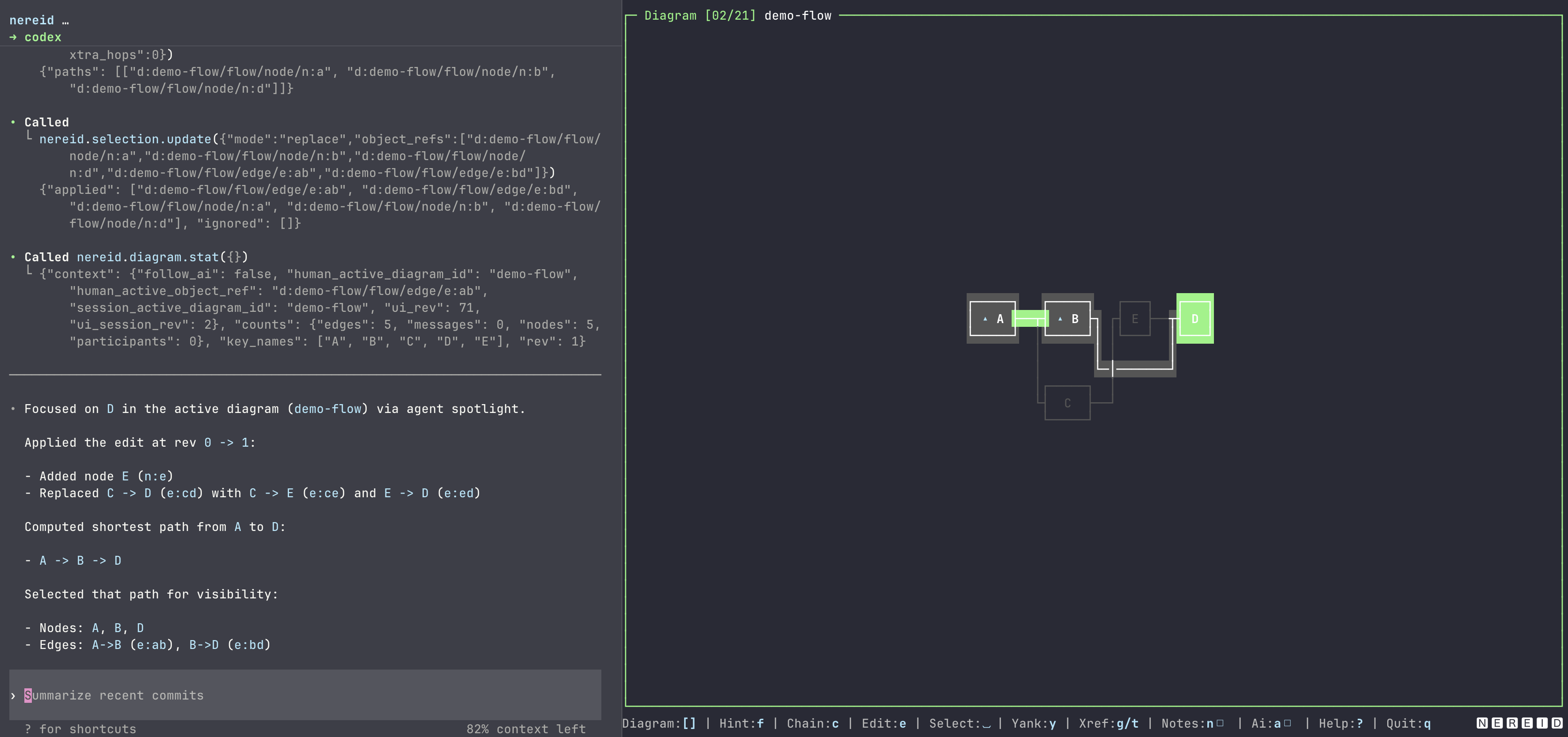
Lançamentos recentes
- 0.9: Adicionados diagramas de classe, entidade-relacionamento e Gantt em análise, renderização de texto, TUI, sessões persistidas e leituras MCP tipadas. A demonstração integrada agora cobre todas as cinco famílias de diagramas.
- 0.8: Adicionadas operações estruturadas de blocos e seções de sequência, além de
diagram_replace_from_mermaid, que reconcilia identidades estáveis durante reescritas Mermaid em massa e relata xrefs pendentes. - 0.7: Adicionado o alternador de diagramas difuso
:e âncoras de símbolo Frigg persistidas para participantes de sequência e nós de fluxograma.
Veja CHANGELOG.md para o histórico completo de lançamentos.
Instalação
Pré-requisitos
- Rust 1.85 ou mais recente ao instalar com Cargo ou compilar a partir do código-fonte.
- Um terminal que suporte aplicações TUI com tela alternativa.
- Opcional:
VISUALouEDITORpara o editor Mermaid no aplicativo. O Nereid usavicomo fallback.
Instalar o Nereid não concede direitos irrestritos. A mesma licença de código-fonte disponível para uso não comercial se aplica a crates.io, Homebrew, GitHub Releases, npm, Docker e compilações a partir do código-fonte.
Cargo
cargo install nereid
nereid --version
Homebrew
brew install bnomei/nereid/nereid
nereid --version
Wrapper npm
Requer Node.js 18 ou mais recente. O wrapper suporta Linux e macOS em x64 ou arm64, além de Windows em x64. Linux e macOS também precisam de tar para extrair o arquivo de lançamento baixado.
npx @bnomei/nereid --version
O pacote npm é um wrapper fino. Na primeira execução, ele baixa o binário correspondente do GitHub Release, verifica o .sha256 publicado, o armazena em cache localmente e encaminha os argumentos para o binário.
Docker
docker run --rm ghcr.io/bnomei/nereid:0.9.0 --version
A imagem é construída a partir dos artefatos de lançamento musl Linux publicados. Prefira vincular um diretório de sessão para trabalho com MCP ou baseado em arquivos:
docker run --rm -i -v "$PWD/my-session:/workspace/my-session" ghcr.io/bnomei/nereid:0.9.0 --mcp --session /workspace/my-session
A flag -i mantém o stdin aberto para o transporte MCP stdio. Adicione -t também ao executar a TUI interativa no Docker.
GitHub Releases
Baixe um arquivo de lançamento de GitHub Releases, revise o aviso de licença incluído, extraia o arquivo e coloque o binário nereid no seu PATH.
A partir do código-fonte
git clone https://github.com/bnomei/nereid.git
cd nereid
cargo build --release
./target/release/nereid --version
Início rápido
Execute a sessão de demonstração integrada:
nereid --demo
A partir de um checkout do código-fonte, use Cargo:
cargo run -- --demo
Resultado esperado:
- A TUI abre com diagramas de demonstração.
- Pressione
?para abrir a ajuda no aplicativo. - Pressione
qpara sair. - Enquanto a TUI está em execução, o MCP está disponível via Streamable HTTP em
http://127.0.0.1:27435/mcp.
Crie ou abra uma pasta de sessão persistente:
mkdir my-session
nereid my-session
Se a pasta não tiver metadados de sessão, nenhum arquivo diagrams/*.mmd existente e nenhum arquivo walkthroughs/*.wt.json existente, o Nereid inicializa um diagrama flow de semente. Se arquivos duráveis de diagrama ou walkthrough existirem sem nereid-session.meta.json, o Nereid se recusa a semear uma nova sessão para que esses arquivos não fiquem órfãos; restaure o índice de metadados para reparar a sessão. Para uma sessão existente, o Nereid carrega o índice de metadados e seus arquivos de diagrama e walkthrough referenciados.
Modos de execução
| Tarefa | Comando | Resultado |
|---|---|---|
| Abrir o diretório atual como uma sessão TUI | nereid | Carrega ou inicializa . e inicia o MCP HTTP na porta 27435. |
| Abrir uma pasta de sessão específica | nereid path/to/session | Carrega ou inicializa essa pasta. |
| Usar uma flag de sessão explícita | nereid --session path/to/session | Igual a um diretório de sessão posicional. |
| Executar a sessão de demonstração | nereid --demo | Inicia a TUI com uma sessão de demonstração temporária. |
| Alterar a porta HTTP do MCP da TUI | nereid --mcp-http-port 27500 | Serve MCP em http://127.0.0.1:27500/mcp. |
| Executar MCP via stdio sem a TUI | nereid --mcp --session path/to/session | Serve MCP em stdin/stdout para integrações de ferramentas. |
| Imprimir o snapshot do esquema MCP | nereid --dump-mcp-tool-schema | Imprime os esquemas de ferramentas registrados e sai. |
| Mostrar ajuda da CLI | nereid --help ou nereid -h | Imprime os formulários e opções de comando suportados. |
| Mostrar a versão instalada | nereid --version ou nereid -V | Imprime o nome do pacote e a versão. |
Sinopse da CLI:
nereid [<session-dir>] [--durable-writes] [--mcp-http-port <port>]
nereid [--session <dir>] [--durable-writes] [--mcp-http-port <port>]
nereid --demo [--mcp-http-port <port>]
nereid [<session-dir>] [--durable-writes] --mcp
nereid [--session <dir>] [--durable-writes] --mcp
nereid --demo --mcp
nereid --dump-mcp-tool-schema
Regras:
- Se
session-dire--sessionforem omitidos, o Nereid usa o diretório de trabalho atual. --demonão pode ser combinado com um diretório de sessão.--mcp-http-porté válido apenas no modo TUI.--durable-writesopta por persistência durável mais lenta de melhor esforço com fsync ou sync onde suportado.
Fonte: src/main.rs.
Pastas de sessão
Uma pasta de sessão é a fonte da verdade para o estado durável do Nereid. A TUI e o servidor MCP persistente leem e escrevem nesta pasta.
| Caminho | Propósito |
|---|---|
nereid-session.meta.json | ID da sessão, IDs de diagrama e walkthrough ativos, índice de diagramas, xrefs e estado de seleção. |
diagrams/*.mmd | Fonte Mermaid canônica para cada diagrama. |
diagrams/*.meta.json | Mapas de IDs estáveis e metadados extraídos para diagramas persistidos. |
diagrams/*.ascii.txt | Exportação de renderização de texto de melhor esforço para cada diagrama. A extensão é legada; o conteúdo pode incluir desenho de caixa Unicode. |
walkthroughs/*.wt.json | Dados do grafo de walkthrough. |
walkthroughs/*.ascii.txt | Exportação de renderização de texto de melhor esforço para cada walkthrough. |
.nereid-session.write.lock | Bloqueio de escrita transitório usado durante salvamentos de sessão. |
O Nereid pode reescrever arquivos gerenciados enquanto executa. Use a tecla e da TUI para editar o diagrama ativo em $VISUAL ou $EDITOR, ou pare o Nereid antes de fazer alterações manuais. As exportações de renderização de texto são geradas assincronamente e podem ficar brevemente atrasadas em relação às atualizações de .mmd ou .wt.json durante edições rápidas.
Fonte: src/store/session_folder.rs.
Suporte a Mermaid
O Nereid analisa um subconjunto deliberado de Mermaid e relata sintaxe não suportada como um erro acionável.
Diagramas de sequência suportam:
sequenceDiagramcomo a primeira linha não vazia,- comentários começando com
%%, - declarações
participant <name>e<role> <name>, - linhas de mensagem como
alice->>bob: Hello, - setas de mensagem Mermaid normalizadas internamente para mensagens síncronas, assíncronas ou de retorno,
- blocos
alt,opt,loopepar, elsedentro dealt,anddentro depare fechamentos de blocoend.
Fluxogramas suportam:
flowchartougraphcomo a primeira linha não vazia, com direção opcionalTD,TB,LR,RLouBT,- comentários começando com
%%, - declarações de nós:
<id>,<id>[<label>],<id>(<label>)e<id>{<label>}, - arestas com operadores comuns de fluxograma Mermaid, normalizadas internamente,
- rótulos de aresta nas formas
A -->|label| BeA -- label --> B, - arestas encadeadas como
A --> B --> C, - declarações
linkStyle, que são preservadas na exportação. Estilos por aresta contendo a palavra literaldashedproduzem traços tracejados na renderização de texto; outras propriedades CSS elinkStyle defaultnão afetam a renderização de texto.
Diagramas de classe suportam:
classDiagramcomo a primeira linha não vazia,- comentários começando com
%%, - nomes de classe simples contendo letras ASCII, dígitos, sublinhados ou hífens,
- membros na forma
ClassName : member; membros contendo(são métodos e o restante são atributos, - relações de herança, composição, agregação, associação, dependência, realização e link simples,
- rótulos de relação opcionais após
:, - notas de classe armazenadas no sidecar do diagrama.
Diagramas de entidade-relacionamento suportam:
erDiagramcomo a primeira linha não vazia,- comentários começando com
%%, - nomes de entidade simples contendo letras ASCII, dígitos, sublinhados ou hífens,
- relacionamentos identificadores (
--) e não identificadores (..), - tokens de cardinalidade Mermaid
||,|o,o|,|{,}|,}oeo{, - rótulos de relacionamento opcionais após
:, - notas de entidade armazenadas no sidecar do diagrama.
Diagramas Gantt suportam:
ganttcomo a primeira linha não vazia,- comentários começando com
%%, - linhas opcionais
titleedateFormat, - grupos nomeados
section, - tarefas com uma tag opcional, um início absoluto
YYYY-MM-DDou dependênciaafter <tag>, e uma duração em dias como14d, - notas de tarefa e de faixa de tempo renderizada armazenadas no sidecar do diagrama.
Nomes de participantes de sequência e nós de fluxograma analisados devem ser strings alfanuméricas ASCII não vazias ou sublinhados. Eles não podem conter espaços em branco ou /. Nomes de classe e ER também permitem hífens. Rótulos de tarefa Gantt são texto de forma livre antes do cólon de metadados da tarefa.
Fontes: src/format/mermaid/sequence.rs, src/format/mermaid/flowchart.rs, src/format/mermaid/class.rs, src/format/mermaid/er.rs, src/format/mermaid/gantt.rs, src/format/mermaid/ident.rs.
TUI
Pressione ? no Nereid para o painel de ajuda completo com rolagem.
Teclas comuns:
| Tecla | Ação |
|---|---|
q | Sair. |
1 | Focar o painel de diagrama. |
2 / 3 | Alternar e focar Objetos / XRefs. |
4 / 5 | Alternar Inspetor / Notas. |
Tab / Shift-Tab | Focar próximo / painel anterior. |
[ / ] | Abrir diagrama anterior / próximo. |
: | Abrir o alternador de diagramas difuso; Tab completa o resultado [SEQ], [FLO], [CLS], [ER] ou [GNT] selecionado. |
/ / \ | Pesquisa regular / difusa. |
n / N | Próximo / resultado de pesquisa anterior. |
Teclas de seta ou h/j/k/l | Mover ou navegar dentro do painel focado. |
f | Modo de salto por dica. |
c | Modo de seleção de dica em cadeia. |
Space | Alternar objeto selecionado. |
d | Desmarcar todos os objetos no diagrama atual. |
y | Copiar a referência do objeto selecionado com OSC52. |
g / t | Saltar por xrefs de entrada / saída. |
e | Editar o diagrama ativo em $VISUAL, $EDITOR ou vi. |
a | Alternar atenção de seguir IA. |
Substituição de paleta
Por padrão, o Nereid usa a paleta ANSI do terminal. Defina NEREID_TUI_PALETTE para substituir o primeiro plano, o segundo plano e as 16 cores ANSI.
Formato do valor:
<fg>,<bg>,<black>,<red>,<green>,<yellow>,<blue>,<magenta>,<cyan>,<white>,<bright_black>,<bright_red>,<bright_green>,<bright_yellow>,<bright_blue>,<bright_magenta>,<bright_cyan>,<bright_white>
Cada cor deve ser #RRGGBB, 0xRRGGBB ou rgb:rr/gg/bb. NEREID_PALETTE é aceito como um alias.
Fontes: src/tui/chrome.rs, src/tui/theme.rs.
MCP
O Nereid expõe ferramentas MCP para colaboração ao vivo em diagramas.
O servidor anuncia apenas ferramentas; ele não expõe recursos ou prompts MCP. Os playbooks do repositório descritos abaixo são exemplos para clientes MCP, não capacidades de prompt registradas.
Transportes:
- Modo TUI: HTTP Streamable em
http://127.0.0.1:<port>/mcp, porta padrão27435. - Modo Stdio:
nereid --mcp --session path/to/session.
Conectar um cliente MCP
Para clientes que iniciam servidores stdio, adicione uma entrada de servidor como esta e substitua o caminho da sessão por um caminho absoluto:
{
  "mcpServers": {
    "nereid": {
      "command": "nereid",
      "args": ["--mcp", "--session", "/absolute/path/to/session"]
    }
  }
}
Se o Nereid já estiver em execução no modo TUI, conecte um cliente HTTP Streamable a http://127.0.0.1:27435/mcp, ou à porta selecionada com --mcp-http-port.
Grupos de ferramentas:
- Ciclo de vida e leituras de diagramas:
diagram_list,diagram_current,diagram_open,diagram_delete,diagram_read,diagram_stat,diagram_get_ast,diagram_get_slice,diagram_render_text,diagram_diff. - Criação e mutação de diagramas:
diagram_create_from_mermaid,diagram_replace_from_mermaid,diagram_propose_ops,diagram_apply_ops(operações de estrutura de sequência para blocos/seções/associações). - Walkthroughs:
walkthrough_list,walkthrough_current,walkthrough_open,walkthrough_read,walkthrough_stat,walkthrough_get_node,walkthrough_render_text,walkthrough_diff,walkthrough_apply_ops. - Estado de colaboração:
attention_human_read,attention_agent_read,attention_agent_set,attention_agent_clear,follow_ai_read,follow_ai_set,selection_read,selection_update,view_read_state. - Referências cruzadas e objetos:
xref_list,xref_neighbors,xref_add,xref_remove,object_read. - Consultas:
route_find,seq_messages,seq_search,seq_trace,flow_reachable,flow_paths,flow_cycles,flow_unreachable,flow_dead_ends,flow_degrees.
As referências de objeto usam este formato canônico:
d:<diagram_id>/<category...>/<object_id>
Exemplos:
d:demo-flow/flow/node/n:a
d:demo-seq/seq/message/m:0001
d:demo-seq/seq/block/b:0000
d:demo-seq/seq/section/sec:0000:00
d:demo-class/class/class/c:Class01
d:demo-class/class/relation/r:0001
d:demo-er/er/entity/e:CUSTOMER
d:demo-er/er/relationship/r:0001
d:demo-gantt/gantt/section/sec:0001
d:demo-gantt/gantt/task/t:0001
d:demo-gantt/gantt/lane/lane:2014-01-01
Os pares de categorias canônicos são seq/participant, seq/message, seq/block, seq/section, flow/node, flow/edge, class/class, class/relation, er/entity, er/relationship, gantt/section, gantt/task e gantt/lane.
Faixas de Gantt com inícios de tarefas YYYY-MM-DD válidos usam ids estáveis de calendário, como
lane:2026-01-08; gráficos sem datas absolutas analisáveis usam ids relativos, como lane:0007.
Âncoras de símbolos de código
Participantes de sequência e nós de fluxograma podem carregar uma âncora opcional de símbolo de código Frigg com um stable_symbol_id hexadecimal minúsculo, como sym-16c57df0026ced40, e um repository_id opcional. Defina ou limpe âncoras com as operações seq_set_participant_symbol e flow_set_node_symbol passadas para diagram_apply_ops ou diagram_propose_ops.
As âncoras aparecem nas respostas de diagram_get_ast e object_read. O Nereid as persiste em diagrams/*.meta.json, separado do código-fonte Mermaid, portanto adicionar uma âncora não reescreve o arquivo .mmd correspondente.
Diagramas de sequência e fluxograma suportam operações de mutação MCP estruturadas. Edite diagramas de classe, ER e Gantt com diagram_replace_from_mermaid ou o editor TUI; suas leituras de AST e objetos específicos do tipo permanecem disponíveis para inspeção e verificação.
Prefira operações de estrutura para edições locais de alt/opt/loop/par. Use diagram_replace_from_mermaid para reescritas Mermaid em massa; impressões digitais correspondentes mantêm ids estáveis, e a resposta relata ids preservados/descartados/novos, além de xrefs pendentes no diagrama de destino.
O snapshot de esquema revisável está em src/mcp/server/tool_schema.snapshot.json. Regere-o após alterar nomes de ferramentas, descrições, esquemas de entrada ou esquemas de saída:
cargo run -- --dump-mcp-tool-schema > src/mcp/server/tool_schema.snapshot.json
cargo test mcp_tool_schema_snapshot_is_current
Fontes: src/mcp/server.rs, src/mcp/server/tool_schema.snapshot.json, src/model/object_ref.rs.
Dados de demonstração e playbooks
O repositório inclui uma sessão de demonstração persistida em data/demo-session. Ela contém diagramas de sequência, fluxograma, classe, ER e Gantt, além de xrefs e um walkthrough que exercitam as ferramentas TUI e MCP. O índice de demonstração vincula-se a cada família de diagramas.
Os prompts de playbook para clientes MCP estão em tests/playbooks. Exemplos de tarefas incluem:
- "Do índice de demonstração, liste cada xref de navegação que aterrissa em um diagrama de sequência."
- "Crie um diagrama de fluxograma temporário, exclua-o e confirme que ele desapareceu de
diagram_list." - "Construa um bloco alt/else com operações de estrutura, ou substitua Mermaid preservando ids de mensagem."
- "Inspecione a relação
placesna demonstração de ER e retorne sua referência de relação canônica." - "Siga a dependência
afterdo Gantt deAnother taskde volta aA task."
Desenvolvimento
Execute as verificações padrão antes da revisão:
cargo fmt
cargo clippy --all-targets --all-features
cargo test
Execute as linhas de base de benchmark Criterion:
./scripts/bench-criterion save
./scripts/bench-criterion compare
Execute os hooks locais de pré-commit:
prek validate-config prek.toml
prek run --all-files
prek install
Os auxiliares de lançamento estão em scripts, e os fluxos de trabalho do GitHub Actions estão em .github/workflows.
Licença
Licença Não Comercial de Código-Fonte Disponível Nereid v1.0. O uso não comercial é permitido apenas sob os termos em LICENSE. Uso comercial, uso de produto, uso de serviço pago, uso comercial interno, redistribuição, sublicenciamento, distribuição modificada ou incorporação em outro projeto requer permissão prévia por escrito do detentor dos direitos autorais.