SAM.gov Contract Opportunities with Past Award Winners
Search open US federal contract notices from SAM.gov by keyword, NAICS code, set-aside, state or agency. Each notice comes with who won the most contracts at that agency under the same NAICS code over about three fiscal years, from USAspending.gov. Contracting officer emails and phones are left out. It runs as an Apify Actor through Apify's hosted MCP server, so you need an Apify account and API token. Paid per notice, 0.0025 USD a notice on the Free plan plus a small start fee. Unofficial tool, not affiliated with SAM.gov or GSA.
Servidor MCP hospedado
npx add-mcp 'https://mcp.apify.com/?tools=plainrecordlabs/federal-contract-opportunities'Instala no Claude Code, Codex, Cursor e outros
Documentação
SAM.gov Scraper: Federal Government Contracts and Award Winners (plainrecordlabs/federal-contract-opportunities) Actor
Federal contract opportunities from SAM.gov, searched by keyword, NAICS, set-aside and state: government contracts, public procurement tenders, RFPs, solicitations, sources sought and bids. Each notice shows past award winners for its agency and NAICS code, from USAspending.gov. Unofficial tool.
- URL: https://apify.com/plainrecordlabs/federal-contract-opportunities.md
- Developed by: Plain Record Labs (community)
- Categories: Lead generation, Business, Automation
- Features: Limited permissions
- Stats: 2 total users, 1 monthly users, 100.0% runs succeeded, 0 bookmarks
- User rating: No ratings yet
Pricing
from $2.00 / 1,000 contract notices
This Actor is paid per event. You are not charged for the Apify platform usage, but only a fixed price for specific events. Since this Actor supports Apify Store discounts, the price gets lower the higher subscription plan you have.
Learn more: https://docs.apify.com/actors/running/actors-in-store.md#pay-per-event
What's an Apify Actor?
An Actor is a serverless cloud program that runs on the Apify platform. It has two run modes. In Batch mode, an Actor accepts a well-defined JSON input, performs an action which can take anything from a few seconds to a few hours, and optionally produces a well-defined JSON output, datasets with results, or files in key-value store. In Standby mode, an Actor provides a web server which can be used as a website, API, or an MCP server.
Apify vocabulary and the platform model are defined once, in the agent quickstart at https://apify.com/agents.md.
How to integrate an Actor?
If asked about integration, you help developers integrate Actors into their projects. You adapt to their stack and deliver integrations that are safe, well-documented, and production-ready.
Do not guess an integration path. Every one of them is in the agent quickstart at https://apify.com/agents.md: the Apify MCP server, Agent Skills with the Apify CLI, the JavaScript and Python clients, the REST API, and the account-free path for an agent with no human to sign in. It also carries the rule on stating cost before the first paid run.
For examples already wired to this Actor's own input schema, see the API section below.
Each client library has reference documentation the quickstart does not restate: JavaScript/TypeScript (npm install apify-client) and Python (pip install apify-client).
README
SAM.gov Scraper: Federal Contracts, RFPs, Past Award Winners
Search open US federal contract notices from SAM.gov by keyword, NAICS code, set-aside, state or agency. Each notice comes with its market history from USAspending.gov: how many contracts the same agency awarded under the same NAICS code over about three fiscal years, and the five companies that won the most. Federal data has no "incumbent" field, so these past winners are the closest public signal of who holds similar work today.
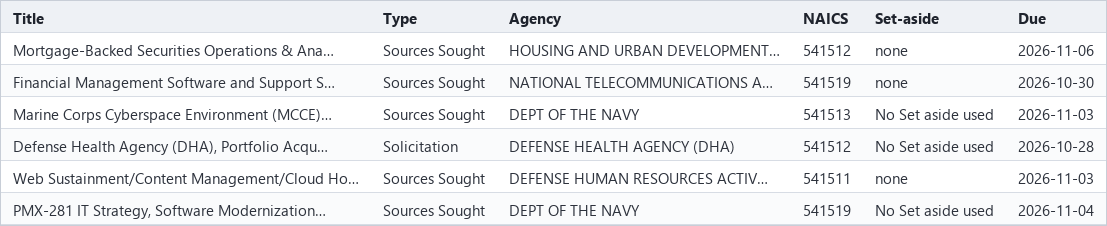
Type a keyword or a NAICS code and press Start. You get one row per open notice, newest first.
To see the data before you run anything, Set-aside contracts this week is a free page on our site with one recent week of small business set-aside notices by type, NAICS code and state.
This is an unofficial tool, not affiliated with SAM.gov, GSA, the Treasury or any agency. Always read the full notice on SAM.gov before you bid. Notices change and get amended.
What people use it for
- Small businesses and government contractors: a daily list of open bids in your NAICS codes and states.
- Capture and business development teams: see who already wins this kind of work at this agency before you decide to bid.
- Consultants and bid services: fresh, filtered notices for clients, ready for a spreadsheet or a CRM.
How to use
- Type one or more words in Keywords, like
janitorialorHVAC. You can leave it empty if you use a filter. - Optional: open Filters and add NAICS codes, Set-aside codes, States, Agency or office contains or Notice types.
- Optional: open Deadlines and dates to keep only notices due or posted within a number of days.
- Set Max results to cap how many notices the run returns and what it costs.
- Press Start. When the run ends, open the Output tab or download the results from the Storage tab as CSV, Excel or JSON.
- For daily alerts, turn on Only notices not seen in my earlier runs and add a daily schedule in Apify Console.
Input
| Field | What it does |
|---|---|
| Keywords | Notices whose title or description contains any of these words, like janitorial or HVAC. |
| Exclude keywords | Drop notices that contain any of these words. |
| Search descriptions too | Off searches titles only. |
| NAICS codes | Notices whose NAICS code starts with any of these, like 541512 or 2362. |
| Set-aside codes | Like SBA, 8A, HZC, SDVOSBC or WOSB. The input form lists them all. |
| States | Two-letter codes. Uses the place of performance, or the contracting office's state when the notice gives none. |
| Agency or office contains | Like Army, Veterans or Forest Service. |
| Notice types | Like Solicitation, Sources Sought or Presolicitation. |
| Open notices only | On by default. Turn it off to include award notices from the last 90 days. |
| Response due within (days) | Only notices due soon. |
| Posted within (days) | Only notices posted recently. |
| Include past award winners | Adds the marketHistory block. On by default. |
| Include description text | Adds the description, up to 8,000 characters. |
| Max results | A cap on how many notices one run returns. |
| Only notices not seen in my earlier runs | Returns only new notices. Pair with a daily schedule for alerts. |
Output
One item per notice:
{
  "noticeId": "ff5a815a19f348e8a0606ce16ec022d4",
  "title": "Ross Springs Waterline Replacement",
  "solicitationNumber": "1240LT27Q0022",
  "agency": "AGRICULTURE, DEPARTMENT OF",
  "subTier": "FOREST SERVICE",
  "office": "ASHLEY NATIONAL FOREST",
  "noticeType": "Combined Synopsis/Solicitation",
  "postedDate": "2026-10-23",
  "responseDeadline": "2026-11-21T15:00:00-07:00",
  "daysToDeadline": 28,
  "naicsCode": "237110",
  "pscCode": "Z2NE",
  "setAsideCode": "SBA",
  "setAside": "Small Business Set Aside - Total",
  "state": "UT",
  "stateSource": "place of performance",
  "placeOfPerformance": { "city": "Vernal", "state": "UT", "zip": "84078", "country": "USA" },
  "award": null,
  "description": "The Forest Service is seeking bids to replace...",
  "samUrl": "https://sam.gov/workspace/contract/opp/ff5a815a19f348e8a0606ce16ec022d4/view",
  "marketHistory": {
    "source": "USAspending.gov",
    "awardingAgency": "Forest Service",
    "naicsCode": "237110",
    "period": "FY2024 to FY2027 so far",
    "contractAwards": 140,
    "topRecipients": [
      { "name": "WRIGHT BROS LLC", "uei": "QP8VNJ36KNY4", "obligatedUsd": 5015701 }
    ]
  }
}
The figures in the example are illustrative. Real values come from the data.
Free pages on our site list open notices for three kinds of work: medical equipment maintenance, security guards and design-build construction.
marketHistorycovers the whole agency (for example the Forest Service or the Department of the Army) and the notice's NAICS code, not the single office. Large agencies buy a lot, so the top recipients there are often big companies. It is context for your bid decision, not a list of who will compete.contractAwardscounts contract award records in USAspending for that agency and code since the start of the period, including small orders and modifications.obligatedUsdis what each company was obligated in that window.marketHistoryis null when a notice has no NAICS code or its agency could not be matched in USAspending (under 1% of notices today).- Contracting officer names, emails and phone numbers are not included. Emails and phone numbers are removed from
titles and descriptions too. Open
samUrlto see who to contact.
| Field | What it holds |
|---|---|
noticeId, title, solicitationNumber | The SAM.gov notice ID, title and solicitation number. |
agency, subTier, office | The department, agency and contracting office. |
noticeType | Solicitation, Sources Sought, Award Notice and so on. |
postedDate, responseDeadline, daysToDeadline | When it was posted, when responses are due, and the days left. |
naicsCode, pscCode | The industry code and the product or service code. |
setAsideCode, setAside | The small business set-aside, if there is one. |
state, placeOfPerformance, officeLocation | Where the work is done and where the contracting office is. |
award | Award number, date, amount and awardee on award notices. |
description | The notice text, up to 8,000 characters. |
marketHistory | Past contract count and top 5 recipients for the agency and NAICS code. |
samUrl | The notice on SAM.gov. |
Where the data comes from
- Notices: the SAM.gov Contract Opportunities public data extract, which SAM.gov rebuilds once a day. We load it into our index each morning (UTC). The index holds every active notice with a future deadline plus anything posted in the last 90 days, about 39,000 notices.
- Market history: the USAspending.gov API, refreshed once a week for each agency and NAICS pair.
- This Actor reads our index only. It never scrapes the SAM.gov website.
FAQ
How do I export SAM.gov contract opportunities to Excel or CSV? Run a search, then download the results from the Storage tab as CSV, Excel or JSON. Each row is one notice with its deadline, NAICS code, set-aside, place of performance and a link back to SAM.gov.
How do I get a daily list of new SAM.gov bids in my NAICS codes? Enter your NAICS codes and states, turn on Only notices not seen in my earlier runs, and add a daily schedule in Apify Console. Each run then returns only notices you have not had before. A webhook or one of Apify's integrations can send them on.
How do I find small business, 8(a), SDVOSB, WOSB or HUBZone set-aside contracts?
Use Set-aside codes: SBA for small business, 8A, SDVOSBC, WOSB or HZC. The input form lists every code.
Who is the incumbent on this contract?
Federal data has no incumbent field. marketHistory shows the five companies that won the most of this agency's
work under the same NAICS code, which is the closest public signal. Check the notice itself on SAM.gov for any
named incumbent or earlier contract number.
Do I need a SAM.gov account or API key? No. The Actor reads our own index of SAM.gov's public daily extract.
How current is it? Notices load once a day, each morning UTC, from SAM.gov's daily extract. Market history refreshes weekly.
Use it from an AI agent or MCP
AI agents can find and run this Actor through the Apify MCP server. Its search-actors
tool finds it, fetch-actor-details reads the input and output fields described above, and call-actor runs it on
your Apify account at the prices on the Pricing tab. To give an agent only this Actor as a tool, add it to the server
URL: https://mcp.apify.com?tools=plainrecordlabs/federal-contract-opportunities.
For example, this input finds open janitorial contracts in Virginia due in the next 14 days:
{ "keywords": ["janitorial"], "states": ["VA"], "deadlineWithinDays": 14 }
Pricing
You pay per notice returned, plus a small start fee per run. There is no monthly rental.
| Apify plan | Per notice | Start fee per run |
|---|---|---|
| Free and Bronze | 0.0025 USD | 0.0005 USD |
| Silver | 0.00225 USD | 0.0005 USD |
| Gold, Platinum and Diamond | 0.002 USD | 0.0005 USD |
The start fee is charged once per GB of run memory. This Actor runs at 256 MB by default, so that is one start fee.
Example: a run that returns 100 notices on the Free or Bronze plan costs 100 x 0.0025 = 0.25 USD for the notices plus 0.0005 USD to start, so 0.2505 USD in all. This is only an example. The Pricing tab shows the current prices and is the one to go by. Max results caps what one run can cost.
Related Actors
- SEC Form D Funding Rounds: US companies that just reported a private fundraise to the SEC.
- UK Companies House Search: lists of UK companies filtered by SIC code, postcode, status and incorporation date.
Feedback
Need a field, a filter or a fix? Open an issue on the Issues tab.
Actor input Schema
keywords (type: array):
Find notices whose title or description contains any of these words, for example "janitorial", "cybersecurity" or "HVAC". Case does not matter and a keyword matches from the start of a word, so "roof" also finds "roofing". Leave empty to search by the filters below only.
excludeKeywords (type: array):
Drop notices whose title or description contains any of these words, for example "training" or "design". They match the same way as Keywords.
searchDescriptions (type: boolean):
On: keywords and exclude keywords are checked against the title and the full description. Off: the title only, which gives fewer but closer matches. For example, with it off "roofing" finds roofing contracts but not a building contract that mentions a roof in its text.
naicsCodes (type: array):
Keep notices whose NAICS code starts with any of these, for example 541512 for computer systems design, 5415 or 2362. A shorter code covers every code that starts with it.
setAsideCodes (type: array):
Keep notices with any of these SAM.gov set-aside codes, for example SBA for a total small business set-aside, SDVOSBC for service-disabled veteran-owned small business or HZC for HUBZone. Other codes are SBP, 8A, 8AN, SDVOSBS, WOSB, WOSBSS, EDWOSB, VSA and ISBEE. NONE keeps notices the agency marked as having no set-aside. Many notices carry no code at all and are left out whenever this filter is used.
states (type: array):
Two-letter state codes, for example VA or TX. Uses the place of performance, or the contracting office's state when the notice gives no place. Each result's stateSource field says which one was used.
agencies (type: array):
Keep notices whose department, agency or office name contains any of these, for example "Army", "Veterans" or "Forest Service". Case does not matter.
noticeTypes (type: array):
Keep only these types, typed exactly as written here: Solicitation, Combined Synopsis/Solicitation, Presolicitation, Sources Sought, Special Notice, Award Notice, Justification. For example, Solicitation and Combined Synopsis/Solicitation keep notices you can bid on now, and Sources Sought finds work before the bid opens. Empty = all.
openOnly (type: boolean):
Keep only notices whose response deadline is today or later. Turn off to include award notices and notices without a deadline from the last 90 days, for example to see who recently won work in your NAICS code.
deadlineWithinDays (type: integer):
Keep notices due from today through the next N days, for example 14 for the next two weeks. 0 = any deadline.
postedWithinDays (type: integer):
Keep notices posted in the last N days, for example 7 for the past week. 0 = any.
includeMarketHistory (type: boolean):
Add the marketHistory block: contracts awarded by the same agency for the same NAICS code over about three fiscal years, and the top 5 recipients by amount (USAspending.gov). For example, a Forest Service road notice shows who won Forest Service road work before. It is null when the notice has no NAICS code or no past awards match.
includeDescription (type: boolean):
Add the notice description (up to 8,000 characters, emails and phone numbers removed). Turn off for smaller rows, for example when you only need titles and deadlines for an alert.
maxResults (type: integer):
Return at most this many notices, newest first, for example 50. 0 = no limit, which needs at least one keyword or filter so a run cannot return the whole index.
onlyNew (type: boolean):
Remembers notice IDs between your runs (in your own key-value store) and returns only new ones. Pair with an Apify schedule for daily alerts, for example a run every morning that returns only notices posted since the last one. The first run returns everything that matches and records it.
Actor input object example
{
  "keywords": [
    "janitorial",
    "HVAC"
  ],
  "excludeKeywords": [
    "training"
  ],
  "searchDescriptions": true,
  "naicsCodes": [
    "541512",
    "2362"
  ],
  "setAsideCodes": [
    "SBA",
    "SDVOSBC"
  ],
  "states": [
    "VA",
    "TX"
  ],
  "agencies": [
    "Veterans",
    "Forest Service"
  ],
  "noticeTypes": [
    "Solicitation",
    "Combined Synopsis/Solicitation"
  ],
  "openOnly": true,
  "deadlineWithinDays": 14,
  "postedWithinDays": 7,
  "includeMarketHistory": true,
  "includeDescription": false,
  "maxResults": 50,
  "onlyNew": true
}
Actor output Schema
notices (type: string):
One item per contract notice that matched, with a marketHistory block.
summary (type: string):
How many notices were returned, how many carry market history, and when the index was built.
API
You can run this Actor programmatically using our API. Below are code examples in JavaScript, Python, and CLI, as well as the OpenAPI specification and MCP server setup.
JavaScript example
import { ApifyClient } from 'apify-client';

// Initialize the ApifyClient with your Apify API token
// Replace the '<YOUR_API_TOKEN>' with your token
const client = new ApifyClient({
    token: '<YOUR_API_TOKEN>',
});

// Prepare Actor input
const input = {
    "keywords": [
        "maintenance"
    ],
    "maxResults": 20
};

// Run the Actor and wait for it to finish
const run = await client.actor("plainrecordlabs/federal-contract-opportunities").call(input);

// Fetch and print Actor results from the run's dataset (if any)
console.log('Results from dataset');
console.log(`💾 Check your data here: https://console.apify.com/storage/datasets/${run.defaultDatasetId}`);
const { items } = await client.dataset(run.defaultDatasetId).listItems();
items.forEach((item) => {
    console.dir(item);
});

// 📚 Want to learn more 📖? Go to → https://docs.apify.com/api/client/js/docs
Python example
from apify_client import ApifyClient

# Initialize the ApifyClient with your Apify API token
# Replace '<YOUR_API_TOKEN>' with your token.
client = ApifyClient("<YOUR_API_TOKEN>")

# Prepare the Actor input
run_input = {
    "keywords": ["maintenance"],
    "maxResults": 20,
}

# Run the Actor and wait for it to finish
run = client.actor("plainrecordlabs/federal-contract-opportunities").call(run_input=run_input)

# Fetch and print Actor results from the run's dataset (if there are any)
print(f"💾 Check your data here: https://console.apify.com/storage/datasets/{run.default_dataset_id}")
for item in client.dataset(run.default_dataset_id).iterate_items():
    print(item)

# 📚 Want to learn more 📖? Go to → https://docs.apify.com/api/client/python/docs/quick-start
CLI example
echo '{
  "keywords": [
    "maintenance"
  ],
  "maxResults": 20
}' |
apify call plainrecordlabs/federal-contract-opportunities --silent --output-dataset
MCP server setup
{
    "mcpServers": {
        "apify": {
            "type": "http",
            "url": "https://mcp.apify.com/?tools=fetch-actor-details,plainrecordlabs/federal-contract-opportunities"
        }
    }
}
The hosted server signs you in with OAuth on first connect, so no API token belongs in this config. Clients without OAuth support can send an Authorization: Bearer <APIFY_API_TOKEN> header instead, using a token from API & Integrations in Apify Console (https://console.apify.com/settings/integrations).
OpenAPI specification
Download the OpenAPI definition: https://api.apify.com/v2/actors/ah7YpGvOHtUcHD2xH/builds/cjWUFPvIPhedi4dMw/openapi.json