ThreatByte-MCP
ThreatByte-MCP é um aplicativo web de gerenciamento de casos baseado em MCP, intencionalmente vulnerável. Ele reflete um fluxo de trabalho realista de analista de SOC com uma interface renderizada pelo servidor e um servidor MCP real. As ferramentas MCP são intencionalmente vulneráveis para treinamento e demonstração.
Documentação
ThreatByte-MCP


ThreatByte-MCP é um aplicativo web de gerenciamento de casos baseado em MCP, deliberadamente vulnerável. Ele reflete o fluxo de trabalho realista de um analista de SOC com uma interface renderizada no servidor e um servidor MCP real. As ferramentas MCP são intencionalmente vulneráveis para fins de treinamento e demonstração.
[!NOTE] Apenas para uso educacional em ambientes controlados.
Recursos
- Autenticação web segura (cadastro/login/logout)
- Interface de gerenciamento de casos (criar/listar/visualizar casos)
- Notas e anexos vinculados a casos
- Pesquisa de indicadores e fluxos de trabalho de agentes via ferramentas MCP
- Personalização de agentes com registro de ferramentas baseado em esquema
Servidor MCP (SDK, JSON-RPC)
ThreatByte-MCP é uma arquitetura dividida:
- SOC Web App (cliente/interface) roda na porta 5001.
- Servidor MCP (ferramentas + agente) roda na porta 5002 usando o SDK Python oficial do MCP (FastMCP).
O servidor MCP expõe JSON-RPC em POST http://localhost:5002/mcp (Streamable HTTP). A interface web chama o servidor MCP por meio de um proxy no lado do servidor para manter a autenticação consistente com a sessão do SOC; o proxy transmite as respostas do agente ao navegador via SSE. Um manifesto de exemplo mcp.json está incluído na raiz do repositório.
Todas as chamadas MCP diretas devem incluir MCP-Protocol-Version: 2025-11-25 e Accept: application/json, text/event-stream.
Arquitetura (simplificada):
          Browser
             |
             v
    +------------------+        X-TBMCP-Token + X-TBMCP-User        +-------------------+
    |  SOC Web App     |  ---------------------------------------> |     MCP Server     |
    |  (Flask, :5001)  |           /mcp-proxy (server-side)         |  (FastMCP, :5002)  |
    +------------------+                                            +-------------------+
             |                                                                  |
             v                                                                  v
         SQLite DB                                                      Tool registry
                                                                       Agent + tool handlers
Arquitetura (detalhada):
Mode A (Web UI as HTTP MCP client)
  Browser (Analyst)
    |
    v
  SOC Web App (Flask, :5001)
    - Auth session (cookie)
    - Dashboards, cases, notes, files UI
    - POST /mcp-proxy forwards JSON-RPC
    - Injects X-TBMCP-Token + X-TBMCP-User to the MCP server
    |
    +--> SQLite DB (users/cases/notes/files/indicators)
    +--> Uploads (app/uploads)
    |
    v
  MCP Server (FastMCP, :5002)
    - /mcp JSON-RPC (Streamable HTTP)
    - Tool registry (mcp_tools)
    - Agent runtime + tool handlers
    - Persistence: agent_contexts, agent_logs, mcp_audit_logs

Mode B (Local agent/IDE as stdio MCP client)
  Local Agent / IDE (e.g., Claude Desktop) spawns:
    python run_mcp_server.py --stdio
  and communicates via stdin/stdout JSON-RPC (stdio transport).
Diagrama: Diagrama de arquitetura do ThreatByte-MCP
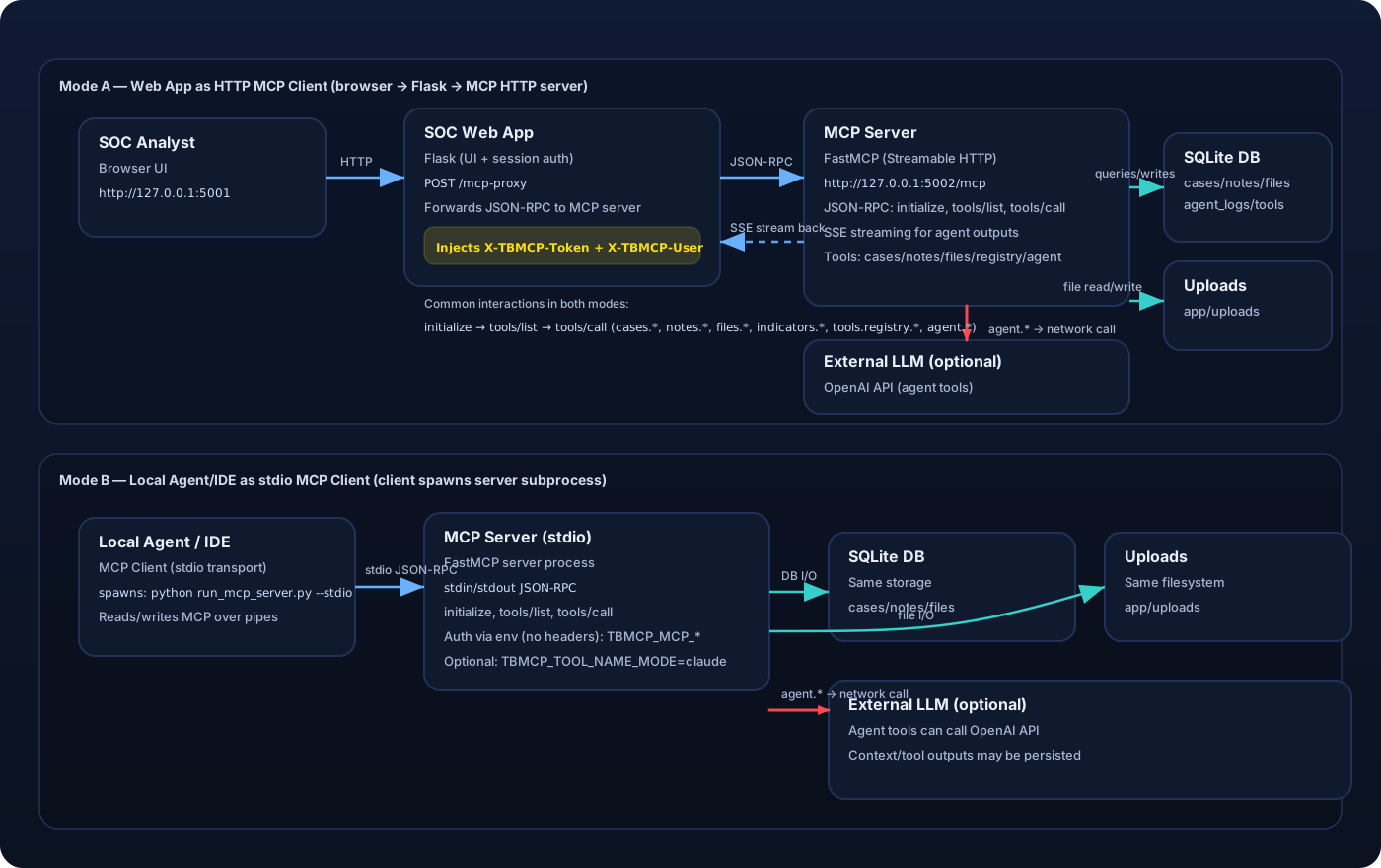
Autenticação MCP entre o Web App e o Servidor MCP
O web app faz proxy das chamadas MCP com estes cabeçalhos:
X-TBMCP-Token: segredo compartilhado deTBMCP_MCP_SERVER_TOKEN(configurado em ambos os servidores).X-TBMCP-User: ID do usuário atual da sessão SOC autenticada.
Chamadas MCP diretas exigem os mesmos cabeçalhos.
Ferramentas suportadas:
cases.createcases.listcases.list_allcases.getcases.renamecases.set_statuscases.deletenotes.createnotes.listnotes.updatenotes.deletefiles.upload(base64)files.listfiles.get(base64)files.read_pathindicators.searchagent.summarize_caseagent.run_tasktools.registry.listtools.builtin.listtools.registry.registertools.registry.delete
Temas de Vulnerabilidade (Foco em Treinamento)
As seguintes fraquezas estão intencionalmente presentes para fins de ensino:
- Autorização de nível de objeto quebrada (casos/notas/arquivos, list_all)
- XSS armazenado (notas renderizadas como HTML confiável)
- Injeção de SQL na pesquisa de indicadores
- Injeção de prompt no executor de tarefas do agente
- Má gestão de tokens e exposição de segredos (tokens codificados em prompts, contextos persistidos, logs completos)
- Envenenamento de ferramentas via substituições do registro de ferramentas baseado em esquema (MCP03)
- Confiança excessiva no contexto do cliente (spoofing de identidade do cabeçalho MCP)
- Leitura arbitrária de arquivos via
files.read_path - Sobrescrita de arquivos entre usuários (namespace de nomes de arquivo compartilhado)
Executando Localmente
cd ThreatByte-MCP
python -m venv venv_threatbyte_mcp
source venv_threatbyte_mcp/bin/activate
pip install -r requirements.txt
python db/create_db_tables.py
python run_mcp_server.py --http
python run.py
Abra: http://localhost:5001
Servidor MCP: http://localhost:5002/mcp
HTTP vs stdio
Este repositório inclui dois transportes de servidor MCP:
- HTTP (Streamable HTTP): o que o web app ThreatByte usa. O web app é apenas um cliente MCP HTTP, via encaminhador
/mcp-proxyno lado do servidor. - stdio: para clientes MCP externos (ex.: clientes IDE/agente) que iniciam o servidor MCP e se comunicam via stdin/stdout.
Exemplos:
# HTTP (required for the web app)
python run_mcp_server.py --http --host 127.0.0.1 --port 5002

# stdio (for MCP clients that support stdio transport; the web app will NOT work with this)
# In stdio mode there are no HTTP headers, so the server reads user context from env vars.
# Note: stdio mode runs the MCP server on AnyIO's Trio backend; ensure `trio>=0.28.0` is installed.
export TBMCP_MCP_SERVER_TOKEN=tbmcp-mcp-token
export TBMCP_MCP_USER_ID=1
python run_mcp_server.py --stdio
Compatibilidade com Claude Desktop (nomes de ferramentas)
Alguns clientes MCP (ex.: Claude Desktop) impõem validação estrita de nomes de ferramentas (^[a-zA-Z0-9_-]{1,64}$) e rejeitam nomes com pontos como cases.create.
Para executar o servidor MCP em modo compatível com Claude, defina:
TBMCP_TOOL_NAME_MODE=claude
Isso expõe as ferramentas com nomes usando sublinhados (ex.: cases_create, tools_registry_register, files_read_path) em vez de nomes com pontos.
Para um passo a passo completo (Windows + WSL stdio), consulte Configuração do Claude Desktop.
Executando com Docker ou Podman
O repositório inclui um Dockerfile e script de inicialização que inicializam o banco de dados e executam ambos os serviços em um único container:
- SOC Web App em
:5001 - Servidor MCP em
:5002
Construa a imagem:
# Docker
docker build -t threatbyte-mcp .

# Podman
podman build -t threatbyte-mcp .
Execute o container:
# Docker
docker run --rm -p 5001:5001 -p 5002:5002 threatbyte-mcp

# Podman
podman run --rm -p 5001:5001 -p 5002:5002 threatbyte-mcp
Execute com variáveis de ambiente opcionais:
# Docker
docker run --rm -p 5001:5001 -p 5002:5002 \
  -e TBMCP_MCP_SERVER_TOKEN=tbmcp-mcp-token \
  -e OPENAI_API_KEY=your_api_key \
  -e TBMCP_OPENAI_MODEL=gpt-4o-mini \
  threatbyte-mcp

# Podman
podman run --rm -p 5001:5001 -p 5002:5002 \
  -e TBMCP_MCP_SERVER_TOKEN=tbmcp-mcp-token \
  -e OPENAI_API_KEY=your_api_key \
  -e TBMCP_OPENAI_MODEL=gpt-4o-mini \
  threatbyte-mcp
Persista dados SQLite entre execuções (opcional):
# Docker
docker run --rm -p 5001:5001 -p 5002:5002 \
  -v "$(pwd)/db:/app/db" \
  -v "$(pwd)/app/uploads:/app/app/uploads" \
  threatbyte-mcp

# Podman
podman run --rm -p 5001:5001 -p 5002:5002 \
  -v "$(pwd)/db:/app/db:Z" \
  -v "$(pwd)/app/uploads:/app/app/uploads:Z" \
  threatbyte-mcp
Popular Dados de Exemplo
python db/populate_db.py --users 8 --cases 20 --notes 40 --files 20
Isso cria usuários, casos, notas e artefatos de arquivo aleatórios. Todas as senhas de usuário são Password123!.
Integração com LLM (Necessária para Respostas do Agente)
O endpoint de tarefas do agente exige um LLM real. Sem uma chave de API, o agente retorna um erro indicando que está indisponível.
Variáveis de ambiente:
TBMCP_OPENAI_API_KEYouOPENAI_API_KEYTBMCP_OPENAI_MODEL(padrão:gpt-4o-mini)
Mantenha as chaves de API apenas no lado do servidor e nunca as exponha no navegador.
Configuração do Servidor MCP
O web app SOC faz proxy das chamadas MCP para o servidor MCP usando um token compartilhado.
Variáveis de ambiente:
TBMCP_MCP_SERVER_URL(padrão:http://localhost:5002/mcp)TBMCP_MCP_SERVER_TOKEN(segredo compartilhado entre o app SOC e o servidor MCP)
Notas
- A interface usa templates renderizados no servidor.
- As ferramentas MCP são expostas em
http://localhost:5002/mcp(JSON-RPC). A interface as chama por meio de/mcp-proxy. - Páginas úteis da interface para treinamento:
My Cases(todos os casos pertencentes ao usuário conectado)MCP Audit Logs(trilha de auditoria no lado do servidor das chamadas de ferramentas MCP de clientes HTTP + stdio)Agent Logs(rastros internos do executor de agentes; populados poragent.run_task)
- Este aplicativo é intencionalmente inseguro. Não o implante na internet pública.