drawdb-mcp
Servidor DrawDB + MCP
Documentação

drawDB + MCP Server
Este fork do DrawDB estende o original com integração de assistente de IA via Model Context Protocol (MCP). Assistentes de IA como o Claude podem criar, modificar e gerenciar diagramas de banco de dados programaticamente.
O backend é o dono do diagrama. As ferramentas MCP leem e escrevem o estado autoritativo diretamente, então todas as ferramentas funcionam com ou sem navegador aberto — você não precisa do editor em execução para que um assistente construa um esquema. Quando uma GUI está conectada, ela atua como uma visão sincronizada: o backend envia cada alteração confirmada para ela, e as edições feitas no editor são enviadas de volta. Uma aba que reconecta adota o que o backend possui.
Relação com o DrawDB Upstream
Este projeto começou como um fork do DrawDB, mas desde então divergiu substancialmente e é intencionalmente não mantido em sincronia com o upstream. Correções e recursos selecionados são ocasionalmente cherry-picked do projeto pai, mas os dois continuarão a se distanciar conforme o drawdb-mcp evolui por conta própria. O DrawDB permanece um projeto separado e ativamente mantido, e todo o crédito vai para seus autores — veja drawdb-io/drawdb.
Vídeo de Demonstração
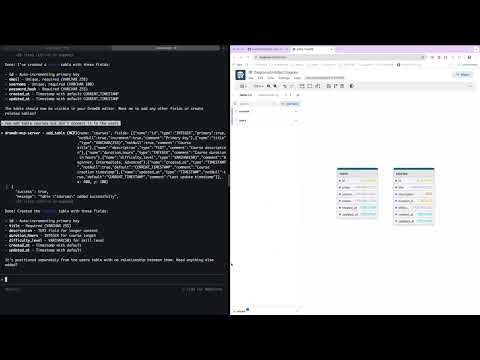
Assista como projetar esquemas de banco de dados usando linguagem natural com o Claude AI.
Arquitetura:
- apps/gui: frontend React derivado do DrawDB — uma visão sincronizada do diagrama do backend, não o store
- apps/backend: servidor MCP NestJS que detém o estado autoritativo do diagrama
- packages/diagram-core: camada de domínio sem framework — esquemas de entidade, o reducer de estado, as tabelas de tipos de dados e os codecs SQL/DBML, para que o backend possa renderizar exportações sem GUI em execução
- packages/remote-control-contract: o contrato ORPC tipado que ambas as direções do socket compartilham
- Construído com Turborepo e pnpm workspaces
Começando
Início Rápido com Docker (Recomendado)
A maneira mais fácil de começar é usando Docker:
docker run \
  --name drawdb-mcp \
  -p 8080:80 \
  -p 3000:3000 \
  --restart unless-stopped \
  ghcr.io/anatoly-lab/drawdb-mcp:latest
Então:
- Abra a GUI: http://localhost:8080
- Conecte o Claude Code ao servidor MCP:
claude mcp add --transport http drawdb-mcp http://127.0.0.1:3000
Agora o Claude pode criar e modificar diagramas de banco de dados para você!
Pré-lançamentos
latest acompanha apenas versões estáveis. Betas e candidatos a lançamento são publicados sob sua versão exata e nunca mudam latest, então fixe a versão completa para executar um:
docker run \
  --name drawdb-mcp \
  -p 8080:80 \
  -p 3000:3000 \
  ghcr.io/anatoly-lab/drawdb-mcp:2.0.0-beta.1
Consulte GHCR_DEPLOYMENT.md para tags disponíveis e uso avançado.
Desenvolvimento Local
Pré-requisitos
- Node.js 20.19+ ou 22.22+ (veja
enginesempackage.json) - pnpm 8.15.0+ (instale via
npm install -g pnpm)
Inicie a GUI e o backend:
git clone https://github.com/anatoly-lab/drawdb-mcp
cd drawdb-mcp
pnpm install
pnpm dev
Inicie apenas a GUI:
pnpm gui:dev
# Access at http://localhost:5173
Inicie apenas o backend:
pnpm backend:dev
# WebSocket at ws://localhost:3000/remote-control
Compilar
Compile ambos os aplicativos:
pnpm install
pnpm build
Compile um aplicativo específico:
pnpm build --filter=gui
pnpm build --filter=backend
Conecte o Claude Code ao Servidor MCP
Ao executar localmente, conecte o Claude Code:
claude mcp add --transport http drawdb-mcp http://127.0.0.1:3000
O frontend se conecta ao backend via WebSocket automaticamente. Lembre-se de que é uma visão do estado do backend, em vez do store: as ferramentas continuam funcionando sem navegador aberto, e uma aba que reconecta adota o que o backend possui.
Implantação com Docker
Consulte DOCKER_BUILD.md para instruções detalhadas de compilação.
Compile com Docker Compose:
docker-compose up --build
# Access at http://localhost:8080
Ou compile diretamente:
docker build -t drawdb-mcp:local .
docker run -p 8080:80 -p 3000:3000 drawdb-mcp:local
A imagem Docker inclui tanto o frontend quanto o backend. O WebSocket é proxiado via Nginx.
Atualizando para Novas Versões
Ao atualizar para uma nova versão (seja via Docker ou desenvolvimento local), você deve realizar uma atualização forçada no navegador para limpar o JavaScript do frontend em cache:
- Windows/Linux:
Ctrl + Shift + RouCtrl + F5 - macOS:
Cmd + Shift + R
Sem uma atualização forçada, o navegador pode continuar usando o código antigo do frontend em cache mesmo que o backend tenha sido atualizado, o que pode causar erros ou comportamento inesperado.
Recursos
Exportar e Importar
O servidor MCP fornece ferramentas para exportar e importar diagramas de banco de dados em vários formatos:
Formatos de Exportação:
- SQL DDL: Exportar instruções SQL específicas do banco de dados (PostgreSQL, MySQL, SQLite, MariaDB, MSSQL, Oracle)
- DBML: Exportar para Database Markup Language (formato legível por humanos e agnóstico de banco de dados)
- JSON: Exportar o estado completo do diagrama para backup/restauração
Formatos de Importação:
- DBML: Importar esquemas de banco de dados do formato DBML
- JSON: Importar o estado completo do diagrama
Ferramentas MCP Disponíveis:
export_sql- Exportar diagrama como SQL DDL para o tipo de banco de dados atualexport_dbml- Exportar diagrama como DBMLimport_dbml- Importar esquema de banco de dados do DBMLexport_diagram- Exportar diagrama completo como JSONimport_diagram- Importar diagrama completo do JSON
Consulte CLAUDE.md para a lista completa de ferramentas MCP disponíveis e seu uso.
Licença e Créditos
Este projeto é licenciado sob a GNU Affero General Public License v3.0 (AGPL-3.0), herdada e mantida do DrawDB upstream. Consulte o arquivo LICENSE para o texto completo.
Construído sobre DrawDB pelos autores e contribuidores do DrawDB. Muito obrigado ao projeto original pela base sobre a qual este fork foi construído.