AnalyticDB for MySQL
Uma interface para agentes de IA interagirem com bancos de dados AnalyticDB for MySQL, permitindo que eles recuperem metadados e executem operações SQL.
Documentação
Servidor MCP AnalyticDB for MySQL
Inglês | Chinês
O Servidor MCP AnalyticDB for MySQL é uma interface universal entre Agentes de IA e AnalyticDB MySQL. Ele fornece dois grupos de ferramentas:
- Ferramentas e Recursos SQL (grupo
sql): Conecta-se diretamente aos clusters ADB MySQL para executar SQL, visualizar planos de execução e navegar pelos metadados do banco de dados. O gruposqlé apenas um interruptor de grupo de ferramentas;execute_sqlexecuta em modo somente leitura por padrão, e o modo de execução SQL completo requer a configuração explícita adicionalENABLE_SQL_WRITE_TOOLS=true. - Ferramentas OpenAPI (grupo
openapi): Gerencia clusters, listas de permissões, contas, rede, monitoramento, diagnósticos e logs de auditoria via OpenAPI da Alibaba Cloud.
Ferramentas somente leitura são anotadas com ToolAnnotations(readOnlyHint=True) de acordo com o protocolo MCP, permitindo que os clientes as distingam de operações de mutação.
一、Pré-requisitos
- Python >= 3.13
- uv (gerenciador de pacotes e executor recomendado)
- AccessKey da Alibaba Cloud (necessário para ferramentas OpenAPI)
- Opcional: credenciais de conexão ADB MySQL (para ferramentas SQL no modo de conexão direta)
二、Início Rápido
2.0 Escolha uma Configuração
Escolha os grupos de ferramentas e interruptores extras para seu cenário antes de copiar uma configuração de cliente:
| Cenário | Grupos de ferramentas | Interruptor extra | Melhor para |
|---|---|---|---|
| Consultas SQL somente leitura, EXPLAIN e navegação de metadados | sql | Nenhum | Padrão recomendado para consultas, solução de problemas e análise somente leitura |
Execução SQL completa através de execute_sql | sql | ENABLE_SQL_WRITE_TOOLS=true | INSERT/UPDATE/DELETE/DDL/SQL multi-instrução quando o cliente MCP é confiável |
| Ferramentas de gerenciamento de cluster OpenAPI + ferramentas de leitura SQL | openapi,sql | AK/SK da Alibaba Cloud + configurações de conexão direta ADB_MYSQL_* | Operações de cluster, conta, lista de permissões, diagnósticos e monitoramento enquanto mantém acesso de leitura SQL |
| OpenAPI + execução SQL completa | openapi,sql | AK/SK da Alibaba Cloud + configurações de conexão direta ADB_MYSQL_* + ENABLE_SQL_WRITE_TOOLS=true | Administração mais execução SQL completa |
MCP_TOOLSETS=sqlapenas habilita o grupo de ferramentas SQL. A execução SQL completa não é um grupo de ferramentas separado, e não existe grupo de ferramentassql_write. Ela deve ser habilitada separadamente comENABLE_SQL_WRITE_TOOLS=true.
Antes de configurar um cliente, verifique:
- Modo de banco de dados direto: configure
ADB_MYSQL_HOST,ADB_MYSQL_PORT,ADB_MYSQL_USER,ADB_MYSQL_PASSWORDe opcionalmenteADB_MYSQL_DATABASE. - Modo de conta temporária: se
ADB_MYSQL_USER/ADB_MYSQL_PASSWORDnão estiverem configurados, mas AK/SK estiver disponível, o servidor cria uma conta de banco de dados temporária através da OpenAPI; chamadas de ferramentas SQL devem fornecerregion_idedb_cluster_id. - SSE remoto / HTTP Streamable: quando
SERVER_HOSTnão for um endereço de loopback, configureAPI_KEYno servidor eAuthorization: Bearer <API_KEY>no cliente. - Execução SQL completa: habilite apenas para usuários confiáveis e clientes MCP confiáveis, e use uma conta de banco de dados com privilégios mínimos.
2.1 Usando cherry-studio (Recomendado)
- Baixe e instale cherry-studio
- Siga a documentação para instalar
uv, que é necessário para o ambiente MCP - Configure e use o ADB MySQL MCP de acordo com a documentação. Você pode importar rapidamente a configuração usando o JSON abaixo.
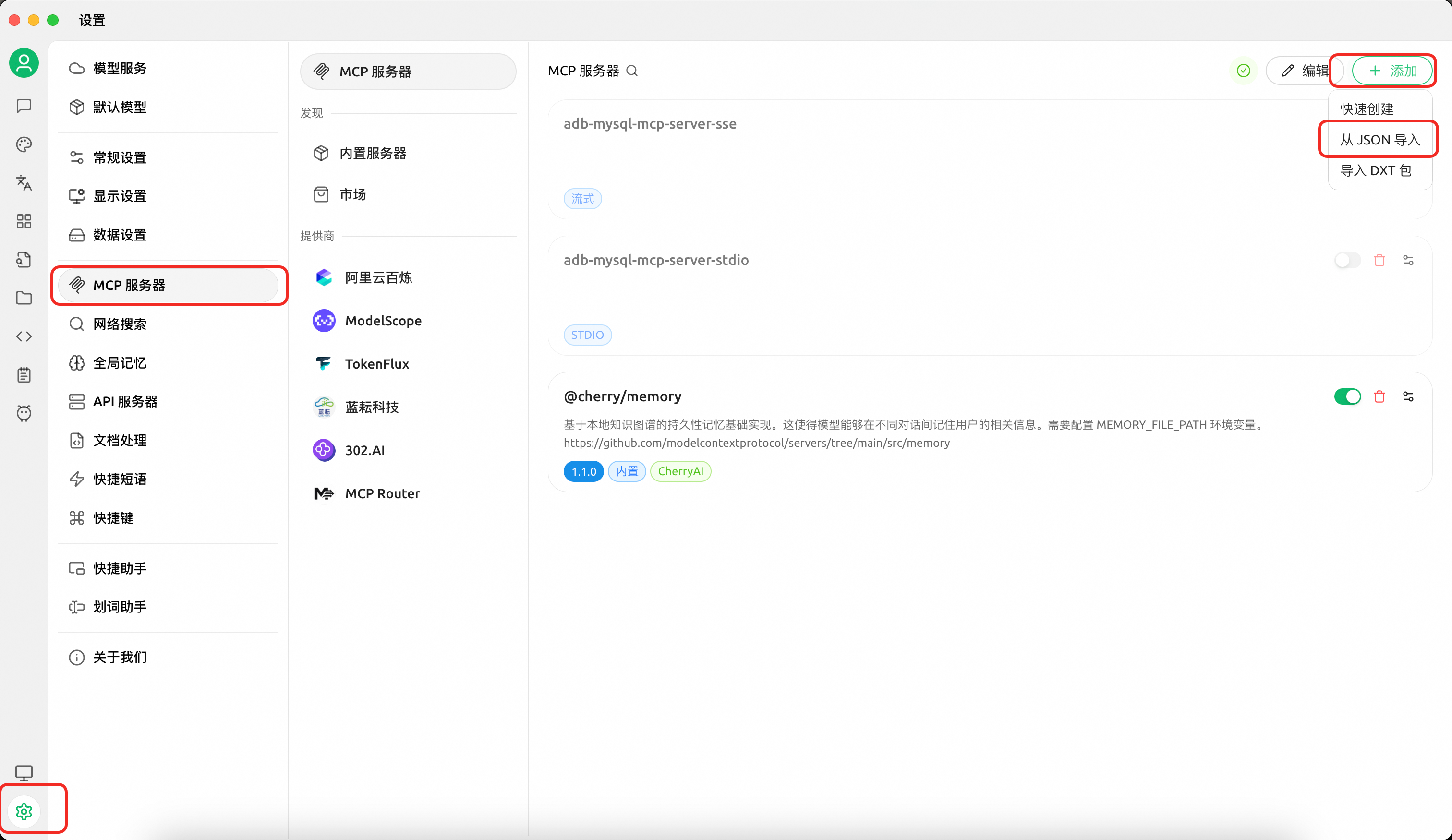
Configuração A — Apenas ferramentas de leitura SQL (executar consultas somente leitura, visualizar planos, navegar metadados):
{
  "mcpServers": {
    "adb-mysql-mcp-server": {
      "name": "adb-mysql-mcp-server",
      "type": "stdio",
      "isActive": true,
      "command": "uv",
      "args": [
        "--directory",
        "/path/to/alibabacloud-adb-mysql-mcp-server",
        "run",
        "adb-mysql-mcp-server"
      ],
      "env": {
        "ADB_MYSQL_HOST": "your_adb_mysql_host",
        "ADB_MYSQL_PORT": "3306",
        "ADB_MYSQL_USER": "your_username",
        "ADB_MYSQL_PASSWORD": "your_password",
        "ADB_MYSQL_DATABASE": "your_database",
        "MCP_TOOLSETS": "sql"
      }
    }
  }
}
Configuração B — Ferramentas OpenAPI + ferramentas de leitura SQL:
Nota: As ferramentas OpenAPI incluem capacidades de administração de mutação, como criação de contas, modificação de listas de permissões e encerramento de consultas. Habilite-as apenas quando você intencionalmente precisar de operações de gerenciamento. O exemplo abaixo também mantém o grupo de ferramentas
sqlhabilitado, então inclui configurações de conexão direta ao banco de dados.
{
  "mcpServers": {
    "adb-mysql-mcp-server": {
      "name": "adb-mysql-mcp-server",
      "type": "stdio",
      "isActive": true,
      "command": "uv",
      "args": [
        "--directory",
        "/path/to/alibabacloud-adb-mysql-mcp-server",
        "run",
        "adb-mysql-mcp-server"
      ],
      "env": {
        "ALIBABA_CLOUD_ACCESS_KEY_ID": "your_access_key_id",
        "ALIBABA_CLOUD_ACCESS_KEY_SECRET": "your_access_key_secret",
        "ADB_MYSQL_HOST": "your_adb_mysql_host",
        "ADB_MYSQL_PORT": "3306",
        "ADB_MYSQL_USER": "your_username",
        "ADB_MYSQL_PASSWORD": "your_password",
        "ADB_MYSQL_DATABASE": "your_database",
        "MCP_TOOLSETS": "openapi,sql"
      }
    }
  }
}
Se você quiser apenas ferramentas de gerenciamento OpenAPI e não precisar de ferramentas ou recursos SQL, altere MCP_TOOLSETS para openapi e remova as configurações de banco de dados direto ADB_MYSQL_*.
Configuração C — Execução SQL completa através de execute_sql:
Aviso: Com
ENABLE_SQL_WRITE_TOOLS=true,execute_sqlexpõe execução SQL completa. O servidor apenas realiza validação básica de entrada e não restringe tipo de instrução, comentários, ponto e vírgula, SQL multi-instrução, DDL, DML, DCL ou TCL. Habilite apenas para usuários confiáveis e use uma conta de banco de dados com privilégios mínimos.
{
  "mcpServers": {
    "adb-mysql-mcp-server": {
      "name": "adb-mysql-mcp-server",
      "type": "stdio",
      "isActive": true,
      "command": "uv",
      "args": [
        "--directory",
        "/path/to/alibabacloud-adb-mysql-mcp-server",
        "run",
        "adb-mysql-mcp-server"
      ],
      "env": {
        "ADB_MYSQL_HOST": "your_adb_mysql_host",
        "ADB_MYSQL_PORT": "3306",
        "ADB_MYSQL_USER": "your_username",
        "ADB_MYSQL_PASSWORD": "your_password",
        "ADB_MYSQL_DATABASE": "your_database",
        "MCP_TOOLSETS": "sql",
        "ENABLE_SQL_WRITE_TOOLS": "true"
      }
    }
  }
}
Configuração D — Ferramentas OpenAPI + execução SQL completa:
Aviso: Esta configuração habilita tanto capacidades de gerenciamento OpenAPI quanto execução SQL completa através de
execute_sql. Use apenas com clientes confiáveis, usuários confiáveis e uma conta de banco de dados com privilégios mínimos.
{
  "mcpServers": {
    "adb-mysql-mcp-server": {
      "name": "adb-mysql-mcp-server",
      "type": "stdio",
      "isActive": true,
      "command": "uv",
      "args": [
        "--directory",
        "/path/to/alibabacloud-adb-mysql-mcp-server",
        "run",
        "adb-mysql-mcp-server"
      ],
      "env": {
        "ALIBABA_CLOUD_ACCESS_KEY_ID": "your_access_key_id",
        "ALIBABA_CLOUD_ACCESS_KEY_SECRET": "your_access_key_secret",
        "ADB_MYSQL_HOST": "your_adb_mysql_host",
        "ADB_MYSQL_PORT": "3306",
        "ADB_MYSQL_USER": "your_username",
        "ADB_MYSQL_PASSWORD": "your_password",
        "ADB_MYSQL_DATABASE": "your_database",
        "MCP_TOOLSETS": "openapi,sql",
        "ENABLE_SQL_WRITE_TOOLS": "true"
      }
    }
  }
}
Sem
MCP_TOOLSETS, apenas o gruposqlé habilitado, eexecute_sqlainda executa em modo somente leitura por padrão. Quando AK/SK não está configurado, as ferramentas OpenAPI são automaticamente desabilitadas mesmo se solicitadas.
2.2 Usando Claude Code
Baixe do GitHub e sincronize as dependências:
git clone https://github.com/aliyun/alibabacloud-adb-mysql-mcp-server
cd alibabacloud-adb-mysql-mcp-server
uv sync
Adicione a seguinte configuração ao arquivo de configuração MCP do Claude Code (nível de projeto: .mcp.json na raiz do projeto, ou nível de usuário: ~/.claude/settings.json):
Transporte stdio:
{
  "mcpServers": {
    "adb-mysql-mcp-server": {
      "command": "uv",
      "args": [
        "--directory",
        "/path/to/alibabacloud-adb-mysql-mcp-server",
        "run",
        "adb-mysql-mcp-server"
      ],
      "env": {
        "MCP_TOOLSETS": "sql",
        "ADB_MYSQL_HOST": "your_adb_mysql_host",
        "ADB_MYSQL_PORT": "3306",
        "ADB_MYSQL_USER": "your_username",
        "ADB_MYSQL_PASSWORD": "your_password",
        "ADB_MYSQL_DATABASE": "your_database"
      }
    }
  }
}
Para ferramentas de gerenciamento OpenAPI, adicione ALIBABA_CLOUD_ACCESS_KEY_ID, ALIBABA_CLOUD_ACCESS_KEY_SECRET e inclua explicitamente openapi em MCP_TOOLSETS. O exemplo abaixo usa a configuração comum MCP_TOOLSETS=openapi,sql, então também inclui configurações de conexão direta ao banco de dados e as ferramentas de leitura SQL funcionam após copiar a configuração:
{
  "mcpServers": {
    "adb-mysql-mcp-server": {
      "command": "uv",
      "args": [
        "--directory",
        "/path/to/alibabacloud-adb-mysql-mcp-server",
        "run",
        "adb-mysql-mcp-server"
      ],
      "env": {
        "ALIBABA_CLOUD_ACCESS_KEY_ID": "your_access_key_id",
        "ALIBABA_CLOUD_ACCESS_KEY_SECRET": "your_access_key_secret",
        "MCP_TOOLSETS": "openapi,sql",
        "ADB_MYSQL_HOST": "your_adb_mysql_host",
        "ADB_MYSQL_PORT": "3306",
        "ADB_MYSQL_USER": "your_username",
        "ADB_MYSQL_PASSWORD": "your_password",
        "ADB_MYSQL_DATABASE": "your_database"
      }
    }
  }
}
Se você quiser apenas ferramentas de gerenciamento OpenAPI e não precisar de ferramentas ou recursos SQL, altere MCP_TOOLSETS para openapi e remova as configurações de banco de dados direto ADB_MYSQL_*.
Para execução SQL completa através de execute_sql, mantenha MCP_TOOLSETS=sql e defina ENABLE_SQL_WRITE_TOOLS=true. Observe que nem MCP_TOOLSETS=sql nem MCP_TOOLSETS=all habilitam execução SQL completa por si só:
{
  "mcpServers": {
    "adb-mysql-mcp-server": {
      "command": "uv",
      "args": [
        "--directory",
        "/path/to/alibabacloud-adb-mysql-mcp-server",
        "run",
        "adb-mysql-mcp-server"
      ],
      "env": {
        "MCP_TOOLSETS": "sql",
        "ENABLE_SQL_WRITE_TOOLS": "true",
        "ADB_MYSQL_HOST": "your_adb_mysql_host",
        "ADB_MYSQL_PORT": "3306",
        "ADB_MYSQL_USER": "your_username",
        "ADB_MYSQL_PASSWORD": "your_password",
        "ADB_MYSQL_DATABASE": "your_database"
      }
    }
  }
}
Se você precisar tanto de gerenciamento OpenAPI quanto execução SQL completa, use MCP_TOOLSETS=openapi,sql e defina ENABLE_SQL_WRITE_TOOLS=true:
{
  "mcpServers": {
    "adb-mysql-mcp-server": {
      "command": "uv",
      "args": [
        "--directory",
        "/path/to/alibabacloud-adb-mysql-mcp-server",
        "run",
        "adb-mysql-mcp-server"
      ],
      "env": {
        "ALIBABA_CLOUD_ACCESS_KEY_ID": "your_access_key_id",
        "ALIBABA_CLOUD_ACCESS_KEY_SECRET": "your_access_key_secret",
        "MCP_TOOLSETS": "openapi,sql",
        "ENABLE_SQL_WRITE_TOOLS": "true",
        "ADB_MYSQL_HOST": "your_adb_mysql_host",
        "ADB_MYSQL_PORT": "3306",
        "ADB_MYSQL_USER": "your_username",
        "ADB_MYSQL_PASSWORD": "your_password",
        "ADB_MYSQL_DATABASE": "your_database"
      }
    }
  }
}
Transporte SSE — inicie o servidor primeiro, depois configure o cliente:
export MCP_TOOLSETS=sql
export ADB_MYSQL_HOST="your_adb_mysql_host"
export ADB_MYSQL_PORT="3306"
export ADB_MYSQL_USER="your_username"
export ADB_MYSQL_PASSWORD="your_password"
export ADB_MYSQL_DATABASE="your_database"
export SERVER_TRANSPORT=sse
export SERVER_HOST=127.0.0.1
export SERVER_PORT=8000
# API_KEY is required when SERVER_HOST is not a loopback address. Use at least 32 characters.
# export API_KEY="replace-with-a-random-token-at-least-32-chars"
# To enable OpenAPI management tools, add AK/SK and explicitly include openapi:
# export ALIBABA_CLOUD_ACCESS_KEY_ID="your_access_key_id"
# export ALIBABA_CLOUD_ACCESS_KEY_SECRET="your_access_key_secret"
# export MCP_TOOLSETS=openapi,sql
# To enable full SQL execution through execute_sql, explicitly set:
# export ENABLE_SQL_WRITE_TOOLS=true

uv --directory /path/to/alibabacloud-adb-mysql-mcp-server run adb-mysql-mcp-server
{
  "mcpServers": {
    "adb-mysql-mcp-server": {
      "url": "http://localhost:8000/sse"
    }
  }
}
Se o servidor estiver vinculado a um host não-loopback, configure API_KEY no lado do servidor e envie-o do lado do cliente como um cabeçalho HTTP. Em resumo: API_KEY é o token do lado do servidor, e Authorization: Bearer <API_KEY> é o cabeçalho de solicitação do lado do cliente.
# Server side
export SERVER_TRANSPORT=sse
export SERVER_HOST=0.0.0.0
export API_KEY="replace-with-a-random-token-at-least-32-chars"
uv --directory /path/to/alibabacloud-adb-mysql-mcp-server run adb-mysql-mcp-server
{
  "mcpServers": {
    "adb-mysql-mcp-server": {
      "url": "http://your-server-host:8000/sse",
      "headers": {
        "Authorization": "Bearer replace-with-a-random-token-at-least-32-chars"
      }
    }
  }
}
Transporte HTTP Streamable — inicie o servidor primeiro, depois configure o cliente:
export MCP_TOOLSETS=sql
export ADB_MYSQL_HOST="your_adb_mysql_host"
export ADB_MYSQL_PORT="3306"
export ADB_MYSQL_USER="your_username"
export ADB_MYSQL_PASSWORD="your_password"
export ADB_MYSQL_DATABASE="your_database"
export SERVER_TRANSPORT=streamable_http
export SERVER_HOST=127.0.0.1
export SERVER_PORT=8000
# API_KEY is required when SERVER_HOST is not a loopback address. Use at least 32 characters.
# export API_KEY="replace-with-a-random-token-at-least-32-chars"
# To enable OpenAPI management tools, add AK/SK and explicitly include openapi:
# export ALIBABA_CLOUD_ACCESS_KEY_ID="your_access_key_id"
# export ALIBABA_CLOUD_ACCESS_KEY_SECRET="your_access_key_secret"
# export MCP_TOOLSETS=openapi,sql
# To enable full SQL execution through execute_sql, explicitly set:
# export ENABLE_SQL_WRITE_TOOLS=true

uv --directory /path/to/alibabacloud-adb-mysql-mcp-server run adb-mysql-mcp-server
{
  "mcpServers": {
    "adb-mysql-mcp-server": {
      "url": "http://localhost:8000/mcp"
    }
  }
}
Para streamable_http em um host não-loopback, use o mesmo padrão de API_KEY no lado do servidor e cabeçalho Authorization: Bearer <API_KEY> no lado do cliente mostrado acima. Exemplo completo de configuração JSON do cliente:
{
  "mcpServers": {
    "adb-mysql-mcp-server": {
      "url": "http://your-server-host:8000/mcp",
      "headers": {
        "Authorization": "Bearer replace-with-a-random-token-at-least-32-chars"
      }
    }
  }
}
Nota: Quando
ADB_MYSQL_USEReADB_MYSQL_PASSWORDnão estão configurados, mas AK/SK está disponível, uma conta de banco de dados temporária é criada automaticamente via OpenAPI para execução SQL e limpa posteriormente.
2.3 Usando Cline
Defina variáveis de ambiente e execute o servidor MCP:
export MCP_TOOLSETS=sql
export ADB_MYSQL_HOST="your_adb_mysql_host"
export ADB_MYSQL_PORT="3306"
export ADB_MYSQL_USER="your_username"
export ADB_MYSQL_PASSWORD="your_password"
export ADB_MYSQL_DATABASE="your_database"
export SERVER_TRANSPORT=sse
export SERVER_HOST=127.0.0.1
export SERVER_PORT=8000
# To enable OpenAPI management tools, add AK/SK and explicitly include openapi:
# export ALIBABA_CLOUD_ACCESS_KEY_ID="your_access_key_id"
# export ALIBABA_CLOUD_ACCESS_KEY_SECRET="your_access_key_secret"
# export MCP_TOOLSETS=openapi,sql

uv --directory /path/to/alibabacloud-adb-mysql-mcp-server run adb-mysql-mcp-server
Depois configure o servidor remoto do Cline:
remote_server = "http://127.0.0.1:8000/sse"
2.4 Teste Rápido
Após o servidor ser iniciado e conectado ao seu cliente MCP, execute estas instruções somente leitura para verificar a configuração sem modificar dados:
select 1 as ok;
select current_date as today, current_timestamp as now_time;
Você também pode testar ferramentas de plano de consulta com get_query_plan ou get_execution_plan:
select 1 as plan_test;
No modo somente leitura padrão, o seguinte SQL multi-instrução deve ser rejeitado, o que confirma que a proteção de instrução única está ativa:
select 1; select 2;
Para confirmar ainda mais a proteção contra escrita, execute o seguinte apenas em um banco de dados de teste ou após confirmar o nome da tabela. Deve ser rejeitado no modo somente leitura padrão:
update your_table set id = id where 1 = 0;
Se você ainda não conhece um nome de tabela real, não execute SQL específico de tabela. Comece com show databases;, o recurso MCP adbmysql:///databases ou adbmysql:///{database}/tables para inspecionar metadados.
三、Variáveis de Ambiente
| Variável | Obrigatória | Descrição |
|---|---|---|
ALIBABA_CLOUD_ACCESS_KEY_ID | Sim (ferramentas OpenAPI) | ID da AccessKey da Alibaba Cloud |
ALIBABA_CLOUD_ACCESS_KEY_SECRET | Sim (ferramentas OpenAPI) | Segredo da AccessKey da Alibaba Cloud |
ALIBABA_CLOUD_SECURITY_TOKEN | Não | Token de segurança temporário STS |
ADB_MYSQL_HOST | Não | Host do banco de dados (modo de conexão direta) |
ADB_MYSQL_PORT | Não | Porta do banco de dados, padrão 3306 (modo de conexão direta) |
ADB_MYSQL_USER | Não | Nome de usuário do banco de dados (modo de conexão direta) |
ADB_MYSQL_PASSWORD | Não | Senha do banco de dados (modo de conexão direta) |
ADB_MYSQL_DATABASE | Não | Nome padrão do banco de dados (modo de conexão direta) |
ADB_MYSQL_CONNECT_TIMEOUT | Não | Tempo limite de conexão do banco de dados em segundos, padrão 2 |
ADB_MYSQL_MAX_SQL_LENGTH | Não | Comprimento máximo aceito de instrução SQL, padrão 10000. Deve ser um inteiro positivo |
ADB_API_CONNECT_TIMEOUT | Não | Tempo limite de conexão OpenAPI em milissegundos, padrão 10000 (10s) |
ADB_API_READ_TIMEOUT | Não | Tempo limite de leitura OpenAPI em milissegundos, padrão 300000 (5min) |
MCP_TOOLSETS | Não | Grupos de ferramentas separados por vírgula para habilitar. Padrão: sql. Grupos suportados: sql, openapi; atalho: all expande para openapi,sql. Esta variável apenas controla a exposição do grupo de ferramentas e não controla a permissão de execução SQL completa |
SERVER_TRANSPORT | Não | Protocolo de transporte: stdio (padrão), sse, streamable_http |
SERVER_HOST | Não | Host de vinculação SSE/HTTP, padrão 127.0.0.1; hosts não-loopback requerem API_KEY |
SERVER_PORT | Não | Porta do servidor SSE/HTTP, padrão 8000 |
API_KEY | Não | Token de autenticação HTTP MCP; os clientes devem enviar Authorization: Bearer <API_KEY> quando configurado. Obrigatório em hosts não-loopback; use pelo menos 32 caracteres |
ENABLE_SQL_WRITE_TOOLS | Não | Controla se execute_sql entra no modo de execução SQL completa. Padrão: false; deve ser explicitamente definido para true para entrar no modo de execução SQL completa. O escopo real executável ainda é limitado pelos privilégios da conta do banco de dados, driver do banco de dados e comprimento máximo de SQL |
四、Lista de Ferramentas
Por padrão, apenas o grupo sql é habilitado e execute_sql apenas permite SQL somente leitura. O grupo openapi é habilitado apenas quando openapi é explicitamente incluído em MCP_TOOLSETS. MCP_TOOLSETS apenas controla a exposição do grupo de ferramentas; execução SQL completa através de execute_sql deve ser habilitada separadamente com ENABLE_SQL_WRITE_TOOLS=true.
4.1 Gerenciamento de Cluster (grupo: openapi)
| Ferramenta | Descrição |
|---|---|
describe_db_clusters | Listar clusters ADB MySQL em uma região |
describe_db_cluster_attribute | Obter atributos detalhados do cluster |
describe_cluster_access_whitelist | Obter lista de permissões de IP do cluster |
modify_cluster_access_whitelist | Modificar lista de permissões de IP do cluster |
describe_accounts | Listar contas de banco de dados em um cluster |
describe_cluster_net_info | Obter informações de conexão de rede do cluster |
get_current_time | Obter hora atual do servidor |
4.2 Diagnósticos e Monitoramento (grupo: openapi)
| Ferramenta | Descrição |
|---|---|
describe_db_cluster_performance | Consultar métricas de desempenho do cluster (CPU, memória, QPS, etc.) |
describe_db_cluster_health_status | Consultar status de saúde do cluster |
describe_diagnosis_records | Consultar registros de resumo de diagnóstico SQL |
describe_diagnosis_sql_info | Obter detalhes de execução SQL (plano, informações de tempo de execução) |
describe_bad_sql_detection | Detectar SQL ruim que impacta a estabilidade do cluster |
describe_sql_patterns | Consultar lista de padrões SQL |
describe_table_statistics | Consultar estatísticas em nível de tabela |
4.3 Administração e Auditoria (grupo: openapi)
| Ferramenta | Descrição |
|---|---|
create_account | Criar uma conta de banco de dados |
modify_db_cluster_description | Modificar descrição do cluster |
describe_db_cluster_space_summary | Obter resumo de espaço de armazenamento do cluster |
describe_audit_log_records | Consultar registros de log de auditoria SQL |
4.4 Diagnósticos Avançados (grupo: openapi)
| Ferramenta | Descrição |
|---|---|
describe_executor_detection | Diagnóstico de nós de computação |
describe_worker_detection | Diagnóstico de nós de armazenamento |
describe_controller_detection | Diagnóstico de nós de acesso |
describe_available_advices | Obter recomendações de otimização |
kill_process | Encerrar um processo de consulta em execução |
describe_db_resource_group | Obter configuração do grupo de recursos |
describe_excessive_primary_keys | Detectar tabelas com excesso de chaves primárias |
describe_oversize_non_partition_table_infos | Detectar tabelas não particionadas superdimensionadas |
describe_table_partition_diagnose | Diagnosticar problemas de particionamento de tabelas |
describe_inclined_tables | Detectar tabelas com distribuição desigual de dados |
4.5 Ferramentas SQL (grupo: sql)
| Ferramenta | Descrição |
|---|---|
execute_sql | Executar SQL em um cluster ADB MySQL. SQL somente leitura é permitido por padrão; execução completa de SQL requer ENABLE_SQL_WRITE_TOOLS=true |
get_query_plan | Obter plano de execução EXPLAIN para uma única instrução SELECT ou CTE somente leitura com WITH |
get_execution_plan | Obter plano de execução real EXPLAIN ANALYZE para uma única instrução SELECT ou CTE somente leitura com WITH |
4.6 Recursos MCP (grupo: sql)
Os recursos MCP são atribuídos ao grupo sql porque leem metadados do banco de dados por meio da conexão SQL, como SHOW DATABASES, SHOW TABLES, SHOW CREATE TABLE e SHOW adb_config. São recursos de metadados somente leitura e estão disponíveis junto com o grupo de leitura SQL padrão.
| URI do recurso | Descrição |
|---|---|
adbmysql:///databases | Listar todos os bancos de dados |
adbmysql:///{database}/tables | Listar todas as tabelas em um banco de dados |
adbmysql:///{database}/{table}/ddl | Obter DDL da tabela |
adbmysql:///config/{key}/value | Obter valor de uma chave de configuração |
五、Política de Segurança
5.1 Modo SQL Somente Leitura
Quando ENABLE_SQL_WRITE_TOOLS não está definido como true, execute_sql opera em modo somente leitura. O servidor valida o SQL antes de abrir uma conexão com o banco de dados:
- Permite SQL somente leitura, como
SELECT,SHOW,DESCRIBE,DESC,EXPLAINe instruções CTE somente leitura comWITH. - Permite um ponto e vírgula terminal opcional e o remove antes da execução.
- Rejeita SQL com múltiplas instruções.
- Rejeita comentários SQL fora de strings ou identificadores entre aspas.
- Rejeita strings ou identificadores entre aspas não fechados.
- Rejeita palavras-chave de escrita em corpos de
SELECTouWITH, incluindo operações de escrita aninhadas. - Rejeita
SELECT ... INTO OUTFILEeSELECT ... INTO DUMPFILE.
Este modo tem como objetivo reduzir mutações acidentais ou não autorizadas por clientes de IA.
5.2 Modo de Execução Completa de SQL
Aviso de risco: O modo de execução completa de SQL significa que o servidor MCP fornece um ponto de entrada de execução SQL de propósito geral. Após ser habilitado, o servidor não tenta mais classificar o SQL como leitura ou escrita e não bloqueia SQL com múltiplas instruções, comentários, DDL, DML, DCL ou TCL. Habilite-o apenas para usuários confiáveis, clientes MCP confiáveis e contas de banco de dados com privilégios mínimos.
Quando ENABLE_SQL_WRITE_TOOLS=true, execute_sql se torna um ponto de entrada de execução completa de SQL. O servidor realiza apenas validação básica de entrada: o valor deve ser uma string, não deve estar vazio após remoção de espaços e não deve exceder ADB_MYSQL_MAX_SQL_LENGTH.
Após habilitar este modo, o servidor não restringe mais o tipo de instrução, comentários, pontos e vírgulas, SQL com múltiplas instruções, DDL, DML, DCL ou TCL, e não realiza validação de sintaxe SQL. Qualquer SQL aceito pela conta de banco de dados e driver configurados pode ser executado.
get_query_plan e get_execution_plan não são ferramentas de execução completa de SQL. Eles sempre validam sua entrada como uma única instrução CTE somente leitura com SELECT ou somente leitura com WITH, mesmo quando ENABLE_SQL_WRITE_TOOLS=true.
5.3 Recomendações Operacionais
- Não exponha SSE ou HTTP Streamable em uma rede pública ou compartilhada sem um
API_KEYforte. - Use chaves de API de alta entropia e rotacione-as quando puderem ter sido compartilhadas.
- Use contas de banco de dados somente leitura para implantações somente leitura.
- Use contas de banco de dados com privilégios mínimos quando a execução completa de SQL estiver habilitada.
- Habilite ferramentas OpenAPI apenas em cenários de administração confiáveis.
六、Desenvolvimento Local
git clone https://github.com/aliyun/alibabacloud-adb-mysql-mcp-server
cd alibabacloud-adb-mysql-mcp-server
uv sync
Execute os testes:
uv run python -m pytest test/ -v
Depure com o MCP Inspector:
npx @modelcontextprotocol/inspector \
  -e ALIBABA_CLOUD_ACCESS_KEY_ID=your_ak \
  -e ALIBABA_CLOUD_ACCESS_KEY_SECRET=your_sk \
  -e ADB_MYSQL_HOST=your_adb_mysql_host \
  -e ADB_MYSQL_PORT=3306 \
  -e ADB_MYSQL_USER=your_username \
  -e ADB_MYSQL_PASSWORD=your_password \
  -e ADB_MYSQL_DATABASE=your_database \
  -e MCP_TOOLSETS=openapi,sql \
  uv --directory /path/to/alibabacloud-adb-mysql-mcp-server run adb-mysql-mcp-server
七、SKILL
Além do servidor MCP acima, este projeto também fornece um SKILL independente no diretório skill/. O Skill pode ser implantado diretamente no Claude Code sem depender deste servidor MCP (ele chama a OpenAPI do ADB MySQL por meio de call_adb_api.py no diretório SKILL).
O Skill abrange consultas de informações de cluster, monitoramento de desempenho, diagnóstico de consultas lentas, análise de padrões SQL e execução de SQL, com fluxos de trabalho de diagnóstico guiados integrados para cenários comuns.
Para detalhes de configuração e uso, consulte skill/skill_readme.md.
Nota: A evolução deste Skill será alinhada com nosso Agente de próxima geração no futuro. Fique atento.
Licença
Apache License 2.0