CaptureMind
Transforme conversas do Claude Desktop em mapas mentais visuais via MCP. Destaca bloqueios para revelar onde você está travado. Nenhuma chave de API extra necessária.
Documentação
CaptureMind
Transforme conversas do Claude Desktop diretamente em mapas mentais visuais
Turn your Claude Desktop conversations into visual mind maps — via MCP, no extra API key needed.
Screenshots
Por que usar · Why
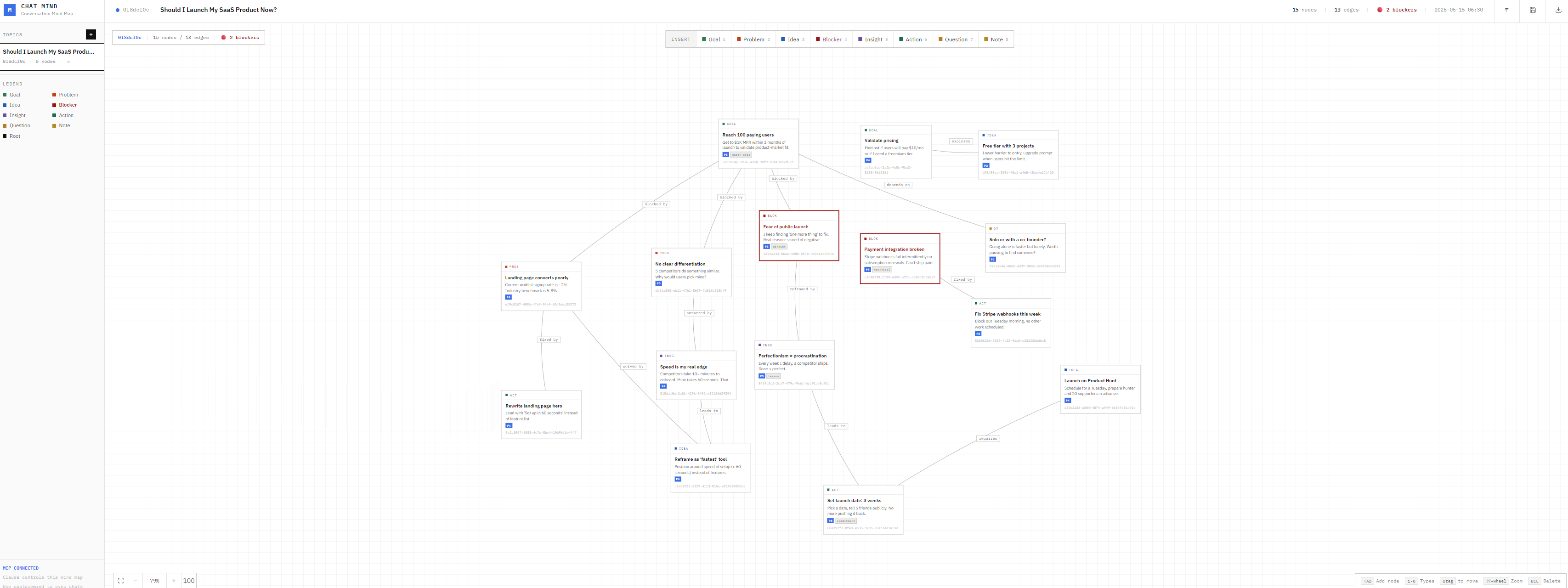
Quando você usa o Claude para discutir ideias de produto, direções de negócio ou decisões pessoais, os pensamentos geralmente ficam dispersos após a conversa. O CaptureMind permite que o Claude estruture ideias, objetivos, bloqueios e ações em um mapa mental logo após o diálogo — especialmente os bloqueios (Blockers), que são destacados para que você enxergue claramente onde está travado.
When you finish a deep conversation with Claude about product ideas, business strategy, or personal decisions, your thoughts are often still scattered. CaptureMind lets Claude structure them into a visual mind map — highlighting Blockers so you can finally see where you're stuck.
Funcionalidades · Features
-
capturemindFerramenta MCP — O Claude analisa a conversa por conta própria e grava nós estruturados no mapa, sem necessidade de API Key adicional
capturemindMCP tool — Claude analyzes the conversation itself and writes structured nodes to the map, no extra API key required -
Destaque de bloqueios — Nós Blocker aparecem em vermelho escuro, revelando gargalos de imediato
Blocker highlight — Blocker nodes are rendered in deep red, making bottlenecks instantly visible -
Layout automático — Nós organizados em árvore hierárquica, sem aglomeração
Auto layout — Nodes are arranged in a hierarchical tree, clean and readable -
Interface bilíngue — Alternância entre Português / English com um clique, preferência memorizada
Bilingual UI — Switch between Chinese and English with one click, preference is remembered -
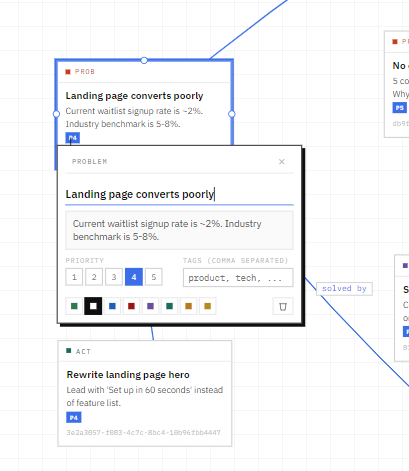
Interação no canvas — Arrastar, zoom, conectar nós e atalhos de teclado totalmente suportados
Canvas interactions — Drag, zoom, connect nodes, full keyboard shortcut support -
Controle MCP completo — O Claude pode adicionar/editar/excluir nós, pesquisar e exportar sem abrir o navegador
Full MCP control — Claude can add/edit/delete nodes, search, and export without opening the browser
Instalação · Setup
Pré-requisitos / Prerequisites: Node.js 18+, Claude Desktop
# 克隆项目 / Clone
git clone https://github.com/acearv09876/capturemind.git
cd capturemind

# 安装依赖 / Install
npm install

# 启动 / Start (default port 3001)
npm start
Abra no navegador / Open in browser: http://localhost:3001
Configuração MCP do Claude Desktop · MCP Configuration
Localize o arquivo de configuração do Claude Desktop / Locate the Claude Desktop config file:
- macOS:
~/Library/Application Support/Claude/claude_desktop_config.json - Windows:
%APPDATA%\Claude\claude_desktop_config.json
Adicione o seguinte conteúdo / Add the following:
{
  "mcpServers": {
    "capturemind": {
      "command": "node",
      "args": ["/path/to/capturemind/mcp-server.js"]
    }
  }
}
Substitua /path/to/capturemind/ pelo caminho real e reinicie o Claude Desktop.
Replace /path/to/capturemind/ with the actual path, then restart Claude Desktop.
Como usar · Usage
① Criar um tópico / Create a topic
帮我用 create_topic 新建一个主题,名字叫"产品定位探讨"
Create a new topic called "Product Positioning" using create_topic
② Após a conversa, peça ao Claude para capturar / After the conversation, ask Claude to capture it
帮我用 capturemind 把这段对话整理成思维导图,topic_id: <主题ID>
Use capturemind to turn this conversation into a mind map, topic_id: <topic_id>
O Claude analisará a conversa, extrairá os nós e os gravará no mapa. Abra http://localhost:3001 para ver o resultado.
Claude will analyze the conversation, extract nodes, and write them to the map. Open http://localhost:3001 to see the result.
③ Organizar o layout / Clean up layout
帮我用 layout_topic 重新整理一下布局,topic_id: <主题ID>
Use layout_topic to reorganize the layout, topic_id: <topic_id>
Tipos de nó · Node Types
| Type | Português | English | Descrição / Description |
|---|---|---|---|
root | Tópico | Topic | Nó raiz do mapa / Root node |
goal | Objetivo | Goal | Resultado desejado / Desired outcome |
problem | Problema | Problem | Desafio a resolver / Challenge to solve |
idea | Ideia | Idea | Solução ou criatividade possível / Possible solution |
blocker | Bloqueio | Blocker | Gargalo de progresso, destacado / Bottleneck, highlighted |
insight | Insight | Insight | Percepção ou descoberta importante / Key realization |
action | Ação | Action | Próximo passo executável imediatamente / Next step to take |
question | Pergunta | Question | Questão sem resposta clara ainda / Unanswered question |
note | Nota | Note | Informações complementares / Supplementary info |
Lista de ferramentas MCP · MCP Tools
| Ferramenta / Tool | Descrição / Description |
|---|---|
capturemind | Ferramenta principal / Core tool: analisar conversa e extrair nós / Analyze conversation and extract nodes |
layout_topic | Reorganizar nós automaticamente (árvore hierárquica) / Auto-arrange nodes (hierarchical tree) |
create_topic | Criar um novo tópico / Create a new topic |
list_topics | Listar todos os tópicos / List all topics |
get_topic | Obter detalhes do tópico / Get topic details |
delete_topic | Excluir um tópico / Delete a topic |
add_node | Adicionar um nó / Add a node |
update_node | Atualizar um nó / Update a node |
delete_node | Excluir um nó / Delete a node |
add_edge | Conectar dois nós / Connect two nodes |
delete_edge | Remover uma conexão / Remove a connection |
batch_add | Importar nós e conexões em lote / Batch import nodes and edges |
search | Pesquisa de texto completo nos nós / Full-text search nodes |
export_topic | Exportar como Mermaid / JSON / Markdown |
Stack tecnológica · Tech Stack
| Backend | Node.js + Express, armazenamento em arquivo JSON |
| Frontend | React 18 (Babel standalone, sem etapa de build) + CSS puro |
| MCP | @modelcontextprotocol/sdk |
Licença
MIT