Mindpilot MCP
Visualize código legado e inspecione fluxos complexos para entender as operações do seu agente.
Documentação
Mindpilot MCP


Veja através dos olhos do seu agente. Visualize código legado, inspecione fluxos complexos, entenda tudo.
[!TIP] O Mindpilot agora está disponível como uma skill de agente leve—sem necessidade de servidor MCP local. Peça ao seu agente para diagramar algo e ele cria um visualizador Mermaid interativo e autossuficiente que você pode abrir no navegador ou publicar como um artefato Claude.
Instale com:
npx skills add abrinsmead/skills/mermaid-viewer
Por que Mindpilot?
- Visualize Qualquer Coisa: Use seu agente de codificação para gerar diagramas de arquitetura, código e processos sob demanda e veja seu código de diferentes perspectivas.
- Vibe Checks: Código gerado por IA pode acumular construções não utilizadas e redundantes. Use visualizações para identificar áreas que precisam de limpeza.
- Processamento Local: Os diagramas nunca são enviados para a nuvem. Tudo permanece entre você, seu agente e o(s) provedor(es) de LLM do seu agente.
- Exporte e Compartilhe: Exporte qualquer diagrama como imagem vetorial.
Pré-requisitos
Node.js v20.0.0 ou superior.
Início Rápido
Claude Code
claude mcp add mindpilot -- npx @mindpilot/mcp@latest
Cursor
Em Settings > Cursor Settings > MCP > Clique em Add new global MCP server e configure o mindpilot no objeto mcpServers.
{
  "mcpServers": {
    "mindpilot": {
      "command": "npx",
      "args": ["@mindpilot/mcp@latest"]
    }
  }
}
VS Code
Siga as instruções aqui para habilitar MCPs no VS Code: https://code.visualstudio.com/docs/copilot/chat/mcp-servers
Vá para Settings > Features > MCP e clique em Edit in settings json
Em seguida, adicione o mindpilot à sua configuração MCP:
{
  "mcp": {
    "servers": {
      "mindpilot": {
        "type": "stdio",
        "command": "npx",
        "args": ["@mindpilot/mcp@latest"]
      }
    }
  }
}
Windsurf
Em Settings > Windsurf Settings > Manage Plugins, clique em view raw config e configure o mindpilot no objeto mcpServers:
{
  "mcpServers": {
    "mindpilot": {
      "command": "npx",
      "args": ["@mindpilot/mcp@latest"]
    }
  }
}
Zed
No painel AI Thread, clique nos três pontos ... e depois clique em Add Custom Server...
No campo Command to run MCPserver, insira npx @mindpilot/mcp@latest e clique em Add Server.
Opções de Configuração
- Porta: O servidor usa a porta 4000 por padrão, mas pode ser configurado usando a opção de linha de comando
--port. - Caminho de Dados: Por padrão, os diagramas são salvos em
~/.mindpilot/data/. Você pode especificar um local personalizado usando a opção de linha de comando--data-path.
Suporte a Múltiplos Clientes
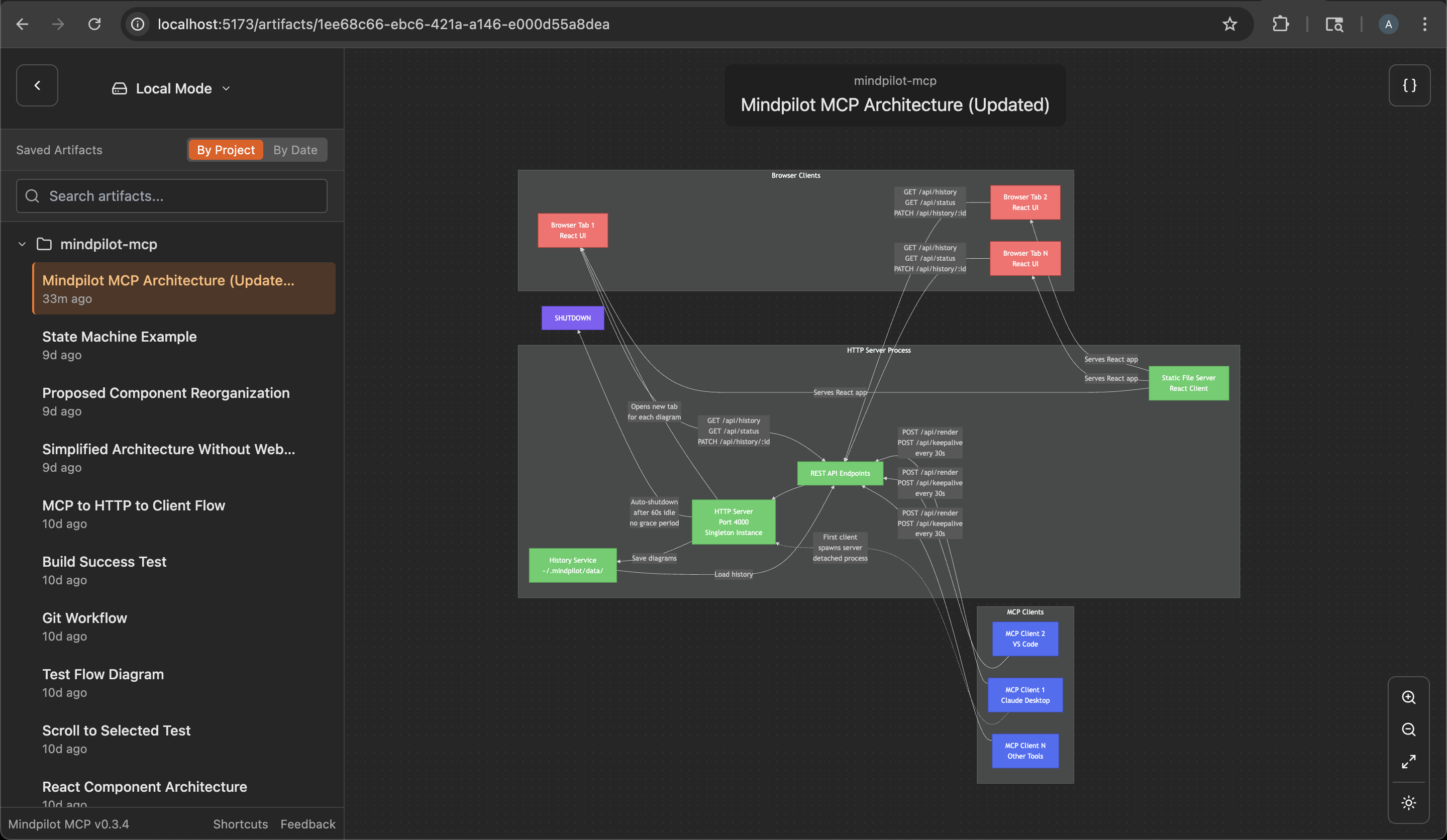
O Mindpilot gerencia de forma inteligente vários assistentes de IA rodando simultaneamente. Quando você tem várias janelas do Claude Desktop ou instâncias de IDE abertas:
- O primeiro cliente MCP a usar o Mindpilot inicia um servidor web compartilhado
- Assistentes adicionais se conectam automaticamente ao servidor existente
- Todos os assistentes compartilham o mesmo histórico de diagramas e interface web
- O servidor será desligado automaticamente um minuto após o último cliente MCP se desconectar
Isso significa que você pode trabalhar com vários hosts MCP ao mesmo tempo sem conflitos de porta, e todos contribuirão para a mesma coleção de diagramas.
Rastreamento de Uso Anônimo
O Mindpilot MCP coleta dados de uso anônimos para nos ajudar a entender como o produto está sendo usado e melhorar a experiência do usuário.
Desativando Analytics
Se você preferir não compartilhar dados de uso anônimos, pode desativar o analytics adicionando a flag --disable-analytics à sua configuração MCP:
Claude Code:
claude mcp add mindpilot -- npx @mindpilot/mcp@latest --disable-analytics
Outras IDEs:
Adicione "--disable-analytics" ao array de args na sua configuração:
{
  "command": "npx",
  "args": ["@mindpilot/mcp@latest", "--disable-analytics"]
}
Usando o servidor MCP
Após configurar o MCP no seu agente de codificação, você pode fazer solicitações como "crie um diagrama sobre x" e ele usará o servidor MCP para renderizar diagramas Mermaid para você em um navegador conectado ao servidor MCP.
Você pode opcionalmente atualizar o arquivo de regras do seu agente para dar instruções específicas sobre quando usar o mindpilot-mcp.
Exemplos de solicitações
- "Mostre-me a máquina de estados para a lógica de conexão WebSocket"
- "Crie um diagrama de contexto C4 da arquitetura deste projeto."
- "Mostre-me o fluxo OAuth como um diagrama de sequência"
Como funciona
LLMs de ponta são bem treinados para gerar sintaxe Mermaid válida. O MCP é projetado para aceitar sintaxe Mermaid e renderizar diagramas em um aplicativo web rodando em http://localhost:4000 (porta padrão).
Solução de Problemas
Conflitos de Porta
Se você usa a porta 4000 para outro serviço, pode configurar o MCP para usar uma porta diferente.
Exemplo com Claude Code:
claude mcp add mindpilot -- npx @mindpilot/mcp@latest --port 5555
Caminho de Dados Personalizado
Para salvar diagramas em um local personalizado (por exemplo, para sincronizar com armazenamento em nuvem):
Exemplo com Claude Code:
claude mcp add mindpilot -- npx @mindpilot/mcp@latest --data-path /path/to/custom/location
Outras IDEs:
{
  "command": "npx",
  "args": ["@mindpilot/mcp@latest", "--data-path", "/path/to/custom/location"]
}
Problemas com asdf
Se você usa asdf como gerenciador de versões e tem problemas para fazer MCPs funcionarem (não apenas o mindpilot), talvez precise definir uma versão "global" do nodejs a partir do seu diretório inicial.
cd
asdf set nodejs x.x.x
Configuração de Desenvolvimento
Configure o MCP no seu agente de codificação (usando claude neste exemplo)
claude mcp add mindpilot -- npx tsx <path to...>/src/server/server.ts
Execute claude com a flag --debug se precisar ver erros do MCP
Inicie o cliente de desenvolvimento (Vite) para obter recarga de módulo a quente durante o desenvolvimento.
npm run dev
Abra o cliente de desenvolvimento
localhost:5173