PostgreSQL MCP Server
Um servidor MCP para explorar e consultar bancos de dados PostgreSQL.
Documentação

PostgreSQL MCP Server
Uma implementação de servidor Model Context Protocol (MCP) para exploração e consulta de banco de dados PostgreSQL.
Sumário
- Visão Geral
- Recursos
- Requisitos
- Instalação
- Uso
- Ferramentas Disponíveis
- Considerações de Segurança
- Exemplo de Interação no Claude
- Solução de Problemas
- Contato
Visão Geral
Este projeto fornece um servidor Model Context Protocol (MCP) que se conecta a um banco de dados PostgreSQL e expõe várias capacidades de descoberta e consulta de dados como ferramentas MCP. Essas ferramentas permitem explorar a estrutura do banco de dados, consultar dados e obter estatísticas do banco de dados por meio de uma interface padronizada.
Recursos
- Conecte-se a qualquer banco de dados PostgreSQL usando uma string de conexão padrão
- Execute consultas SELECT personalizadas com resultados retornados em um formato estruturado
- Liste todas as tabelas no banco de dados conectado
- Obtenha informações detalhadas de esquema para qualquer tabela
- Filtre registros do banco de dados com condições simples de igualdade
- Obtenha estatísticas do banco de dados, incluindo tamanho, número de tabelas e maiores tabelas
Requisitos
- Python 3.7+
- Pacotes Python necessários (listados em
requirements.txt):- mcp
- pg8000
- sqlalchemy
Instalação
- Clone este repositório ou baixe o código-fonte
- Crie um ambiente virtual (recomendado)
- Instale os pacotes necessários:
pip install -r requirements.txt
Uso
Uso Básico
Execute o servidor fornecendo uma string de conexão PostgreSQL:
python server.py postgresql://username:password@hostname:port/database
Usando com Claude Desktop
Para integrar com o Claude Desktop, adicione a seguinte configuração ao seu arquivo de configuração do Claude Desktop:
{
  "mcpServers": {
    "postgres": {
      "command": "python",
      "args": [
        "/ABOSLUTE/PATH/TO/postgres-mcp-server/server.py",
        "postgresql://user:password@host:port/database"
      ]
    }
  }
}
Após adicionar ou fazer qualquer alteração no arquivo de configuração acima, certifique-se de reiniciar o Claude Desktop forçando o encerramento.
Localização do Arquivo de Configuração
O arquivo de configuração do Claude Desktop geralmente está localizado em:
- macOS:
~/Library/Application\ Support/Claude/claude_desktop_config.json - Windows:
%APPDATA%\Claude\claude_desktop_config.json - Linux:
~/.config/Claude/claude_desktop_config.json
Ferramentas Disponíveis
O servidor fornece as seguintes ferramentas MCP:
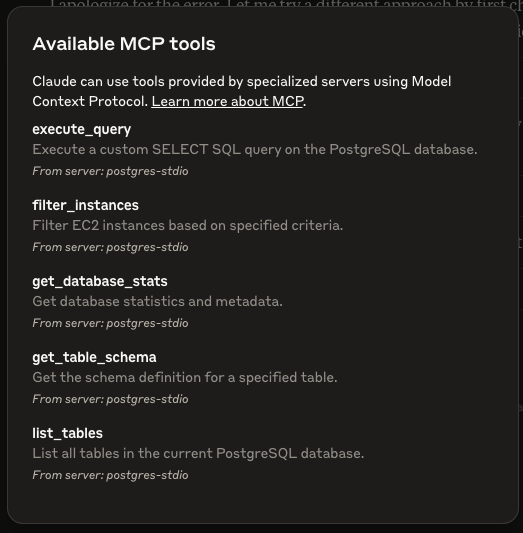
execute_query
Execute uma consulta SQL SELECT personalizada e retorne os resultados.
list_tables
Liste todas as tabelas no banco de dados PostgreSQL atual.
get_table_schema
Obtenha a definição de esquema para uma tabela especificada.
filter_instances
Filtre registros do banco de dados com base em critérios especificados.
get_database_stats
Obtenha estatísticas gerais e metadados sobre o banco de dados PostgreSQL.
Considerações de Segurança
- Este servidor permite apenas consultas SELECT para evitar modificações no banco de dados
- As credenciais de conexão são fornecidas via linha de comando e não são armazenadas
- Considere usar variáveis de ambiente ou um método de configuração seguro em ambientes de produção
Exemplo de Interação no Claude
Uma vez conectado ao Claude Desktop, você pode fazer perguntas como:
- "Quais tabelas estão disponíveis no banco de dados?"
- "Mostre-me o esquema da tabela de clientes"
- "Quantos registros existem na tabela de pedidos?"
- "Qual é o tamanho total do banco de dados?"
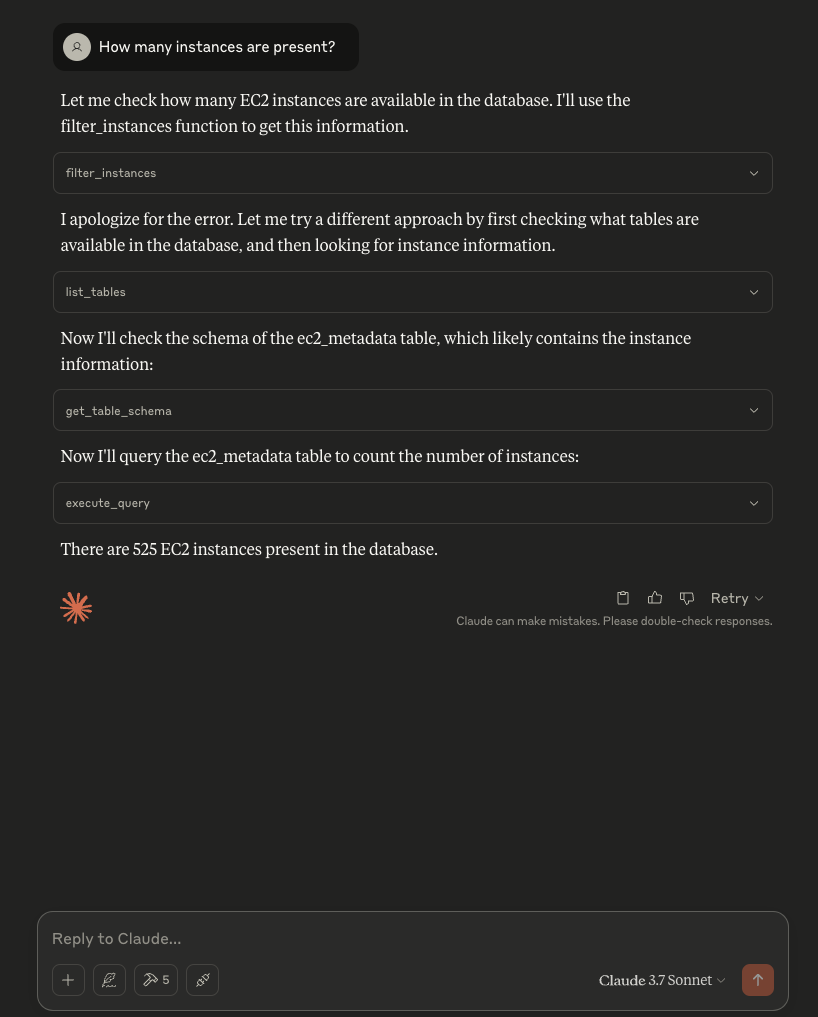
O Claude usará as ferramentas MCP apropriadas para responder a essas perguntas consultando seu banco de dados PostgreSQL.
Solução de Problemas
-
Se a conexão falhar, verifique se a string de conexão PostgreSQL está correta
-
Verifique se o seu servidor PostgreSQL permite conexões da sua máquina cliente
-
Servidor Não Encontrado: Certifique-se de que os caminhos no seu arquivo de configuração estão corretos e absolutos
Use caminho absoluto para o comando executando
where pythonPor exemplo -
"command": "python"deve ser escrito como"command": "/Users/username/miniconda3/bin/python" -
Problemas de Permissão: Certifique-se de que o aplicativo Claude Desktop tenha permissão para executar o script
-
Falhas do Servidor: Verifique os logs do servidor para erros e garanta que todas as dependências estejam instaladas
Contato
Sinta-se à vontade para abrir uma issue neste repositório.
SSE e Streamable-HTTP postgres-mcp-server estão em desenvolvimento....