SQLAlchemy ODBC
Um servidor MCP para conectar a qualquer banco de dados compatível com ODBC via SQLAlchemy, suportando diversos backends de DBMS.
Documentação
Servidor MCP ODBC via SQLAlchemy
Um servidor MCP (Model Context Protocol) leve para ODBC construído com FastAPI, pyodbc e SQLAlchemy. Este servidor é compatível com Virtuoso DBMS e outros backends de DBMS que implementam um provedor SQLAlchemy.
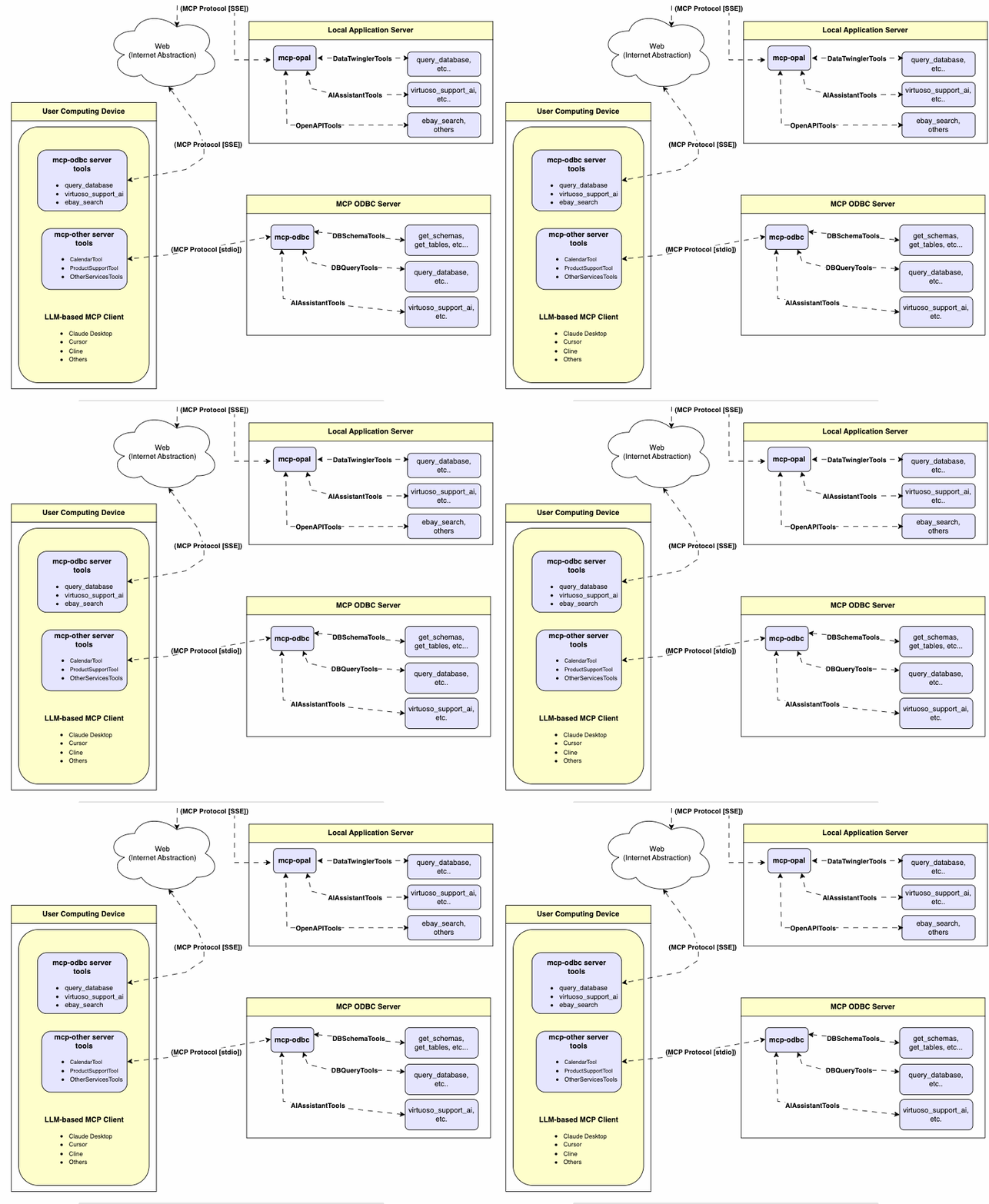
Recursos
- Obter Schemas: Buscar e listar todos os nomes de schemas do banco de dados conectado.
- Obter Tabelas: Recuperar informações de tabelas para schemas específicos ou todos os schemas.
- Descrever Tabela: Gerar uma descrição detalhada das estruturas das tabelas, incluindo:
- Nomes das colunas e tipos de dados
- Atributos anuláveis
- Chaves primárias e estrangeiras
- Pesquisar Tabelas: Filtrar e recuperar tabelas com base em substrings do nome.
- Executar Procedimentos Armazenados: No caso do Virtuoso, executar procedimentos armazenados e recuperar resultados.
- Executar Consultas:
- Formato de resultado JSONL: Otimizado para respostas estruturadas.
- Formato de tabela Markdown: Ideal para relatórios e visualização.
Pré-requisitos
-
Instalar uv:
pip install uvOu use Homebrew:
brew install uv -
Verificações do Ambiente de Execução unixODBC:
-
Verifique a configuração da instalação (ou seja, a localização dos arquivos INI principais) executando:
odbcinst -j -
Liste os nomes de fontes de dados disponíveis executando:
odbcinst -q -s -
Configuração do DSN ODBC: Configure seu Nome de Fonte de Dados ODBC (
~/.odbc.ini) para o banco de dados de destino. Exemplo para Virtuoso DBMS:[VOS] Description = OpenLink Virtuoso Driver = /path/to/virtodbcu_r.so Database = Demo Address = localhost:1111 WideAsUTF16 = Yes -
Vinculação de URL SQLAlchemy: Use o formato:
virtuoso+pyodbc://user:password@VOS
Instalação
Clone este repositório:
git clone https://github.com/OpenLinkSoftware/mcp-sqlalchemy-server.git
cd mcp-sqlalchemy-server
Variáveis de Ambiente
Atualize seu .env substituindo os padrões para atender às suas preferências
ODBC_DSN=VOS
ODBC_USER=dba
ODBC_PASSWORD=dba
API_KEY=xxx
Configuração
Para usuários do Claude Desktop:
Adicione o seguinte ao claude_desktop_config.json:
{
  "mcpServers": {
    "my_database": {
      "command": "uv",
      "args": ["--directory", "/path/to/mcp-sqlalchemy-server", "run", "mcp-sqlalchemy-server"],
      "env": {
        "ODBC_DSN": "dsn_name",
        "ODBC_USER": "username",
        "ODBC_PASSWORD": "password",
        "API_KEY": "sk-xxx"
      }
    }
  }
}
Uso
URLs de Conexão do Sistema de Gerenciamento de Banco de Dados (DBMS)
Aqui estão os exemplos de URL pyodbc para conectar a sistemas DBMS que foram testados usando este mcp-server.
| Banco de Dados | Formato da URL |
|---|---|
| Virtuoso DBMS | virtuoso+pyodbc://user:password@ODBC_DSN |
| PostgreSQL | postgresql://user:password@localhost/dbname |
| MySQL | mysql+pymysql://user:password@localhost/dbname |
| SQLite | sqlite:///path/to/database.db |
Uma vez conectado, você pode interagir com seus contatos do WhatsApp através do Claude, aproveitando os recursos de IA do Claude em suas conversas do WhatsApp.
Ferramentas Fornecidas
Visão Geral
| nome | descrição |
|---|---|
| podbc_get_schemas | Lista os schemas do banco de dados acessíveis ao sistema de gerenciamento de banco de dados (DBMS) conectado. |
| podbc_get_tables | Lista as tabelas associadas a um schema de banco de dados selecionado. |
| podbc_describe_table | Fornece a descrição de uma tabela associada a um schema de banco de dados designado. Isso inclui informações sobre nomes de colunas, tipos de dados, tratamento de nulos, autoincremento, chave primária e chaves estrangeiras. |
| podbc_filter_table_names | Lista tabelas, com base em um padrão de substring do campo de entrada q, associadas a um schema de banco de dados selecionado. |
| podbc_query_database | Executa uma consulta SQL e retorna os resultados em formato JSONL. |
| podbc_execute_query | Executa uma consulta SQL e retorna os resultados em formato JSONL. |
| podbc_execute_query_md | Executa uma consulta SQL e retorna os resultados em formato de tabela Markdown. |
| podbc_spasql_query | Executa uma consulta SPASQL e retorna os resultados. |
| podbc_sparql_query | Executa uma consulta SPARQL e retorna os resultados. |
| podbc_virtuoso_support_ai | Interage com o Assistente/Agente de Suporte do Virtuoso -- um recurso específico do Virtuoso para interagir com LLMs. |
Descrição Detalhada
-
podbc_get_schemas
- Recupera e retorna uma lista de todos os nomes de schemas do banco de dados conectado.
- Parâmetros de entrada:
user(string, opcional): Nome de usuário do banco de dados. Padrão: "demo".password(string, opcional): Senha do banco de dados. Padrão: "demo".dsn(string, opcional): Nome da fonte de dados ODBC. Padrão: "Local Virtuoso".
- Retorna uma matriz de strings JSON com os nomes dos schemas.
-
podbc_get_tables
- Recupera e retorna uma lista contendo informações sobre tabelas em um schema especificado. Se nenhum schema for fornecido, usa o schema padrão da conexão.
- Parâmetros de entrada:
schema(string, opcional): Schema do banco de dados para filtrar tabelas. Padrão: padrão da conexão.user(string, opcional): Nome de usuário do banco de dados. Padrão: "demo".password(string, opcional): Senha do banco de dados. Padrão: "demo".dsn(string, opcional): Nome da fonte de dados ODBC. Padrão: "Local Virtuoso".
- Retorna uma string JSON contendo informações da tabela (por exemplo, TABLE_CAT, TABLE_SCHEM, TABLE_NAME, TABLE_TYPE).
-
podbc_filter_table_names
- Filtra e retorna informações sobre tabelas cujos nomes contêm uma substring específica.
- Parâmetros de entrada:
q(string, obrigatório): A substring a ser pesquisada nos nomes das tabelas.schema(string, opcional): Schema do banco de dados para filtrar tabelas. Padrão: padrão da conexão.user(string, opcional): Nome de usuário do banco de dados. Padrão: "demo".password(string, opcional): Senha do banco de dados. Padrão: "demo".dsn(string, opcional): Nome da fonte de dados ODBC. Padrão: "Local Virtuoso".
- Retorna uma string JSON contendo informações das tabelas correspondentes.
-
podbc_describe_table
- Recupera e retorna informações detalhadas sobre as colunas de uma tabela específica.
- Parâmetros de entrada:
schema(string, obrigatório): O nome do schema do banco de dados que contém a tabela.table(string, obrigatório): O nome da tabela a ser descrita.user(string, opcional): Nome de usuário do banco de dados. Padrão: "demo".password(string, opcional): Senha do banco de dados. Padrão: "demo".dsn(string, opcional): Nome da fonte de dados ODBC. Padrão: "Local Virtuoso".
- Retorna uma string JSON descrevendo as colunas da tabela (por exemplo, COLUMN_NAME, TYPE_NAME, COLUMN_SIZE, IS_NULLABLE).
-
podbc_query_database
- Executa uma consulta SQL padrão e retorna os resultados em formato JSON.
- Parâmetros de entrada:
query(string, obrigatório): A string da consulta SQL a ser executada.user(string, opcional): Nome de usuário do banco de dados. Padrão: "demo".password(string, opcional): Senha do banco de dados. Padrão: "demo".dsn(string, opcional): Nome da fonte de dados ODBC. Padrão: "Local Virtuoso".
- Retorna os resultados da consulta como uma string JSON.
-
podbc_query_database_md
- Executa uma consulta SQL padrão e retorna os resultados formatados como uma tabela Markdown.
- Parâmetros de entrada:
query(string, obrigatório): A string da consulta SQL a ser executada.user(string, opcional): Nome de usuário do banco de dados. Padrão: "demo".password(string, opcional): Senha do banco de dados. Padrão: "demo".dsn(string, opcional): Nome da fonte de dados ODBC. Padrão: "Local Virtuoso".
- Retorna os resultados da consulta como uma string de tabela Markdown.
-
podbc_query_database_jsonl
- Executa uma consulta SQL padrão e retorna os resultados no formato JSON Lines (JSONL) (um objeto JSON por linha).
- Parâmetros de entrada:
query(string, obrigatório): A string da consulta SQL a ser executada.user(string, opcional): Nome de usuário do banco de dados. Padrão: "demo".password(string, opcional): Senha do banco de dados. Padrão: "demo".dsn(string, opcional): Nome da fonte de dados ODBC. Padrão: "Local Virtuoso".
- Retorna os resultados da consulta como uma string JSONL.
-
podbc_spasql_query
- Executa uma consulta SPASQL (híbrido SQL/SPARQL) e retorna os resultados. Este é um recurso específico do Virtuoso.
- Parâmetros de entrada:
query(string, obrigatório): A string da consulta SPASQL.max_rows(number, opcional): Número máximo de linhas a retornar. Padrão: 20.timeout(number, opcional): Tempo limite da consulta em milissegundos. Padrão: 30000.user(string, opcional): Nome de usuário do banco de dados. Padrão: "demo".password(string, opcional): Senha do banco de dados. Padrão: "demo".dsn(string, opcional): Nome da fonte de dados ODBC. Padrão: "Local Virtuoso".
- Retorna o resultado da chamada do procedimento armazenado subjacente (por exemplo,
Demo.demo.execute_spasql_query).
-
podbc_sparql_query
- Executa uma consulta SPARQL e retorna os resultados. Este é um recurso específico do Virtuoso.
- Parâmetros de entrada:
query(string, obrigatório): A string da consulta SPARQL.format(string, opcional): Formato de resultado desejado. Padrão: 'json'.timeout(number, opcional): Tempo limite da consulta em milissegundos. Padrão: 30000.user(string, opcional): Nome de usuário do banco de dados. Padrão: "demo".password(string, opcional): Senha do banco de dados. Padrão: "demo".dsn(string, opcional): Nome da fonte de dados ODBC. Padrão: "Local Virtuoso".
- Retorna o resultado da chamada de função subjacente (por exemplo,
"UB".dba."sparqlQuery").
-
podbc_virtuoso_support_ai
- Utiliza uma função de Assistente de IA específica do Virtuoso, passando um prompt e chave de API opcional. Este é um recurso específico do Virtuoso.
- Parâmetros de entrada:
prompt(string, obrigatório): O texto do prompt para a função de IA.api_key(string, opcional): Chave de API para o serviço de IA. Padrão: "none".user(string, opcional): Nome de usuário do banco de dados. Padrão: "demo".password(string, opcional): Senha do banco de dados. Padrão: "demo".dsn(string, opcional): Nome da fonte de dados ODBC. Padrão: "Local Virtuoso".
- Retorna o resultado da chamada da função do Assistente de Suporte de IA (por exemplo,
DEMO.DBA.OAI_VIRTUOSO_SUPPORT_AI).
Solução de Problemas
Para facilitar a solução de problemas:
-
Instale o MCP Inspector:
npm install -g @modelcontextprotocol/inspector -
Inicie o inspector:
npx @modelcontextprotocol/inspector uv --directory /path/to/mcp-sqlalchemy-server run mcp-sqlalchemy-server
Acesse a URL fornecida para solucionar problemas de interações com o servidor.