Sentry
Recupere e analise problemas, relatórios de erro e informações de depuração do Sentry.io.
Documentação
mcp-sentry: Um servidor MCP do Sentry
Visão Geral
Um servidor Model Context Protocol para recuperar e analisar issues do Sentry.io. Este servidor fornece ferramentas para inspecionar relatórios de erros, stacktraces e outras informações de depuração da sua conta Sentry.
Ferramentas
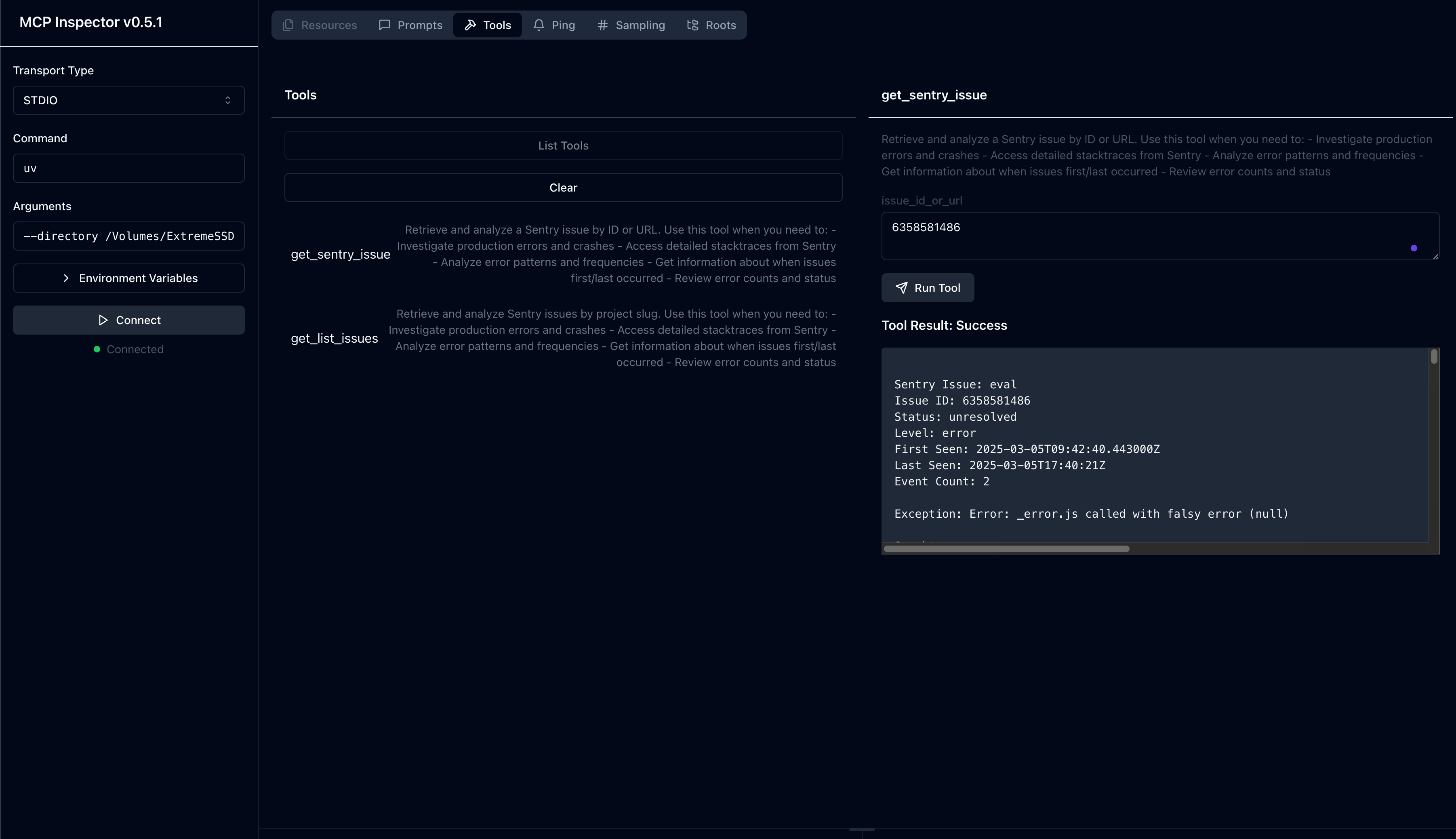
get_sentry_issue- Recuperar e analisar uma issue do Sentry por ID ou URL
- Entrada:
issue_id_or_url(string): ID da issue do Sentry ou URL para analisar
- Retorna: Detalhes da issue incluindo:
- Título
- ID da issue
- Status
- Nível
- Timestamp da primeira ocorrência
- Timestamp da última ocorrência
- Contagem de eventos
- Stacktrace completo
get_list_issues- Recuperar e analisar issues do Sentry por slug do projeto
- Entrada:
project_slug(string): Slug do projeto Sentry para analisarorganization_slug(string): Slug da organização Sentry para analisar
- Retorna: Lista de issues com detalhes incluindo:
- Título
- ID da issue
- Status
- Nível
- Timestamp da primeira ocorrência
- Timestamp da última ocorrência
- Contagem de eventos
- Informações básicas da issue
Prompts
sentry-issue- Recuperar detalhes da issue do Sentry
- Entrada:
issue_id_or_url(string): ID da issue do Sentry ou URL
- Retorna: Detalhes formatados da issue como contexto de conversa
Instalação
Instalando via Smithery
Para instalar o mcp-sentry para Claude Desktop automaticamente via Smithery:
npx -y @smithery/cli install @qianniuspace/mcp-sentry --client claude
Usando uv (recomendado)
Ao usar uv nenhuma instalação específica é necessária. Usaremos
uvx para executar diretamente o mcp-sentry.
Usando PIP
Alternativamente, você pode instalar o mcp-sentry via pip:
pip install mcp-sentry
ou usar uv
uv pip install -e .
Após a instalação, você pode executá-lo como um script usando:
python -m mcp_sentry
Configuração
Uso com Claude Desktop
Adicione isso ao seu claude_desktop_config.json:
Usando uvx
"mcpServers": {
  "sentry": {
    "command": "uvx",
    "args": ["mcp-sentry", "--auth-token", "YOUR_SENTRY_TOKEN","--project-slug" ,"YOUR_PROJECT_SLUG", "--organization-slug","YOUR_ORGANIZATION_SLUG"]
  }
}
Usando docker
"mcpServers": {
  "sentry": {
    "command": "docker",
    "args": ["run", "-i", "--rm", "mcp/sentry", "--auth-token", "YOUR_SENTRY_TOKEN","--project-slug" ,"YOUR_PROJECT_SLUG", "--organization-slug","YOUR_ORGANIZATION_SLUG"]
  }
}
Usando instalação via pip
"mcpServers": {
  "sentry": {
    "command": "python",
    "args": ["-m", "mcp_sentry", "--auth-token", "YOUR_SENTRY_TOKEN","--project-slug" ,"YOUR_PROJECT_SLUG", "--organization-slug","YOUR_ORGANIZATION_SLUG"]
  }
}
Uso com Zed
Adicione ao seu settings.json do Zed:
Usando uvx
Por exemplo, Curson
"context_servers": [
  "mcp-sentry": {
    "command": {
      "path": "uvx",
      "args": ["mcp-sentry", "--auth-token", "YOUR_SENTRY_TOKEN","--project-slug" ,"YOUR_PROJECT_SLUG", "--organization-slug","YOUR_ORGANIZATION_SLUG"]
    }
  }
],
Usando instalação via pip
"context_servers": {
  "mcp-sentry": {
    "command": "python",
    "args": ["-m", "mcp_sentry", "--auth-token", "YOUR_SENTRY_TOKEN","--project-slug" ,"YOUR_PROJECT_SLUG", "--organization-slug","YOUR_ORGANIZATION_SLUG"]
  }
},
Usando instalação via pip com caminho personalizado
"context_servers": {
  "sentry": {
      "command": "python",
      "args": [
        "-m",
        "mcp_sentry",
        "--auth-token",
        "YOUR_SENTRY_TOKEN",
        "--project-slug",
        "YOUR_PROJECT_SLUG",
        "--organization-slug",
        "YOUR_ORGANIZATION_SLUG"
      ],
      "env": {
        "PYTHONPATH": "path/to/mcp-sentry/src"
      }
    }
},
Depuração
Você pode usar o inspetor MCP para depurar o servidor. Para instalações via uvx:
npx @modelcontextprotocol/inspector uvx mcp-sentry --auth-token YOUR_SENTRY_TOKEN --project-slug YOUR_PROJECT_SLUG --organization-slug YOUR_ORGANIZATION_SLUG
Ou se você instalou o pacote em um diretório específico ou está desenvolvendo nele:
cd path/to/servers/src/sentry
npx @modelcontextprotocol/inspector uv run mcp-sentry --auth-token YOUR_SENTRY_TOKEN --project-slug YOUR_PROJECT_SLUG --organization-slug YOUR_ORGANIZATION_SLUG
ou no terminal
npx @modelcontextprotocol/inspector uv --directory /Volumes/ExtremeSSD/MCP/mcp-sentry/src run mcp_sentry --auth-token YOUR_SENTRY_TOKEN
--project-slug YOUR_PROJECT_SLUG --organization-slug YOUR_ORGANIZATION_SLUG
Fork De
Licença
Este servidor MCP é licenciado sob a Licença MIT. Isso significa que você é livre para usar, modificar e distribuir o software, sujeito aos termos e condições da Licença MIT. Para mais detalhes, consulte o arquivo LICENSE no repositório do projeto.