WolframAlpha LLM
Answer math and other queries using the WolframAlpha LLM API.
WolframAlpha LLM MCP Server
A Model Context Protocol (MCP) server that provides access to WolframAlpha's LLM API. https://products.wolframalpha.com/llm-api/documentation
Features
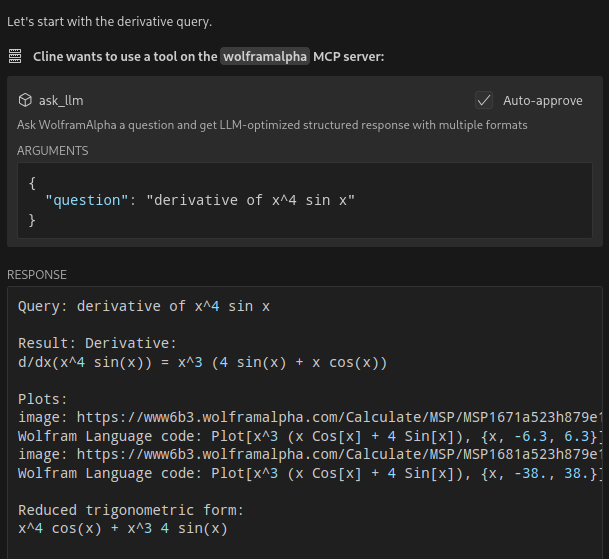
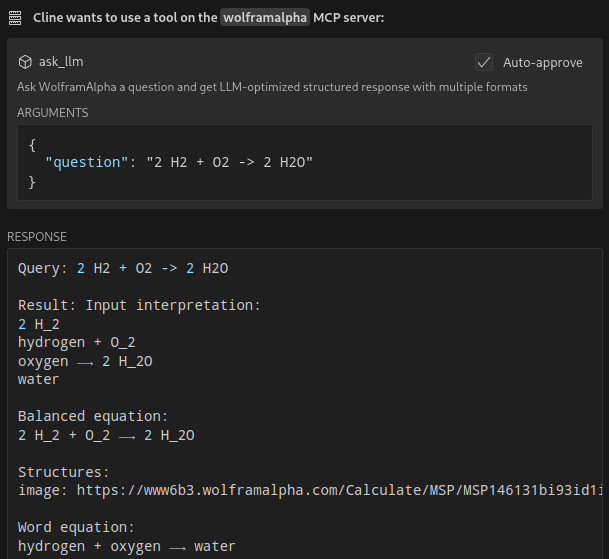
- Query WolframAlpha's LLM API with natural language questions
- Answer complicated mathematical questions
- Query facts about science, physics, history, geography, and more
- Get structured responses optimized for LLM consumption
- Support for simplified answers and detailed responses with sections
Available Tools
ask_llm: Ask WolframAlpha a question and get a structured llm-friendly responseget_simple_answer: Get a simplified answervalidate_key: Validate the WolframAlpha API key
Installation
git clone https://github.com/Garoth/wolframalpha-llm-mcp.git
npm install
Configuration
-
Get your WolframAlpha API key from developer.wolframalpha.com
-
Add it to your Cline MCP settings file inside VSCode's settings (ex. ~/.config/Code/User/globalStorage/saoudrizwan.claude-dev/settings/cline_mcp_settings.json):
{
"mcpServers": {
"wolframalpha": {
"command": "node",
"args": ["/path/to/wolframalpha-mcp-server/build/index.js"],
"env": {
"WOLFRAM_LLM_APP_ID": "your-api-key-here"
},
"disabled": false,
"autoApprove": [
"ask_llm",
"get_simple_answer",
"validate_key"
]
}
}
}
Development
Setting Up Tests
The tests use real API calls to ensure accurate responses. To run the tests:
-
Copy the example environment file:
cp .env.example .env -
Edit
.envand add your WolframAlpha API key:WOLFRAM_LLM_APP_ID=your-api-key-hereNote: The
.envfile is gitignored to prevent committing sensitive information. -
Run the tests:
npm test
Building
npm run build
License
MIT
Servidores relacionados
Google Search
Perform Google searches and view web content with advanced bot detection avoidance.
Rememberizer MCP Server for Common Knowledge
Access personal and team knowledge repositories, including documents and Slack discussions.
Rememberizer MCP Server for Common Knowledge
Access and search personal or team knowledge repositories, including documents and Slack discussions, using semantic search and retrieval tools.
MCP-MCP
A meta-server for discovering and provisioning other MCP servers from a large database.
Context7 HTTP
An MCP server for the Context7 project, providing HTTP streaming and search endpoints for library information without local installation.
OpenAI WebSearch
Provides web search functionality for AI assistants using the OpenAI API, enabling access to up-to-date information.
Glean
Search and chat across your company's apps using the Glean API.
Crawleo MCP Server
Crawleo MCP - Web Search & Crawl for AI Enable AI assistants to access real-time web data through native tool integration. Two Powerful Tools: web.search - Real-time web search with flexible formatting Search from any country/language Device-specific results (desktop, mobile, tablet) Multiple output formats: Enhanced HTML (AI-optimized, clean) Raw HTML (original source) Markdown (formatted text) Plain Text (pure content) Auto-crawl option for full content extraction Multi-page search support web.crawl - Deep content extraction Extract clean content from any URL JavaScript rendering support Markdown conversion Screenshot capture Multi-URL support Features: ✅ Zero data retention (complete privacy) ✅ Real-time, not cached results ✅ AI-optimized with Enhanced HTML mode ✅ Global coverage (any country/language) ✅ Device-specific search (mobile/desktop/tablet) ✅ Flexible output formats (4 options) ✅ Cost-effective (5-10x cheaper than competitors) ✅ Simple Claude Desktop integration Perfect for: Research, content analysis, data extraction, AI agents, RAG pipelines, multi-device testing
TripGo
Find transport-related locations, departures, and routes using the TripGo API.
Web Search
Perform Google searches and view web content with advanced bot detection avoidance.