MCP-PDF2MD
Um serviço de conversão de PDF para Markdown de alto desempenho, alimentado pela API MinerU, com suporte para processamento em lote de arquivos locais e URLs.
Documentação
MCP-PDF2MD
Serviço MCP-PDF2MD
Um serviço de conversão de PDF para Markdown de alto desempenho baseado em MCP, alimentado pela API MinerU, com suporte a processamento em lote para arquivos locais e links de URL com saída estruturada.
Principais Recursos
- Conversão de Formato: Converta arquivos PDF para o formato Markdown estruturado.
- Suporte a Múltiplas Fontes: Processe tanto arquivos PDF locais quanto links de URL.
- Processamento Inteligente: Selecione automaticamente o melhor método de processamento.
- Processamento em Lote: Suporte à conversão em lote de múltiplos arquivos para lidar eficientemente com grandes volumes de PDFs.
- Integração MCP: Integração perfeita com clientes de LLM como o Claude Desktop.
- Preservação de Estrutura: Mantenha a estrutura original do documento, incluindo títulos, parágrafos, listas, etc.
- Layout Inteligente: Saída de texto em ordem legível para humanos, adequada para layouts de coluna única, múltiplas colunas e layouts complexos.
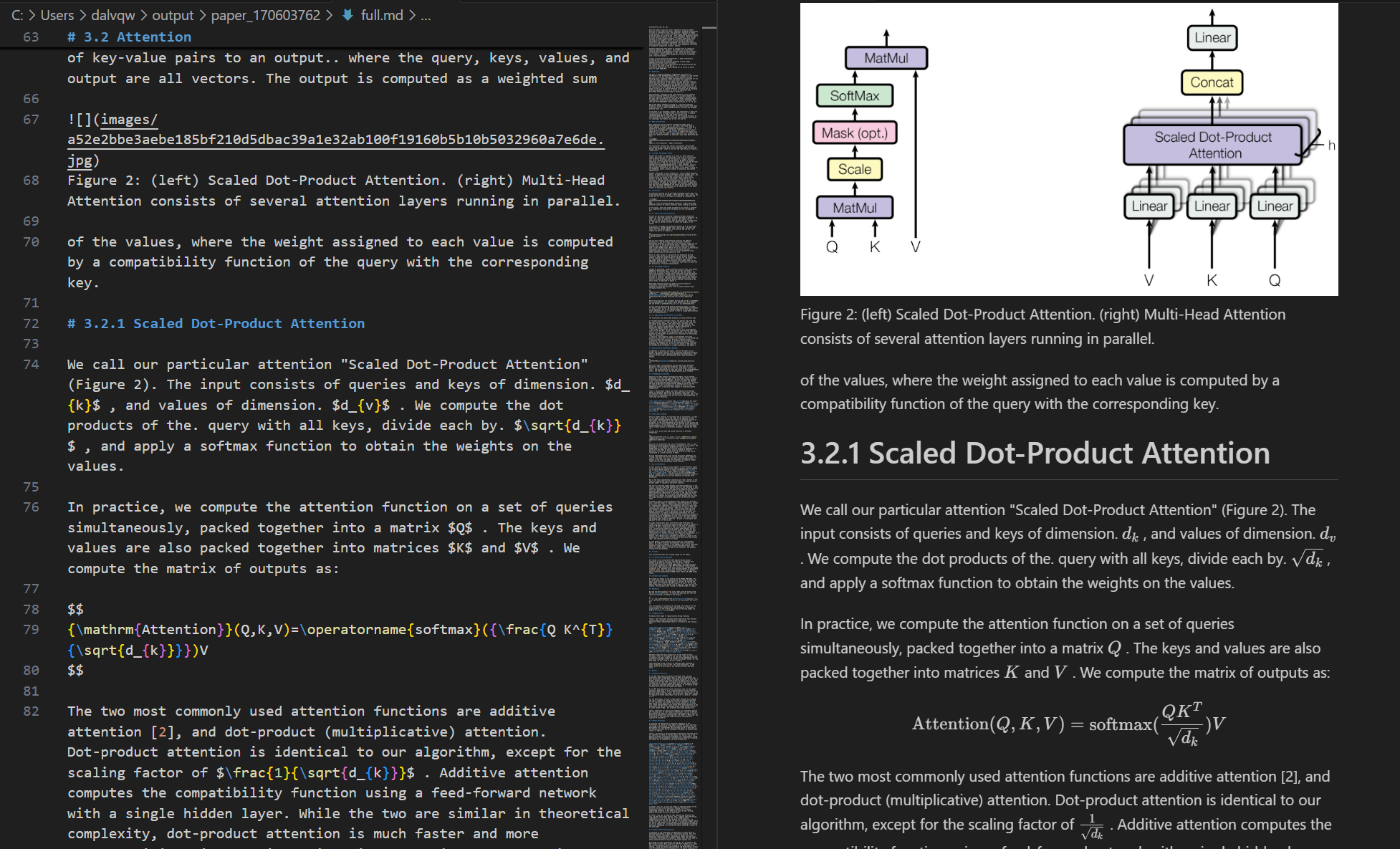
- Conversão de Fórmulas: Reconheça e converta automaticamente fórmulas no documento para o formato LaTeX.
- Extração de Tabelas: Reconheça e converta automaticamente tabelas no documento para o formato estruturado.
- Otimização de Limpeza: Remova cabeçalhos, rodapés, notas de rodapé, números de página, etc., para garantir coerência semântica.
- Extração de Alta Qualidade: Extração de alta qualidade de texto, imagens e informações de layout de documentos PDF.
Requisitos do Sistema
- Software: Python 3.10+
Início Rápido
-
Clone o repositório e entre no diretório:
git clone https://github.com/FutureUnreal/mcp-pdf2md.git cd mcp-pdf2md -
Crie um ambiente virtual e instale as dependências:
Linux/macOS:
uv venv source .venv/bin/activate uv pip install -e .Windows:
uv venv .venv\Scripts\activate uv pip install -e . -
Configure as variáveis de ambiente:
Crie um arquivo
.envno diretório raiz do projeto e defina as seguintes variáveis de ambiente:MINERU_API_BASE=https://mineru.net/api/v4/extract/task MINERU_BATCH_API=https://mineru.net/api/v4/extract/task/batch MINERU_BATCH_RESULTS_API=https://mineru.net/api/v4/extract-results/batch MINERU_API_KEY=your_api_key_here -
Inicie o serviço:
uv run pdf2md
Argumentos de Linha de Comando
O servidor suporta os seguintes argumentos de linha de comando:
Configuração do Claude Desktop
Adicione a seguinte configuração no Claude Desktop:
Windows:
{
    "mcpServers": {
        "pdf2md": {
            "command": "uv",
            "args": [
                "--directory",
                "C:\\path\\to\\mcp-pdf2md",
                "run",
                "pdf2md",
                "--output-dir",
                "C:\\path\\to\\output"
            ],
            "env": {
                "MINERU_API_KEY": "your_api_key_here"
            }
        }
    }
}
Linux/macOS:
{
    "mcpServers": {
        "pdf2md": {
            "command": "uv",
            "args": [
                "--directory",
                "/path/to/mcp-pdf2md",
                "run",
                "pdf2md",
                "--output-dir",
                "/path/to/output"
            ],
            "env": {
                "MINERU_API_KEY": "your_api_key_here"
            }
        }
    }
}
Nota sobre a Configuração da Chave de API: Você pode definir a chave de API de duas maneiras:
- No arquivo
.envdentro do diretório do projeto (recomendado para desenvolvimento) - Na configuração do Claude Desktop, conforme mostrado acima (recomendado para uso regular)
Se você definir a chave de API em ambos os locais, a da configuração do Claude Desktop terá precedência.
Ferramentas MCP
O servidor fornece as seguintes ferramentas MCP:
- convert_pdf_url: Converte URL de PDF para Markdown
- convert_pdf_file: Converte arquivo PDF local para Markdown
Obtendo a Chave de API MinerU
Este projeto depende da API MinerU para extração de conteúdo de PDF. Para obter uma chave de API:
- Visite o site oficial da MinerU e registre uma conta
- Após fazer login, solicite a qualificação para teste da API em este link
- Quando sua solicitação for aprovada, você poderá acessar a página de Gerenciamento de API
- Gere sua chave de API seguindo as instruções fornecidas
- Copie a chave de API gerada
- Use esta string como o valor para
MINERU_API_KEY
Observe que o acesso à API MinerU está atualmente em fase de testes e requer aprovação da equipe MinerU. O processo de aprovação pode levar algum tempo, portanto, planeje-se adequadamente.
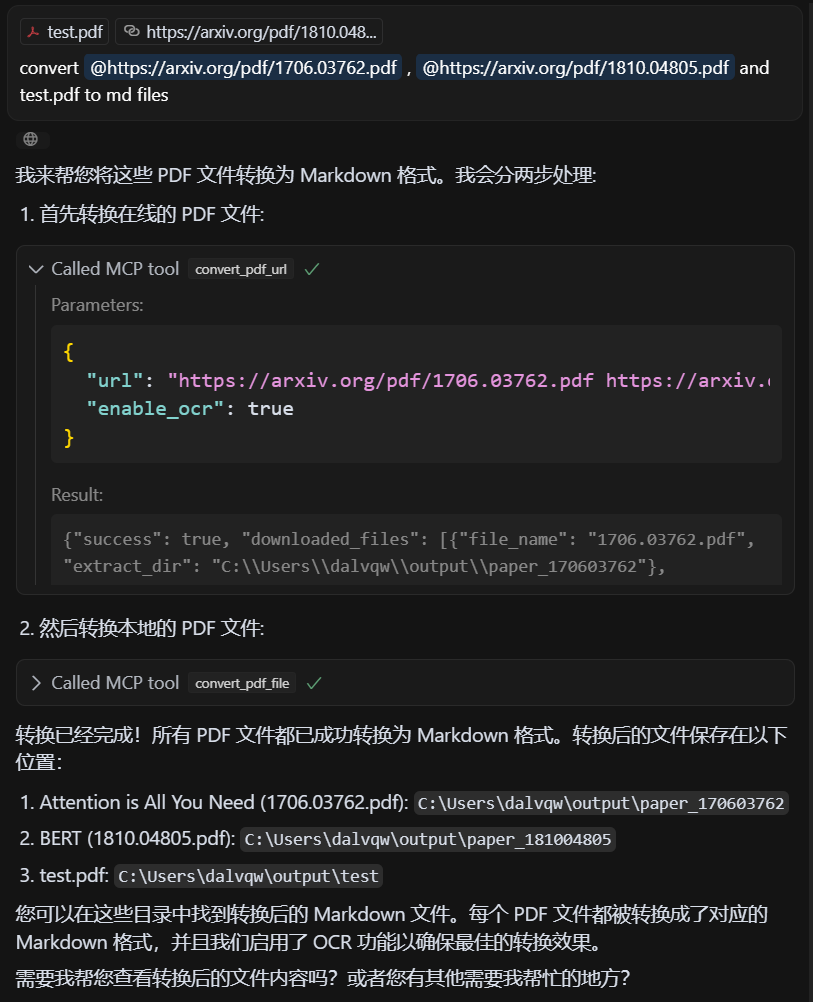
Demonstração
PDF de Entrada
Markdown de Saída
Licença
Licença MIT - consulte o arquivo LICENSE para obter detalhes.
Créditos
Este projeto é baseado na API do MinerU.