FOCUS DATA MCP Server
Converta linguagem natural em instruções SQL com uma solução de geração em duas etapas para reduzir alucinações e melhorar a confiança.
Documentação
FOCUS DATA MCP Server [Chinês]
Um servidor Model Context Protocol (MCP) permite que assistentes de inteligência artificial convertam linguagem natural em instruções SQL.
Já existem tantos frameworks Text-to-SQL. Por que ainda precisamos de outro?
Em termos simples, o focus_mcp_sql adota uma solução de geração de SQL em duas etapas, que permite controlar as alucinações do LLM e realmente constrói a confiança dos usuários não técnicos nos resultados de SQL gerados.
Abaixo está a tabela de comparação entre focus_mcp_sql e outros:
Tabela de Análise Comparativa
Aqui está uma comparação lado a lado do focus_mcp_sql com outros frameworks baseados em LLM:
| Recurso | Frameworks LLM Tradicionais | focus_mcp_sql |
|---|---|---|
| Processo de Geração | Caixa preta, geração direta de SQL | Transparente, duas etapas (palavras-chave + SQL) |
| Risco de Alucinação | Alto, depende da qualidade do modelo | Baixo, controlável (verificação de palavras-chave) |
| Velocidade | Lento, depende da inferência de modelos grandes | Rápido, conversão determinística de palavras-chave para SQL |
| Custo | Alto, requer modelos avançados | Baixo, reduz a dependência de modelos grandes |
| Facilidade para Usuários Não Técnicos | Baixo, difícil verificar resultados | Alto, fácil verificação de palavras-chave |
Recursos
- Inicializar o modelo
- Converter linguagem natural em instruções SQL
Pré-requisitos
- jdk 23 ou superior. Baixe jdk
- gradle 8.12 ou superior. Baixe gradle
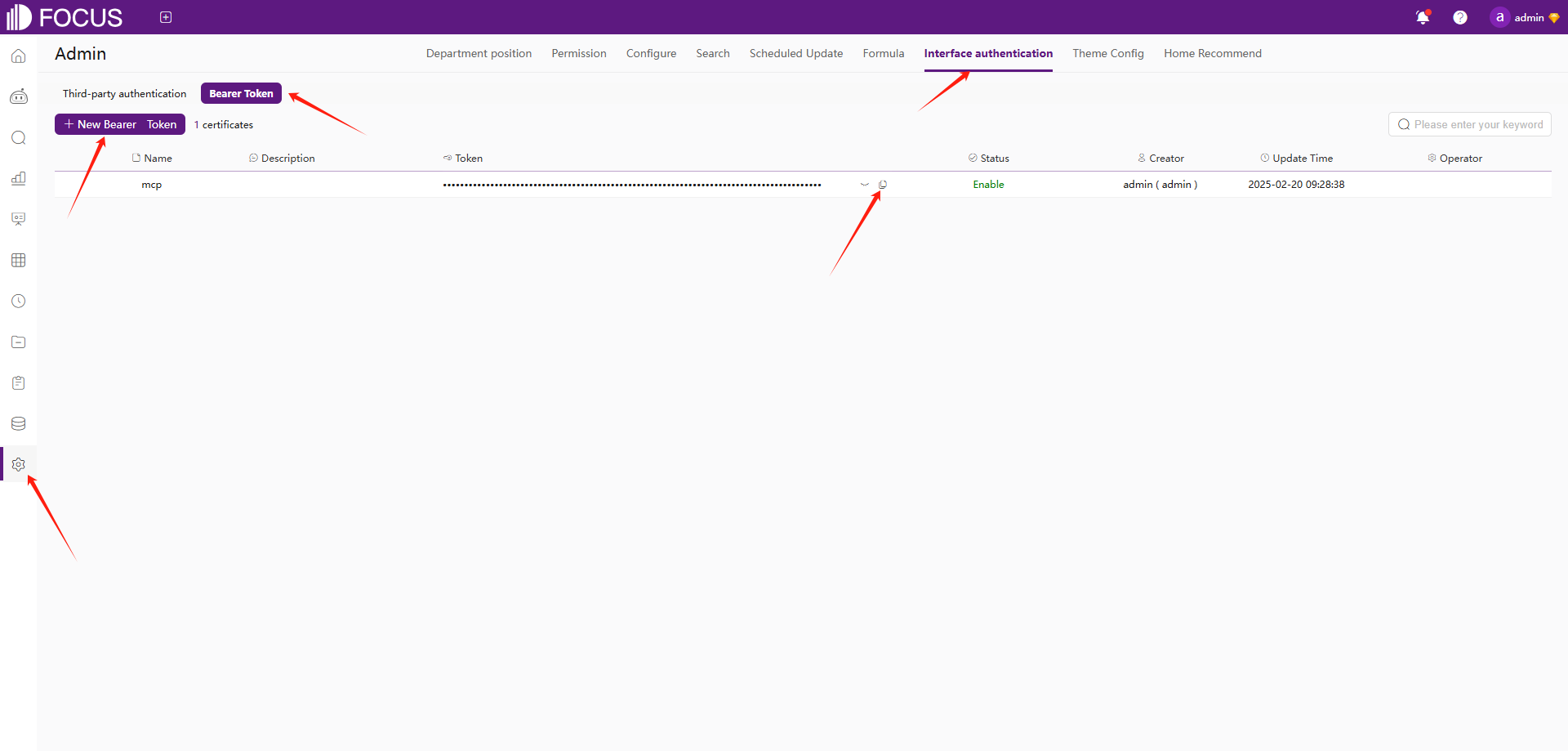
- registre-se no Datafocus para obter o bearer token:
- Registre uma conta no Datafocus
- Crie um aplicativo
- Entre no aplicativo
- Admin -> Autenticação de interface -> Bearer Token -> Novo Bearer Token
Instalação
- Clone este repositório:
git clone https://github.com/FocusSearch/focus_mcp_sql.git
cd focus_mcp_sql
- Compile o servidor:
gradle clean
gradle bootJar

The jar path: build/libs/focus_mcp_sql.jar
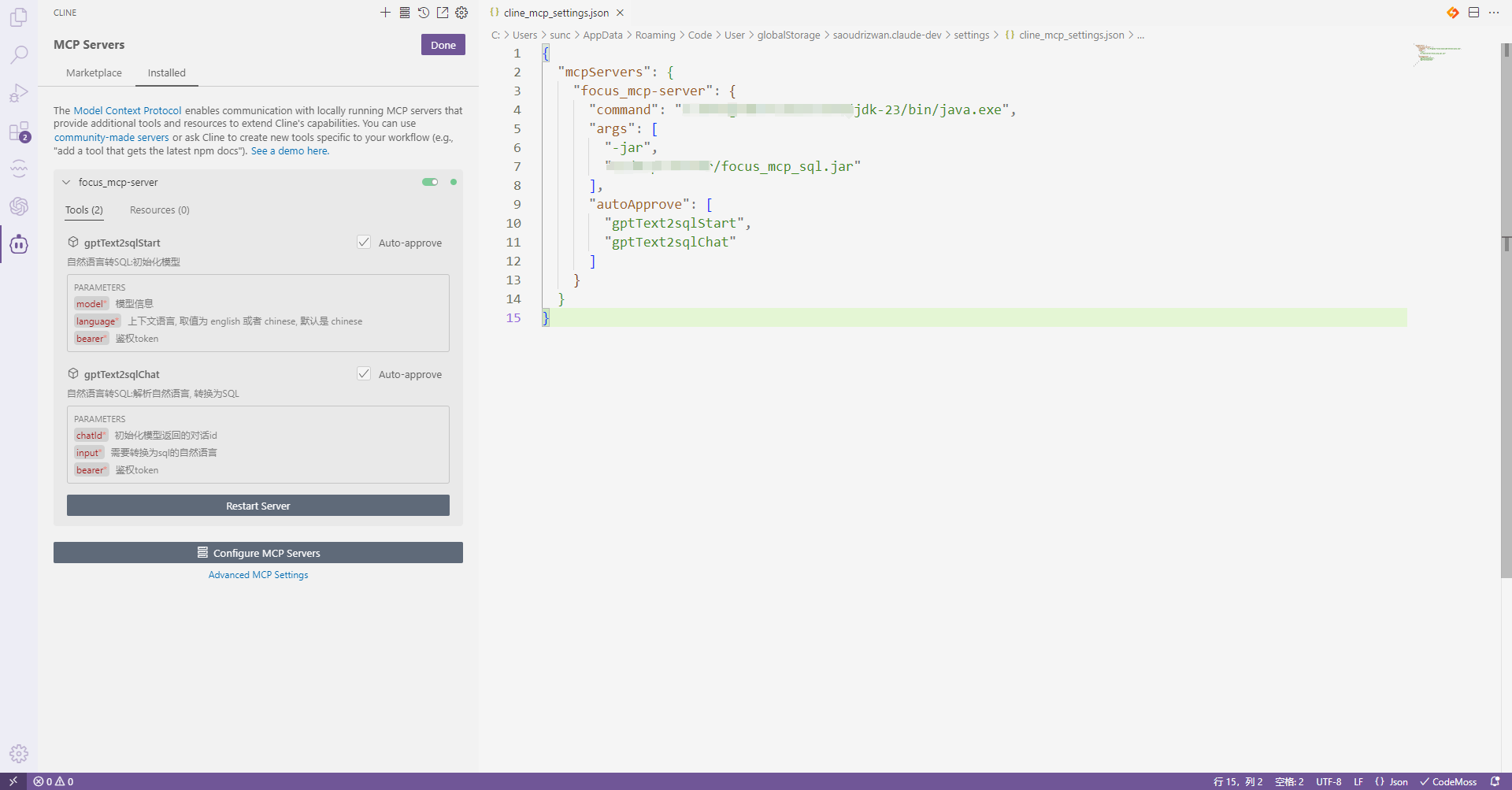
Configuração do MCP
Adicione o servidor ao seu arquivo de configurações do MCP:
{
  "mcpServers": {
    "focus_mcp_data": {
      "command": "java",
      "args": [
        "-jar",
        "path/to/focus_mcp_sql/focus_mcp_sql.jar"
      ],
      "autoApprove": [
        "gptText2sqlStart",
        "gptText2sqlChat"
      ]
    }
  }
}
Ferramentas Disponíveis
1. gptText2sqlStart
inicializar modelo.
Parâmetros:
model(obrigatório): modelo de tabelabearer(obrigatório): bearer tokenlanguage(opcional): idioma ['inglês','chinês']
Exemplo:
{
  "model": {
    "tables": [
      {
        "columns": [
          {
            "columnDisplayName": "name",
            "dataType": "string",
            "aggregation": "",
            "columnName": "name"
          },
          {
            "columnDisplayName": "address",
            "dataType": "string",
            "aggregation": "",
            "columnName": "address"
          },
          {
            "columnDisplayName": "age",
            "dataType": "int",
            "aggregation": "SUM",
            "columnName": "age"
          },
          {
            "columnDisplayName": "date",
            "dataType": "timestamp",
            "aggregation": "",
            "columnName": "date"
          }
        ],
        "tableDisplayName": "test",
        "tableName": "test"
      }
    ],
    "relations": [

    ],
    "type": "mysql",
    "version": "8.0"
  },
  "bearer": "ZTllYzAzZjM2YzA3NDA0ZGE3ZjguNDJhNDjNGU4NzkyYjY1OTY0YzUxYWU5NmU="
}
Descrição dos parâmetros do modelo:
| Nome | Local | Tipo | Obrigatório | Descrição |
|---|---|---|---|---|
| model | body | object | Sim | nenhum |
| » type | body | string | Sim | tipo de banco de dados |
| » version | body | string | Sim | versão do banco de dados |
| » tables | body | [object] | Sim | lista de estruturas de tabela |
| »» tableDisplayName | body | string | Não | nome de exibição da tabela |
| »» tableName | body | string | Não | nome original da tabela |
| »» columns | body | [object] | Não | lista de colunas da tabela |
| »»» columnDisplayName | body | string | Sim | nome de exibição da coluna |
| »»» columnName | body | string | Sim | nome original da coluna |
| »»» dataType | body | string | Sim | tipo de dados da coluna |
| »»» aggregation | body | string | Sim | método de agregação da coluna |
| » relations | body | [object] | Sim | lista de relações de tabela |
| »» conditions | body | [object] | Não | condições de associação |
| »»» dstColName | body | string | Não | nome original da coluna de associação da tabela de dimensão |
| »»» srcColName | body | string | Não | nome original da coluna de associação da tabela de fato |
| »» dimensionTable | body | string | Não | nome original da tabela de dimensão |
| »» factTable | body | string | Não | nome original da tabela de fato |
| »» joinType | body | string | Não | tipo de associação |
2. gptText2sqlChat
Converter linguagem natural em SQL.
Parâmetros:
chatId(obrigatório): ID do chatinput(obrigatório): Linguagem naturalbearer(obrigatório): bearer token
Exemplo:
{
  "chatId": "03975af5de4b4562938a985403f206d4",
  "input": "what is the max age",
  "bearer": "ZTllYzAzZjM2YzA3NDA0ZGE3ZjguNDJhNDjNGU4NzkyYjY1OTY0YzUxYWU5NmU="
}
Formato de Resposta
Todas as ferramentas retornam respostas no seguinte formato:
{
  "errCode": 0,
  "exception": "",
  "msgParams": null,
  "promptMsg": null,
  "success": true,
  "data": {
  }
}
Exemplo de Cline no Visual Studio Code
- instalar o plugin cline no vsCode
- configurar o servidor MCP
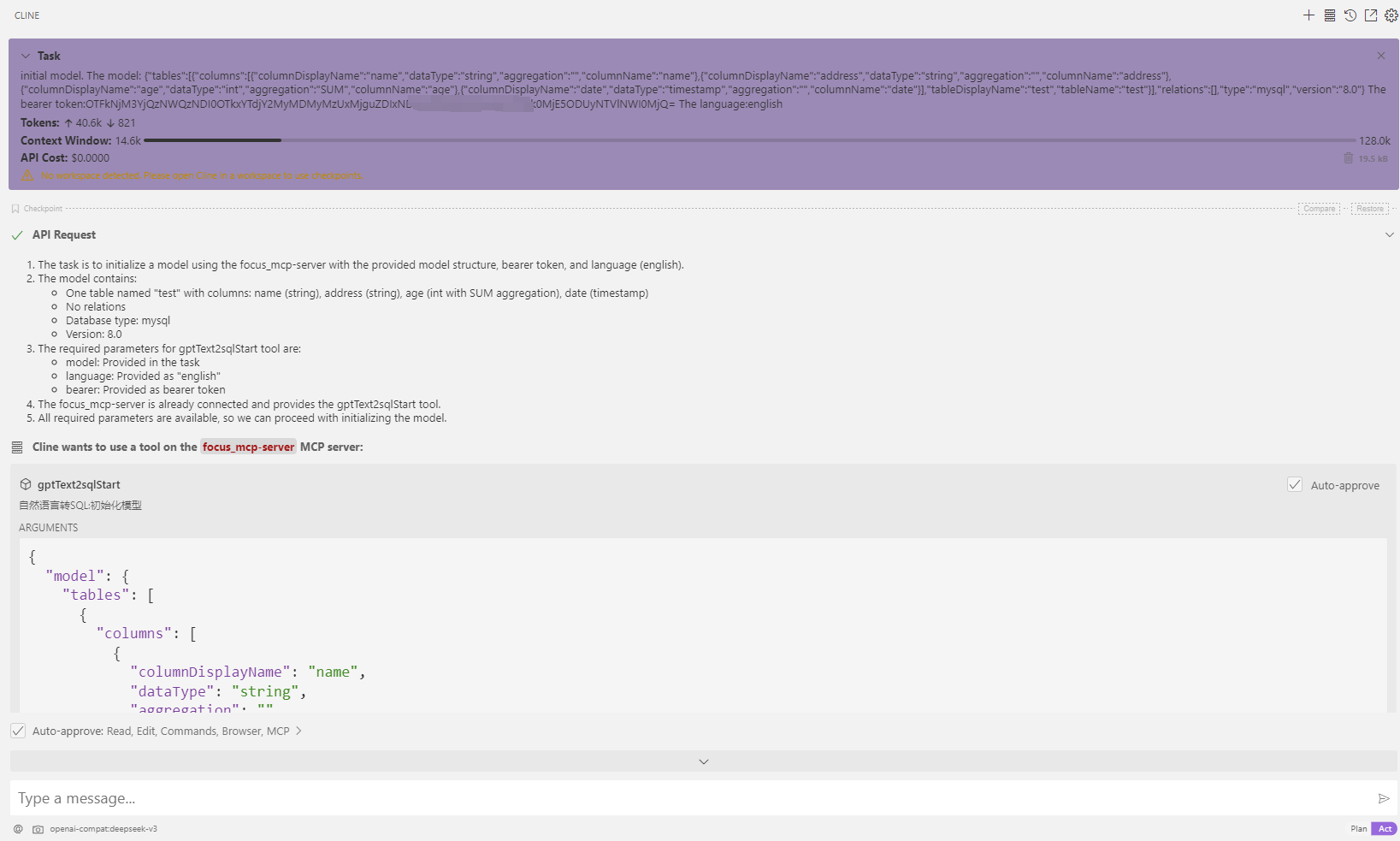
- uso
- inicializar modelo
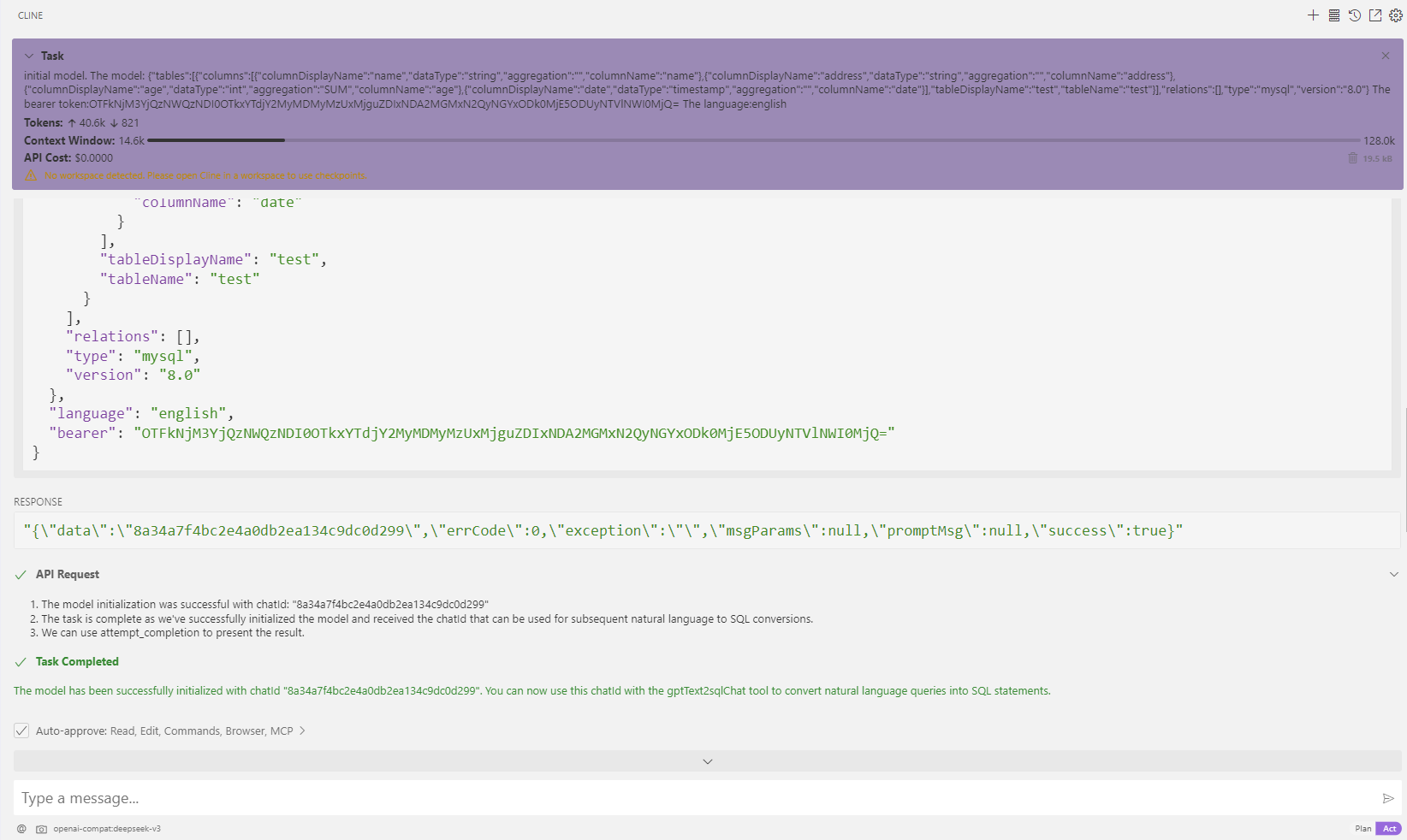
- transferir: qual é a idade máxima
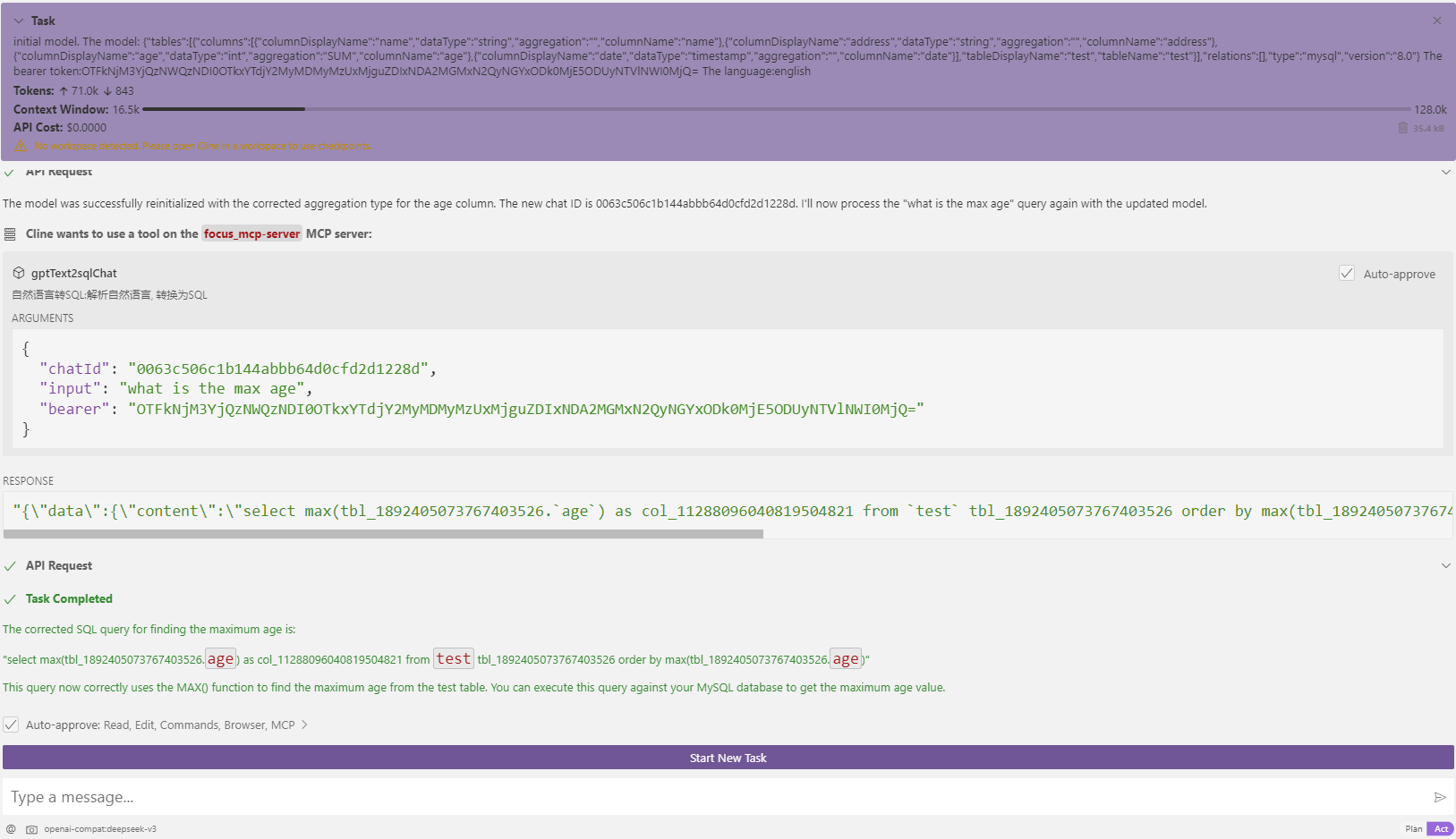
- inicializar modelo