MCPOmni Connect
Um gateway universal de interface de linha de comando (CLI) para o ecossistema MCP, integrando múltiplos servidores MCP, modelos de IA e protocolos de transporte.
Documentação

Dê trabalho real ao seu agente. Mantenha o controle.
Cada ação é verificada antes de ser executada. Cada execução sobrevive a uma falha sem refazer nada silenciosamente. Cada passo fica registrado.


Documentação · Início rápido · Livro de receitas · Prova · Como se compara · Para seu agente de codificação · Pergunte à IA
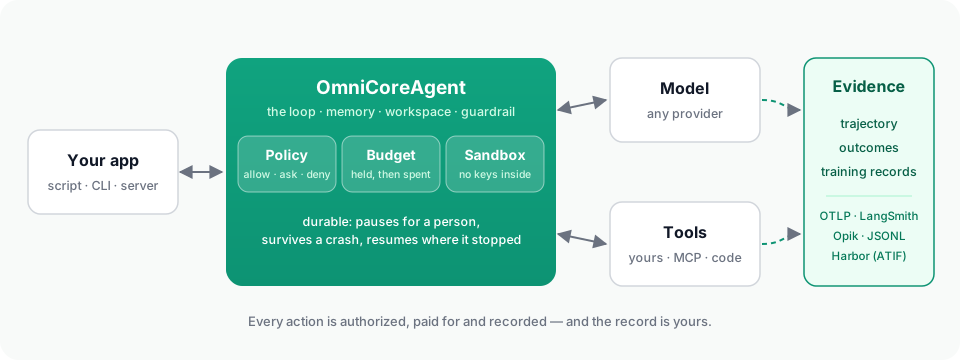
Um modelo não é um agente. O runtime ao redor dele é o que o torna utilizável em uma aplicação: o loop, as ferramentas, a memória, os arquivos em que trabalha e — uma vez que o agente pode fazer coisas reais — a política que diz o que ele pode fazer, o sandbox em que seu código é executado, o registro que sobrevive a uma falha, o orçamento que impede gastos e as evidências que uma pessoa pode ler depois.
OmniCoreAgent é esse runtime e harness, usado por meio de um SDK Python. Um objeto de agente, de um primeiro script a um worker em segundo plano governado em um servidor — e até um benchmark.
| O que significa aqui | |
|---|---|
| Runtime | O que executa e mantém o trabalho: execuções e seus estados, o registro durável, workers, sandboxes, persistência. |
| Harness | O que envolve o modelo e controla cada passo: o loop, o contexto, a execução de ferramentas, aprovações, orçamentos, recuperação, telemetria. |
| SDK | Contra o que você escreve: OmniCoreAgent, ToolRegistry, a configuração, os métodos, a CLI e a API HTTP. |
As palavras se sobrepõem, e "framework de agentes" também é justo; são três visões de uma mesma coisa.
Instalação
pip install omnicoreagent            # Python 3.12–3.14; check with python --version
export LLM_API_KEY=your_api_key      # the key for the provider in model_config
No Python 3.10 ou 3.11, a instalação para e avisa.
Início rápido
import asyncio
from omnicoreagent import OmniCoreAgent, ToolRegistry

tools = ToolRegistry()

@tools.register_tool("lookup_order")
def lookup_order(order_id: str) -> dict:
    """Look an order up in the application's own store."""
    return {"order_id": order_id, "status": "shipped", "carrier": "DHL"}

agent = OmniCoreAgent(
    name="support",
    system_instruction="You answer questions about orders, using the tools. Answer in plain text.",
    model_config={"provider": "openai", "model": "gpt-5.6-terra"},
    local_tools=tools,
)

async def main():
    result = await agent.run("Where is order 1042?", session_id="customer-7")
    print(result["response"])

    # Every run is evidence: each step, what the model asked for,
    # and what it received back.
    trajectory = await agent.get_trajectory(result["trace_id"])
    for step in trajectory["steps"]:
        for call in step["tool_calls"]:
            print(step["step"], call["tool_name"], call["arguments"], "->", call["observation"]["content"])

    # What the run turned out to be worth, whenever that is known ...
    await agent.record_outcome(result["run_id"], source="support-lead", reward=1.0, label="resolved")
    # ... and the run as one record for an evaluator or a trainer.
    [record] = await agent.training_records(run_id=result["run_id"])
    print(record["outcomes"])

    await agent.cleanup()

asyncio.run(main())
O que foi impresso:
Order 1042 has shipped via DHL.
1 lookup_order {'order_id': '1042'} -> {"tool_name": "lookup_order", "args": {"order_id": "1042"}, "status": "success", "data": {"order_id": "1042", "status": "shipped", "carrier": "DHL"}, "message": null}
[{'outcome_id': 'outcome_57a6d81724c44f51b08c540fe83f4694', 'reward': 1.0, 'label': 'resolved', 'source': 'support-lead', 'detail': {}, 'recorded_at': '2026-09-25T18:00:36.136396+00:00'}]
Esse é o loop completo: o modelo chama ferramentas (chamadas independentes são executadas em um único lote), os resultados voltam como observações estruturadas, a sessão lembra, os arquivos ficam em um workspace, a proteção contra injeção observa, e a execução é registrada, tudo sob a política padrão, que permitiu suas ferramentas e teria recusado segredos brutos, comandos de shell do host e rede sem restrições. Tudo abaixo você adiciona quando precisar.
Funciona com OpenAI, Anthropic, Gemini, Groq, DeepSeek, Mistral, Azure,
OpenRouter e Ollama por meio de um único model_config
(modelos).
Cada execução é evidência
A resposta final de um agente deixa a maior parte da história de fora. O runtime mantém o resto, legível de ponta a ponta, para cada execução:
- O que o modelo viu em cada passo — as mensagens e as ferramentas que foram oferecidas — e o que recebeu de volta, que nem sempre é o que a ferramenta retornou: um resultado grande é salvo em um arquivo e o modelo recebe uma prévia, e a trajetória mostra ambos.
- Resultados que chegam depois. Um pull request mesclado, uma revisão, uma
execução de CI aprovada:
record_outcomeanexa isso à execução que fez o trabalho. - Registros de treinamento.
training_recordsretorna cada execução concluída como um registro — o que foi enviado ao modelo, o que ele produziu, o que as ferramentas responderam, a política que o atendeu, os totais e seus resultados — para um avaliador ou um treinador. - Seu próprio armazenamento, e o seu. O runtime mantém as evidências por conta própria e as exporta para OTLP, LangSmith, Opik ou JSONL. As credenciais que ele mantém nunca são entregues ao modelo nem escritas em um registro.
(Leia uma execução, Resultados e registros de treinamento)
De um script a CI a um benchmark
O mesmo arquivo de agente é executado sem interface — uma instrução, um estado terminal, um código de saída, e o resultado e a trajetória no disco — para CI e scripts:
omnicoreagent run --agent agent.py \
  --instruction "Fix the failing test in tests/test_orders.py" \
  --approval-mode deny --timeout 900 --output-dir ./out
E no Harbor, o framework em que o Terminal-Bench é executado: o agente é instalado no contêiner de cada tarefa, e cada tentativa relata sua recompensa, custo, tokens e uma trajetória no formato próprio do Harbor, ao lado de qualquer outro agente.
pip install "omnicoreagent[harbor]"
omnicoreagent harbor doctor -m gpt-5.6-terra
omnicoreagent harbor run -d terminal-bench@2.0 -m gpt-5.6-terra -n 4
omnicoreagent harbor results jobs
(Execuções sem interface, Harbor)
O que a produção precisa, e onde está
| Necessidade | O que o runtime faz | Leia |
|---|---|---|
| Ferramentas | Suas funções Python e servidores MCP (stdio, SSE, HTTP streamable, OAuth) por meio de um único catálogo; lotes paralelos; detecção de loop por assinatura de chamada; recuperação de ferramentas para grandes conjuntos. | Ferramentas locais, MCP |
| Modo de código | Uma ferramenta run_code: o modelo escreve um programa Python curto que chama suas ferramentas, faz loops e calcula, executado no Monty — cada chamada dentro dele é governada e rastreada, e uma chamada que precisa de aprovação pausa o próprio programa. | Modo de código |
| Governança | Uma política — permitir, perguntar, negar — sobre cada capacidade que o agente tem: cada ferramenta, cada servidor MCP, o sandbox, a rede, delegação, execuções em segundo plano. ask pausa a execução para uma pessoa. Com hash, para que não possa ser ampliada em tempo de execução. | Modelo de segurança, Políticas, Aprovações |
| Execução | Uma ferramenta execute cujos comandos são executados em um sandbox — Docker, E2B, Modal, Daytona, Vercel, o seu próprio, ou local onde um contêiner já é o limite — sem rede, a menos que a política permita, sem chaves e tokens do seu processo, e com o workspace conectado para dentro e para fora. Um sandbox que morre é relatado e substituído. | Execução, Provedores |
| Execuções duráveis | Cada execução tem um registro: seu passo, suas chamadas de ferramenta, suas aprovações. Uma execução pausa para uma aprovação ou recarga e retoma de onde parou; com um armazenamento de memória durável, uma execução cujo processo morreu continua de seu checkpoint; uma chamada interrompida nunca é repetida silenciosamente. | Execuções duráveis |
| Orçamentos | Limites em dólares, tokens, chamadas, segundos de sandbox, por solicitação, sessão, agente ou aplicação, por dia ou mês; cada chamada de modelo é precificada e retida antes de ser feita; uma execução que esgota espera por uma pessoa. | Orçamentos |
| Memória e contexto | Memória de sessão em memória, Redis, Postgres/SQL ou MongoDB; contexto gerenciado antes de cada chamada de modelo; grandes saídas de ferramentas descarregadas em arquivos do workspace. | Memória, Contexto, Armazenamentos e escala |
| Subagentes | Workers gerados pelo líder sob a mesma política e orçamentos, cada um com seu próprio rastreamento vinculado ao do pai. | Subagentes |
| Trabalho em segundo plano | Tarefas agendadas e manuais com um armazenamento de tarefas durável (Redis, MongoDB, SQL), leases, novas tentativas, recuperação após reinicialização, uma execução por tarefa por vez. | Agentes em segundo plano |
| Telemetria | Um rastreamento por execução, legível de ponta a ponta — cada chamada de modelo, chamada de ferramenta, comando de sandbox, aprovação e decisão de orçamento — completo por padrão (capture: "default" deixa os prompts do modelo de fora), dados pessoais removidos do registro (nunca da execução); exportado para OTLP, LangSmith, Opik ou JSONL. | Leia uma execução, Telemetria, Privacidade |
| Serviço | omniserve run --agent agent.py: REST e SSE para execuções, aprovações, orçamentos, tarefas em segundo plano, rastreamentos; autenticação, limites de taxa, métricas; suas próprias páginas ao lado da API. | OmniServe |
Um agente governado, em uma configuração:
agent = OmniCoreAgent(
    name="steward",
    system_instruction="...",
    model_config={"provider": "openai", "model": "gpt-5.6-terra"},
    mcp_tools=[{"name": "github", "transport_type": "streamable_http", "url": "https://api.githubcopilot.com/mcp/",
                "headers": {"Authorization": "Bearer ..."}}],
    agent_config={
        "governance_config": {
            "enabled": True,
            "policy": {"name": "steward", "mode": "strict", "rules": {
                "allow": [{"rule_id": "read", "capability": "tool.mcp.call",
                           "target": {"mcp_server": "github", "tool_name": "get_file_contents"}},
                          {"rule_id": "sandbox", "capability": "sandbox.execute"},
                          {"rule_id": "commands", "capability": "process.exec",
                           "constraints": {"sandbox_required": True}},
                          # The manifest asks for the network; a strict policy must allow it.
                          {"rule_id": "network", "capability": "sandbox.network.configure"}],
                "ask":   [{"rule_id": "pr", "capability": "tool.mcp.call",
                           "target": {"mcp_server": "github", "tool_name": "create_pull_request"}}],
                "deny":  [{"rule_id": "merge", "capability": "tool.mcp.call",
                           "target": {"mcp_server": "github", "tool_name": "merge_pull_request"}}],
            }},
            "budgets": {"application_id": "steward",
                        "application": [{"meter": "model_cost_usd", "limit": 5.0, "window": "day"}],
                        "request": [{"meter": "model_cost_usd", "limit": 1.0}]},
            "sandbox_config": {"provider": "e2b"},
            "sandbox_manifest": {"network_policy": {"default": "allow"}},
        },
    },
    telemetry_config={"capture": "full"},
)
Prova, não uma lista de recursos
O runtime é comprovado executando trabalho real e difícil nele e prejudicando-o de
fora. Um steward de repositório para este repositório — um agente em segundo plano
em um servidor que reproduz testes com falha em um sandbox, corrige-os atrás da
aprovação de uma pessoa, abre pull requests que vinculam seu próprio rastreamento, tria
suas próprias falhas em trabalho e é executado em um cronograma — é sua primeira aplicação
(apps/steward/). Tentativas no Harbor são a segunda: tarefas
construídas para só serem aprovadas por meio do que provam, e tarefas construídas
para dar errado, cada uma verificada lendo como a tentativa terminou, não apenas sua recompensa.
O que quebrou ao longo do caminho — 54 descobertas, cada uma com o que aconteceu, por que,
e o que corrigiu — é o
relatório de comprovação em produção.
Como isso se compara ao OpenAI Agents SDK, LangGraph, Pydantic AI, ao Claude Agent SDK e ao CrewAI — incluindo onde eles são mais fortes — está capacidade por capacidade, cada célula com fonte.
Instale apenas o que você usa
pip install "omnicoreagent[serve]"        # OmniServe REST/SSE
pip install "omnicoreagent[docker]"       # Docker sandboxes; e2b, modal, daytona, vercel likewise
pip install "omnicoreagent[redis]"        # Redis memory and task store; postgres, mongodb likewise
pip install "omnicoreagent[s3]"           # S3 / R2 workspace storage
pip install "omnicoreagent[tokenizer]"    # token-exact context and budget estimates
pip install "omnicoreagent[otel]"         # OTLP export; langsmith, opik likewise
pip install "omnicoreagent[codemode]"     # code mode, in Monty
pip install "omnicoreagent[harbor]"       # Harbor and Terminal-Bench trials
pip install "omnicoreagent[all]"          # every extra above except harbor
Usando um agente de codificação de IA?
Aponte-o para AGENTS.md — um mapa deste repositório para agentes:
o que fica onde, como executar os testes e qual página explica qual parte.
A documentação serve llms.txt, copiar-como-markdown e um servidor MCP pelo mesmo
motivo (use a documentação com ferramentas de IA).
Livro de receitas
Começando · Aplicações reais · Agentes em segundo plano · OmniServe · Produção
Desenvolvimento
git clone https://github.com/omnirexflora-labs/omnicoreagent.git && cd omnicoreagent
uv venv && source .venv/bin/activate
uv sync --all-extras --all-groups --locked
pytest tests/
Veja CONTRIBUTING.md. Notas de design e planos ficam em
engineering/.
Licença e autor
MIT — veja LICENSE. Construído por Abiola Adeshina (@abiorhmangana), com OmniMemory e OmniDaemon na mesma família. Construído sobre LiteLLM, FastAPI e Pydantic.