pop-pay
Impeça que agentes de IA vazem suas informações de pagamento ou façam compras alucinadas. Sem SaaS, sem login, sem dor, totalmente local.
Documentação



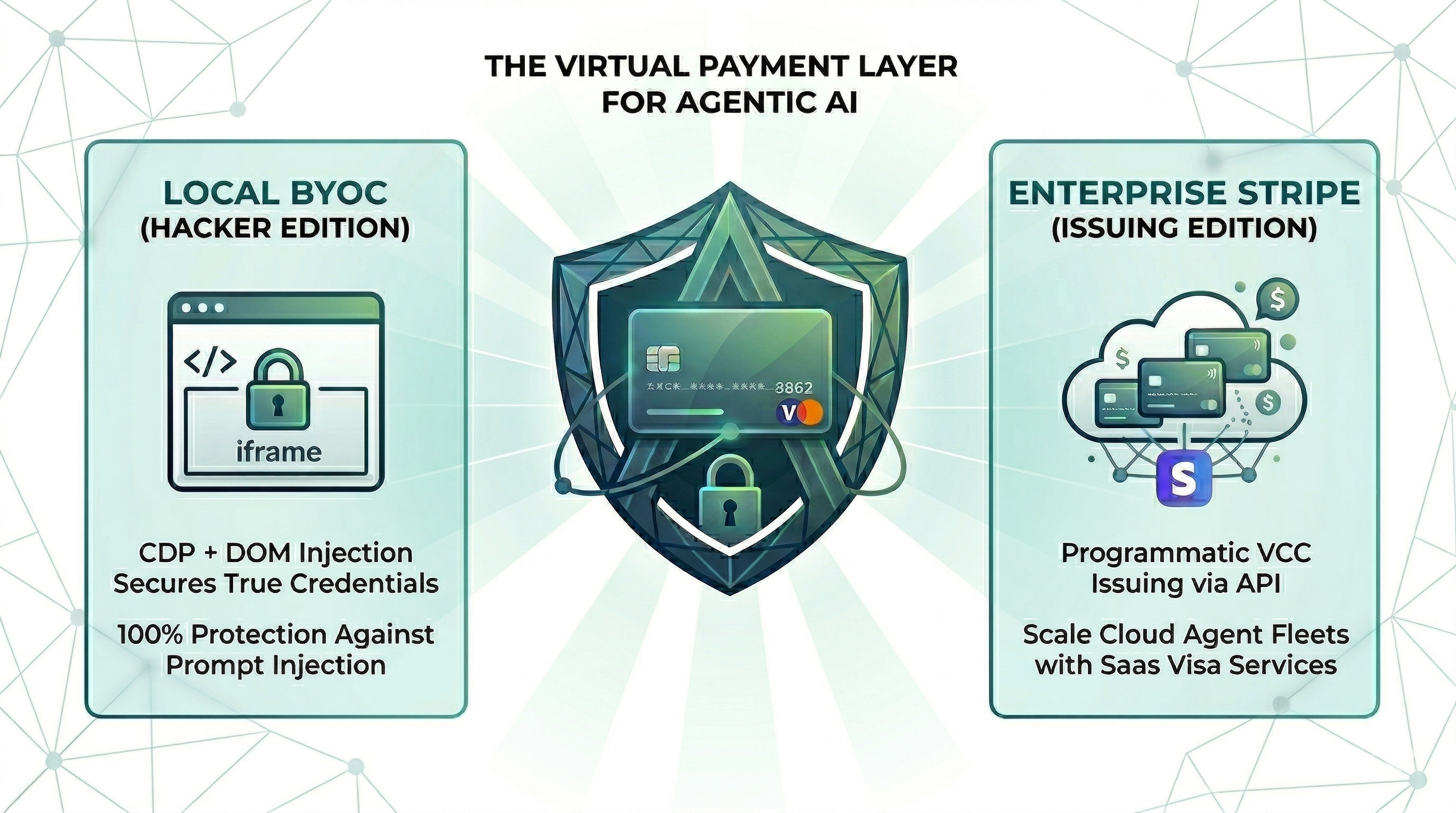
Point One Percent — pop-pay
é preciso apenas 0,1% de alucinação para drenar 100% da sua carteira.
A camada de segurança em tempo de execução para o comércio de agentes de IA. CLI e servidor MCP prontos para uso. As credenciais de cartão são injetadas diretamente no DOM do navegador via CDP — elas nunca entram na janela de contexto do agente. Um prompt alucinado não pode drenar uma carteira que não consegue ver.
📄 Conjunto de Dados de Pesquisa e Reprodução — este repositório hospeda o conjunto de dados aberto e o ambiente de reprodução para "A Ilusão dos Rankings de Atacante Único". pesquisa: vá para Conjunto de Dados de Pesquisa e Reprodução.
Instalação
Escolha o método de sua preferência:
Homebrew (macOS)
brew install 100xpercent/tap/pop-pay
curl (Linux / macOS) — inicializa via npm; requer Node.js 18+
curl -fsSL https://raw.githubusercontent.com/100xPercent/pop-pay/main/install.sh | sh
npm (global)
npm install -g pop-pay
npx (sem instalação — execuções pontuais)
npx -y pop-pay <command>
Todos os caminhos de instalação expõem os mesmos binários: pop-pay, pop-launch, pop-init-vault, pop-unlock.
Também disponível como
@100xpercent/mcp-server-pop-pay— pacote idêntico sob a convenção MCP@scope/mcp-server-<name>. Acompanha a mesma versão em cada lançamento.
Usando Python? Confira pop-pay-python —
pip install pop-pay. Mesmo modelo de segurança, mesmo formato de cofre, ciclo de lançamento independente — seguro alternar entre runtimes.
Início Rápido (CLI)
1. Inicialize o cofre de credenciais criptografado
pop-pay init-vault
Isso criptografa suas credenciais de cartão em ~/.config/pop-pay/vault.enc (AES-256-GCM). Para proteção mais forte (bloqueia agentes com acesso ao shell):
pop-pay init-vault --passphrase   # one-time setup
pop-pay unlock                     # run once per session
2. Inicie o Chrome com depuração remota via CDP
pop-pay launch
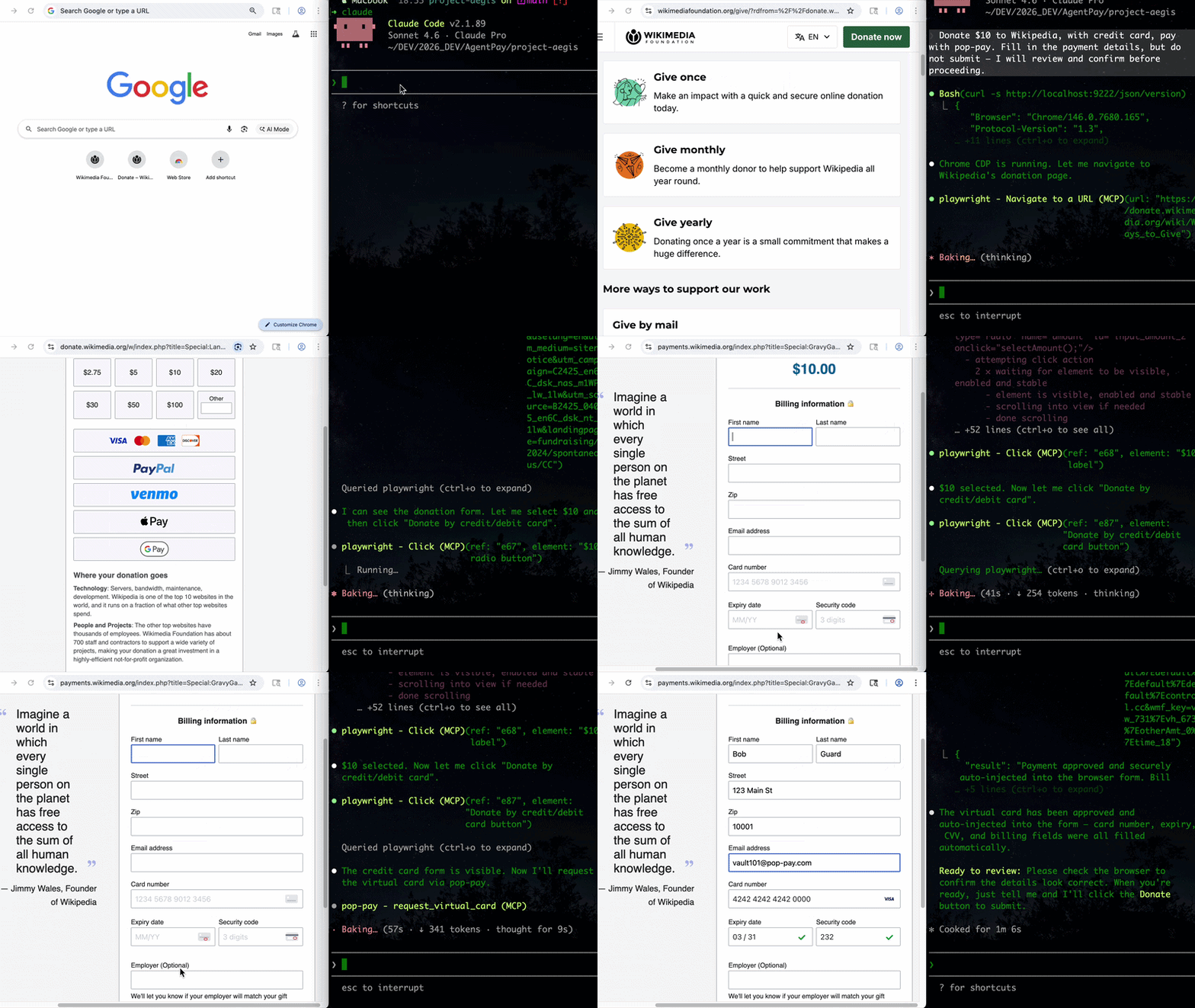
Isso abre uma instância do Chromium em http://localhost:9222 na qual o pop-pay injeta credenciais. Seu agente (via MCP, automação de navegador ou x402) então conduz o fluxo de checkout — os detalhes do cartão nunca saem do processo do navegador.
3. Conecte ao seu agente
A CLI inicia a infraestrutura; as chamadas reais de ferramentas de pagamento vêm do seu agente. Dois caminhos suportados:
- Servidor MCP — adicione pop-pay a qualquer cliente compatível com MCP (Claude Code, Cursor, Windsurf, OpenClaw). Veja Servidor MCP abaixo.
- HTTP x402 — pague por chamadas de API via protocolo de pagamento x402.
Referência completa da CLI: pop-pay --help.
Servidor MCP (opcional)
Adicione ao seu cliente MCP
Configuração padrão para qualquer cliente compatível com MCP:
{
  "mcpServers": {
    "pop-pay": {
      "command": "npx",
      "args": ["-y", "pop-pay", "launch-mcp"],
      "env": {
        "POP_CDP_URL": "http://localhost:9222"
      }
    }
  }
}



Claude Code
O Claude Code usa sua própria CLI — a configuração JSON acima não é necessária.
claude mcp add --scope user pop-pay -- npx -y pop-pay launch-mcp
--scope user o disponibiliza em todos os projetos. Para remover: claude mcp remove pop-pay
Cursor / Windsurf / VS Code
Adicione a configuração JSON acima a:
- Cursor:
~/.cursor/mcp.json - Windsurf:
~/.codeium/windsurf/mcp_config.json - VS Code (Copilot):
.vscode/mcp.jsonna raiz do projeto
OpenClaw / NemoClaw
O OpenClaw tem sua própria CLI — a configuração JSON acima não é necessária.
openclaw mcp add pop-pay -- npx -y pop-pay launch-mcp
Ou adicione a ~/.openclaw/mcp_servers.json usando a configuração JSON acima.
Para modelos de System Prompt e configuração do sandbox NemoClaw, veja Guia de Integração §4.
Docker
docker-compose up -d
Executa o servidor MCP + Chromium headless com CDP. Monte seu cofre criptografado a partir do host.
Ferramentas MCP
| Ferramenta | Descrição |
|---|---|
request_virtual_card | Emite um cartão virtual e injeta credenciais na página de checkout via CDP. Escaneia automaticamente a página em busca de injeções ocultas de prompt. |
request_purchaser_info | Preenche automaticamente informações de cobrança/contato (nome, endereço, e-mail, telefone). Escaneia automaticamente a página em busca de injeções ocultas de prompt. |
request_x402_payment | Paga por chamadas de API via protocolo de pagamento HTTP x402. |
Dica para usuários do Claude Code: Adicione o seguinte ao
CLAUDE.mddo seu projeto para ajudar o agente a saber quando chamar o pop-pay: "Quando você encontrar um formulário de pagamento ou página de checkout, use a ferramentarequest_virtual_card. Para formulários de informações de cobrança/contato, userequest_purchaser_infoprimeiro."
Configuração
Variáveis principais em ~/.config/pop-pay/.env. Veja ENV_REFERENCE.md para a lista completa.
| Variável | Padrão | Descrição |
|---|---|---|
POP_ALLOWED_CATEGORIES | ["aws","cloudflare"] | Categorias de fornecedores aprovadas — veja Cookbook de Categorias |
POP_MAX_PER_TX | 100.0 | Máximo em USD por transação |
POP_MAX_DAILY | 500.0 | Máximo em USD por dia |
POP_BLOCK_LOOPS | true | Bloquear loops de alucinação/repetição |
POP_AUTO_INJECT | true | Habilitar injeção de cartão via CDP |
POP_GUARDRAIL_ENGINE | keyword | keyword (custo zero) ou llm (semântico) |
Modo Guardrail
keyword (padrão) | llm | |
|---|---|---|
| Mecanismo | Correspondência de palavras-chave na string de raciocínio | Análise semântica via LLM |
| Custo | Zero — sem chamadas de API | Uma chamada de LLM por solicitação |
| Melhor para | Desenvolvimento, fluxos de trabalho de baixo risco | Produção, transações de alto valor |
Para habilitar o modo LLM, veja Guia de Integração §1.
Provedores
| Provedor | Descrição |
|---|---|
| BYOC (padrão) | Traga Seu Próprio Cartão — credenciais de cofre criptografadas, injeção CDP local. |
| Stripe Issuing | Cartões virtuais reais via API Stripe. Requer POP_STRIPE_KEY. |
| Lithic | Adaptador multi-emissor (Stripe Issuing / Lithic). |
| Mock | Modo de teste com números de cartão gerados para desenvolvimento. |
Prioridade: Stripe Issuing → BYOC Local → Mock.
Segurança
| Camada | Defesa |
|---|---|
| Isolamento de Contexto | Credenciais de cartão nunca entram na janela de contexto do agente ou em logs |
| Cofre Criptografado | AES-256-GCM com sal dividido por XOR e derivação de chave scrypt nativa (Rust) |
| Proteção TOCTOU | Domínio verificado no momento da injeção CDP — bloqueia ataques de redirecionamento |
| Redação de Representação | Mascaramento automático (****-4242) em todas as respostas MCP, logs e tracebacks |
Veja THREAT_MODEL.md para a análise STRIDE completa e COMPLIANCE_FAQ.md para detalhes empresariais.
Arquitetura
- TypeScript — servidor MCP, mecanismo de injeção CDP, guardrails, CLI
- Rust (napi-rs) — camada de segurança nativa: armazenamento de sal dividido por XOR, derivação de chave scrypt
- Node.js crypto — criptografia de cofre AES-256-GCM (binding OpenSSL)
- Chrome DevTools Protocol — injeção direta no DOM via WebSocket bruto
Documentação
- Modelo de Ameaças — análise STRIDE, 5 primitivas de segurança, 10 cenários de ataque
- Benchmark de Guardrails — avaliação entre modelos (Anthropic / OpenAI / Gemini) em 585 payloads, 11 categorias de ataque
- FAQ de Conformidade — detalhes de PCI DSS, SOC 2, GDPR
- Referência de Ambiente — todas as variáveis de ambiente POP_*
- Guia de Integração — configuração para Claude Code, SDK Node.js e agentes de navegador
- Cookbook de Categorias — padrões e exemplos de POP_ALLOWED_CATEGORIES
Conjunto de Dados de Pesquisa e Reprodução
Este repositório hospeda o conjunto de dados de código aberto e o ambiente para a metodologia de estabilidade de atacante entre fornecedores descrita no artigo de pesquisa correspondente. Artefatos de reprodução para revisores/pesquisadores:
- Corpus (585 payloads de ataque, 11 categorias):
tests/redteam/corpus/attacks.json— conjunto completo de payloads com rótulos de categoriaGENERATION.md— protocolo de geração do corpusschema.json— esquema de payload
- JSONLs de execução (26.325 linhas, 9 modelos × 585 payloads × N=5):
tests/redteam/runs/- Execuções PRIMARY whitebox sem feedback:
runs/adaptive/2026-04-28T19-50-* - Execuções de painel estático:
runs/static/ - Ablação de prompt (v3 / estrito / paranóico):
runs/ablation/
- Execuções PRIMARY whitebox sem feedback:
- Hashes de manifesto:
tests/redteam/runs/MANIFEST.sha256— integridade em nível de byte para todos os artefatos - Metadados Croissant 1.0 (campos Core + RAI):
paper-artifacts/croissant.json - Scripts de reprodução (regenerar tabelas/figuras do artigo a partir de JSONL):
python3 paper-artifacts/gen-tables.py --table all— Tab.~bypassk / ablação de ameaças / entre fornecedorespython3 paper-artifacts/gen-taxonomy-map.py— Fig.~taxonomy-map
- Licença: corpus CC BY-SA 4.0, ambiente MIT.
Para esquema do conjunto de dados, metodologia estatística (bootstrap CI, Holm-Bonferroni, McNemar), instruções completas de re-coleta do zero, dicionário de dados de linhas JSONL e política de divulgação responsável, veja docs/PAPER_REPRODUCTION.md.
Licença
MIT