MDVP
Analisis DOM untuk URL langsung mana pun, diberi skor 0–100 dengan perbaikan konkret.
Dokumentasi
@mdvp/cli
Design linter for AI-generated frontends. Audit any live URL for HTML/CSS quality, design-system drift, accessibility-relevant structure, and common AI UI patterns. Default audits run locally through the exact rendered browser path with no API key, no account, and no screenshot baseline; static/cache shortcuts require MDVP_USE_CACHE=1.




npx @mdvp/cli audit myapp.com
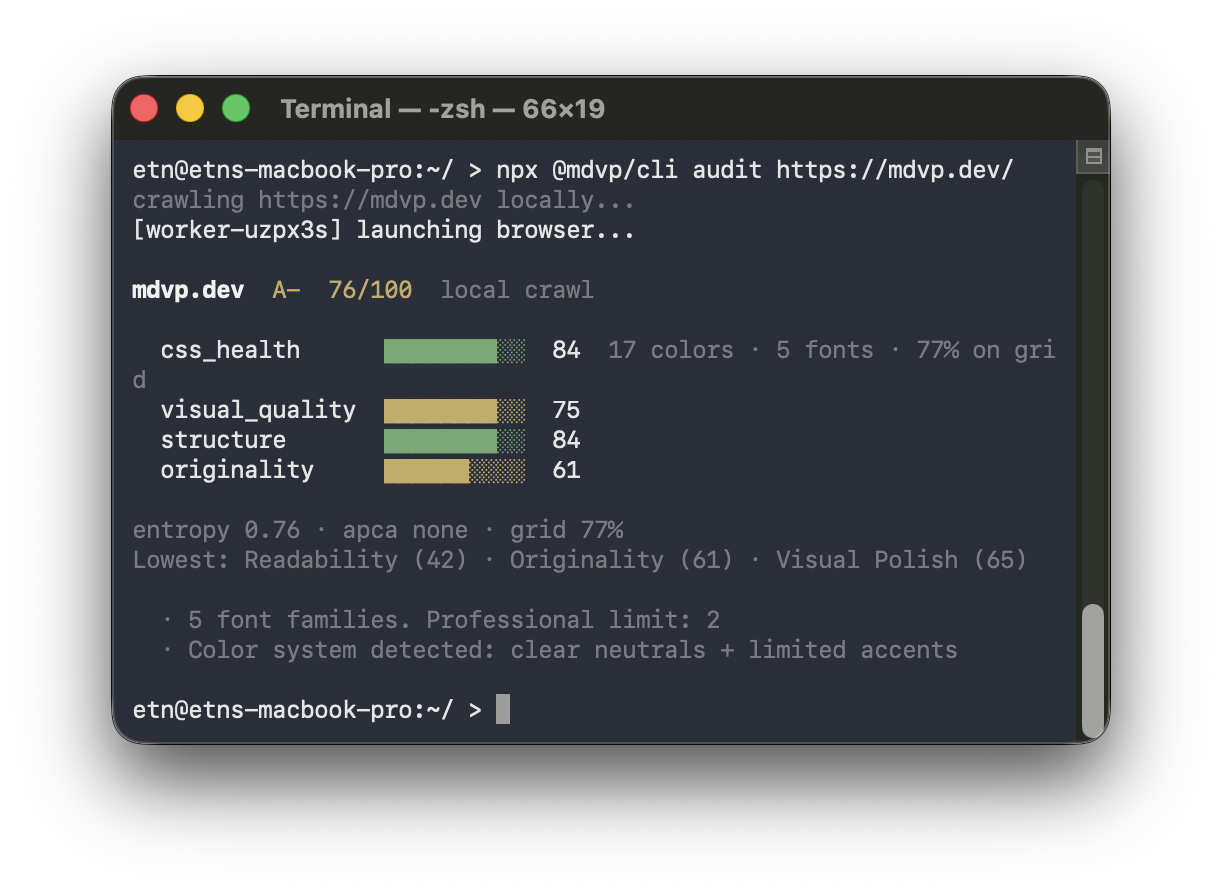
MDVP gives teams and agents a deterministic design-quality signal before a page has users, screenshots, or a baseline. It reads the rendered DOM with getComputedStyle(), measures color/spacing/type discipline, checks APCA contrast and semantic structure, and flags common generated-UI patterns such as default Tailwind palettes, pill-radius everything, generic hero chips, and missing design tokens.
Use it to:
- Catch vibe-coded UI drift before merge.
- Gate preview URLs in CI with
audit --check. - Give Cursor, Claude, OpenCode, Windsurf, and Cline an MCP design-quality tool.
- Publish a score badge after submitting a public result.
Pipeline
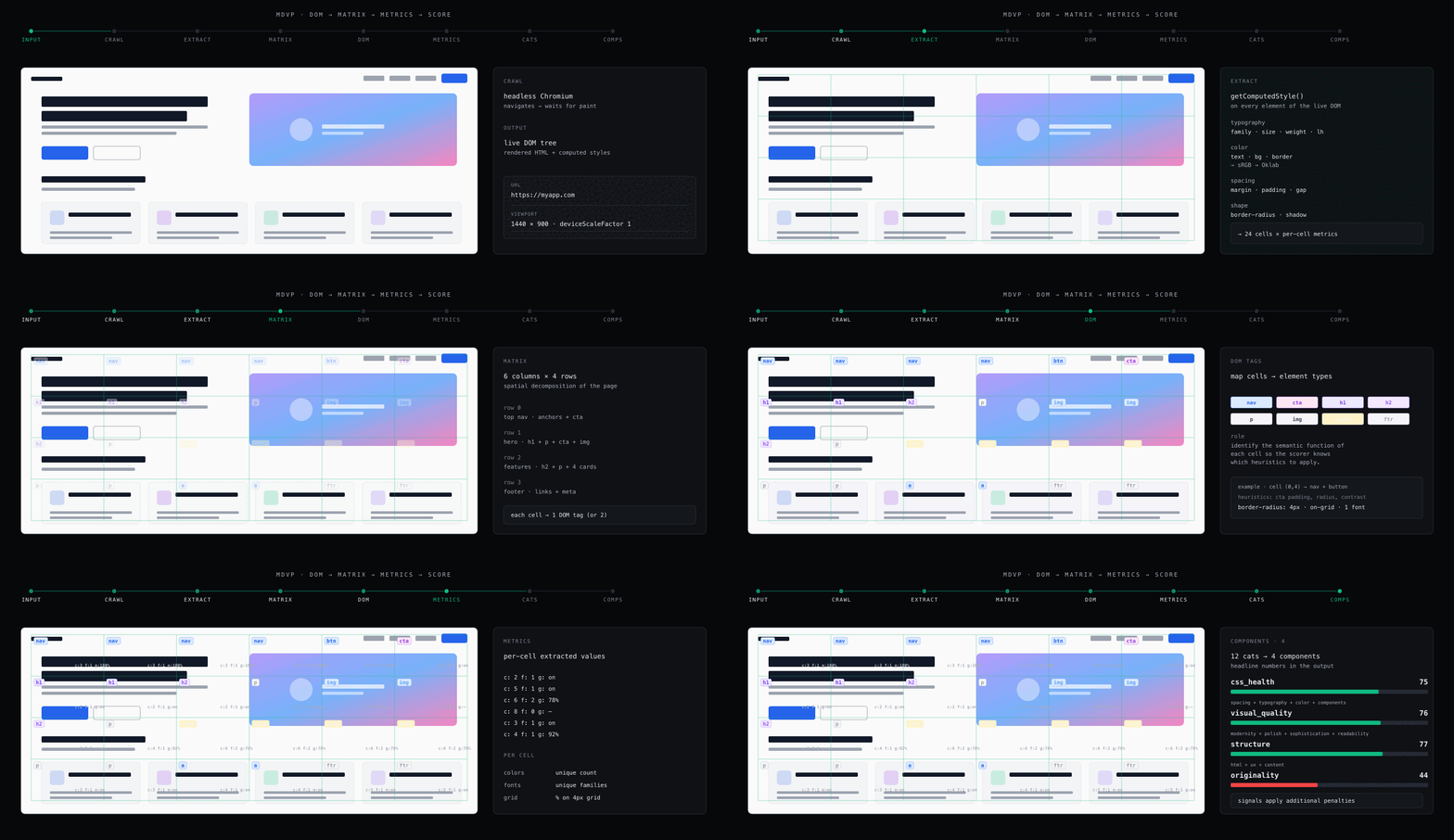
Exact audit launches the local browser crawler → extracts rendered DOM metrics with getComputedStyle() → 12 categories score into 4 components → a pattern registry highlights common design heuristics. Set MDVP_USE_CACHE=1 only when you intentionally want the approximate static/cache shortcut; add --fast in scripts to make that opt-in visible. See How it works below for the full walkthrough.
Development Proof
MDVP is useful when it gives a developer a concrete next change, not just a score.
- Dogfood finding:
node cli.mjs audit mdvp.devproduced B+ 75/100 and flagged an actionable issue: 5 font families on the rendered page where the professional limit is 2. The next engineering task is clear: consolidate the site typography stack and re-run the audit. - Before/after workflow: the reproducible design-system fixture starts at 95/A+; stacking generated-UI problems drops it to 60/B- with originality at 0. That maps directly to development actions: reduce font families, replace default Tailwind purple-blue gradients, normalize pill radii, add semantic design tokens, and add real content.
- PR gate:
npx @mdvp/cli init --github-actionturns those same checks into a preview-URL CI gate, so color sprawl, font drift, low spacing-grid adherence, and banned generated-UI signals fail before merge.
See Development proof for the concrete workflow and Benchmark for the validation caveats.
Why
Tools like v0, Bolt, Lovable, and Cursor generate frontends fast — but the output often shares common patterns: Inter as the primary font, Tailwind's default purple-blue-pink gradient palette, every button is border-radius: 9999px, 40+ unique CSS colors with no system. Visual regression tools can't help when there is no prior screenshot to compare against; code linters check syntax, not rendered quality.
MDVP gives you numbers on the page structure and design system. The default audit instruments the rendered page, extracts computed CSS values via getComputedStyle(), and is the right mode for disputed results or screenshot-backed evidence. The static analyzer is still available as an approximate shortcut, but only when you explicitly opt in with MDVP_USE_CACHE=1 --fast.
Quickstart
# Score any URL locally with rendered browser evidence
npx @mdvp/cli audit myapp.com

# Check local first-run prerequisites without crawling
npx @mdvp/cli doctor

# Make the default rendered browser path explicit in scripts
npx @mdvp/cli audit myapp.com --exact

# Use the approximate static/cache shortcut only after opting in
MDVP_USE_CACHE=1 npx @mdvp/cli audit myapp.com --fast

# Enforce thresholds in CI — exits 1 on violation
npx @mdvp/cli audit myapp.com --check

# Score a logged-in local or staging page through your own Chrome session
MDVP_BROWSER_URL=http://127.0.0.1:9222 npx @mdvp/cli audit http://localhost:3000/dashboard --json

# Create starter .mdvprc and GitHub Actions workflow
npx @mdvp/cli init --github-action

# Look up a known site from the public dataset (no local crawl)
npx @mdvp/cli audit myapp.com --cloud

# Contribute your local result to the public dataset
npx @mdvp/cli audit myapp.com --swarm

# JSON output for scripting
npx @mdvp/cli audit myapp.com --json | jq .components.css_health

# Compare two saved JSON snapshots
npx @mdvp/cli diff before.json after.json

# Print a README badge for your site
npx @mdvp/cli badge myapp.com
Output:
myapp.com  C+  58/100  local audit

  css_health      ████████░░░░  48   32 colors · 4 fonts · 61% on grid
  visual_quality  ██████████░░  67
  structure       ████████████  81
  originality     ████░░░░░░░░  38

entropy 0.82 · apca 94.2 · grid 61%
Lowest: originality (38) · color (44) · spacing (51)
  · 32 unique colors. Professional limit: 8–12
  · 4 font families. Professional limit: 2
  · Inter + Tailwind purple-blue palette — common design pattern
How it works
Default audit uses Puppeteer for rendered DOM and computed style evidence, groups 12 categories into four named components, and uses independent heuristic detectors to score common AI-generated UI patterns. The static Rust analyzer remains available through MDVP_USE_CACHE=1 --fast for low-resource loops, and its JSON output is marked source: "static" with limitations. See the methodology paper for the full algorithm, weight table, and prior-work comparison.
Documentation
- Install — requirements, install, first run, troubleshooting
- CLI commands — every flag, every subcommand, exit codes
- Scoring — what the four components measure, the signal registry
- Signal catalog — every generated-UI detector, evidence surface, and remediation path
- DESIGN.md compliance — diff audited page metrics against your design system
- Authenticated page scoring — local Chrome session connector prototype and privacy model
- CI enforcement —
.mdvprc, GitHub Action, exit codes, other CI systems - Containers — Alpine, distroless, Apple Container, and exact/browser image guidance
- Standalone binaries — release artifact decision and static-only binary constraints
- Nix —
nix develop, reproducible verify/smoke apps, and NixOS notes - MCP server — plug into Claude, OpenCode, Cursor, Windsurf, Cline
- Architecture — components, job protocol, self-hosting
- Methodology — full scoring paper (4 pillars, weight table)
- Benchmark — sensitivity / ablation + live reference panel
- Adoption playbook — examples, positioning, and honest distribution loops
- Development — setup, tests, adding a signal, cutting a release
Add a score badge to your project
Show your MDVP score in your project's README: docs/badge.md. Submit your site, then generate the shields.io markdown:
npx @mdvp/cli badge myapp.com
Contributing
Bug reports and feature requests: GitHub Issues. Code and signal detectors: see CONTRIBUTING.md. New generated-UI detectors should start with the signal catalog and the development guide.
Citing
If you use MDVP in research, cite via the "Cite this repository" button (powered by CITATION.cff). A preprint draft of the methodology is in docs/paper.md.
License
MIT. The local scoring engine, CLI, MCP server, and GitHub Action are in this repository. The hosted coordination layer and dataset are not part of this open-source package — see docs/architecture.md for the boundary.