Gitee
resmiIntegrasi API Gitee, manajemen repositori, isu, dan pull request, serta lainnya.
Apa yang bisa Anda lakukan dengan Gitee MCP?
- Mengelola masalah repositori — Minta asisten Anda untuk membuat daftar, membuat, atau memperbarui masalah di repositori menggunakan
list_repo_issues,create_issue, danupdate_issue. - Menangani permintaan tarik — Minta asisten Anda untuk membuat daftar, membuat, menggabungkan, atau meninjau permintaan tarik dengan alat seperti
list_repo_pulls,create_pull,merge_pull, danmanage_pull_review. - Jelajahi konten repositori — Dapatkan isi file, bandingkan cabang atau tag, dan cari file berdasarkan konten menggunakan
get_file_content,compare_branches_tags, dansearch_files_by_content. - Kelola rilis dan fork — Buat rilis, buat daftar yang sudah ada, atau fork repositori melalui
create_release,list_releases, danfork_repository. - Cari dan temukan — Temukan repositori sumber terbuka atau pengguna di Gitee dengan
search_open_source_repositoriesdansearch_users. - Lacak notifikasi — Periksa notifikasi terbaru Anda dengan
list_user_notifications.
Dokumentasi
Server MCP Gitee
Server MCP Gitee adalah implementasi server Model Context Protocol (MCP) untuk Gitee. Server ini menyediakan seperangkat alat untuk berinteraksi dengan API Gitee, memungkinkan asisten AI untuk mengelola repositori, isu, pull request, dan lainnya.

Fitur
- Berinteraksi dengan repositori, isu, pull request, dan notifikasi Gitee
- URL basis API yang dapat dikonfigurasi untuk mendukung berbagai instance Gitee
- Flag baris perintah untuk konfigurasi yang mudah
- Mendukung operasi pribadi, organisasi, dan enterprise
- Aktivasi/penonaktifan perangkat alat secara dinamis
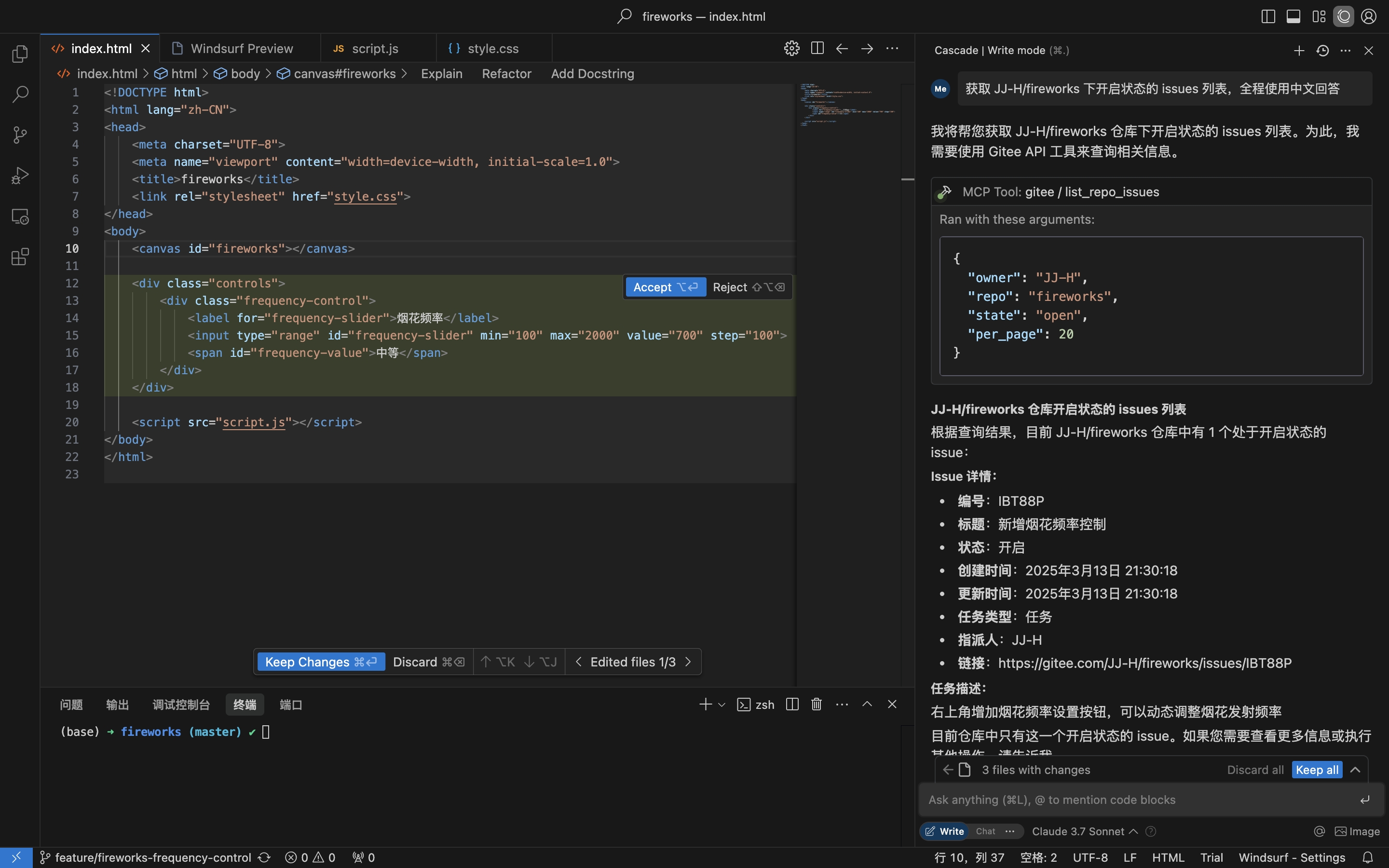
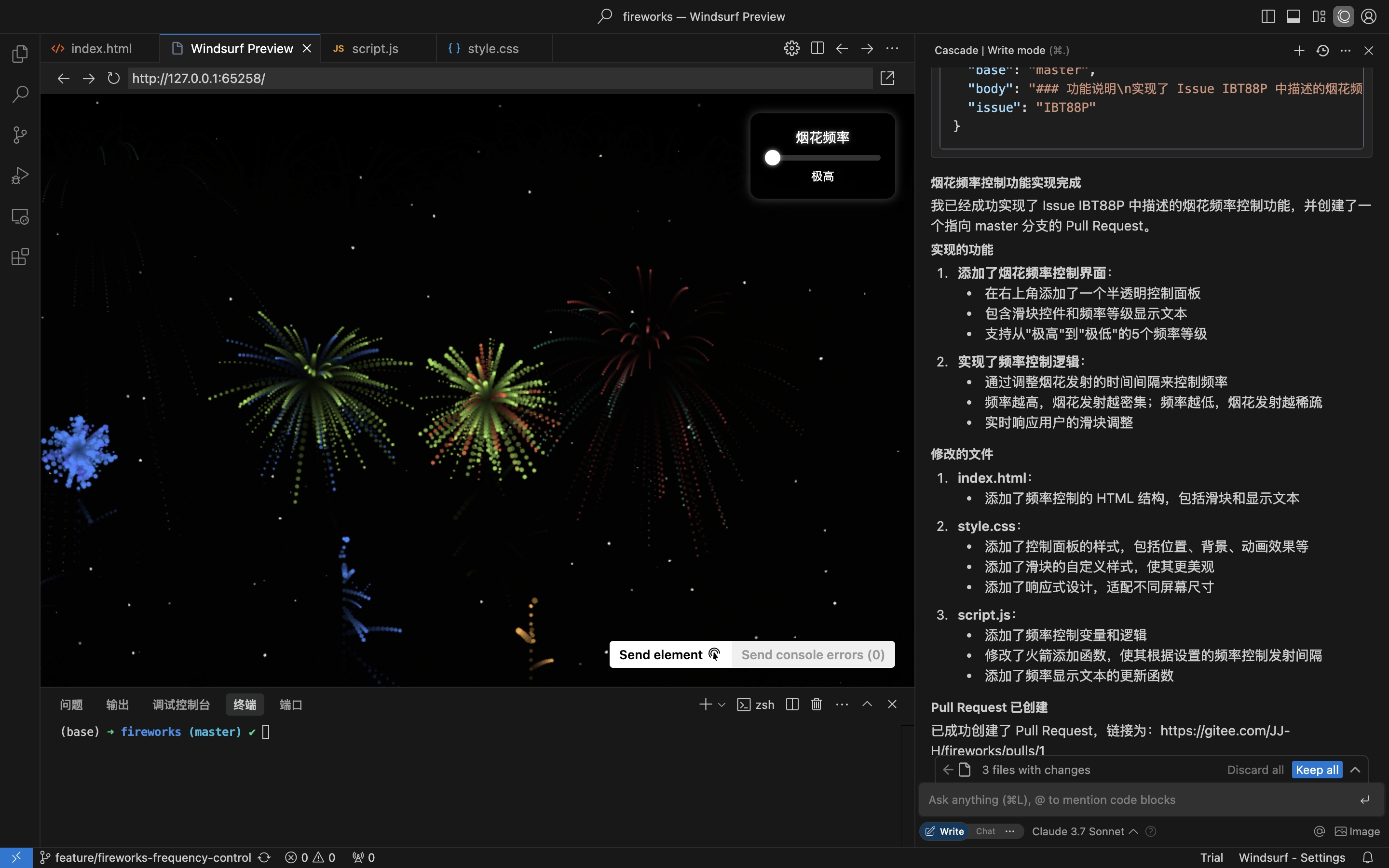
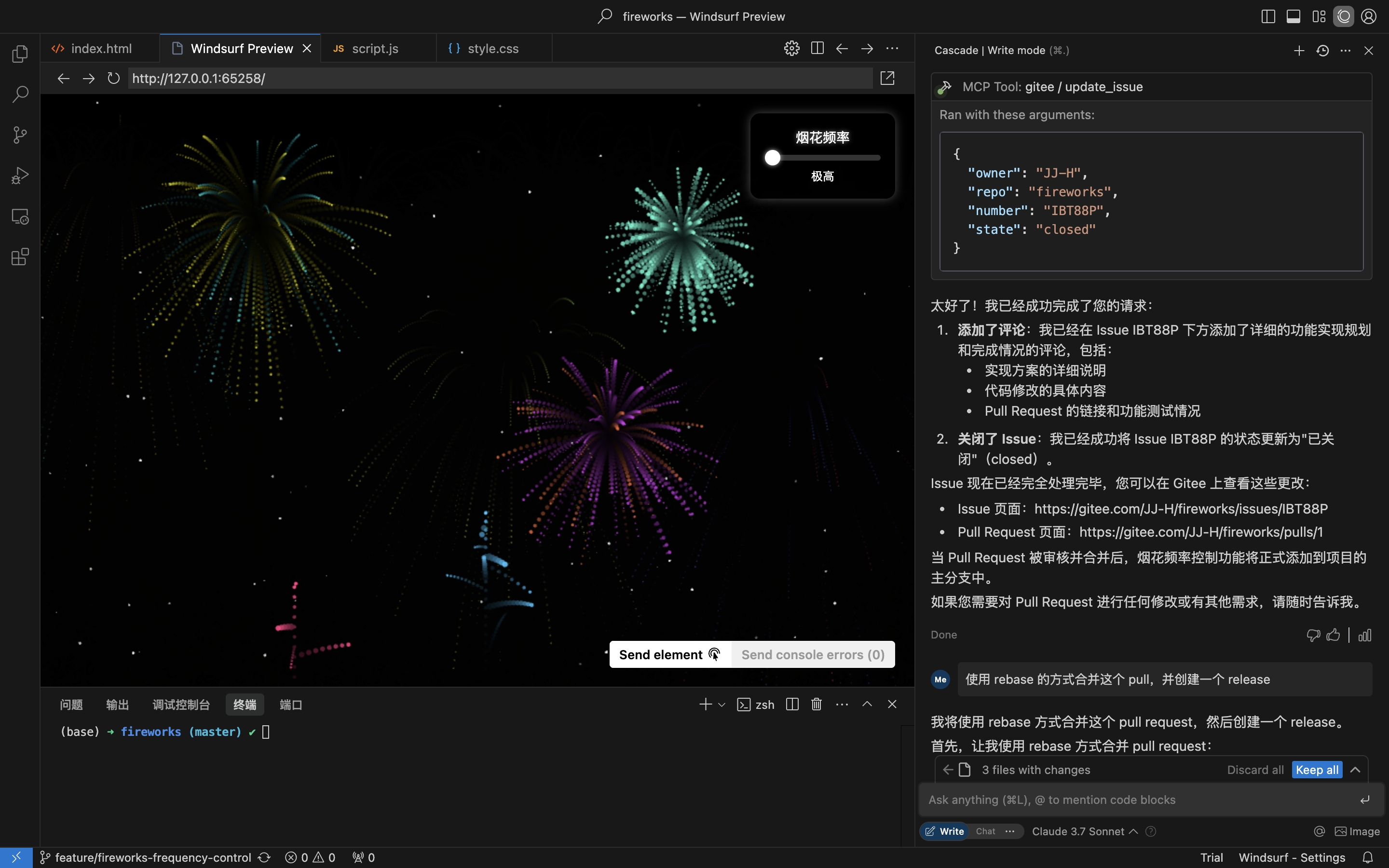
Skenario praktis: Dapatkan Issue dari repositori, implementasikan dan buat Pull Request
- Dapatkan Issue repositori
- Implementasikan kode & buat Pull Request berdasarkan detail Issue
- Beri komentar & tutup Issue
Instalasi
Server MCP Jarak Jauh tidak memerlukan instalasi dan langsung berfungsi. Untuk menjalankan mcp-gitee secara lokal (stdio), pilih salah satu opsi di bawah ini.
Server MCP Jarak Jauh (Direkomendasikan)
Tambahkan berikut ini ke bagian mcpServers dari konfigurasi host Anda, ganti <your personal access token> dengan token dari sini:
{
  "mcpServers": {
    "gitee": {
      "url": "https://api.gitee.com/mcp",
      "headers": {
        "Authorization": "Bearer <your personal access token>"
      }
    }
  }
}
Untuk jalur dan format file konfigurasi per-klien (Claude Code, Codex, Cursor, Trae, Cline, Continue, opencode), ikuti panduan yang ditautkan di bagian Konfigurasi Host MCP di bawah.
Lokal (stdio)
Unduh Biner yang Sudah Dibangun
Ambil arsip untuk platform Anda (linux-amd64 / linux-arm / darwin-amd64 / darwin-arm64 / windows-amd64) dari Rilis, ekstrak, dan letakkan mcp-gitee di PATH Anda (di Windows, executable-nya adalah mcp-gitee.exe).
Gunakan npx
Tidak perlu instalasi; biner yang sudah dibangun untuk platform Anda diunduh otomatis saat startup:
{
  "mcpServers": {
    "gitee": {
      "command": "npx",
      "args": [
        "-y",
        "@gitee/mcp-gitee@latest"
      ],
      "env": {
        "GITEE_API_BASE": "https://gitee.com/api/v5",
        "GITEE_ACCESS_TOKEN": "<your personal access token>"
      }
    }
  }
}
Membangun dari Sumber
Membutuhkan Go 1.23.0 atau lebih tinggi.
-
Klon repositori:
git clone https://gitee.com/oschina/mcp-gitee.git cd mcp-gitee -
Bangun proyek:
make buildPindahkan ./bin/mcp-gitee ke variabel PATH
Gunakan go install
go install gitee.com/oschina/mcp-gitee@latest
Gunakan Executable yang Terpasang
Setelah mcp-gitee tersedia di PATH Anda (melalui Rilis, build sumber, atau go install):
{
  "mcpServers": {
    "gitee": {
      "command": "mcp-gitee",
      "env": {
        "GITEE_API_BASE": "https://gitee.com/api/v5",
        "GITEE_ACCESS_TOKEN": "<your personal access token>"
      }
    }
  }
}
Windows: executable harus menyertakan akhiran
.exe, dan jalur dicommandharus menggunakan garis miring ke depan/(Windows menerimanya, dan ini menghindari kesalahan escape garis miring terbalik JSON):{ "mcpServers": { "gitee": { "command": "C:/Users/<you>/bin/mcp-gitee.exe", "env": { "GITEE_ACCESS_TOKEN": "<your personal access token>" } } } }
Konfigurasi Host MCP




Contoh konfigurasi: Klik untuk melihat lebih banyak konfigurasi aplikasi
Opsi Baris Perintah
--token: Token akses Gitee--api-base: URL basis API Gitee (default: https://gitee.com/api/v5)--version: Tampilkan informasi versi--transport: Jenis transportasi (stdio, sse, atau http, default: stdio)--address: Host dan port untuk memulai server (default: localhost:8000)--enabled-toolsets: Daftar alat yang dipisahkan koma untuk diaktifkan (jika ditentukan, hanya alat ini yang akan diaktifkan)--disabled-toolsets: Daftar alat yang dipisahkan koma untuk dinonaktifkan
Variabel Lingkungan
Anda juga dapat mengonfigurasi server menggunakan variabel lingkungan:
GITEE_ACCESS_TOKEN: Token akses GiteeGITEE_API_BASE: URL basis API GiteeENABLED_TOOLSETS: Daftar alat yang dipisahkan koma untuk diaktifkanDISABLED_TOOLSETS: Daftar alat yang dipisahkan koma untuk dinonaktifkan
Manajemen Perangkat Alat
Manajemen perangkat alat mendukung dua mode:
-
Aktifkan alat yang ditentukan (mode daftar putih):
- Gunakan parameter
--enabled-toolsetsatau variabel lingkunganENABLED_TOOLSETS - Setelah ditentukan, hanya alat yang terdaftar yang akan diaktifkan, lainnya akan dinonaktifkan
- Contoh:
--enabled-toolsets="list_user_repos,get_file_content"
- Gunakan parameter
-
Nonaktifkan alat yang ditentukan (mode daftar hitam):
- Gunakan parameter
--disabled-toolsetsatau variabel lingkunganDISABLED_TOOLSETS - Setelah ditentukan, alat yang terdaftar akan dinonaktifkan, lainnya akan diaktifkan
- Contoh:
--disabled-toolsets="list_user_repos,get_file_content"
- Gunakan parameter
Catatan:
- Jika
enabled-toolsetsdandisabled-toolsetskeduanya ditentukan,enabled-toolsetsmemiliki prioritas - Nama alat peka huruf besar/kecil
Pemfilteran Alat Per-Permintaan (Header HTTP)
Saat menggunakan server MCP jarak jauh (transportasi HTTP/SSE), Anda dapat memfilter alat yang tersedia secara dinamis per-permintaan melalui header HTTP. Ini berguna untuk klien yang memerlukan kontrol granular atas paparan alat tanpa memulai ulang server.
-
Aktifkan alat yang ditentukan melalui header (daftar putih):
- Gunakan header
X-MCP-Enabled-Tools - Hanya alat yang terdaftar yang akan diaktifkan untuk permintaan tersebut
- Contoh:
X-MCP-Enabled-Tools: list_user_repos,get_file_content
- Gunakan header
-
Nonaktifkan alat yang ditentukan melalui header (daftar hitam):
- Gunakan header
X-MCP-Disabled-Tools - Alat yang terdaftar akan dinonaktifkan untuk permintaan tersebut
- Contoh:
X-MCP-Disabled-Tools: create_repo,delete_repo
- Gunakan header
Aturan prioritas:
- Jika
X-MCP-Enabled-ToolsdanX-MCP-Disabled-Toolskeduanya ada dalam permintaan yang sama, daftar putih (X-MCP-Enabled-Tools) memiliki prioritas - Nama alat peka huruf besar/kecil
Contoh konfigurasi untuk Cursor/Claude:
{
  "mcpServers": {
    "gitee": {
      "url": "https://api.gitee.com/mcp",
      "headers": {
        "Authorization": "Bearer <your personal access token>",
        "X-MCP-Enabled-Tools": "list_user_repos,get_file_content,list_repo_issues"
      }
    }
  }
}
Lisensi
Proyek ini dilisensikan di bawah Lisensi MIT. Lihat file LICENSE untuk detail lebih lanjut.
Alat yang Tersedia
Server menyediakan berbagai alat untuk berinteraksi dengan Gitee:
| Alat | Kategori | Deskripsi |
|---|---|---|
| list_user_repos | Repositori | Daftar repositori yang diotorisasi pengguna |
| get_file_content | Repositori | Dapatkan konten file di repositori |
| create_repo | Repositori | Buat repositori (pengguna, organisasi, atau enterprise) |
| fork_repository | Repositori | Fork repositori |
| create_release | Repositori | Buat rilis untuk repositori |
| list_releases | Repositori | Daftar rilis repositori |
| search_open_source_repositories | Repositori | Cari repositori sumber terbuka di Gitee |
| search_files_by_content | Repositori | Cari file berdasarkan konten di repositori |
| compare_branches_tags | Repositori | Bandingkan dua cabang, tag, atau commit di repositori |
| list_repo_pulls | Pull Request | Daftar pull request di repositori |
| merge_pull | Pull Request | Gabungkan pull request |
| create_pull | Pull Request | Buat pull request |
| update_pull | Pull Request | Perbarui pull request |
| get_pull_detail | Pull Request | Dapatkan detail pull request |
| get_diff_files | Pull Request | Dapatkan file diff pull request |
| manage_pull_review | Pull Request | Kelola tinjauan pull request (setujui atau batalkan) |
| create_comment | Komentar | Buat komentar pada isu atau pull request |
| list_comments | Komentar | Daftar semua komentar untuk isu atau pull request |
| create_issue | Isu | Buat isu |
| update_issue | Isu | Perbarui isu |
| get_repo_issue_detail | Isu | Dapatkan detail isu repositori |
| list_repo_issues | Isu | Daftar isu repositori |
| get_user_info | Pengguna | Dapatkan informasi pengguna yang terautentikasi saat ini |
| search_users | Pengguna | Cari pengguna |
| list_user_notifications | Notifikasi | Daftar notifikasi pengguna |
Kontribusi
Kami menyambut kontribusi dari komunitas sumber terbuka! Jika Anda ingin berkontribusi pada proyek ini, silakan ikuti panduan berikut:
- Fork repositori.
- Buat cabang baru untuk fitur atau perbaikan bug Anda.
- Lakukan perubahan Anda dan pastikan kode didokumentasikan dengan baik.
- Kirim pull request dengan deskripsi yang jelas tentang perubahan Anda.
Untuk informasi lebih lanjut, silakan merujuk ke file CONTRIBUTING.