KafDesk Kafka MCP
Server MCP Apache Kafka yang disertakan dengan klien desktop KafDesk: topik, rekaman sampel, penjelasan lag konsumen, perbedaan skema, dan rencana pengaturan ulang offset; secara default hanya-baca, dengan penyamaran data.
Dokumentasi
A Kafka MCP server that uses the connections you already have
KafDesk ships kafdesk-mcp, a Model Context Protocol server for Apache Kafka. Claude Code, Cursor, Codex or any MCP client can list topics, sample and find messages, explain consumer lag and compare schema versions, with the same scoped credentials you use in the app.
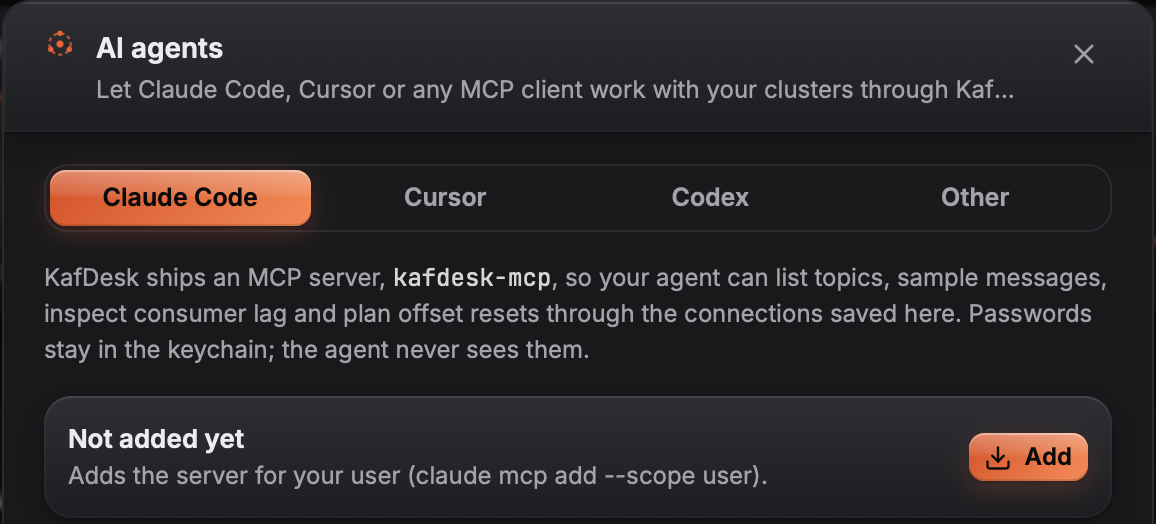
One click adds the server to Claude Code, Cursor or Codex.
Tools for agents
- Clusters and topics:
list_clusters,cluster_overview,list_topics,describe_topic,partition_placement(replicas and leaders per broker and rack, under-replicated and offline partitions, leaders off their preferred broker, running reassignments and leftover throttles). - Messages:
consume(bounded samples, decoded, also Protobuf from your local.proto files),find_messages_by_keyandcompare_topics(two topics by key, for example after a copy: counts and sample keys, no values). - Consumer groups:
list_groups,describe_group,explain_consumer_lag(stopped consumers, rebalances, one hot partition, stalled commits, consumers slower than producers). - Schemas:
compare_schema_versions. - Changes, only when you allow them:
reset_offsetsplans a reset; with writes set to Ask in KafDesk,reset_offsets(apply),produceandupdate_topic_configsend each change to the KafDesk window for your Allow or Deny.
Guard rails
The server is read-only by default, a read-only connection stays read-only, outputs are capped so a big topic cannot flood the agent, the masking rules you set in KafDesk apply to every record an agent reads, and cluster data is marked as untrusted input in the tool descriptions. Every call goes to a log on your computer.
Writes with your approval
Set writes to Ask in KafDesk on the AI agents screen (or start kafdesk-mcp --writes=ask). The agent can then ask to produce one record, apply an offset reset to an empty consumer group or change topic configs. The request appears in the KafDesk window with exactly what would be written; the change is made by the app, through the same checks as a change you make by hand, only after you press Allow. The offset plan is committed exactly as shown, production connections need the topic or group name typed, and requests nobody answers are refused after 60 seconds. KafDesk listens for requests only while approval is on, and only from programs running as your user. The older direct mode (--writes=direct, formerly --allow-write) writes without asking and refuses production-protected connections.
Questions
What is the KafDesk MCP server?
kafdesk-mcp is a Model Context Protocol server that ships with KafDesk. It gives AI agents such as Claude Code, Cursor or Codex tools to look at your Kafka clusters through the connections you saved in KafDesk.
Can an AI agent change my Kafka cluster?
Not by default: kafdesk-mcp is read-only. With writes set to Ask in KafDesk (kafdesk-mcp --writes=ask), an agent can ask to produce a record, apply an offset reset or change topic configs; each request opens in the KafDesk window with exactly what would be written, and nothing is written until you press Allow. Connections marked read-only stay read-only, and every request and answer goes to the log.
How does approval work?
kafdesk-mcp never writes in this mode. It passes the request to the running KafDesk app over a private local socket; the app shows the whole record value and headers, the offset plan per partition, or each config's value now and after, with the agent's reason and the name the client gives itself. Production connections also need the topic or group name typed. Unanswered requests are refused after 60 seconds. KafDesk listens only while you have approval turned on (choosing Ask in KafDesk on the AI agents screen turns it on); if KafDesk is not open or approval is off, the agent is told to ask you.
Which tools does it offer?
list_clusters, cluster_overview, list_topics, describe_topic, consume, find_messages_by_key, list_groups, describe_group, explain_consumer_lag, compare_schema_versions, compare_topics, partition_placement and reset_offsets (plan only, unless writes are on). With writes on, produce and update_topic_config are added.
How do I add it to Claude Code or Cursor?
Open AI agents in KafDesk and click the client: KafDesk adds kafdesk-mcp to Claude Code, Cursor or Codex. Any other MCP client can start the kafdesk-mcp binary over stdio.
Where do the credentials come from?
From your KafDesk connections and the OS keychain. The agent never sees passwords; it only gets the results of the tools.