cwprep
buat file tableau prep dengan ai
Dokumentasi
cwprep

Tableau Prep flow engineering for reproducible
.tfl/.tflxgeneration, validation, and SQL translation.
cwprep is a Python toolkit and Model Context Protocol (MCP) server for building Tableau Prep flows from code or agent tool calls.
It is meant to be a PrepFlow engineering layer, not a generic conversational analytics agent. The focus is reproducibility, inspectability, and safe automation in local workflows, scripts, and AI clients.
The cw in cwprep comes from Cooper Wenhua.
Author: Cooper Wenhua <imgwho@gmail.com>





Try the example workflow · Read the guide
Quick Start
Install
pip install cwprep
Run As An MCP Server
uvx cwprep
The short form above remains the simplest MCP client option and is the default config shown in this repository. When a human runs cwprep directly in an interactive terminal, it prints CLI help instead of starting stdio MCP.
Add the server to your MCP client with the same command. For example:
{
  "mcpServers": {
    "cwprep": {
      "command": "uvx",
      "args": ["cwprep"]
    }
  }
}
For Claude Code:
claude mcp add cwprep -- uvx cwprep
For VSCode, add cwprep to your workspace or user mcp.json and use uvx cwprep as the command.
If you prefer an explicit script name, these equivalent launch styles also work:
cwprep mcp
uvx --from cwprep cwprep-mcp
cwprep-mcp
python -m cwprep.mcp_server
For client-specific details and the full reference, see https://github.com/aidatacooper/cwprep/blob/main/docs/guide.md.
Use The CLI
cwprep --help
cwprep doctor
cwprep status
cwprep capabilities
cwprep validate examples/basic_flow.yaml
cwprep run examples/basic_flow.yaml --out demo_output/cli_basic_flow.tfl
cwprep translate examples/basic_flow.yaml --out demo_output/cli_basic_flow.sql
cwprep run uses the same declarative flow shape as the MCP tools, so specs can move between local terminals, CI jobs, and agents without translation.
Highlights
| Area | What you get |
|---|---|
| Flow authoring | Generate Tableau Prep .tfl / .tflx flows from Python or declarative MCP definitions |
| Data inputs | Connect to MySQL, PostgreSQL, SQL Server, Alibaba AnalyticDB for MySQL, CSV, Excel, custom SQL, and table inputs |
| Prep operations | Build joins, unions, filters, value filters, keep/remove columns, renames, calculations, quick clean steps, type changes, aggregates, pivots, and unpivots |
| Packaging | Save final .tfl archives or packaged .tflx files with embedded data files |
| SQL translation | Translate generated or existing .tfl flows into readable ANSI SQL CTEs |
| CLI workflow | Validate specs, generate flows, inspect capabilities, and translate SQL from terminal or CI |
| MCP support | Drive flow generation from Claude, Cursor, VSCode, Gemini CLI, Continue, or other MCP clients |
See It In Action
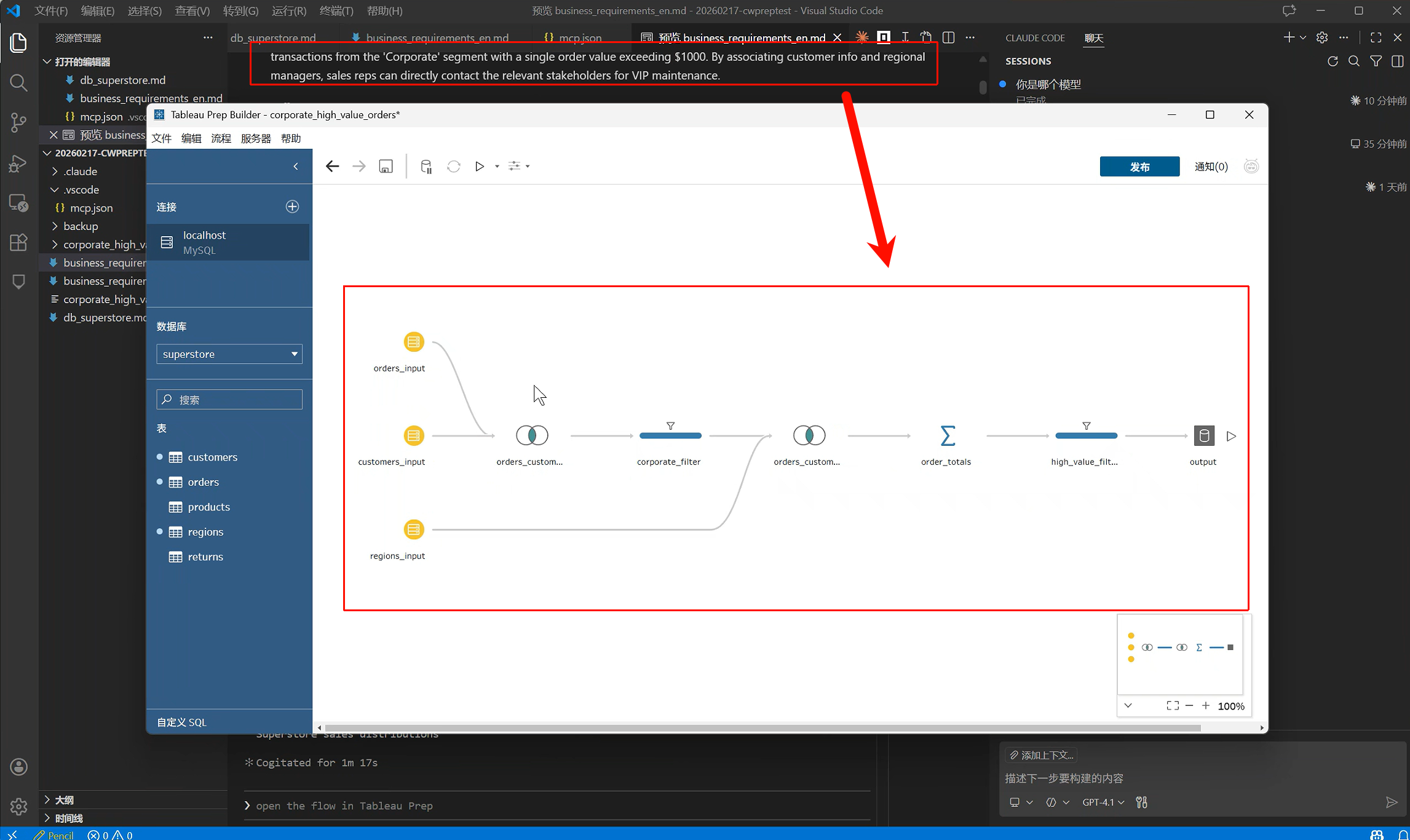
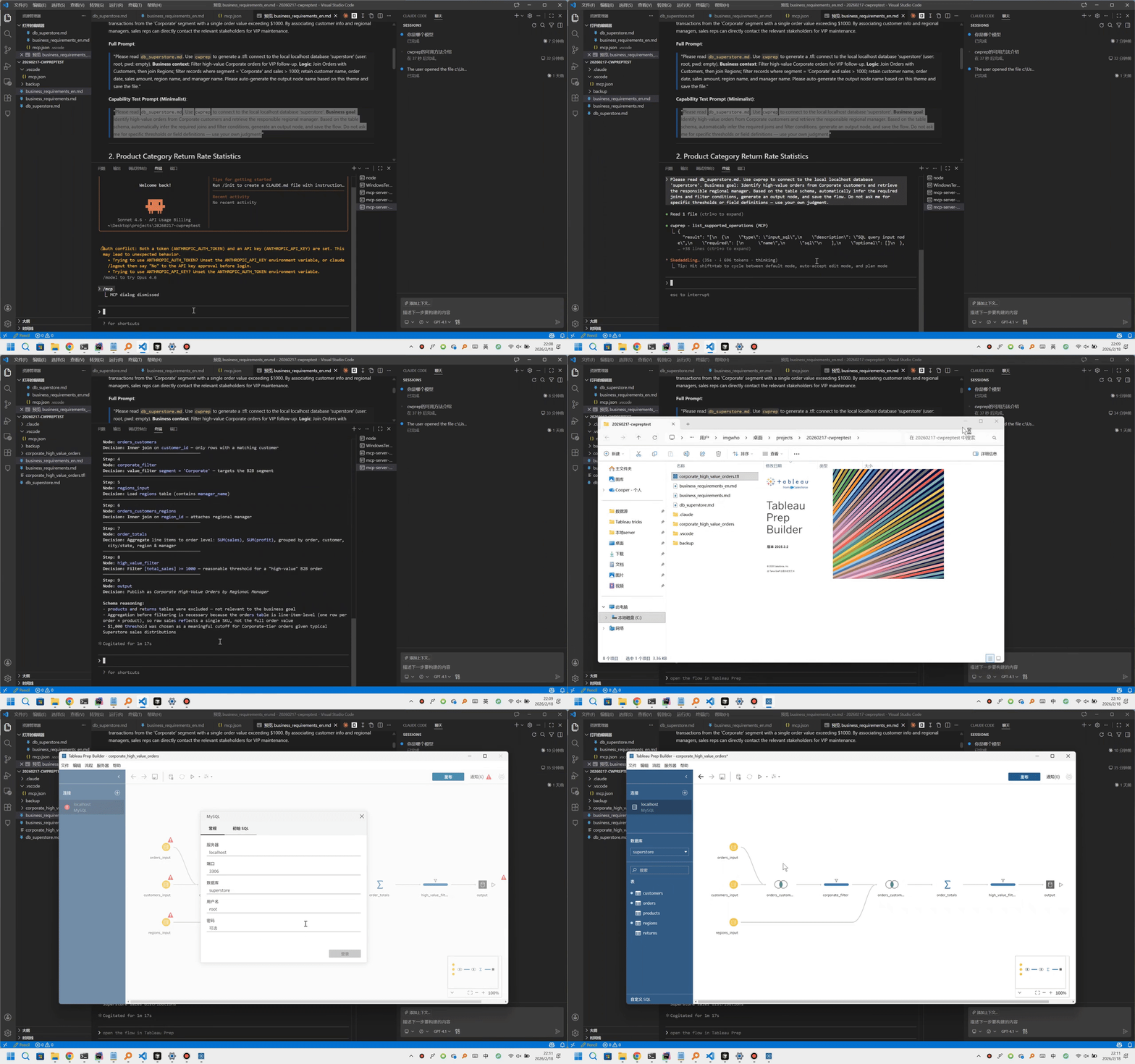
This GIF shows the MCP tool flow that designs and generates a Tableau Prep flow.
Architecture
                            Interfaces
  +---------------------------------------------------------------+
  |  +--------------------------+  +---------------------------+  |
  |  |        MCP Server        |  |      Python Library       |  |
  |  |  generate_tfl            |  |  from cwprep import       |  |
  |  |  validate_flow_definition|  |  TFLBuilder, TFLPackager |  |
  |  |  translate_to_sql        |  |                           |  |
  |  |                          |  |  builder.add_...()       |  |
  |  |                          |  |  builder.build()         |  |
  |  |  (Claude / Cursor /      |  |  TFLPackager.save_tfl()  |  |
  |  |   VSCode / Gemini)       |  |                           |  |
  |  +------------+-------------+  +-------------+-------------+  |
  |               +-----------------------------+                 |
  +---------------------------------------------|-----------------+
                                                v
  +---------------------------------------------------------------+
  |                    Packaged References                        |
  |    api_reference.md  calculation_syntax.md  best_practices.md |
  |    served as cwprep://docs/... MCP resources                  |
  +----------------------------+----------------------------------+
                               v
  +---------------------------------------------------------------+
  |                         TFLBuilder                            |
  |       connections  inputs  joins  unions  cleaning            |
  |       calculations  aggregates  pivots  outputs               |
  +-------------+-------------------+-----------------------------+
                |                   |
                v                   v
  +--------------------------+  +-------------------------------+
  |       TFLPackager        |  |        SQLTranslator          |
  |  flow/display/meta JSON  |  |  .tfl or flow JSON -> SQL    |
  |  archive/tflx packaging  |  |  CTEs + step comments        |
  +------------+-------------+  +---------------+---------------+
               |                                |
               v                                v
       output.tfl / output.tflx          translated.sql
               |
               v
  +---------------------------------------------------------------+
  |                      Tableau Prep Builder                     |
  |          Open, inspect, run, publish, or continue editing      |
  +---------------------------------------------------------------+
Mermaid view:
flowchart TD
    subgraph Interfaces
        MCP["MCP Server<br/>generate_tfl<br/>validate_flow_definition<br/>translate_to_sql"]
        PY["Python Library<br/>TFLBuilder · TFLPackager<br/>SQLTranslator"]
    end

    subgraph References["Packaged References"]
        REFS["api_reference.md<br/>calculation_syntax.md<br/>best_practices.md<br/>served as cwprep://docs/..."]
    end

    subgraph Engine["Flow Engine"]
        BUILDER["TFLBuilder<br/>connections · inputs · joins · unions<br/>cleaning · calculations · pivots · outputs"]
    end

    subgraph Artifacts["Packaging & Translation"]
        PACKAGER["TFLPackager<br/>flow/display/meta JSON<br/>archive/tflx packaging"]
        SQL["SQLTranslator<br/>.tfl or flow JSON → SQL<br/>CTEs + step comments"]
    end

    subgraph Outputs
        TFL["output.tfl / output.tflx"]
        SQL_OUT["translated.sql"]
        PREP["Tableau Prep Builder<br/>open · inspect · run · publish"]
    end

    MCP --> BUILDER
    PY --> BUILDER
    REFS --> MCP
    REFS --> BUILDER
    REFS --> SQL
    BUILDER --> PACKAGER
    BUILDER --> SQL
    PACKAGER --> TFL
    SQL --> SQL_OUT
    TFL --> PREP
The reference layer is packaged with the library so agents and scripts can start from known-good API guidance, resolve Tableau Prep calculation syntax, and avoid common flow-design pitfalls without relying on a checked-out repository.
Agent Architecture
cwprep is designed for tool-using agents, not just direct Python calls. The MCP server gives agents a compact flow-generation surface; resource documents give phase-specific Tableau Prep guidance before generation.
Human or agent prompt
        |
        v
MCP server instructions
        |
        v
Resource documents
api-reference -> calculation-syntax -> best-practices
        |
        v
Flow tools
validate_flow_definition -> generate_tfl / translate_to_sql
        |
        v
.tfl / .tflx artifact + optional SQL representation
Prompts explain what to build. Resources explain how to build it correctly. Tools make the generated flow inspectable and repeatable.
Capability Boundary
cwprep keeps its public surface intentionally small:
| Level | Meaning |
|---|---|
| Core | Stable primitives for normal SDK docs, examples, and MCP workflows |
| Advanced | Supported compositions such as packaged .tflx, file unions, multi-column joins, and SQL translation |
| Inspectable | Exploded flow folders and internal JSON are available for debugging, but final archives are the default output |
Use list_supported_operations when an agent needs to check whether a requested Prep operation belongs in the stable surface.
Design Decisions
- The MCP workflow is definition-first: design the flow, validate the JSON contract, then generate the archive.
- Resource documents are phase-specific operating guides, not generic prompt stuffing.
- The SDK and MCP output only the final
.tfl/.tflxarchive by default. Usesave_to_folder()only when you explicitly want the exploded folder for inspection. - Tableau Prep calculation syntax is not SQL syntax. Agents should read
cwprep://docs/calculation-syntaxbefore creating formulas. - SQL translation is a readability and migration aid, not a replacement for Tableau Prep execution.
- File replacement is handled defensively: generation writes temporary artifacts first and backs up existing outputs before replacement.
Validation
cwprep provides four levels of flow validation and review:
| Level | Description | Requires |
|---|---|---|
| 1. Definition validation | Validate the declarative MCP flow definition before generating files | None |
| 2. Archive generation safety | Write temporary artifacts, back up existing outputs, and emit final .tfl / .tflx archives | None |
| 3. SQL translation review | Translate supported flow logic into ANSI SQL CTEs for inspection and migration planning | None |
| 4. Tableau Prep openability | Open the generated archive in Tableau Prep Builder for final product verification | Tableau Prep Builder |
from cwprep import TFLBuilder, TFLPackager

builder = TFLBuilder(flow_name="Customer Orders")
# ... add connections, inputs, transforms, and outputs ...
flow, display, meta = builder.build()
TFLPackager.save_tfl("./customer_orders.tfl", flow, display, meta)
# MCP tools
validate_flow_definition(flow_definition={...})
generate_tfl(flow_definition={...}, output_path="customer_orders.tfl")
translate_to_sql(tfl_path="customer_orders.tfl")
FAQ
What is the difference between .tfl and .tflx?
.tfl is the Tableau Prep flow archive. .tflx is the packaged version that can include local data files used by the flow.
Does cwprep open or run Tableau Prep Builder?
No. cwprep generates files that Tableau Prep Builder can open. It does not automate the Tableau Prep desktop GUI.
Does validate_flow_definition save files?
No. validate_flow_definition checks the requested flow definition before generation. generate_tfl is the MCP tool that writes the final .tfl or .tflx archive.
Can cwprep translate flows to SQL?
Yes. SQLTranslator and the translate_to_sql MCP tool can translate supported .tfl flow logic into ANSI SQL-style CTEs.
When should I use uvx cwprep versus python -m cwprep.mcp_server?
Use uvx cwprep for the normal MCP workflow. Use cwprep mcp or python -m cwprep.mcp_server for explicit local MCP testing without relying on smart entrypoint detection.
For backward compatibility, uvx --from cwprep cwprep-mcp and cwprep-mcp continue to work.
Where is the full guide?
See the online guide.