Houtini LM
Delegasikan pekerjaan terbatas dari Claude ke endpoint LLM apa pun yang kompatibel dengan OpenAI (LM Studio, Ollama, OpenRouter), sambil mempertahankan konteks dan kuota Claude Anda.
Dokumentasi

Houtini LM (@houtini/lm) - Offload Work from Claude Code to a Local LLM, OpenAI GPT-5/6, a Router or a Cheaper Cloud Model




Houtini LM is an MCP server that lets Claude (or any MCP client) hand bounded work to another model - a local LLM on your GPU, OpenAI's latest GPT models, a LiteLLM router, OpenRouter or a cheap cloud API - while you carry on working in the AI platform you already like. It cuts your token bill, and it gives you a second model to review your code whenever you want one.
Quick Navigation
What's new | Why use it | Install | How it handles different models | What to hand over | Tools | Reading the footer | Configuration | Endpoints | The manual
I built this because I kept leaving Claude Code running overnight on big refactors and the token bill was painful. A huge chunk of that spend went on bounded tasks any decent model handles fine - generating boilerplate, code review, commit messages, format conversion, the sort of work that doesn't need Claude's reasoning or its tool access.
So Claude stays the architect, doing the planning, the multi-file changes and the judgement calls, and houtini-lm passes the drafting to whatever model you've got running. That could be Qwen on a GPU box under your desk, GPT-5 or GPT-6 straight from OpenAI, a model behind a LiteLLM router, one of OpenRouter's 300+ models or DeepSeek at pennies per million tokens. Claude QAs everything that comes back.
I wrote a full walkthrough of why I built this and how I use it day to day if you'd like the longer story.
What's new in 3.3
houtini-lm now speaks to far more than a local GPU. Point it at OpenAI directly and GPT-5, GPT-6 and the o-series reasoning models work without any router in between. They reject parameters every open model accepts (max_tokens, temperature), so houtini-lm sends them max_completion_tokens only, learns a model's output cap from its own error when the endpoint doesn't report it, and leaves the image, speech and moderation models out of the list. Point it at a LiteLLM router and it reads which real model sits behind each alias, along with that model's true context window and output cap, so a mixed fleet of local and hosted models is sized and profiled correctly. Thinking is now your call (auto, off or on), there's a Docker guide built from a working deployment, and the manual has a page per job. The changelog has the detail.
Why use houtini-lm?
The bottom line before we go deep: you keep your favourite AI platform, and you stop paying frontier prices for work that doesn't need a frontier model.
The obvious win is cost. When Claude delegates a review with code_task_files, the source files are read by the houtini-lm process and sent straight to the other model, so they never enter Claude's context window at all. Claude sends a short tool call and reads back a short answer. I benchmarked this on real TypeScript source files:
| Task | Claude reads it directly | Delegated | Saved |
|---|---|---|---|
| Code review (1,352 lines) | 14,466 tokens | 769 tokens | 95% |
| Architecture review (2,022 lines) | 20,014 tokens | 983 tokens | 95% |
| External repo review (581 lines) | 5,344 tokens | 741 tokens | 86% |
| Code explanation (833 lines) | 8,678 tokens | 744 tokens | 91% |
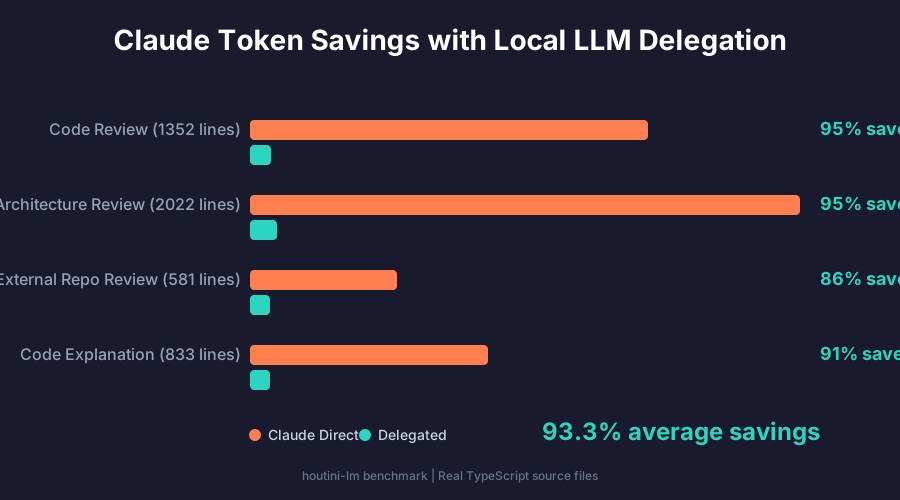
That averages out at 93.3% saved across the session. To be fair, small tasks like a one-line question or a commit message don't save much, because the tool call overhead (around 250 tokens) is about the same size as the answer. Anything that involves reading files, which is most of a real coding session, pays for itself straight away. You can run the same benchmark against your own setup with LM_STUDIO_URL=http://your-server:1234 node scripts/benchmark.mjs.
The less obvious win is a second opinion. A different model reads your code with different blind spots, and it costs you next to nothing to ask. As it happens, the 3.3.0 release of this repo is a decent example: I had Claude point houtini-lm at gpt-6-astra (through my LiteLLM router) and ask it to review the release's own 14,000-token diff. It came back with three real bugs - a router probe that cached a temporary 429 as a permanent "not a router", an output cap that got overwritten, and a race in the model list cache - and all three were fixed before the release shipped. Two of the three new test files were drafted the same way, then reviewed by Claude before commit.
Code review is where this pays off hardest, because reviews are exactly the bounded, read-a-lot-write-a-little work that a cheaper model does well. From there the list keeps growing: test stubs, docstrings, commit messages, changelog drafts, format conversion, mock data, type definitions, embeddings for a RAG pipeline, a quick sanity check on a regex, brainstorming three approaches before Claude commits to one, and so on.
The trade-off is wall-clock time. Local inference is typically 3-30x slower than a frontier model, so delegation wins on bounded, self-contained tasks rather than everything. A local model keeps your code private and costs nothing per token, a cloud model is cheap, and neither touches your Claude quota or its rate limits.
How it works
Claude Code, Claude Desktop, Cursor... (orchestrator)
   |
   |-- Reasoning, planning, architecture, tool use --> your main AI platform
   |
   +-- Bounded grunt work --> houtini-lm --HTTP/SSE--> any OpenAI-compatible endpoint
       . Code review & second opinions       LM Studio, Ollama, vLLM, SGLang, llama.cpp
       . Test stubs & boilerplate            LiteLLM routers
       . Commit messages & docs              OpenRouter (300+ models)
       . Format conversion & mock data       DeepSeek, Groq, Cerebras, OpenAI...
       . Embeddings for RAG pipelines
Claude's the architect, the other model's the drafter, and Claude checks everything that comes back.
Install
You'll need Node 22.5 or newer and an OpenAI-compatible endpoint: LM Studio, Ollama, vLLM, SGLang, a LiteLLM router, or a cloud API key for OpenAI, DeepSeek, Groq and the like. In Claude Code, with LM Studio running on the same machine, it's one command:
claude mcp add houtini-lm -- npx -y @houtini/lm
That's it. LM Studio listens on localhost:1234 by default, which is where houtini-lm looks first, so Claude can start delegating straight away. Anywhere else, set the URL (and a key, if the endpoint needs one):
claude mcp add houtini-lm \
  -e HOUTINI_LM_ENDPOINT_URL=http://192.168.1.50:1234 \
  -e HOUTINI_LM_API_KEY=your-key-if-needed \
  -- npx -y @houtini/lm
OpenAI works the same way. Pin the model you want, because OpenAI lists dozens and they all score the same in routing:
claude mcp add houtini-lm \
  -e HOUTINI_LM_ENDPOINT_URL=https://api.openai.com \
  -e HOUTINI_LM_API_KEY=sk-... \
  -e HOUTINI_LM_MODEL=gpt-5.2 \
  -e HOUTINI_LM_SERIALISE=0 \
  -- npx -y @houtini/lm
Installing houtini-lm walks through every route: a GPU on another machine, OpenAI and other cloud APIs, OpenRouter, a LiteLLM router, Claude Desktop and other MCP clients, plus how to check it worked and how to update. If you'd rather run it in a container, Running houtini-lm in Docker covers both a plain docker run -i and serving it over HTTP behind Docker's MCP Gateway. New to local models altogether? Start with Getting started, which covers which models fit on 16, 32, 64, 96 or 128 GB of VRAM.
To check everything's wired up, ask Claude to run houtini-lm's discover tool. It tells you the version, which endpoint it found, which model is active and how big its context window is.
How houtini-lm handles different models
No two open source LLMs are the same. They differ in context window, output cap, prompt template, whether they think before they answer and how much of that they report, so a lot of houtini-lm's code is about working out what it's talking to and adjusting for it. How houtini-lm handles different models has the full detail, and here's the short version.
At startup houtini-lm asks your server for every model it has, loaded and downloaded, and looks each one up on HuggingFace for its architecture, licence and chat template, caching the lot in SQLite so later startups are instant. For the families I know well (Qwen, Nemotron, Granite, LLaMA, GLM, GPT-OSS, DeepSeek, Gemma, Kimi and OpenAI's hosted GPT models) there's a curated profile, and each family gets its own temperature, output constraints and think-block handling, while OpenAI's hosted reasoning models (GPT-5/6, o-series) are sent only the parameters they accept. Run list_models and you get the whole picture:
Loaded models (ready to use):

  nvidia/nemotron-3-nano
    type: llm, arch: nemotron_h_moe, quant: Q4_K_M, format: gguf
    context: 200,082 (max 1,048,576), by: nvidia
    Capabilities: tool_use
    NVIDIA Nemotron: compact reasoning model optimised for step-by-step logic
    Best for: analysis tasks, code bug-finding, math/science questions
    HuggingFace: text-generation, 1.7M downloads, MIT licence

Available models (downloaded, not loaded):

  qwen3-coder-30b-a3b-instruct
    type: llm, arch: qwen3moe, quant: BF16, context: 262,144
    Qwen3 Coder: code-specialised model with agentic capabilities
    Best for: code generation, code review, test stubs, refactoring
    HuggingFace: text-generation, 12.9K downloads, Apache-2.0
Output budgets come from the model each call is actually sent to. Leave max_tokens unset and the call gets 25% of that model's context window, never more than its declared output cap or the room left beside your prompt, so a hosted model doesn't get sent a request it'll reject. There's a floor too, because MCP clients habitually pass tiny caps like 256 that strangle reasoning models mid-thought, so anything under 4,096 is ignored unless you set HOUTINI_LM_MIN_TOKENS=0.
Thinking is your decision, through HOUTINI_LM_THINKING. The default, auto, switches thinking off for models detected as supporting the toggle (Qwen3, Gemma 4, Nemotron, DeepSeek R1, GLM-4, gpt-oss), which suits Claude doing the reasoning and the other model doing the drafting. off forces that on every call, which you need when a backend serves a thinking model under a name detection can't recognise. on forces thinking on, which is worth it for bug-hunting or checking an argument, at the cost of time and tokens. Whichever you choose, houtini-lm inflates the output budget for thinking models and strips any <think> blocks from the answer, so the reasoning doesn't leave you with an empty reply.
With several models available, houtini-lm scores each against the task type and picks the best, and it suggests a better model rather than swapping one in, since loading a model takes minutes. On a big catalogue every unknown model scores the same and the first listed wins, so pin one with HOUTINI_LM_MODEL, or pass model on an individual call.
Point it at a LiteLLM router and it reads /model/info as well, which tells it the real model behind each alias (my local alias is qwen3.6-27b) and, for hosted models, the true context window and output cap. Each alias is then profiled and sized as the model it actually is, the TTS, image and video models a router lists by the dozen are filtered out, and rate-limit errors are retried with backoff. Calls are queued one at a time by default, because a single GPU can only serve one request anyway; OpenRouter skips the queue, and for OpenAI, a router or a batching backend like vLLM you can turn it off with HOUTINI_LM_SERIALISE=0.
What to hand over
The best candidates are bounded and well defined, with a clear input and a clear output:
| Task | Why it works on another model |
|---|---|
| Code review | Paste the full source (or pass the paths), ask for bugs |
| A second opinion on a plan | Doesn't commit to anything, costs next to nothing |
| Generate test stubs | Source in, tests out |
| Explain a function | Summarisation doesn't need tool access |
| Draft commit messages | Diff in, message out |
| Convert formats | JSON to YAML, snake_case to camelCase |
| Generate mock data | Schema in, data out |
| Write type definitions | Source in, types out |
| Structured JSON output | Grammar-constrained, valid by construction |
| Text embeddings | Semantic search, RAG pipelines |
Anything that needs reasoning across the codebase, tool access or multi-step orchestration stays on Claude: architectural decisions, reading and writing files, running tests and interpreting the results, multi-file refactoring plans and anything that has to call other tools. The tool descriptions are written to nudge Claude into planning delegation at the start of a big task, rather than only using it when it happens to remember.
The tools
There are eight of them. The full parameter reference is in The tools, in depth.
| Tool | What it's for |
|---|---|
chat | The workhorse. Send a task, get an answer. |
custom_prompt | System, context and instruction kept separate, which consistently beats stuffing everything into one message on local models. I tested this properly one weekend with the same batch of review tasks run both ways, and the three-part version won every round. |
code_task | Code analysis with a code-tuned system prompt and per-family temperature. |
code_task_files | Like code_task, but houtini-lm reads the files from disk itself, so the source never passes through Claude's context. Unreadable files are reported inline rather than sinking the call, and a pre-flight estimator refuses inputs that measured data says would time out. |
embed | Text embeddings via /v1/embeddings (Nomic Embed is a solid choice). |
discover | Health check: endpoint, active model, context window, output cap, and measured speed once there's a real call to measure. |
list_models | Everything on the server, loaded and downloaded, with profiles. |
stats | Session and lifetime offload totals and per-model performance, without the model catalogue. |
The inference tools (chat, custom_prompt, code_task, code_task_files) all take an optional model to pin the call, max_tokens, and sampling controls (temperature, seed, stop, top_p, top_k, repeat_penalty, frequency_penalty, presence_penalty). chat and custom_prompt also take a json_schema, which forces the answer to conform to a JSON Schema; on LM Studio that's grammar-based sampling, so there's no hoping the model remembers to close its brackets:
{
  "json_schema": {
    "name": "code_review",
    "schema": {
      "type": "object",
      "properties": {
        "issues": {
          "type": "array",
          "items": {
            "type": "object",
            "properties": {
              "line": { "type": "number" },
              "severity": { "type": "string" },
              "description": { "type": "string" }
            },
            "required": ["line", "severity", "description"]
          }
        }
      },
      "required": ["issues"]
    }
  }
}
If you're driving houtini-lm from your own scripts rather than from Claude, set HOUTINI_LM_STRUCTURED=1 and each inference result also carries a structuredContent block (the answer, model, tokens, timing, quality flags) to read as JSON. Leave it off for Claude Code, which shows the model only that block when it's present (the tools page has the story).
Reading the footer
Every response ends with a footer computed from the SSE stream itself:
---
Model: nvidia/nemotron-3-nano | 279→303 tokens (12 reasoning / 291 visible) | TTFT: 485ms, 58.0 tok/s, 5.2s
📊 First measured call on nvidia/nemotron-3-nano: 58.0 tok/s, 485ms to first token - use this to gauge whether to delegate longer tasks.
💰 Offloaded - this session: 4,283 tokens / 7 calls · lifetime: 147,432 tokens / 213 calls
The first-call line appears once per model per session, and it's a benchmark from a real task rather than a synthetic warm-up. The 💰 line updates every call, and it counts the tokens the other model handled (its prompt and completion, reasoning included), which is work Claude didn't do rather than a measure of Claude tokens saved; the benchmark above is the honest measure of that. When a model reports its reasoning tokens, the token count splits into reasoning and visible, so you can see when a thinking model is burning budget on hidden reasoning.
When something went wrong, a quality line says so: TRUNCATED for a partial result (a stalled connection gives you what arrived rather than a timeout error), hit-max-tokens when the budget ran out, think-blocks-stripped when reasoning was removed and tokens-estimated when the server didn't report usage. Clean output gets no quality line at all.
Per-model speed and token counts persist in ~/.houtini-lm/model-cache.db, so discover shows your measured tok/s and time to first token from the first call of a new session, and stats gives you the lifetime totals. That data is specific to your workstation on purpose, because delegation decisions should reflect your hardware rather than somebody else's benchmark. In practice, Claude delegates more the longer a session runs; after about 5,000 offloaded tokens it starts hunting for more work to push over.
Getting good results
Qwen, Llama, Nemotron and GLM score brilliantly on coding benchmarks now, and the gap between a good and a bad result is almost always the prompt rather than the model. I've spent a fair bit of time on this, and the short version goes like this. Send complete code, because local models make up details when the input is truncated, so send the whole function rather than a snippet with ... in the middle. Be explicit about the output format ("return a JSON array"), since smaller models need it. Give the model a specific persona ("expert Rust developer who cares about memory safety" does noticeably better than "helpful assistant"), state what not to do as well as what to do, and for code generation include the imports, types and signatures around the function body.
Keep long jobs in chunks, too. Most MCP clients time a tool call out at around 60 seconds, and although houtini-lm sends a progress notification on every streamed chunk to keep the clock reset, not every client or gateway passes those through. Calls of roughly 500-900 output tokens finish comfortably inside the limit. The craft of delegation goes much deeper, including the verbatim-echo pattern I use for fixes.
Check your install
npm run shakedown
scripts/shakedown.mjs runs seven of the eight tools end to end (everything except stats) and prints a table of real TTFT, tok/s, token counts and reasoning split for each call. It takes under a minute on a decent rig:
Summary

   7/7 steps passed on LM Studio, model=nvidia/nemotron-3-nano

| Tool              | OK  | TTFT (ms) | tok/s  | Tokens in→out        | Reasoning | Notes
| chat              | ✅  |      891  |   36.9 | 48→104               |        —  | answered
| custom_prompt     | ✅  |      872  |   43.9 | 170→333              |        —  | 5 valid items
| code_task         | ✅  |      857  |   41.6 | 180→189              |        —  | tests generated
| code_task_files   | ✅  |   11028   |   39.5 | 6891→3000            |        —  | cross-referenced
| embed             | ✅  |      —    |     —  | —                    |        —  | 768-dim vector

   Tokens offloaded: 10,915 (prompt: 7,289, completion: 3,626, reasoning: 0)
If you'd rather have a quality review than latency numbers, paste SHAKEDOWN.md into a Claude session with houtini-lm attached and Claude will drive the same steps and write you a report on the output as well as the speed.
Configuration
Most setups need only the first two or three of these. The full list, including the file-access and queuing controls, is in Configuration.
| Variable | Default | What it does |
|---|---|---|
HOUTINI_LM_ENDPOINT_URL | http://localhost:1234 | Base URL of the OpenAI-compatible API, without /v1. |
HOUTINI_LM_API_KEY | (none) | Bearer token for authenticated endpoints. |
HOUTINI_LM_MODEL | (auto-detect) | The model calls use unless they name one. Pin it on routers and big catalogues. |
HOUTINI_LM_THINKING | auto | auto, off or on - see Thinking: auto, off or on. |
HOUTINI_LM_SERIALISE | 1 | Set to 0 for cloud APIs like OpenAI, routers in front of cloud models, and backends that batch natively (vLLM, SGLang). |
HOUTINI_LM_MIN_TOKENS | 4096 | Floor for caller-supplied max_tokens. Set to 0 to honour any value. |
Compatible endpoints
Anything that speaks the OpenAI /v1/chat/completions API will work:
| What | URL | Notes |
|---|---|---|
| LM Studio | http://localhost:1234 | Default, zero config, rich metadata via its v0 API. Setup guide |
| Ollama | http://localhost:11434 | Thinking models (qwen3, deepseek-r1) handled via Ollama's delta.reasoning channel. Setup guide |
| vLLM | http://localhost:8000 | Native OpenAI API. Setup guide |
| SGLang | http://localhost:30000 | Good for repeated-context work. See Getting started |
| LiteLLM router | http://localhost:4000 | Auto-detected: aliases resolved, real limits read, non-chat models filtered, 429 backoff |
| llama.cpp | http://localhost:8080 | Server mode |
| OpenAI | https://api.openai.com | GPT-5, GPT-6 and the o-series sent only the parameters they accept; image, speech and moderation models left out of the list. Pin a model |
| OpenRouter | https://openrouter.ai/api | 300+ models, auto-detected, parallel requests allowed |
| DeepSeek | https://api.deepseek.com | Very cheap per token |
| Groq | https://api.groq.com/openai | Fast |
| Cerebras | https://api.cerebras.ai | Very fast |
| Any OpenAI-compatible API | Any URL | Set the URL and API key |
The manual
This README is the overview, and the depth lives in these pages:
| Page | What's in it |
|---|---|
| Installing houtini-lm | Every install route: local, remote GPU, cloud, OpenRouter, LiteLLM, Claude Desktop, other clients, and updating |
| Running houtini-lm in Docker | docker run -i, or served over HTTP behind Docker's MCP Gateway, with the traps we measured |
| How houtini-lm handles different models | Discovery, profiles, thinking (auto, off or on), output budgets, routing, LiteLLM routers, models that reject parameters |
| Configuration | Every environment variable, per-call settings, and where state lives |
| The tools, in depth | All eight tools: the parameters, reading the footer, the max_tokens floor |
| The craft of delegation | What to hand off and how to brief it, the verbatim-echo pattern, micro-chunking, reasoning-model budgets |
| Troubleshooting | Symptom > cause > fix for empty responses, timeouts, context-length 400s, queuing and routers |
| Getting started | Local models from zero: LM Studio or Docker, what small models are good at, which fit your VRAM |
| LM Studio, Ollama and vLLM setup | Backend guides, each with the traps that cause silent failures |
| Shakedown test | The end-to-end check, as a script or as a prompt for Claude |
| Developer guide | Architecture, contributing, release process |
Development
git clone https://github.com/houtini-ai/houtini-lm.git
cd houtini-lm
npm install
npm test             # build + unit tests
npm run shakedown    # end-to-end self-test against a live endpoint
DEVELOPER.md covers the architecture, the reasoning-model pipeline, backend detection, the SQLite performance cache and how to add new tools or backends. If you find a model family houtini-lm handles badly, open an issue with the discover output and I'll take a look.
Good luck, and let me know how you get on!
Licence
Apache-2.0