XcodeProj MCP Server
Server MCP untuk memanipulasi file proyek Xcode (.xcodeproj) menggunakan Swift. Membutuhkan Docker dan macOS.
Dokumentasi
xcodeproj-mcp-server






A Model Context Protocol (MCP) server for manipulating Xcode project files (.xcodeproj) using Swift.
Overview
xcodeproj-mcp-server is an MCP server that provides tools for programmatically manipulating Xcode project files. It leverages the tuist/xcodeproj library for reliable project file manipulation and implements the Model Context Protocol using the swift-sdk.
This server enables AI assistants and other MCP clients to:
- Create new Xcode projects
- Manage targets, files, and build configurations
- Inspect project structure including groups and hierarchies
- Modify build settings
- Add dependencies and frameworks
- Automate common Xcode project tasks
Use Cases
Project Creation and Setup
- Create projects from scratch: Generate new Xcode projects with custom configurations, bundle identifiers, and organization settings without opening Xcode
- Multi-target project scaffolding: Set up complex projects with multiple apps, frameworks, tests, and extensions in a single automated workflow
Development Workflow Automation
- Add new files to targets: After creating a new Swift file, automatically add it to the appropriate target's source files for compilation
- Add folder references: Include external resource folders or asset directories as synchronized folder references in your project, automatically reflecting any file system changes
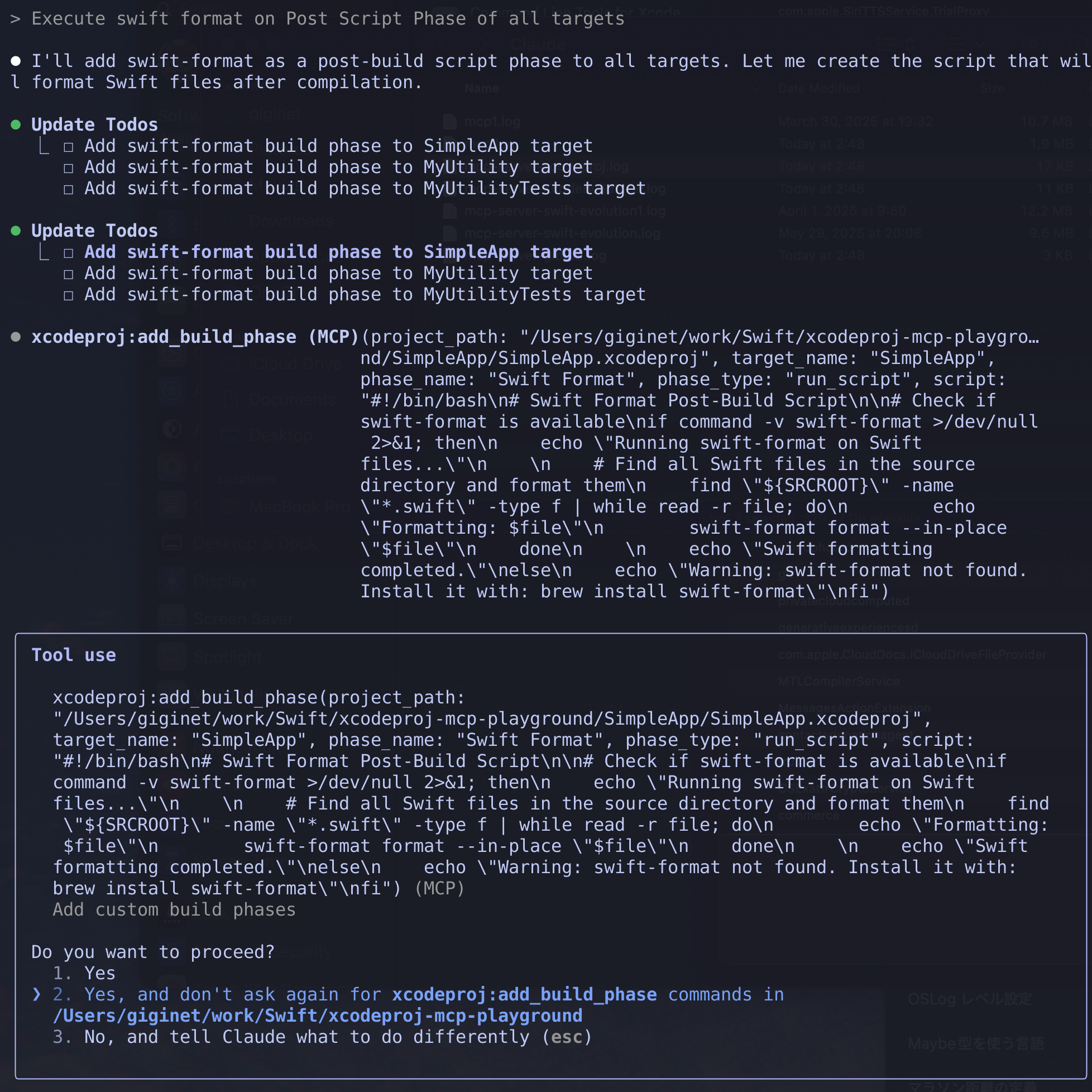
- Add build phases: Integrate code formatters, linters, or custom build scripts into your targets (e.g., SwiftLint, SwiftFormat execution phases)
- Create frameworks and app extensions: Quickly scaffold new framework targets or app extensions for modularizing your codebase
- Add Widget Extensions: Automatically create and embed Widget Extension targets with proper configuration for iOS home screen widgets
Project Configuration Management
- Automate Info.plist setup: Programmatically configure Info.plist settings, entitlements, and provisioning profiles for different targets
- Build configuration management: Set up different build configurations with appropriate compiler flags, bundle identifiers, and deployment targets
- Dependency management: Add system frameworks, link libraries, and configure target dependencies without manual Xcode navigation
How to set up for Claude Desktop and Claude Code
Prerequisites
- macOS (for running Xcode projects)
- A container runtime — either Apple's
container(recommended) or Docker
The server is distributed as a linux/arm64 container image, which runs on either runtime.
Setup with Apple's container (recommended)
container is Apple's own tool for running Linux containers as lightweight virtual machines on macOS. It is the recommended runtime for this server: it comes from Apple, requires no third-party desktop application, and runs the published linux/arm64 image natively on Apple silicon.
Requirements
- A Mac with Apple silicon
- macOS 26 or later (
containerdoes not support older versions)
Installation
Install the container CLI from the official release page.
container needs its background service running. Start it once after installing, and again after each reboot:
container system start
Then pull the pre-built image from GitHub Container Registry:
container image pull ghcr.io/giginet/xcodeproj-mcp-server:latest
container run has no --pull option, so run container image pull again whenever you want to update to the latest image.
Configuration for Claude Code
claude mcp add xcodeproj -- container run --rm -i -v '${CLAUDE_PROJECT_DIR:-.}:/workspace' ghcr.io/giginet/xcodeproj-mcp-server:latest /workspace
This mounts the project directory to /workspace inside the container, which is how the server gets access to your Xcode projects. Keep the single quotes: they stop your shell from expanding the mount at registration time, so Claude Code resolves it every time it launches the server instead of pinning it to the directory you happened to run claude mcp add from. It falls back to ., the working directory Claude Code starts the server in, which is the project root.
Configuration for Claude Desktop
Add the following to your Claude Desktop configuration file:
macOS: ~/Library/Application Support/Claude/claude_desktop_config.json
{
  "mcpServers": {
    "xcodeproj": {
      "command": "/usr/local/bin/container",
      "args": [
        "run",
        "--rm",
        "-i",
        "-v",
        "${workspaceFolder}:/workspace",
        "ghcr.io/giginet/xcodeproj-mcp-server",
        "/workspace"
      ]
    }
  }
}
The installer places the binary at /usr/local/bin/container. The absolute path is used here because that directory is not always on the PATH of GUI applications.
Building the image locally
container build reads the same Dockerfile:
container build -t xcodeproj-mcp-server:local .
The builder container defaults to 2 CPUs and 2 GB of memory. Allocate more to it to speed up the release build:
container build -c 8 -m 8g -t xcodeproj-mcp-server:local .
Setup with Docker
Use Docker if you are on macOS 15 or earlier, or if Docker is already part of your workflow.
Pull the pre-built Docker image from GitHub Container Registry:
docker pull ghcr.io/giginet/xcodeproj-mcp-server
Configuration for Claude Code
claude mcp add xcodeproj -- docker run --pull=always --rm -i -v '${CLAUDE_PROJECT_DIR:-.}:/workspace' ghcr.io/giginet/xcodeproj-mcp-server:latest /workspace
As with container, the project directory is mounted to /workspace inside the container so that the server can access your Xcode projects, and the single quotes keep the mount unexpanded until Claude Code launches the server.
Configuration for Claude Desktop
Add the following to your Claude Desktop configuration file:
macOS: ~/Library/Application Support/Claude/claude_desktop_config.json
{
  "mcpServers": {
    "xcodeproj": {
      "command": "docker",
      "args": [
        "run",
        "--rm",
        "-i",
        "-v",
        "${workspaceFolder}:/workspace",
        "ghcr.io/giginet/xcodeproj-mcp-server",
        "/workspace"
      ]
    }
  }
}
Using the server from Claude Code or Codex inside Xcode
Xcode can run Claude Code and Codex as coding agents, and it reads their configuration from agent-specific subfolders of ~/Library/Developer/Xcode/CodingAssistant, a folder Xcode uses exclusively. Configuration placed there affects agents only when you launch them in Xcode, so it does not interfere with your regular ~/.claude or ~/.codex setup. See Apple's Extending and customizing agents for details.
Two things differ from the command-line setup:
- Xcode launches the MCP server with the project directory as its working directory, so mount
.directly. Codex has no equivalent of Claude Code's${CLAUDE_PROJECT_DIR:-.}expansion, so this keeps both agents on the same mount. - Give
commandan absolute path, because the agent's environment does not necessarily have/usr/local/binon itsPATH.
Claude Code in Xcode
~/Library/Developer/Xcode/CodingAssistant/ClaudeAgentConfig acts as Claude Code's configuration directory. Point CLAUDE_CONFIG_DIR at it and use claude mcp add:
CLAUDE_CONFIG_DIR=~/Library/Developer/Xcode/CodingAssistant/ClaudeAgentConfig \
  claude mcp add xcodeproj -s user -- \
  /usr/local/bin/container run --rm -i -v .:/workspace ghcr.io/giginet/xcodeproj-mcp-server:latest /workspace
That writes the server into ClaudeAgentConfig/.claude.json. To add it by hand instead, add an entry under mcpServers:
{
  "mcpServers": {
    "xcodeproj": {
      "type": "stdio",
      "command": "/usr/local/bin/container",
      "args": [
        "run",
        "--rm",
        "-i",
        "-v",
        ".:/workspace",
        "ghcr.io/giginet/xcodeproj-mcp-server:latest",
        "/workspace"
      ]
    }
  }
}
Codex in Xcode
~/Library/Developer/Xcode/CodingAssistant/codex acts as Codex's CODEX_HOME:
CODEX_HOME=~/Library/Developer/Xcode/CodingAssistant/codex \
  codex mcp add xcodeproj -- \
  /usr/local/bin/container run --rm -i -v .:/workspace ghcr.io/giginet/xcodeproj-mcp-server:latest /workspace
That writes the server into codex/config.toml. To add it by hand instead:
[mcp_servers.xcodeproj]
command = "/usr/local/bin/container"
args = ["run", "--rm", "-i", "-v", ".:/workspace", "ghcr.io/giginet/xcodeproj-mcp-server:latest", "/workspace"]
If you set up with Docker, use the absolute path to your docker binary in place of /usr/local/bin/container. Restart the agent in Xcode after changing its configuration.
Recommended settings for Claude Code
Enabling ENABLE_TOOL_SEARCH in .claude/settings.json activates dynamic MCP tool loading. This prevents unused MCP tools from consuming context.
{
  "env": {
    "ENABLE_TOOL_SEARCH": "1"
  }
}
Path Security
The MCP server now supports restricting file operations to a specific base directory. When you provide a base path as a command-line argument:
- All
project_pathand file path parameters will be resolved relative to this base path - Absolute paths are validated to ensure they're within the base directory
- Any attempt to access files outside the base directory will result in an error
This is especially useful when running the server in containers or other sandboxed environments.
Available Tools
Project Management
-
create_xcodeproj- Create a new Xcode project- Parameters:
project_name,path,organization_name,bundle_identifier
- Parameters:
-
list_targets- List all targets in a project- Parameters:
project_path
- Parameters:
-
list_build_configurations- List all build configurations- Parameters:
project_path
- Parameters:
-
list_files- List all files in a specific target- Parameters:
project_path,target_name
- Parameters:
-
list_groups- List all groups in the project with hierarchical paths, optionally filtered by target- Parameters:
project_path,target_name(optional)
- Parameters:
File Operations
-
add_file- Add a file to the project- Parameters:
project_path,file_path,target_name,group_path
- Parameters:
-
remove_file- Remove a file from the project- Parameters:
project_path,file_path
- Parameters:
-
move_file- Move or rename a file within the project- Parameters:
project_path,source_path,destination_path
- Parameters:
-
add_synchronized_folder- Add a synchronized folder reference to the project- Parameters:
project_path,folder_path,group_name,target_name
- Parameters:
-
create_group- Create a new group in the project navigator- Parameters:
project_path,group_name,parent_group_path
- Parameters:
Target Management
-
add_target- Create a new target- Parameters:
project_path,target_name,type,platform,bundle_identifier
- Parameters:
-
remove_target- Remove an existing target- Parameters:
project_path,target_name
- Parameters:
-
duplicate_target- Duplicate an existing target- Parameters:
project_path,source_target_name,new_target_name
- Parameters:
-
add_dependency- Add dependency between targets- Parameters:
project_path,target_name,dependency_name
- Parameters:
App Extension Management
-
add_app_extension- Add an App Extension target and embed it in a host app- Parameters:
project_path,extension_name,extension_type,host_target_name,bundle_identifier,platform(optional),deployment_target(optional) - Supported extension types:
widget,notification_service,notification_content,share,today,action,file_provider,intents,intents_ui,keyboard,photo_editing,document_provider,custom
- Parameters:
-
remove_app_extension- Remove an App Extension target and its embedding from the host app- Parameters:
project_path,extension_name
- Parameters:
Build Configuration
-
get_build_settings- Get build settings for a target- Parameters:
project_path,target_name,configuration_name
- Parameters:
-
set_build_setting- Modify build settings- Parameters:
project_path,target_name,setting_name,value,configuration_name
- Parameters:
-
add_framework- Add framework dependencies- Parameters:
project_path,target_name,framework_name,embed
- Parameters:
-
add_build_phase- Add custom build phases- Parameters:
project_path,target_name,phase_type,name,script
- Parameters:
Swift Package Management
-
add_swift_package- Add a Swift Package dependency to the project- Parameters:
project_path,package_url,requirement,target_name,product_name
- Parameters:
-
list_swift_packages- List all Swift Package dependencies in the project- Parameters:
project_path
- Parameters:
-
remove_swift_package- Remove a Swift Package dependency from the project- Parameters:
project_path,package_url,remove_from_targets
- Parameters:
License
This project is licensed under the MIT License.