Chargebee
resmiServer MCP yang menghubungkan agen AI ke platform Chargebee.
Apa yang bisa Anda lakukan dengan Chargebee MCP?
- Cari dokumentasi Chargebee — Ajukan pertanyaan tentang API, fitur, atau konsep penagihan dan dapatkan jawaban dari dokumen resmi melalui
chargebee_documentation_search. - Hasilkan kerangka kode integrasi — Minta rencana kode terstruktur dan cuplikan contoh untuk integrasi Chargebee Anda dengan
chargebee_code_planner. - Cari catatan rilis dan FAQ — Ambil pembaruan produk terbaru, pertanyaan yang sering diajukan, dan konten basis pengetahuan lainnya.
Dokumentasi
Server Model Context Protocol (MCP) Chargebee


⚠️ Pemberitahuan Penghentian
Paket ini sudah tidak digunakan lagi dan tidak akan menerima pembaruan atau dukungan. Silakan migrasi ke Server MCP KnowledgeBase baru kami, yang menawarkan kemampuan lebih baik dan akurasi yang ditingkatkan. Pelajari lebih lanjut dan tingkatkan di sini: Dokumentasi Server MCP Chargebee
Model Context Protocol (MCP) adalah protokol terstandarisasi yang dirancang untuk mengelola konteks antara model bahasa besar (LLM) dan sistem eksternal.
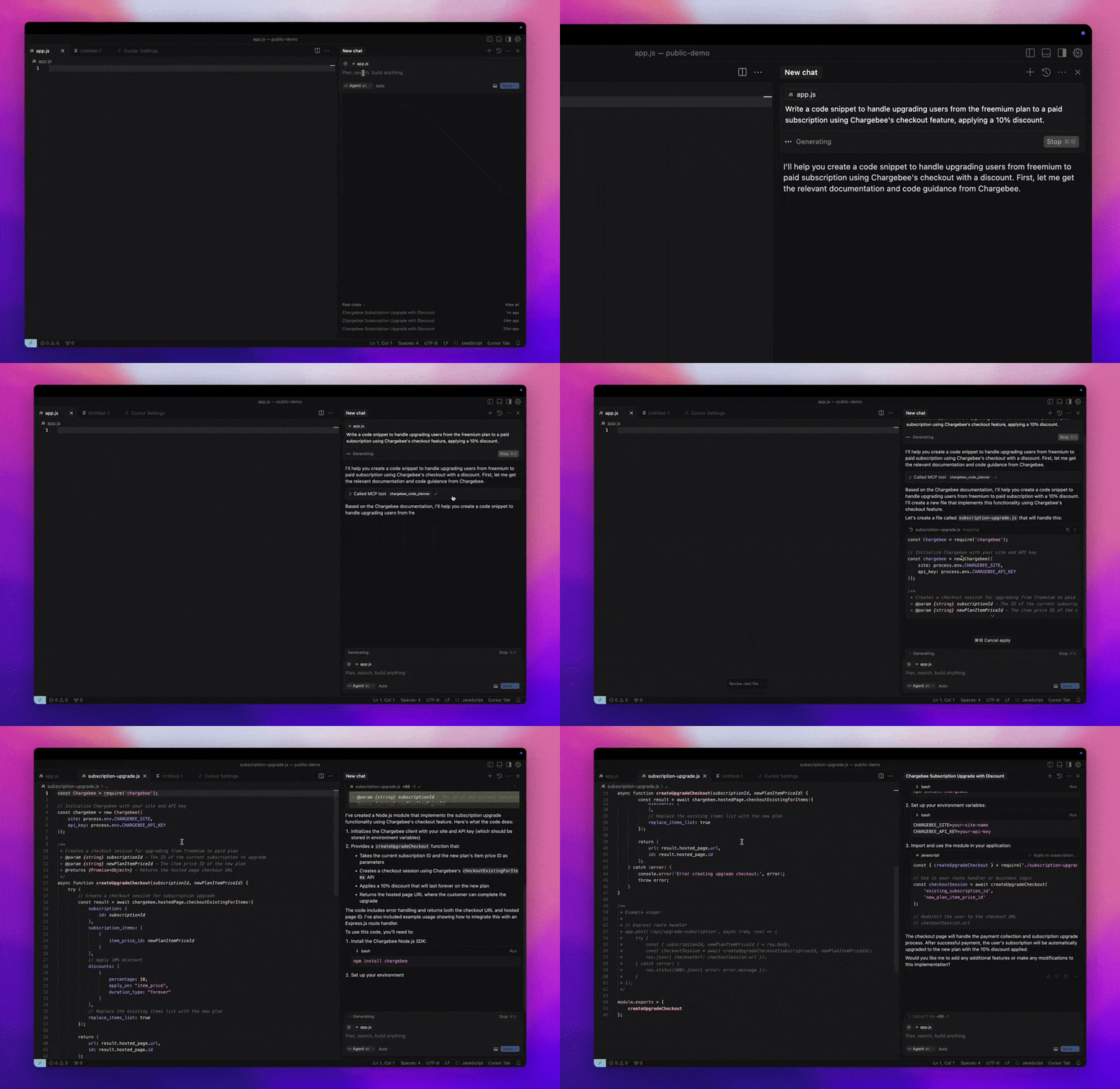
Server MCP Chargebee menawarkan serangkaian alat yang tangguh untuk meningkatkan efisiensi pengembang. Ini terintegrasi dengan editor kode bertenaga AI seperti Cursor, Windsurf, dan Cline, serta alat serbaguna seperti Claude Desktop. Ini kompatibel dengan Klien MCP apa pun.
Dengan Server MCP ini, Anda dapat:
-
Mendapatkan jawaban langsung tentang produk Chargebee dan layanan API.
-
Menerima cuplikan kode yang sadar konteks yang disesuaikan dengan kebutuhan integrasi Anda.
-
Mengakses basis pengetahuan Chargebee, termasuk:
- Dokumentasi
- FAQ
- Catatan rilis
- Dan masih banyak lagi
Prasyarat
- Node.js LTS - Server MCP Chargebee memerlukan versi Node.js LTS agar berfungsi dengan benar.
Penyiapan
Untuk menjalankan server MCP Chargebee menggunakan Node.js npx, jalankan perintah berikut:
npx -y @chargebee/mcp@latest
Alat yang Tersedia
| Alat | Deskripsi |
|---|---|
chargebee_documentation_search | Cari dokumentasi Chargebee untuk mengambil informasi terperinci dan panduan penggunaan. |
chargebee_code_planner | Hasilkan kerangka kode terstruktur dan kode contoh untuk mengintegrasikan API dan fitur Chargebee. |
Instalasi
Cursor
Untuk menambahkan server ini ke Cursor IDE:
- Arahkan ke
Cursor Settings>MCP. - Klik
+ Add new Global MCP Server. - Tambahkan konfigurasi berikut ke file
.cursor/mcp.jsonglobal Anda:
{
  "mcpServers": {
    "chargebee": {
      "command": "npx",
      "args": [
          "-y",
          "@chargebee/mcp"
      ]
    }
  }
}
Lihat dokumentasi Cursor untuk detail tambahan. Catatan: Anda juga dapat menambahkan ini ke konfigurasi Cursor khusus proyek Anda (didukung di Cursor 0.46+).
Windsurf
Untuk menyiapkan MCP dengan Cascade:
- Buka Windsurf dan arahkan ke
Settings>Advanced Settingsatau gunakan Palet Perintah >Open Windsurf Settings Page. - Gulir ke bagian Cascade untuk menambahkan server baru, melihat server yang ada, atau mengakses file konfigurasi JSON mentah di
mcp_config.json. - Klik “Tambahkan server kustom +” untuk menyertakan server MCP Chargebee langsung di
mcp_config.json:
{
  "mcpServers": {
    "chargebee": {
      "command": "npx",
      "args": [
          "-y",
          "@chargebee/mcp"
      ]
    }
  }
}
Lihat dokumentasi Windsurf untuk informasi lebih lanjut.
VS Code
Instal server MCP Chargebee di VS Code menggunakan salah satu tombol ini:

Atau, Anda dapat menginstal server MCP Chargebee menggunakan CLI VS Code:
# For VS Code
code --add-mcp '{"name":"chargebee","command":"npx","args":["-y","@chargebee/mcp"]}'
# For VS Code Insiders
code-insiders --add-mcp '{"name":"chargebee","command":"npx","args":["-y","@chargebee/mcp"]}'
Setelah instalasi, server MCP Chargebee akan tersedia untuk digunakan dengan agen GitHub Copilot Anda di VS Code.
Claude
Tambahkan konfigurasi berikut ke file claude_desktop_config.json Anda. Lihat dokumentasi Claude Desktop untuk detail lebih lanjut:
{
  "mcpServers": {
    "chargebee": {
      "command": "npx",
      "args": [
          "-y",
          "@chargebee/mcp"
      ]
    }
  }
}
Cline
Tambahkan JSON berikut secara manual ke file cline_mcp_settings.json Anda melalui pengaturan Server MCP Cline:
{
  "mcpServers": {
    "chargebee": {
      "command": "npx",
      "args": [
          "-y",
          "@chargebee/mcp"
      ]
    }
  }
}
Roo Code
Akses pengaturan MCP dengan memilih Edit MCP Settings di pengaturan Roo Code atau menggunakan perintah Roo Code: Open MCP Config di palet perintah VS Code:
{
  "mcpServers": {
    "chargebee": {
      "command": "npx",
      "args": [
          "-y",
          "@chargebee/mcp"
      ]
    }
  }
}
Kontribusi
Untuk berkontribusi pada proyek ini, lihat panduan kontribusi.