diagrams-mcp-server
Server MCP untuk menghasilkan diagram arsitektur cloud, diagram alir, diagram sekuens, dan lainnya — didukung oleh mingrammer/diagrams, Mermaid, dan PlantUML.
Dokumentasi
diagrams-mcp-server


MCP server for generating cloud architecture diagrams, flowcharts, sequence diagrams, and more — powered by three rendering engines: mingrammer/diagrams, Mermaid, and PlantUML.
Getting Started
Local Installation
Prerequisites
Graphviz is required for the default local/in-process rendering mode. Mermaid CLI and PlantUML are optional — install them only if you need those specific rendering engines locally.
| Dependency | Required for | Install |
|---|---|---|
| Graphviz | render_diagram (cloud architecture) | brew install graphviz |
| Mermaid CLI | render_mermaid (flowcharts, sequence, etc.) | npm install -g @mermaid-js/mermaid-cli |
| Java + PlantUML | render_plantuml (UML diagrams) | brew install openjdk + download plantuml.jar |
Install the server
Via uvx (recommended):
uvx diagrams-mcp-server
Via pip:
pip install diagrams-mcp-server
From source:
pip install git+https://github.com/ByteOverDev/diagrams-mcp.git
Configure your MCP client
Claude Desktop
Add to your claude_desktop_config.json (Settings → Developer → Edit Config):
uvx (recommended):
{
  "mcpServers": {
    "diagrams-mcp": {
      "command": "uvx",
      "args": ["diagrams-mcp-server"]
    }
  }
}
pip:
{
  "mcpServers": {
    "diagrams-mcp": {
      "command": "diagrams-mcp-server"
    }
  }
}
Claude Code (CLI)
Run:
claude mcp add diagrams-mcp -- uvx diagrams-mcp-server
Or add to your .mcp.json:
uvx (recommended):
{
  "mcpServers": {
    "diagrams-mcp": {
      "command": "uvx",
      "args": ["diagrams-mcp-server"]
    }
  }
}
pip:
{
  "mcpServers": {
    "diagrams-mcp": {
      "command": "diagrams-mcp-server"
    }
  }
}
Cursor
Add to your .cursor/mcp.json:
uvx (recommended):
{
  "mcpServers": {
    "diagrams-mcp": {
      "command": "uvx",
      "args": ["diagrams-mcp-server"]
    }
  }
}
pip:
{
  "mcpServers": {
    "diagrams-mcp": {
      "command": "diagrams-mcp-server"
    }
  }
}
Windsurf
Add to your ~/.codeium/windsurf/mcp_config.json:
uvx (recommended):
{
  "mcpServers": {
    "diagrams-mcp": {
      "command": "uvx",
      "args": ["diagrams-mcp-server"]
    }
  }
}
pip:
{
  "mcpServers": {
    "diagrams-mcp": {
      "command": "diagrams-mcp-server"
    }
  }
}
VS Code
Add to your .vscode/mcp.json:
uvx (recommended):
{
  "servers": {
    "diagrams-mcp": {
      "type": "stdio",
      "command": "uvx",
      "args": ["diagrams-mcp-server"]
    }
  }
}
pip:
{
  "servers": {
    "diagrams-mcp": {
      "type": "stdio",
      "command": "diagrams-mcp-server"
    }
  }
}
Available Tools
Discovery
list_providers()→list[str]— List all diagram providers (aws,gcp,k8s,azure,onprem, etc.)list_services(provider)→list[str]— List service categories within a provider (e.g.aws→compute,database,network)list_nodes(provider, service)→list[dict]— List node classes for a provider.service pair with import pathssearch_nodes(query)→list[dict]— Search for nodes by keyword across all providers (e.g. "postgres", "lambda")
Rendering
render_diagram(code)→Image(PNG) — Execute a Python script using mingrammer/diagrams in a sandboxed subprocess. Returns a rendered cloud architecture diagram.render_mermaid(definition)→Image(PNG/SVG) — Render a Mermaid diagram definition (flowcharts, sequence, class, ER, state, Gantt, and more).render_plantuml(definition)→Image(PNG) — Render a PlantUML diagram definition (sequence, class, component, activity, state, deployment).
Cross-Provider Equivalence
find_equivalent(node, target_provider?)→dict— Find equivalent services across cloud providers (e.g.EC2→ComputeEngineon GCP).list_categories()→list[dict]— List all 30 infrastructure role categories with mapped nodes across providers.
Resources
The server provides reference documentation accessible via MCP resource URIs:
| URI | Description |
|---|---|
diagrams://reference/diagram | Diagram constructor parameters, defaults, and usage |
diagrams://reference/edge | Edge operators, labels, styling, and chaining |
diagrams://reference/cluster | Cluster nesting, styling, and graph attributes |
diagrams://reference/mermaid | Mermaid syntax examples for 6 diagram types |
diagrams://reference/plantuml | PlantUML syntax examples for 6 diagram types |
Examples
Cloud Architecture (mingrammer/diagrams)
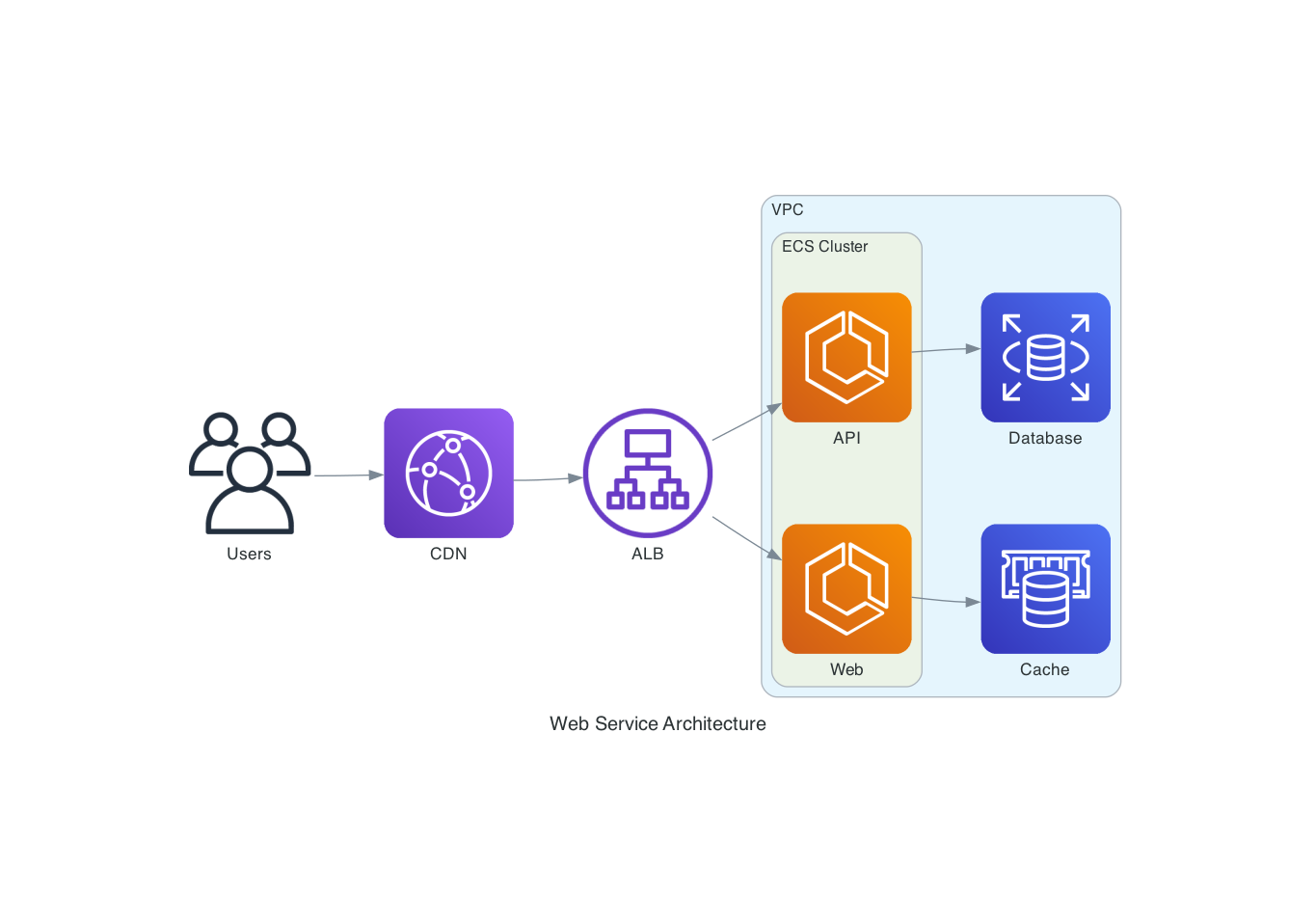
"Draw an AWS architecture with an ALB routing to two ECS services, backed by RDS and ElastiCache"
from diagrams import Diagram, Cluster
from diagrams.aws.network import ALB
from diagrams.aws.compute import ECS
from diagrams.aws.database import RDS, ElastiCache

with Diagram("ECS Service", direction="LR"):
    lb = ALB("ALB")

    with Cluster("ECS Cluster"):
        services = [ECS("Web"), ECS("API")]

    lb >> services
    services[0] >> ElastiCache("Cache")
    services[1] >> RDS("Database")
Flowchart (Mermaid)
"Create a flowchart showing a CI/CD pipeline"

Sequence Diagram (PlantUML)
"Show the authentication flow between a client, API gateway, and auth service"
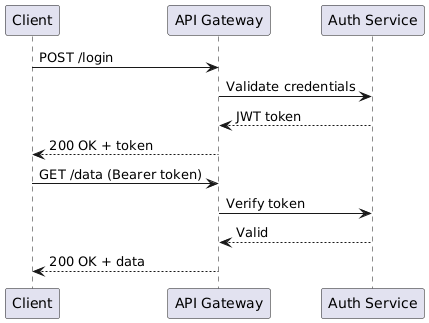
@startuml
Client -> "API Gateway": POST /login
"API Gateway" -> "Auth Service": Validate credentials
"Auth Service" --> "API Gateway": JWT token
"API Gateway" --> Client: 200 OK + token
Client -> "API Gateway": GET /data (Bearer token)
"API Gateway" -> "Auth Service": Verify token
"Auth Service" --> "API Gateway": Valid
"API Gateway" --> Client: 200 OK + data
@enduml
Development
# Clone and install
git clone https://github.com/ByteOverDev/diagrams-mcp.git
cd diagrams-mcp
pip install -e ".[dev]"

# Run tests
pytest

# Lint and format
ruff check .
ruff format .

# Run the MCP server locally (stdio mode)
diagrams-mcp-server
Split Facade/Renderer Mode
For hosted deployments, the MCP server can run as a lightweight facade that delegates render work to a separate renderer service. This keeps the always-on MCP process small while Graphviz, Chromium, Mermaid CLI, Java, and PlantUML live only in the renderer image.
# Terminal 1: renderer service
RENDERER_HOST=0.0.0.0 RENDERER_PORT=8001 diagrams-renderer-server

# Terminal 2: HTTP MCP facade delegating to the renderer
FASTMCP_TRANSPORT=http \
FASTMCP_HOST=0.0.0.0 \
FASTMCP_PORT=8000 \
DIAGRAMS_RENDERER_MODE=remote \
DIAGRAMS_RENDERER_URL=http://127.0.0.1:8001 \
diagrams-mcp-server
Docker/Railway examples are included:
| File | Purpose |
|---|---|
Dockerfile.facade | Slim MCP facade image without renderer-only binaries |
Dockerfile.renderer | Renderer image with Graphviz, Chromium, Mermaid CLI, Java, and PlantUML |
railway.facade.toml | Example Railway facade service config |
railway.renderer.toml | Example Railway renderer service config |
Key environment variables:
| Variable | Purpose |
|---|---|
DIAGRAMS_RENDERER_MODE=remote | Makes the facade use the HTTP renderer service |
DIAGRAMS_RENDERER_URL | Renderer base URL, for example http://diagrams-renderer.railway.internal:8080 |
DIAGRAMS_IMAGE_STORE_DIR | Optional file-backed temporary image store directory |
BASE_URL | Optional public base URL used when returning absolute download links |
Supported Providers
The render_diagram tool supports all providers from the mingrammer/diagrams library, including:
AWS, GCP, Azure, Kubernetes, On-Premise, AlibabaCloud, OCI, OpenStack, DigitalOcean, Elastic, Outscale, Generic, and Custom nodes.
Use list_providers() and search_nodes(query) to discover available nodes.
License
MIT