MCP Connect Lite for Odoo
Free MCP server inside Odoo 17, 18, 19 and 20: connect Claude, ChatGPT and other AI assistants to your Odoo data with an API key, read-only, with each user's own access rights and record rules. The paid MCP Connect adds OAuth sign-in, write tools and a call log.
Dokumentasi
MCP Connect Lite
A free, read-only MCP server for Odoo: AI tools search and read your data with an Odoo API key and each user's own access rights.
Free · Odoo 17, 18, 19 and 20 · Community and Enterprise
Get it for Odoo 20.0 Get it for Odoo 19.0 Get it for Odoo 18.0 Get it for Odoo 17.0
Sold and installed through the official Odoo Apps Store.
MCP (Model Context Protocol) is the standard way for AI assistants and agents to use outside tools. MCP Connect Lite adds an MCP endpoint to Odoo: a developer or administrator adds its address and an Odoo API key to an AI client, which can then find models, describe their fields, and search, read and count records. Every call runs as the user who owns the key, with that user's access rights, and Lite's tools cannot change anything.
What it does
Five read tools
list_models, get_fields, search_records, read_records and count_records: find a model, see its fields, search with Odoo domains, read records by id and count them. Files and images are always left out of answers.
Read-only by design
Lite has no tool that creates, changes or deletes records. A client that asks for one gets an unknown-tool error and nothing in Odoo changes.
Each user's own access rights
Every call runs as the user who owns the API key. Odoo's access rights and record rules apply as in the web client, so the assistant never sees more than that user.
Odoo API keys
Users create a key in their own preferences and the AI client sends it as a bearer token. Remove the key and the next call is refused. Only internal users can connect; a call without a valid key gets 401 with a WWW-Authenticate header.
Sensitive models blocked
System parameters, API keys, attachments, mail servers, payment providers, saved payment tokens and other sensitive models are never available to assistants, whatever the user's rights: the tools refuse them, also as a step in a search condition, and leave fields that link to them out of answers.
Current and earlier MCP versions
One address serves the stateless protocol version 2026-07-28 and the versions with a handshake, 2024-11-05 to 2025-11-25. One call returns at most 100 records.
A guide for every user
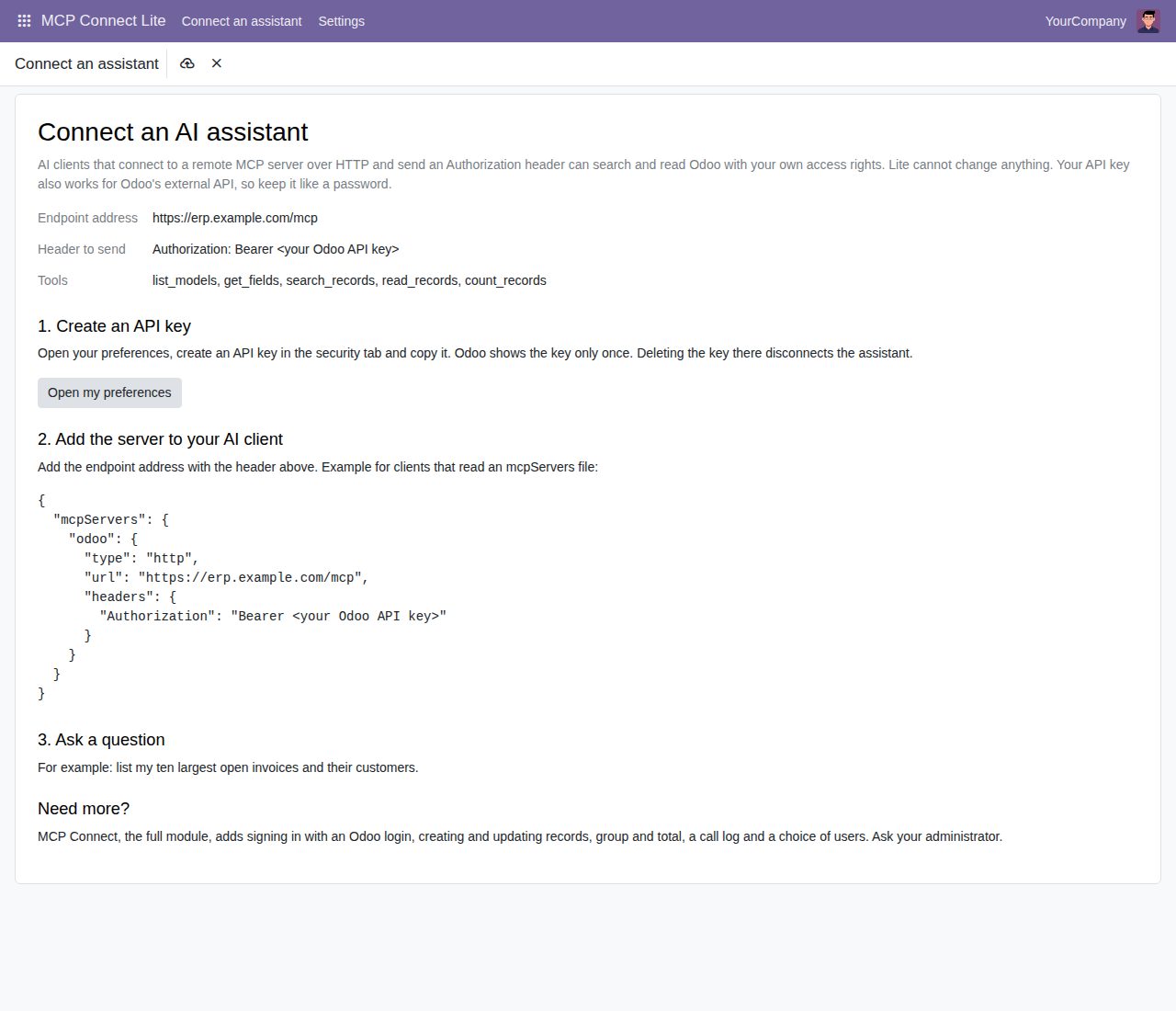
MCP Connect Lite > Connect an assistant shows the endpoint address, the header to send, the five tools and an example configuration, and opens the user's preferences to create a key.
Switch it off at any time
One setting closes the MCP endpoint for everyone, and a removed API key is refused on the next call. Requests from web pages on other sites are refused.
How to use it
- Install MCP Connect Lite. The endpoint is on after installation.
- Open MCP Connect Lite > Connect an assistant and copy the endpoint address, for example https://erp.example.com/mcp.
- Click Open my preferences, create an API key in the security tab and copy it. Odoo shows a new key only once.
- In your AI client, add a remote MCP server (HTTP) with that address and the header Authorization: Bearer followed by the key. The guide shows an example configuration.
- Ask a question, for example: list my ten largest open invoices and their customers.
Screenshots
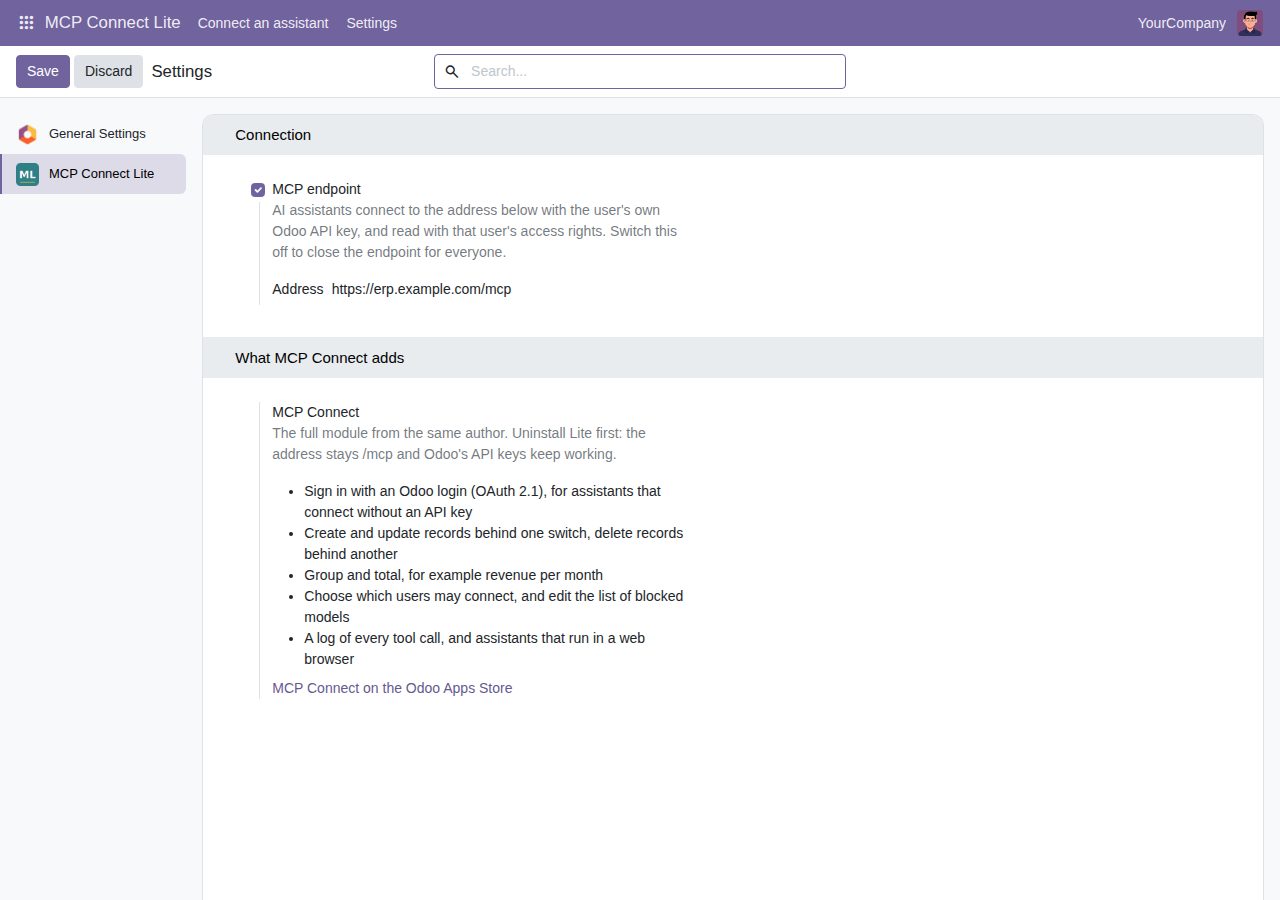
Settings: the endpoint switch and address, and what MCP Connect adds.
Need it to work differently?
We build custom Odoo modules and changes to this one at a fixed price, from €950 excluding VAT. Small modules are usually delivered within five working days, tested on your Odoo version. Describe what you need to hello@bizzkitt.ai.
Bitwerf is a trade name of BizzKitt B.V., Frederikstraat 67, 3034 LD Rotterdam, the Netherlands (KvK 42149345, VAT NL869932354B01). Questions: hello@bizzkitt.ai · Support · Privacy · Terms