Enoch
Server MCP untuk bidang kendali Enoch: gerbang pengiriman, sinkronisasi bukti, provenans, dan gerbang kualitas untuk pekerjaan AI otonom yang berjalan lama.
Dokumentasi
enoch-mcp
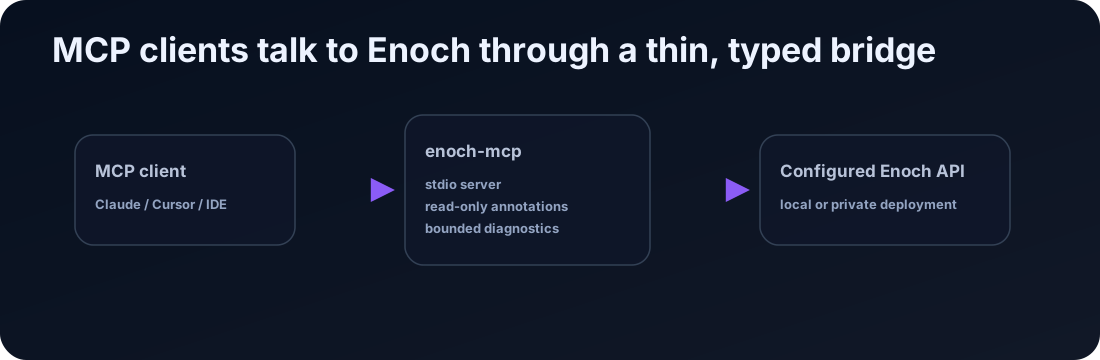
enoch-mcp is a local Model Context Protocol stdio server for a configured Enoch FastAPI control-plane API. It lets MCP clients inspect and operate Enoch through typed tools without exposing a raw shell or reimplementing Enoch business logic.
Enoch system repo · Docs · MCP
What it does
- Registers MCP tools for Enoch control-plane, Dashboard V1, and core endpoints.
- Sends requests to a configured Enoch API URL.
- Adds
Authorization: Bearer <token>to API requests using the configured token. - Returns Enoch API responses to the MCP client.
- Marks read-only tools with MCP read-only annotations.
- Marks mutating tools as non-read-only and adds approval metadata.
- Keeps safe defaults for dry-run operations.
- Optionally probes configured CPU/GPU workers directly through worker APIs or allowlisted SSH diagnostics.
What it does not do
- It does not expose a raw shell tool.
- It does not accept arbitrary SSH commands.
- It does not read or write local artifact files directly.
- It does not call language models.
- It does not cache, retry, queue, or schedule work.
- It does not bypass Enoch authentication or authorization.
Requirements
- Python 3.11 or newer
- A running Enoch API, normally at
http://localhost:8787 - An Enoch API bearer token
- An MCP client that can run local stdio servers
Installation
Run from PyPI with uvx:
uvx enoch-mcp --api-url http://localhost:8787 --api-token '<token>'
Or configure with environment variables:
export ENOCH_API_URL='http://localhost:8787'
export ENOCH_API_TOKEN='<token>'
uvx enoch-mcp
For local development from a checkout:
git clone https://github.com/alias8818/enoch-mcp.git
cd enoch-mcp
uv sync --dev
uv run enoch-mcp --api-url http://localhost:8787 --api-token '<token>'
Configuration
| Option | Environment variable | Default | Description |
|---|---|---|---|
--api-url | ENOCH_API_URL | http://localhost:8787 | Base URL for the Enoch API. |
--api-token | ENOCH_API_TOKEN | none | Bearer token for the Enoch API. |
--worker-probes-json | ENOCH_WORKER_PROBES_JSON | none | Optional JSON map for direct worker diagnostics. |
--worker-probes-file | ENOCH_WORKER_PROBES_FILE | none | Optional path to a JSON map for direct worker diagnostics. |
The token is required. If it is missing, tool calls fail before making an HTTP request.
Optional worker probes
Worker probes are disabled unless ENOCH_WORKER_PROBES_JSON or ENOCH_WORKER_PROBES_FILE is configured. This keeps the default package a thin control-plane bridge. When configured, the MCP exposes named diagnostics for worker truth: API health, worker-gate dashboard status, active process markers, bounded log tails, disk space, and expected artifact presence.
Example:
{
  "cpu": {
    "api_url": "http://127.0.0.1:18788",
    "api_token": "worker-api-token",
    "service_name": "enoch-control-plane",
    "project_root": "/srv/enoch/projects"
  },
  "gpu": {
    "api_url": "http://127.0.0.1:18789",
    "api_token": "worker-api-token",
    "ssh_host": "worker-gpu.example.internal",
    "ssh_user": "enoch",
    "service_name": "enoch-control-plane",
    "project_root": "/srv/enoch/projects",
    "log_paths": ["/var/log/enoch-control-plane.log"]
  }
}
Supported fields per lane:
api_url: worker-gate base URL. Used first for/healthz,/dashboard/api,/dashboard/api/run/{run_id}, and/project-status/{project_id}.api_token: worker bearer token. Treated as secret.ssh_host,ssh_user,ssh_port: optional SSH fallback/debug target.service_name: systemd unit name for service checks and journal tails.project_root,state_dir: fixed worker roots used for disk and artifact checks.log_paths: fixed worker-gate log paths that may be tailed.
SSH probes only run fixed diagnostic commands. They do not accept arbitrary shell input from the MCP client. User-supplied IDs are limited to safe run/project identifier characters, log output is bounded, SSH uses batch mode and no stdin, and the recommended deployment is a read-only worker user or forced-command policy.
MCP client setup
Claude Desktop
{
  "mcpServers": {
    "enoch": {
      "command": "uvx",
      "args": ["enoch-mcp"],
      "env": {
        "ENOCH_API_URL": "http://localhost:8787",
        "ENOCH_API_TOKEN": "replace-with-token"
      }
    }
  }
}
For local development, point the MCP client at the checkout:
{
  "mcpServers": {
    "enoch": {
      "command": "uv",
      "args": ["--directory", "/path/to/enoch-mcp", "run", "enoch-mcp"],
      "env": {
        "ENOCH_API_URL": "http://localhost:8787",
        "ENOCH_API_TOKEN": "replace-with-token"
      }
    }
  }
}
Use the equivalent local stdio-server settings for Cursor, Copilot, Windsurf, or other MCP clients.
Development
uv sync --dev
uv run pytest -q
gitleaks detect --no-git --redact
Public-safety note
This package is public. Examples must use placeholders and local URLs only. Do not publish private hostnames, LAN/Tailscale IPs, operator paths, or live tokens.