Teradata
resmiKumpulan alat untuk mengelola platform, menangani kualitas data, serta membaca dan menulis ke Teradata Database.
Apa yang bisa Anda lakukan dengan Teradata MCP?
- Query and analyze data — Ajukan pertanyaan dalam bahasa alami untuk mengeksplorasi tabel, membuat profil data, dan memvisualisasikan pola tanpa menulis SQL.
- Generate semantic layers — Buat alat khusus domain, prompt, dan kubus dari definisi YAML melalui panduan kustomisasi.
- Run AI and RAG pipelines — Lakukan pencarian semantik, pembangkitan augmented retrieval, dan penyimpanan vektor menggunakan alat
rag,tdvs, danfs. - Manage database administration — Tangani keamanan, pantau kapasitas, dan otomatiskan pencadangan melalui rangkaian alat
dba,sec, danbar. - Execute long-running analytics — Jalankan fungsi analitik
tdml_*sebagai tugas latar belakang dan polling hasilnya alih-alih memblokir. - Protect against destructive actions — Gunakan Guard Mode untuk alur konfirmasi multi-langkah pada operasi
bar_*dansec_*.
Dokumentasi
Teradata MCP Server



Hubungkan agen AI secara langsung ke Teradata dengan keamanan dan ekstensibilitas tingkat perusahaan.
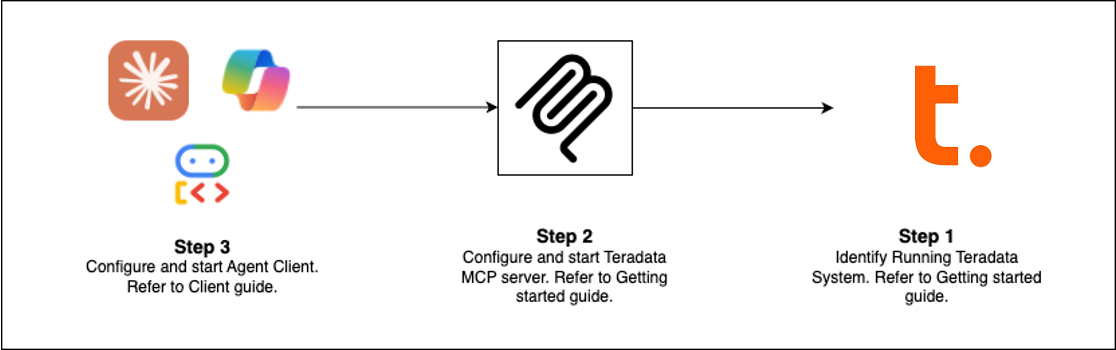
Memulai dengan Cepat (Pilih Jalur Anda)
| Klien | Terbaik Untuk | Waktu Pengaturan |
|---|---|---|
| Claude Desktop | Analisis eksploratif, admin platform | 5 menit |
| VS Code + Copilot | Rekayasa data, pengembangan agen | 5 menit |
| Open WebUI | Menguji LLM baru secara lokal | 5 menit |
| Contoh Kode | Membangun klien Anda sendiri | bervariasi |
| Flowise | Pembuat agen visual | 10 menit |
Prasyarat: Database Teradata (atau sandbox gratis) + uv
Pengaturan Claude Desktop (Tanpa Instalasi)
Tambahkan ini ke claude_desktop_config.json (Pengaturan > Pengembang > Edit Konfigurasi):
{
  "mcpServers": {
    "teradata": {
      "command": "uvx",
      "args": ["teradata-mcp-server"],
      "env": {
        "DATABASE_URI": "teradata://<USERNAME>:<PASSWORD>@<HOST_URL>:1025/<USERNAME>"
      }
    }
  }
}
Yang Dapat Anda Lakukan
| Kasus Penggunaan | Kemampuan | Alat |
|---|---|---|
| Kueri & Analisis | Jelajahi tabel, profil data, jelaskan hasil, visualisasikan pola—tanpa perlu SQL | base, dba, qlty, plot |
| Lapisan Semantik | Hasilkan lapisan semantik dan alat khusus dari YAML atau dengan Agent Skill kami | Pelajari lebih lanjut → |
| Pipelines AI & RAG | Pencarian semantik, pembangkitan augmented retrieval, penyimpanan vektor | rag, tdvs, fs |
| Administrasi Database | Kelola keamanan, pantau kapasitas, otomatiskan pencadangan | dba, sec, bar |
Yang Baru (Rilis Terbaru)
- FastMCP v4 — Protokol tanpa sesi, tugas latar belakang untuk analitik berjalan lama, penyelesaian argumen
- Caching Respons — Sinyal TTL 5 menit mengurangi kueri database yang redundan dalam percakapan multi-putaran
- Mode Penjaga — Alur konfirmasi multi-langkah untuk operasi destruktif (bar_, sec_)
- Tugas Latar Belakang —
tdml_*fungsi analitik mengembalikan ID tugas untuk polling alih-alih memblokir - Penyelesaian Argumen — Saran otomatis nama tabel dan kolom dari skema saat pengguna mengetik
- Kemampuan Hooks — Intersepsi panggilan alat untuk pemantauan, audit, atau pembatasan kecepatan khusus
- Perlindungan Batas Baris — Batas yang dapat dikonfigurasi (
DEFAULT_ROW_LIMIT,MAX_ROW_LIMIT) mencegah luapan token LLM - Keamanan yang Ditingkatkan — Tampilan VX untuk kontrol akses tingkat baris yang terperinci
Perluas & Terapkan
Tambahkan Logika Khusus
Gunakan hooks untuk mengintersepsi panggilan alat untuk pemantauan, jejak audit, atau validasi → Panduan Hooks
Tentukan Lapisan Semantik
Buat alat, prompt, dan kubus khusus domain dalam YAML → Panduan Kustomisasi
Terapkan di Mana Saja
Jalankan sebagai CLI (uv), server HTTP, kontainer Docker, atau layanan cloud → Panduan Instalasi
Lihat Dalam Aksi
- Agen Suara — Audio dua arah real-time dengan Amazon Nova Sonic
- Agen Web — UI obrolan interaktif dengan kerangka kerja Google ADK
- Pembuat Flowise — Alur kerja seret-dan-lepas visual
- Middleware Kustom — Pola pemantauan kinerja
Pelajari Lebih Lanjut
- Dokumentasi Lengkap — Instalasi, konfigurasi, arsitektur, keamanan
- Tutorial Video — Panduan langkah demi langkah
- Panduan Pengembang — Perluas dan berkontribusi
- Arsitektur — Bagaimana komponen bekerja bersama
Berkontribusi
Kami menyambut kontribusi! Lihat Panduan Berkontribusi dan Panduan Pengembang untuk memulai.