302AI Custom MCP Server
A customizable MCP service with flexible tool selection and configuration. Requires a 302AI API key.
🤖 302AI Custom MCP Server🚀✨
A customizable MCP service that supports tool selection and flexible configuration to meet your various needs.

Tutorial
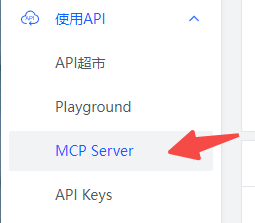
Open MCP Server in the menu
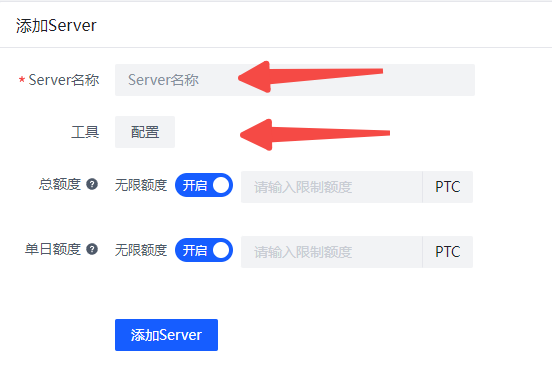
Enter a name and select the tools you want to configure.
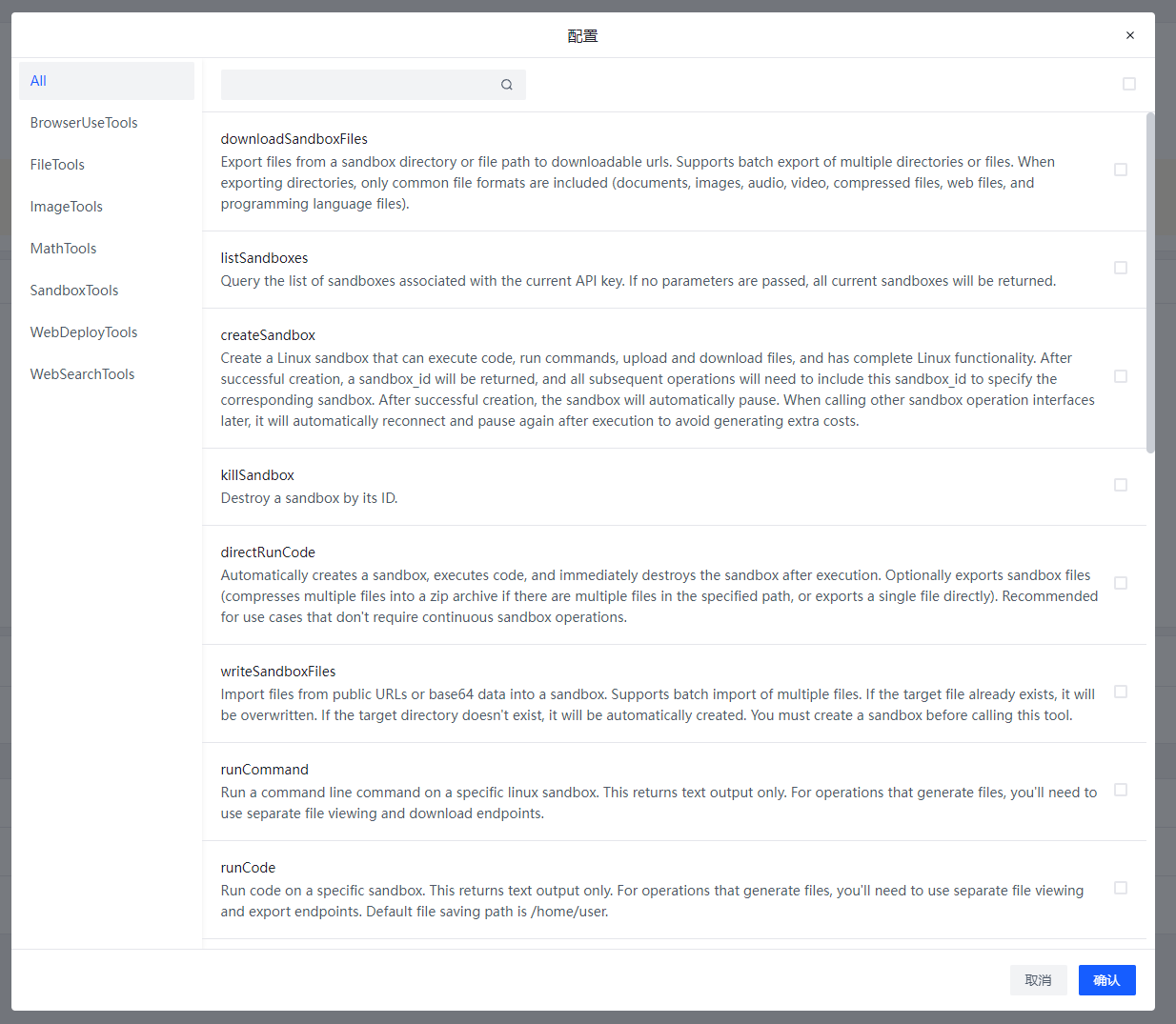
This is the current list of available tools, which is continuously being updated
After creation, click on the Server name to view the Server configuration

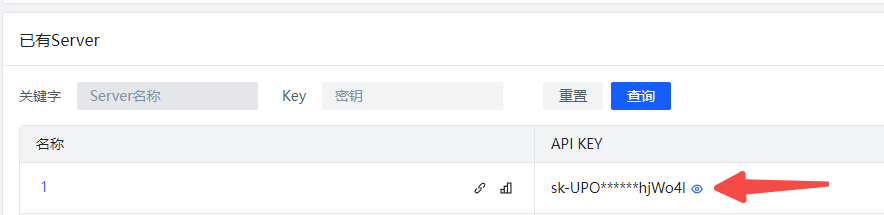
Different Servers use different KEYs to obtain tool configurations. The client only needs to be installed once, no repeated installation required. Switching between different Servers only requires changing the API_KEY.
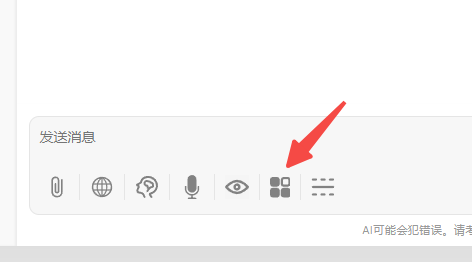
Open the MCP Server button in the chatbot
Enter the key you just created in 302ai-custom-server
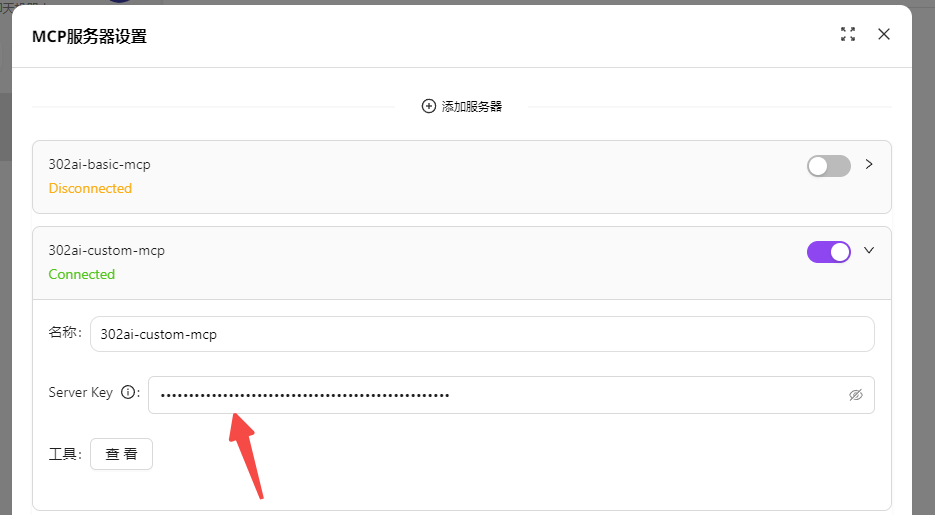
 Turn on the Server switch to start using it.
Taking Chatwise as an example for use in third-party clients
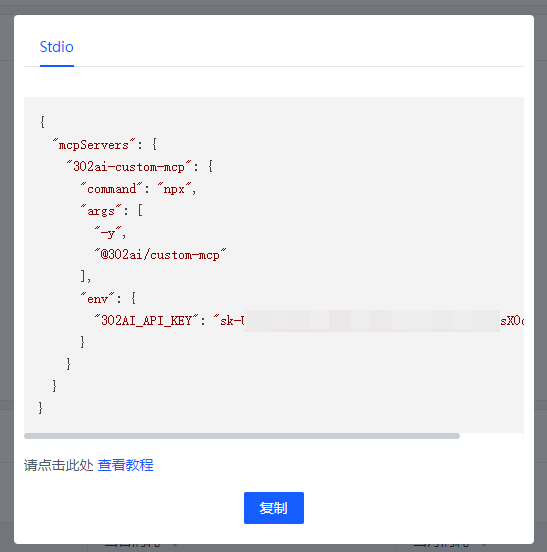
Click on the Server name, then click the copy button
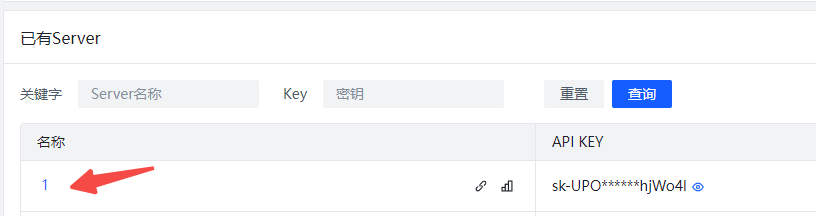
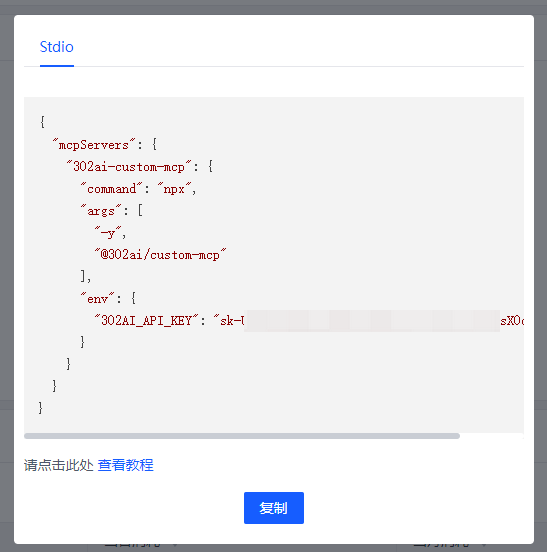
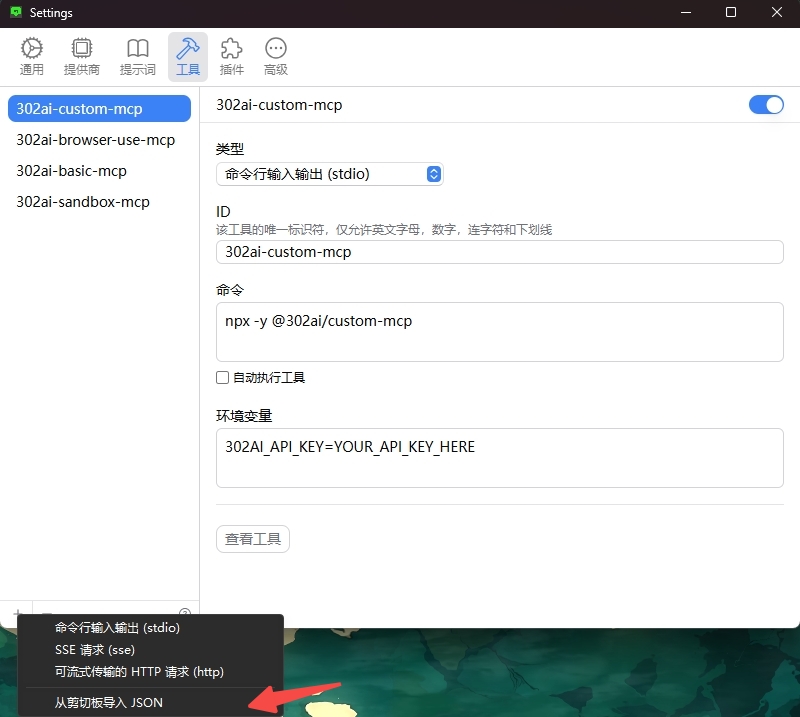
Open Chatwise settings-tools, click the bottom left corner, import JSON from clipboard
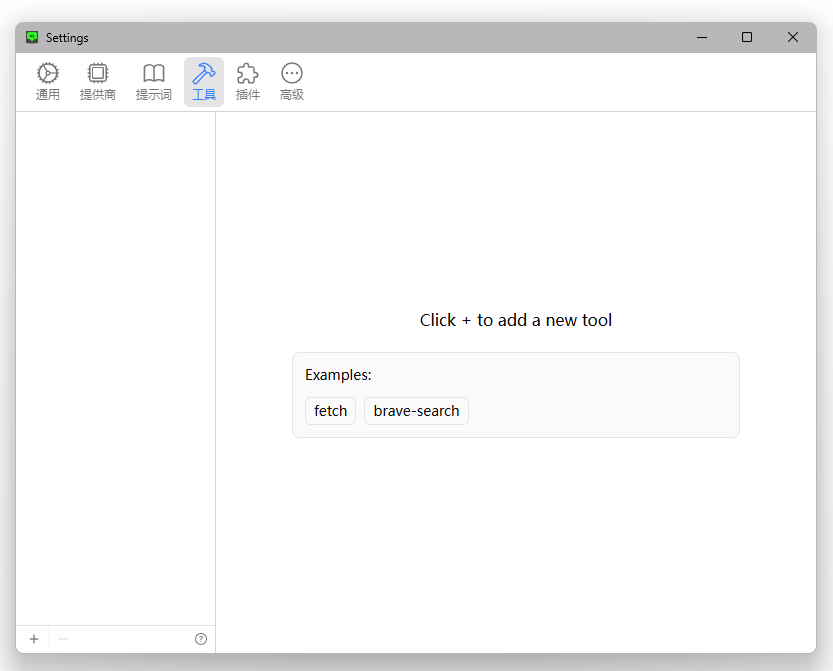
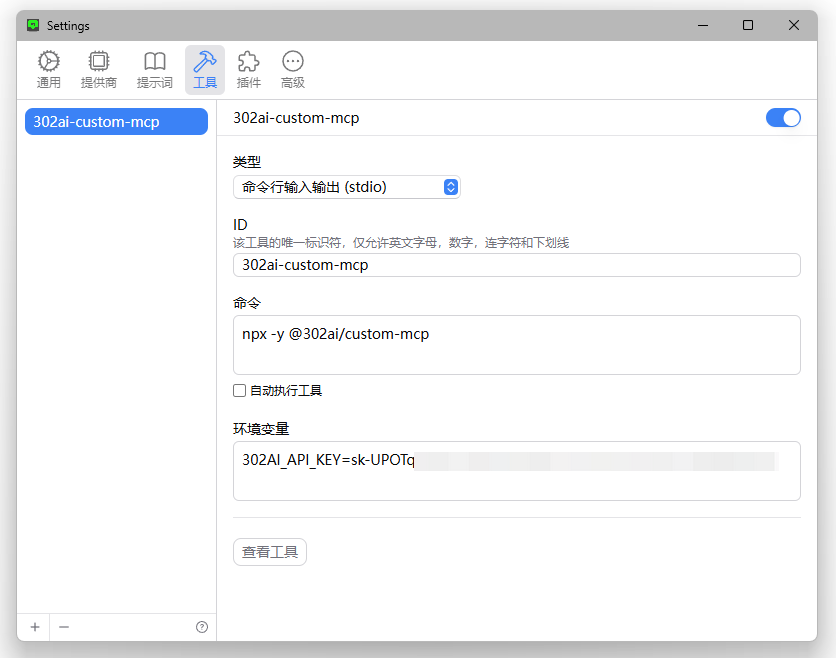 MCP Server imported successfully, you can now use it normally.
✨ Features ✨
- 🔧 Quickly generate your own MCP Server by selecting different APIs
- 🌐 Compatible with: Various MCP-supported clients, including 302.AI's chatbot
- 💻 Currently includes multiple tool types such as BrowserUseTools, FileTools, ImageTools, MathTools, SandboxTools, with more updates coming
Development
Install dependencies:
npm install
Build the server:
npm run build
For development with auto-rebuild:
npm run watch
Installation
To use with Claude Desktop, add the server config:
On MacOS: ~/Library/Application Support/Claude/claude_desktop_config.json
On Windows: %APPDATA%/Claude/claude_desktop_config.json
{
  "mcpServers": {
    "302ai-custom-mcp": {
      "command": "npx",
      "args": ["-y", "@302ai/custom-mcp"],
      "env": {
        "302AI_API_KEY": "YOUR_API_KEY_HERE",
        "LANGUAGE": "YOUR_LANGUAGE_HERE"
      }
    }
  }
}
To use with Cherry Studio, add the server config:
{
  "mcpServers": {
    "Li2ZXXJkvhAALyKOFeO4N": {
      "name": "302ai-custom-mcp",
      "description": "",
      "isActive": true,
      "registryUrl": "",
      "command": "npx",
      "args": [
        "-y",
        "@302ai/custom-mcp"
      ],
      "env": {
        "302AI_API_KEY": "YOUR_API_KEY_HERE"
      }
    }
  }
}
To use with ChatWise, copy the following content to clipboard
{
  "mcpServers": {
    "302ai-custom-mcp": {
      "command": "npx",
      "args": ["-y", "@302ai/custom-mcp"],
      "env": {
        "302AI_API_KEY": "YOUR_API_KEY_HERE"
      }
    }
  }
}
Go to Settings -> Tools -> Add button -> Select Import from Clipboard
Find Your 302AI_API_KEY here
Debugging
Since MCP servers communicate over stdio, debugging can be challenging. We recommend using the MCP Inspector, which is available as a package script:
npm run inspector
The Inspector will provide a URL to access debugging tools in your browser.
✨ About 302.AI ✨
302.AI is an enterprise-oriented AI application platform that offers pay-as-you-go services, ready-to-use solutions, and an open-source ecosystem.✨
- 🧠 Integrates the latest and most comprehensive AI capabilities and brands, including but not limited to language models, image models, voice models, and video models.
- 🚀 Develops deep applications based on foundation models - we develop real AI products, not just simple chatbots
- 💰 Zero monthly fee, all features are pay-per-use, fully open, achieving truly low barriers with high potential.
- 🛠 Powerful management backend for teams and SMEs - one person manages, many people use.
- 🔗 All AI capabilities provide API access, all tools are open source and customizable (in progress).
- 💡 Strong development team, launching 2-3 new applications weekly, products updated daily. Developers interested in joining are welcome to contact us.
Server Terkait
Alpha Vantage MCP Server
sponsorAccess financial market data: realtime & historical stock, ETF, options, forex, crypto, commodities, fundamentals, technical indicators, & more
ButterKit
Ship App Store screenshots from your AI coding agent: generate, localize to all 50 App Store languages, and upload to App Store Connect
RefactorMCP
Automated refactoring tools for C# code transformation using Roslyn.
Session Continuity MCP Server
An MCP server for Claude Code CLI that provides persistent session management, entity tracking, and context preservation across development sessions.
MCP Servers for CS Experimentation Workshop
A collection of MCP servers designed for rapid prototyping in CS experimentation workshops.
GrowthBook
Create and read feature flags, review experiments, generate flag types, search docs, and interact with GrowthBook's feature flagging and experimentation platform.
Adamik MCP Server
Interact with over 60 blockchain networks using any MCP client. Requires an Adamik API key.
Formo
Formo makes analytics and attribution easy for crypto apps, so you can focus on growth. Measure what matters and drive growth onchain with the data platform for onchain apps. Get the best of web, product, and onchain analytics on one versatile platform.
Just Prompt
A unified interface for various Large Language Model (LLM) providers, including OpenAI, Anthropic, Google Gemini, Groq, DeepSeek, and Ollama.
Nuxt MCP
MCP server helping models to understand your Vite/Nuxt app better.
BundlerMCP
Query information about dependencies in a Ruby project's Gemfile.