nworks
Servidor CLI + MCP de NAVER WORKS. 26 herramientas para mensajes, calendario, drive, correo, tareas y tableros.
Documentación
nworks




Destacado en awesome-mcp-servers
Servidor MCP completo para LINE WORKS (NAVER WORKS). CLI + servidor MCP — 36 herramientas que cubren mensajes, calendario, drive, correo, tareas y tableros.
nworks permite que agentes de IA externos (Claude, Cursor) y tu terminal operen LINE WORKS desde fuera — complementario a la IA integrada de LINE WORKS (AiStudio, WORKS AI), no un reemplazo. No oficial y mantenido por la comunidad; no está afiliado con LINE WORKS / NAVER WORKS.
Inicio rápido
npm install -g nworks
nworks login --user
nworks calendar list
¿Es tu primera vez? Primero necesitas una aplicación de Developer Console (Client ID/Secret), una URL de redirección registrada y — para mensajería de bots — aprobación del administrador. Consulta la guía de Onboarding y configuración de administrador.
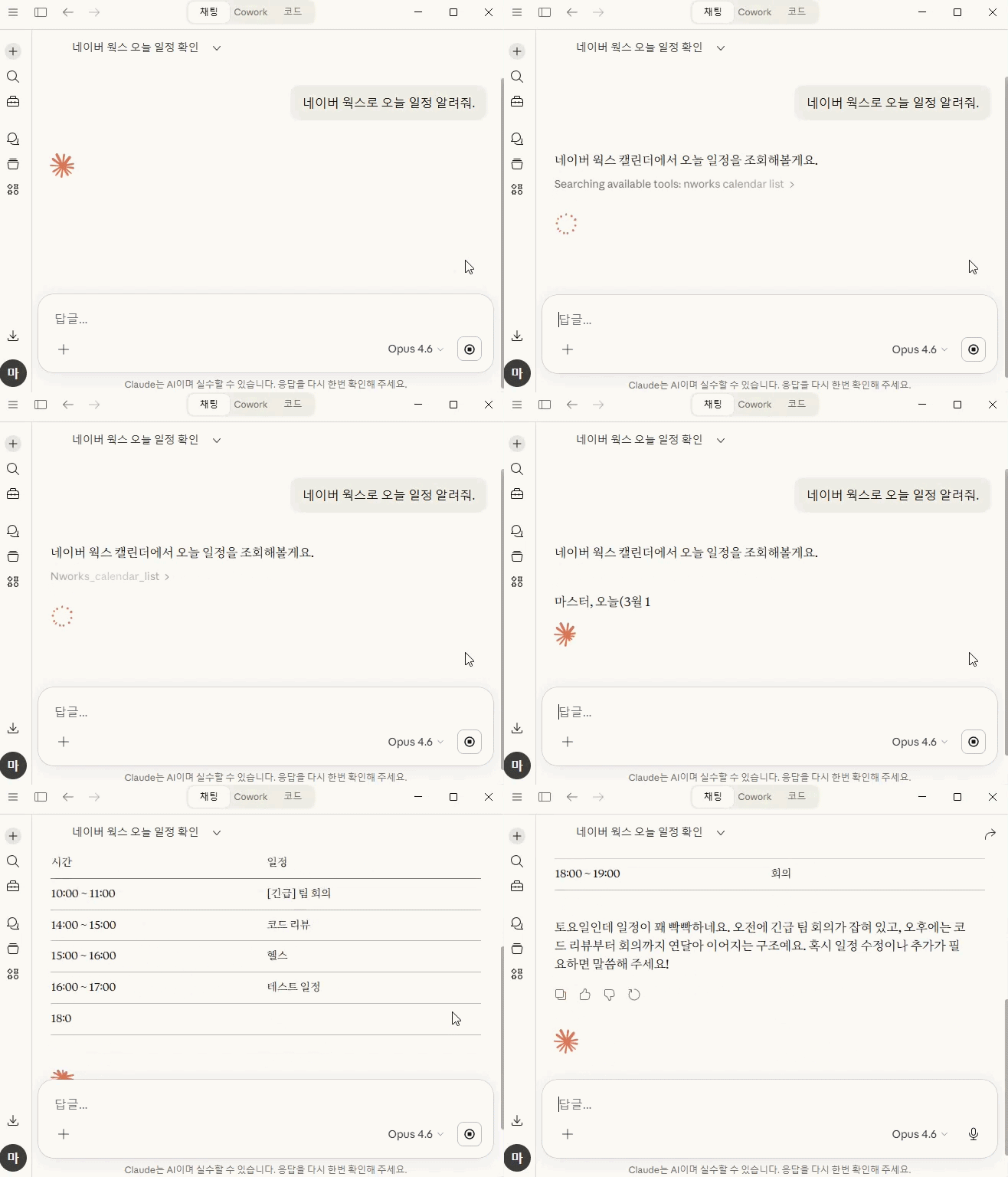
Así lo usan realmente los agentes de IA
User: Show me today's schedule

Claude → nworks_calendar_list
  → 3 events: Standup (10:00), Lunch meeting (12:00), Code review (15:00)

User: Send a deploy complete message to the team channel

Claude → nworks_message_send
  { "channel": "C001", "text": "v1.2.0 deploy complete" }
  → Message sent

User: Check my unread emails and summarize them

Claude → nworks_mail_list (unread)
  → 3 unread emails
Claude → nworks_mail_read (each)
  → "3 unread: 1) Deploy approval from CTO, 2) Meeting invite for Friday, 3) Weekly report reminder"
Instalación
npx nworks             # Run directly
npm install -g nworks  # Global install
Inicio de sesión
# User OAuth (calendar, drive, mail, tasks, boards)
nworks login --user --scope "calendar calendar.read file file.read mail mail.read task task.read board board.read user.read"

# Bot messaging (Service Account)
nworks login

# Check auth status
nworks whoami

# Logout
nworks logout
nworks login --usersolo requiere CLIENT_ID + CLIENT_SECRET. Los valores ya establecidos mediante variables de entorno o configuración existente no se volverán a solicitar.
Developer Console: Para usar User OAuth, registra
http://localhost:9876/callbackcomo URL de redirección en la Developer Console.
Integración con agentes de IA (servidor MCP)
Funciona con Claude Desktop, Cursor y otros clientes compatibles con MCP.
Configuración
Inicia sesión primero:
nworks login --user --scope "calendar calendar.read file file.read mail mail.read task task.read board board.read user.read"
Luego agrégalo a tu configuración de MCP (~/.config/claude/claude_desktop_config.json):
{
  "mcpServers": {
    "nworks": {
      "command": "nworks",
      "args": ["mcp"]
    }
  }
}
Un solo inicio de sesión habilita las 36 herramientas. No se necesita configuración adicional de entorno.
Sin inicio de sesión por CLI, un agente de IA puede llamar a
nworks_setup→nworks_login_userpara autenticarse directamente mediante el navegador. La Client Secret y la ruta de la Private Key deben estar preconfiguradas mediante el campoenvde la configuración de MCP o variables de entorno del sistema.
Herramientas MCP (32)
| Herramienta | Descripción | Autenticación |
|---|---|---|
| Configuración / Autenticación | ||
nworks_setup | Configurar credenciales de API (Client ID, etc.). La Client Secret se establece mediante env | — |
nworks_login_user | Inicio de sesión OAuth de usuario en el navegador (todos los alcances incluidos) | — |
nworks_logout | Eliminar credenciales y tokens | — |
nworks_whoami | Verificar estado de autenticación | — |
nworks_doctor | Diagnosticar conexión (autenticación, tokens, estado de la API) | — |
| Mensajes | ||
nworks_message_send | Enviar mensaje a usuario/canal | Service Account |
nworks_message_members | Listar miembros del canal | Service Account |
nworks_directory_members | Listar miembros de la organización | Service Account |
| Calendario | ||
nworks_calendar_list | Listar eventos de calendario | User OAuth (calendar.read) |
nworks_calendar_create | Crear evento de calendario | User OAuth (calendar + calendar.read) |
nworks_calendar_update | Actualizar evento de calendario | User OAuth (calendar + calendar.read) |
nworks_calendar_delete | Eliminar evento de calendario | User OAuth (calendar + calendar.read) |
| Drive | ||
nworks_drive_list | Listar archivos/carpetas de drive | User OAuth (file.read) |
nworks_drive_upload | Subir archivo a drive | User OAuth (file) |
nworks_drive_download | Descargar archivo (se guarda localmente si >5MB) | User OAuth (file.read) |
nworks_sharedrive_list | Listar drives compartidos | User OAuth (file.read) |
nworks_sharedrive_files | Listar archivos/carpetas en un drive compartido | User OAuth (file.read) |
nworks_sharedrive_download | Descargar archivo de drive compartido (se guarda localmente si >5MB) | User OAuth (file.read) |
| Correo | ||
nworks_mail_send | Enviar correo | User OAuth (mail) |
nworks_mail_list | Listar buzón | User OAuth (mail.read) |
nworks_mail_read | Leer detalle de correo | User OAuth (mail.read) |
nworks_mail_download_attachment | Descargar adjunto de correo (se guarda localmente si >5MB) | User OAuth (mail.read) |
| Tareas | ||
nworks_task_list | Listar tareas | User OAuth (task.read) |
nworks_task_create | Crear tarea | User OAuth (task + user.read) |
nworks_task_update | Actualizar/completar tarea | User OAuth (task + user.read) |
nworks_task_delete | Eliminar tarea | User OAuth (task + user.read) |
| Tableros | ||
nworks_board_list | Listar tableros | User OAuth (board.read) |
nworks_board_posts | Listar publicaciones de tablero | User OAuth (board.read) |
nworks_board_read | Leer detalle de publicación de tablero | User OAuth (board.read) |
nworks_board_create | Crear publicación de tablero | User OAuth (board) |
| Contactos | ||
nworks_contact_list | Listar contactos | User OAuth (contact.read) |
nworks_contact_get | Obtener detalle de contacto | User OAuth (contact.read) |
nworks_contact_create | Crear contacto | User OAuth (contact) |
nworks_contact_update | Actualizar contacto | User OAuth (contact) |
nworks_contact_delete | Eliminar contacto | User OAuth (contact) |
nworks_contact_list_tags | Listar etiquetas de contacto | User OAuth (contact.read) |
Ejemplo de uso con agente de IA
User: Schedule a meeting tomorrow at 2pm and notify the team channel

Claude → nworks_calendar_create
  { "summary": "Meeting", "start": "2026-03-15T14:00:00", "end": "2026-03-15T15:00:00" }
  → Event created

Claude → nworks_message_send
  { "channel": "C001", "text": "Meeting scheduled tomorrow at 14:00" }
  → Message sent

User: Check my unread emails and summarize them

Claude → nworks_mail_list (unread)
  → 3 unread emails
Claude → nworks_mail_read (each)
  → "3 unread: 1) Deploy approval from CTO, 2) Meeting invite for Friday, 3) Weekly report reminder"
Uso de CLI
Todos los comandos admiten
--jsonpara análisis con pipes/scripts/agentes.message send,mail sendydrive uploadadmiten--dry-runpara pruebas sin envío.
Mensajes (API de bot)
# Send text to user
nworks message send --to <userId> --text "Hello"

# Send text to channel
nworks message send --channel <channelId> --text "Announcement"

# Button message
nworks message send --to <userId> --type button --text "PR review request" \
  --actions '[{"type":"message","label":"Approve","postback":"approve"}]'

# List message
nworks message send --to <userId> --type list --text "Today's tasks" \
  --elements '[{"title":"Code review","subtitle":"PR #382"}]'

# List channel members
nworks message members --channel <channelId>
Directorio
nworks directory members # List organization members
Calendario (User OAuth)
# List today's events
nworks calendar list

# Specify date range
nworks calendar list --from "2026-03-14T00:00:00+09:00" --until "2026-03-14T23:59:59+09:00"

# Create event
nworks calendar create --title "Meeting" --start "2026-03-14T14:00+09:00" --end "2026-03-14T15:00+09:00"

# With location/description
nworks calendar create --title "Lunch" --start "2026-03-14T12:00+09:00" --end "2026-03-14T13:00+09:00" \
  --location "Conference Room" --description "Quarterly review"

# With attendees + notification
nworks calendar create --title "Team meeting" --start "2026-03-14T10:00+09:00" --end "2026-03-14T11:00+09:00" \
  --attendees "user1@example.com,user2@example.com" --notify

# Update event
nworks calendar update --id <eventId> --title "Updated title"

# Delete event
nworks calendar delete --id <eventId>
Drive (User OAuth)
# List files/folders
nworks drive list

# Upload file
nworks drive upload --file ./report.pdf

# Upload to specific folder
nworks drive upload --file ./report.pdf --folder <folderId>

# Download file
nworks drive download --file-id <fileId>

# Specify output path/name
nworks drive download --file-id <fileId> --out ./downloads --name report.pdf

# List shared drives
nworks drive sharedrive-list

# List files in a shared drive (root)
nworks drive sharedrive-files --sharedrive <sharedriveId>

# List files in a shared drive folder
nworks drive sharedrive-files --sharedrive <sharedriveId> --folder <fileId>

# Download a shared drive file
nworks drive sharedrive-download --sharedrive <sharedriveId> --file-id <fileId>
Correo (User OAuth)
# Send mail
nworks mail send --to "user@example.com" --subject "Subject" --body "Body"

# With CC/BCC
nworks mail send --to "user@example.com" --cc "cc@example.com" --subject "Subject" --body "Body"

# List inbox
nworks mail list

# Unread only
nworks mail list --unread

# Read mail detail
nworks mail read --id <mailId>

# Download a mail attachment
nworks mail download-attachment --id <mailId> --attachment-id <attachmentId>

# Specify output path/name
nworks mail download-attachment --id <mailId> --attachment-id <attachmentId> --out ./downloads --name invoice.pdf
Tareas (User OAuth)
# List tasks
nworks task list

# Incomplete only
nworks task list --status TODO

# Create task
nworks task create --title "Code review" --body "Review PR #382"

# With due date
nworks task create --title "Deploy" --due 2026-03-20

# Mark as done
nworks task update --id <taskId> --status done

# Delete task
nworks task delete --id <taskId>
Tableros (User OAuth)
# List boards
nworks board list

# List posts
nworks board posts --board <boardId>

# Read post detail
nworks board read --board <boardId> --post <postId>

# Create post
nworks board create --board <boardId> --title "Announcement" --body "Content"

# With notification + disable comments
nworks board create --board <boardId> --title "Notice" --body "Content" --notify --no-comment
Contactos (User OAuth)
# List contacts
nworks contact list

# Filter by tag
nworks contact list --tag <contactTagId>

# Get contact detail
nworks contact get --id <contactId>

# Create contact
nworks contact create --payload '{"contactName":{"lastName":"Kim","firstName":"Chulsoo"},"emails":[{"email":"chulsoo@example.com","primary":true}],"permission":{"accessibleRange":"MEMBER","isCoEditing":false,"accessibleMembers":[{"id":"<yourUserId>","type":"USER"}]}}'

# Update contact
nworks contact update --id <contactId> --payload '{"telephones":[{"type":"CELLPHONE","telephone":"010-1234-5678","primary":true}]}'

# Delete contact
nworks contact delete --id <contactId>

# List contact tags
nworks contact list-tags
contact createrequierecontactNameypermission;permission.accessibleMembersdebe listar al menos un miembro (normalmente tú mismo). Obtén tu propio ID de usuario desdenworks whoami.
Notificación de despliegue CI/CD
# Notify team channel after deployment in GitHub Actions
nworks message send --channel $CHANNEL_ID --text "v${VERSION} deployed"
Script de automatización de equipo
# Send daily standup reminder to all members
for userId in $(nworks directory members --json | jq -r '.users[].userId'); do
  nworks message send --to "$userId" --text "Standup at 10:00 today"
done
Alcances de OAuth
Agrega los alcances requeridos en la LINE WORKS Developer Console.
| Alcance | Propósito | Autenticación | Requerido para |
|---|---|---|---|
bot | Mensajería de bot | Service Account | message send |
bot.read | Lectura de canal/miembros de bot | Service Account | message members |
calendar | Escritura de calendario | User OAuth | calendar create/update/delete (requiere calendar.read) |
calendar.read | Lectura de calendario | User OAuth | calendar list, también necesario para escritura de calendario |
file | Lectura/escritura de drive | User OAuth | drive list/upload/download |
file.read | Drive solo lectura | User OAuth | drive list/download |
mail | Lectura/escritura de correo | User OAuth | mail send/list/read |
mail.read | Correo solo lectura | User OAuth | mail list/read |
task | Lectura/escritura de tareas | User OAuth | task create/update/delete (requiere user.read) |
task.read | Tareas solo lectura | User OAuth | task list |
user.read | Lectura de información de usuario | Service Account / User OAuth | directory members, también necesario para escritura de tareas |
board | Lectura/escritura de tableros | User OAuth | board list/posts/read/create |
board.read | Tableros solo lectura | User OAuth | board list/posts/read |
contact | Lectura/escritura de contactos | User OAuth | contact create/update/delete (requiere contact.read) |
contact.read | Contactos solo lectura | User OAuth | contact list/get/list-tags |
Los ajustes preestablecidos son más simples que listar alcances:
nworks login --user --preset all       # predeterminado: funcionalidad completa en un solo inicio de sesión
nworks login --user --preset readonly  # alcances de solo lectura
defaultes un alias deall. El envío de mensajes usa la Service Account (bot), por lo que funciona independientemente del ajuste preestablecido. Volver a iniciar sesión nunca reduce el acceso — los alcances recién solicitados se fusionan con el token existente, por lo que cambiar de ajuste preestablecido solo agrega capacidad. Para un conjunto seleccionado manualmente usa--scope "calendar calendar.read".
Variables de entorno
Establece variables de entorno para usar nworks sin nworks login (útil para CI/agentes).
# Required
NWORKS_CLIENT_ID=
NWORKS_CLIENT_SECRET=

# Bot messaging only (not needed for User OAuth)
NWORKS_SERVICE_ACCOUNT=
NWORKS_PRIVATE_KEY_PATH=
NWORKS_BOT_ID=

# Optional
NWORKS_DOMAIN_ID=
NWORKS_SCOPE=              # default: bot bot.read user.read
NWORKS_VERBOSE=1           # debug logging
Servidor MCP con variables de entorno
Los valores sensibles (Client Secret, ruta de Private Key) deben establecerse mediante el campo env de la configuración de MCP. Los valores no sensibles como Client ID pueden configurarse mediante el agente de IA a través de la herramienta nworks_setup.
{
  "mcpServers": {
    "nworks": {
      "command": "npx",
      "args": ["-y", "nworks", "mcp"],
      "env": {
        "NWORKS_CLIENT_SECRET": "<Client Secret>",
        "NWORKS_PRIVATE_KEY_PATH": "<Private Key file absolute path (for Service Account)>"
      }
    }
  }
}
Licencia
Apache-2.0