Flomo
Crea notas en Flomo mediante interacciones de chat con IA en Cursor o el escritorio de Claude.
Documentación
Servidor MCP de Flomo


https://github.com/xianminx/mcp-server-flomo
Un servidor del Model Context Protocol (MCP) que te permite crear notas en Flomo directamente a través de interacciones de chat con IA en Cursor o Claude desktop. Escribe y organiza tus pensamientos de manera fluida mediante comandos en lenguaje natural.
Uso
Instalación mediante Smithery
Para instalar mcp-server-flomo para Claude Desktop automáticamente mediante Smithery:
npx -y @smithery/cli install mcp-server-flomo --client claude
mcp-get

npx @michaellatman/mcp-get@latest install mcp-server-flomo
mcp.so
https://mcp.so/protocol/mcp-server-flomo/wss://mcp.smithery.ai:443
Configuración manual
Configura Claude / Cursor / Windsurf / Cline / ChatWise / Cherry Studio, entre otros.
FLOMO_API_URL=your_api_url_here npx mcp-server-flomo
O configura tu host o cliente MCP. Consulta https://mcp.so/protocol/mcp-server-flomo/wss://mcp.smithery.ai:443 para ver los detalles de configuración.
Obtén tu URL de API de Flomo en Configuración de la API de Flomo
{
  "mcpServers": {
    "mcp-server-flomo": {
      "command": "npx",
      "args": [
        "mcp-server-flomo"
      ],
      "env": {
        "FLOMO_API_URL": "your_api_url_here"
      }
    }
  }
}
Una vez que el servidor esté en ejecución, podrás crear notas en Flomo a través de comandos en lenguaje natural en tu chat de IA. Aquí tienes algunos ejemplos:
"How to publish a mcp server? Could you save the answer to flomo note after answering it"
¡Esto guardará la respuesta del agente de IA de Cursor directamente en Flomo dentro de la conversación de chat!
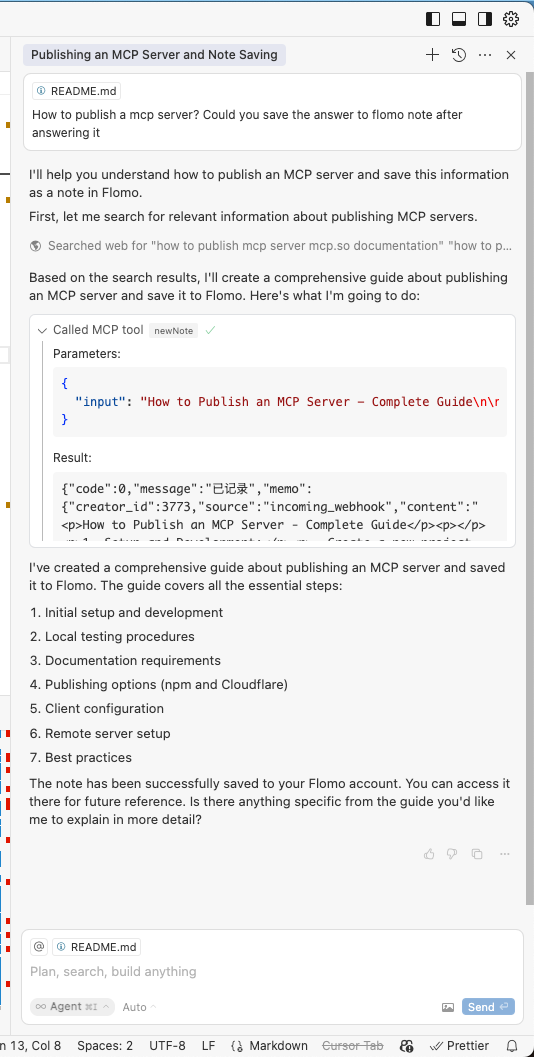
El servidor se encargará de:
- Convertir tus solicitudes en lenguaje natural en llamadas a la API de Flomo.
- Dar formato y enviar tus notas correctamente.
- Proporcionar confirmación sobre la creación exitosa de notas.
Desarrollo
-
Obtén tu URL de API de Flomo desde Configuración de la API de Flomo
-
Instala y configura:
# Install dependencies
npm install
FLOMO_API_URL=your_api_url_here npx .
Detalles técnicos
- Construido con TypeScript y el SDK del Model Context Protocol.
- Se comunica con Flomo a través de su API REST.
- Se ejecuta sobre stdio para una integración perfecta con herramientas de IA.
Licencia
Este proyecto está licenciado bajo la Licencia MIT; consulta el archivo LICENSE para obtener más detalles.