Schedchie
Programa, publica y realiza un seguimiento de publicaciones en 13 redes sociales desde tu asistente de IA. X es un complemento de pago.
Servidor MCP alojado
npx add-mcp 'https://mcp.schedchie.com/mcp'Se instala en Claude Code, Codex, Cursor y más
Documentación
Tell your AI. It’s scheduled.
Schedchie is a social media scheduler with its own MCP server: connect Claude, ChatGPT or any MCP client, and your assistant gets 88 tools for scheduling, media, analytics, comments, reviews and approvals.
14-day free trialCancel anytime, no questions asked
One connection, thirteen platforms
MCP, the Model Context Protocol, is the open standard that lets an assistant use real tools.
ChatGPTClaudeClaude CodeCursorVS Code
The assistant you already use
MCP
 Your Schedchie account
publishes
InstagramFacebookTikTokLinkedInPinterestYouTubeThreadsBlueskyMastodonTelegramGoogle Business ProfileDiscordX
Thirteen platforms. Posting to X is a €4.99 add-on for 30 posts.
What it looks like
A clip, a cover and one sentence: three accounts scheduled with the thumbnail you picked.
ChatGPTSchedchie connected
launch-clip.mp4Video · 4.2 MBcover.pngImage · 240 KB
Monday, 09:00, on YouTube, Instagram and LinkedIn. Use cover.png as the thumbnail.
An illustration. The tool names are real, and all 7 calls are in the 14-tool set a ChatGPT connector sees.
Connect your client
Three steps in any client: copy the URL, add it, sign in.
1
Copy the Schedchie MCP URL
You will paste this into ChatGPT in the next step.
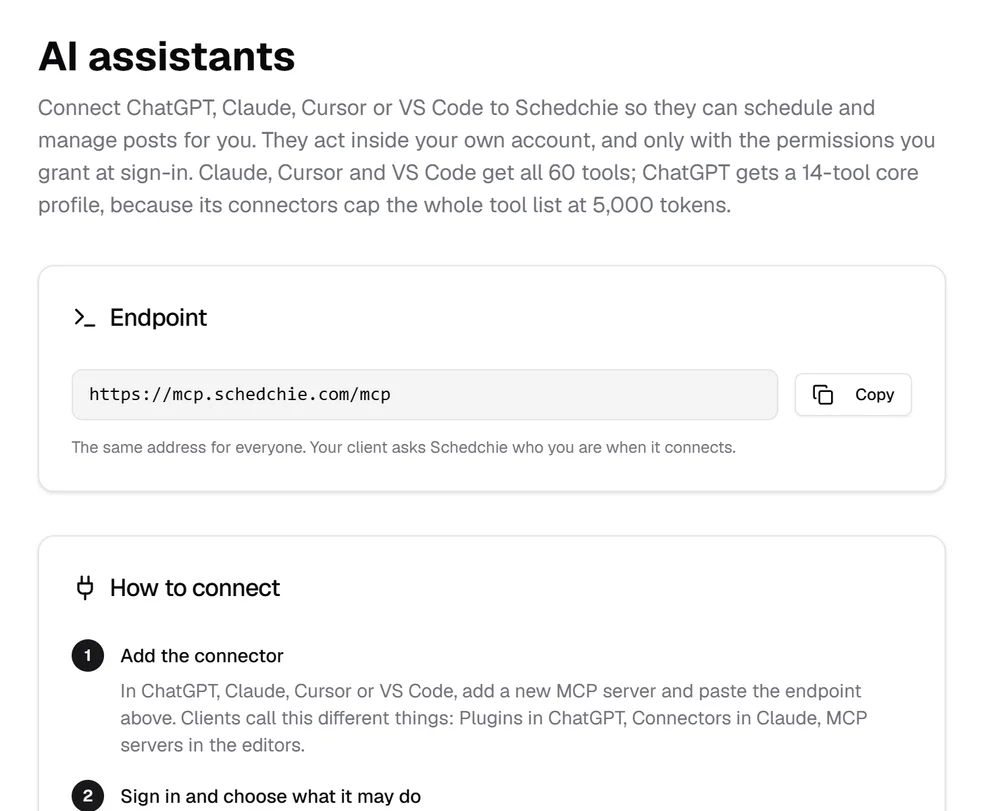
https://mcp.schedchie.com/mcp
2
Turn on developer mode, then add it under Plugins
Settings → Security and login → Developer mode. Then open Plugins, press the + next to the search box, name it Schedchie, paste the URL as the MCP server URL, leave authentication on OAuth, tick the box that says you understand, and press Create.
3
Choose what it may do, and sign in
The Schedchie screen opens. Tick the groups this connection may use, sign in, then pick Schedchie in a chat and ask for your connected accounts.
ChatGPT gets a 14-tool core set: scheduling, editing, retries, media, approvals and two analytics reads.
1
Copy the Schedchie MCP URL
You will paste this into Claude in the next step.
https://mcp.schedchie.com/mcp
2
Go to Claude → Customize → Connectors
Press the +, then Add custom connector, and paste the URL. Same steps on claude.ai and in Claude Desktop. On Claude Team and Enterprise workspaces only an owner can add one, under Organization settings.
3
Choose what it may do, and sign in
The Schedchie screen opens. Tick the groups this connection may use, sign in, and those tools appear in the chat.
1
Copy the Schedchie MCP URL
The prompt in the next step already contains it.
https://mcp.schedchie.com/mcp
2
Send Claude Code this prompt
It does the setup itself. Nothing to look up.
Copy and send this to Claude Code
Set up Schedchie so I can schedule and manage my social posts from here.
- Add the MCP server: claude mcp add --transport http schedchie https://mcp.schedchie.com/mcp
- Run claude mcp login schedchie, then tell me to finish the sign-in in the browser it opens.
- Once I confirm, list my connected Schedchie accounts so we know it works.
3
Finish it in the browser
Your browser opens the Schedchie screen. Tick the groups this connection may use and sign in, and Claude Code has those tools.
Prefer doing it yourself? Run claude mcp add --transport http schedchie , then claude mcp login schedchie to sign in. Add -s user to the first command to register it globally rather than per project.
1
Copy the Schedchie MCP URL
The prompt in the next step already contains it.
https://mcp.schedchie.com/mcp
2
Send Cursor this prompt
Cursor writes its own config file.
Copy and send this to Cursor
Set up Schedchie so I can schedule and manage my social posts from here.
- Create or edit .cursor/mcp.json and add: { "mcpServers": { "schedchie": { "url": "https://mcp.schedchie.com/mcp" } } }
- Tell me to reload Cursor and finish the Schedchie sign-in it prompts for.
- Once I confirm, list my connected Schedchie accounts so we know it works.
3
Sign in when Cursor asks
Cursor registers itself with Schedchie and opens the screen where you tick what the connection may do. Nothing to paste.
1
Copy the Schedchie MCP URL
The prompt in the next step already contains it.
https://mcp.schedchie.com/mcp
2
Send Copilot this prompt
Or run MCP: Add Server from the Command Palette, pick HTTP and paste the URL.
Copy and send this to VS Code
Set up Schedchie so I can schedule and manage my social posts from here.
- Create or edit .vscode/mcp.json and add: { "servers": { "schedchie": { "type": "http", "url": "https://mcp.schedchie.com/mcp" } } }
- Tell me to start the server from the MCP panel and finish the Schedchie sign-in.
- Once I confirm, list my connected Schedchie accounts so we know it works.
3
Sign in when VS Code asks
VS Code registers itself with Schedchie and opens the screen in your browser, where you tick what the connection may do.
1
Copy the Schedchie MCP URL
It is the whole configuration.
https://mcp.schedchie.com/mcp
2
Point the client at the URL
The one requirement is the Streamable HTTP transport. Nothing to install.
3
It finds the sign-in on its own
Your client sends you to the sign-in without any setup. What the client asks for does not decide access; your ticks do.
Signed up with Google and never set a password? Use the access-token tab on that screen and paste a connection token from Dashboard → AI assistants.
No Schedchie account yet? Start free trial, then connect it in the three steps above.
How it works
88
tools on one connection
13
flagged destructive, each with a machine-readable warning
200MB
per file and 15 minutes per video; 5 MB inside the chat
€0
extra for the connection, on every plan and the 14-day trial
An open standard.
ChatGPT, Claude, Cursor and VS Code all speak MCP. Schedchie is listed in the official MCP Registry as com.schedchie.www/schedchie. Connecting is opt-in: the dashboard works the same without it.
You choose what it can touch.
You sign in to Schedchie yourself, so the assistant never sees your password, and tick the tool groups it may use. Unticked tools do not exist on that connection. Owner-only actions stay owner-only, and held posts still wait for approval.
Media, whatever the size.
Small files travel in the chat and links are fetched for you. In Claude, Cursor and VS Code it can hand you an upload link for the video on your phone; clients that render in-chat apps show a file picker.
All 88 tools
Every tool the server registers, grouped as the sign-in screen groups them, on the same routes and permissions as the web app.
Schedule and edit posts10
Draft, schedule and change posts, one at a time or up to 25 in one call. It sees which account missed and why, and retries only that one. Per-network fields travel too: Pinterest board and section, Instagram trial reels and collaborators, TikTok visibility and Commercial Music Library tracks, the Google Business Profile post type.
- schedule_post
- schedule_posts
- edit_post
- reschedule_post
- retry_post
- list_posts
- get_post
- pending_count
- reply_to_live_post
- delete_post ⚠
Upload media5
Images and video for every selected account, inline or by link; upload_media also takes a Google Drive share link for a file shared as “Anyone with the link”. Custom video covers: your own image on Instagram, Facebook, TikTok, LinkedIn, Pinterest and YouTube, or a picked frame on Instagram, TikTok and Pinterest.
- upload_media
- request_media_upload
- get_media_status
- create_upload_slot
- confirm_upload
Read analytics15
Followers, views and engagement per account against the previous period, and each account’s top posts. It sees what is live on your accounts, posts made outside Schedchie included on most platforms, and answers comments on TikTok, LinkedIn, Threads, Bluesky, Mastodon and YouTube after showing you the text.
- get_analytics_overview
- get_account_analytics
- get_best_times
- get_analytics_summary
- get_account_history
- list_live_posts
- get_live_post_comments
- get_linkedin_analytics
- list_linkedin_live_posts
- get_linkedin_post_engagement
- get_youtube_analytics
- get_bluesky_analytics
- get_pinterest_analytics
- get_meta_analytics
- get_x_addon_status
Team and approvals14
Client review links on any plan. On the Ultra plan (€24.99, three teammates included), your assistant also lists members, sends invites, approves or rejects held posts and creates client connect links, so a client connects their own Facebook Pages and Instagram accounts without a Schedchie account. Approval rules hold over MCP.
- list_members
- invite_member ✉
- update_membership
- remove_member ⚠
- list_pending_approvals
- approve_post ✉
- reject_post ✉
- get_team_activity
- create_client_review_link
- list_client_review_links
- revoke_client_review_link ⚠
- create_client_connect_link
- list_client_connect_links
- revoke_client_connect_link ⚠
Notes, presets and groups20
Content notes with tags and linked dates, publishing presets, account groups and connections, all by name from the conversation. For the post itself: Threads places to tag, and TikTok’s own hashtag suggestions and trending searches on the TikTok Business connection.
- list_notes
- create_note
- update_note
- delete_note ⚠
- list_presets
- create_preset
- update_preset
- delete_preset ⚠
- create_account_group
- move_account_between_groups
- get_affected_post_count
- list_pinterest_boards
- get_tiktok_creator_info
- search_instagram_audio
- search_tiktok_music
- search_threads_locations
- suggest_tiktok_hashtags
- get_tiktok_trending_searches
- disconnect_account ⚠
- delete_account_group ⚠
Comments, mentions and reviews21
On any plan it likes comments under your posts on LinkedIn Pages, Bluesky, Mastodon and TikTok, hides them on Threads and TikTok, and approves or rejects held Threads replies. On the Ultra plan it also reads mentions, searches public posts and runs keyword monitors on Threads, Bluesky and Mastodon, records competitors’ follower counts and answers Google reviews. Before anything goes out in public, it shows you the text.
- like_live_comment
- hide_comment
- list_pending_replies
- decide_pending_reply ⚠
- list_listening_accounts
- get_mentions
- search_public_posts
- lookup_profile
- reply_to_public_post
- list_monitors
- create_monitor
- update_monitor
- delete_monitor ⚠
- get_monitor_hits
- run_monitor
- list_watched_profiles
- watch_profile
- unwatch_profile ⚠
- list_reviews
- reply_to_review ⚠
- delete_review_reply ⚠
On every connection3
Who you are, your connected accounts and their health, and your email preferences, whatever you tick.
- whoami
- list_accounts
- set_notification_preferences
⚠ cannot be undone: it deletes, disconnects, revokes or replaces something, or makes a held reply public. The eight that touch posts, accounts, teammates, client links or held Threads replies, or answer a Google review, make the assistant confirm with you first. ✉ sends an email when it runs: an invite, or an approval or rejection to the post's author. Posting to X is a €4.99 add-on per 30 posts: the status tool reads your balance, buying stays in the app.
When something goes wrong
Disconnecting, sign-in and the limits, in one place.
Disconnecting
Remove Schedchie in your assistant's connector settings. To cut it off on our side as well, open AI assistants in the dashboard and revoke its token under Your connection tokens. It stops working within a minute.
“Resolve this in the Schedchie app”
Schedchie refused the request for a reason no tool can change, usually the account’s plan or a payment. Sign in to the web app and sort it there; in a team workspace the owner does. Retrying the same request gets the same answer.
No plan yet
A new account, including one made on the sign-in page, has no plan until you start one, so every tool that reads or changes its workspace is refused. Open the dashboard and start the free trial or choose a plan. The same connection works from then on, and anything already set up is kept.
Asked to sign in again
A connection token lasts 30 days. When it runs out, the assistant asks you to sign in again.
Fair-use limits
Each connection can make up to 120 tool calls a minute. On Pro it gets 300 tool calls an hour, plus 30 session opens that make no call (a session that makes a call costs only that call); on Ultra four times that, 1,200 calls and 120 opens.
€7.99 a month, assistant connection included
Flat, for unlimited posts and accounts: the cheapest unlimited scheduler.
14-day free trialCancel anytime, no questions asked
Canonical HTML version: https://www.schedchie.com/ai Product facts: https://www.schedchie.com/index.md · Pricing: https://www.schedchie.com/pricing.md