Urlbox Full Page Screenshots
oficialUn servidor MCP para la API de capturas de pantalla de Urlbox. Permite a tu cliente tomar capturas de pantalla, generar PDFs, extraer HTML/markdown y más desde sitios web.
¿Qué puedes hacer con Urlbox Full Page Screenshots MCP?
- Capturas de pantalla de página completa — Solicita una captura de cualquier URL, con opciones para bloquear anuncios o banners de cookies.
- Generar PDF y videos — Solicita un PDF con etiquetas y esquema o un renderizado en video de una página, guardado localmente mediante
save_render. - Extraer contenido de la página — Convierte cualquier artículo o página web en markdown limpio, HTML o texto de artículo plano.
- Comparar versiones de página — Pide una comparación visual de dos URLs o captura cómo se ve un sitio en una ventana de teléfono.
- Gestionar recursos de Urlbox — Con una clave de organización, crea o actualiza proyectos, inspecciona webhooks y revisa el uso de la cuenta.
Documentación
Servidor MCP de capturas de pantalla Urlbox
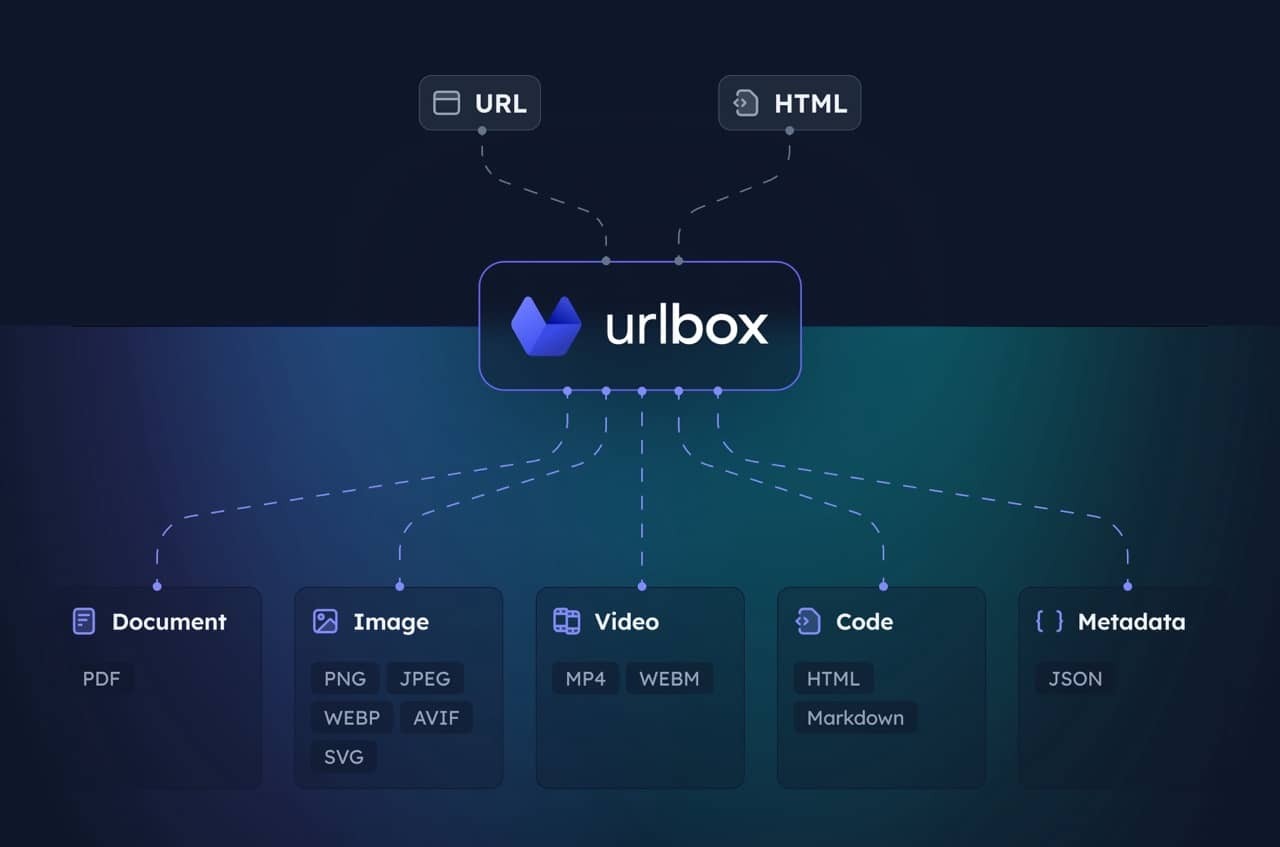
Dale a tu asistente de IA un navegador real para capturas de pantalla de sitios web. El servidor MCP de Urlbox toma capturas de pantalla, genera PDFs y videos, extrae HTML, markdown y texto de artículos, compara páginas y gestiona tus proyectos, webhooks y uso de Urlbox.
Usa el servidor alojado (recomendado)
Conecta tu cliente a https://api.urlbox.com/mcp. No hay nada que instalar.
-
Claude (claude.ai y escritorio): Configuración, Conectores, Añadir conector personalizado, introduce
https://api.urlbox.com/mcpy luego inicia sesión en Urlbox. -
ChatGPT: añade un conector con la URL
https://api.urlbox.com/mcpy luego inicia sesión en Urlbox. -
Claude Code:
claude mcp add --transport http urlbox https://api.urlbox.com/mcp, luego ejecuta/mcppara iniciar sesión. -
Codex:
codex mcp add urlbox --url https://api.urlbox.com/mcp, luegocodex mcp login urlboxpara iniciar sesión. -
Cursor: añade esto a
~/.cursor/mcp.json:{ "mcpServers": { "urlbox": { "url": "https://api.urlbox.com/mcp", "headers": { "Authorization": "Bearer YOUR_URLBOX_API_KEY" } } } }
Los clientes que no pueden iniciar sesión pueden enviar una clave de API como Authorization: Bearer <key>. Una clave de API de organización (ubx_org_...) desbloquea todas las herramientas. Una clave secreta de proyecto funciona solo para las herramientas de renderizado. Encuentra tus claves en el panel de Urlbox.
Puente local (este paquete)
Algunos clientes solo pueden iniciar servidores locales. Este paquete es un pequeño puente local: se ejecuta en tu máquina a través de stdio y reenvía todo al servidor alojado, para que obtengas exactamente las mismas herramientas, siempre actualizadas.
{
  "mcpServers": {
    "urlbox": {
      "command": "npx",
      "args": ["-y", "@urlbox/screenshot-mcp"],
      "env": {
        "URLBOX_API_KEY": "your_api_key_here"
      }
    }
  }
}
Requiere Node.js 20 o posterior.
| Variable | Descripción |
|---|---|
URLBOX_API_KEY | Tu clave de API de organización o clave secreta de proyecto. |
SECRET_KEY | También se acepta, para configuraciones escritas para 1.x. URLBOX_API_KEY tiene prioridad si ambas están configuradas. |
URLBOX_DOWNLOAD_DIR | Dónde save_render guarda los archivos. El valor predeterminado es ~/Downloads. |
El puente añade una herramienta local, save_render, que descarga una URL de renderizado devuelta por cualquier herramienta de Urlbox y la guarda en tu computadora. Solo pide, por ejemplo, "captura example.com y guárdala en mi computadora". Los archivos existentes nunca se sobrescriben.
Actualización desde 1.x
Tu configuración existente sigue funcionando: SECRET_KEY todavía se lee y el nombre del paquete y el comando no cambian.
- Las herramientas ahora provienen del servidor alojado, por lo que hay muchas más y siguen mejorando sin necesidad de actualización.
rendersigue ahí. Su opciónstore_rendersy la herramientadownloadse reemplazan porsave_render.- Los archivos se guardan en
~/Downloadsen lugar de~/Downloads/urlbox-renders. ConfiguraURLBOX_DOWNLOAD_DIRpara mantener la ubicación anterior. - Con una clave secreta de proyecto obtienes las herramientas de renderizado. Usa una clave de API de organización para también gestionar proyectos, webhooks y uso.
- Se requiere Node.js 20 o posterior.
Ejemplos de indicaciones
- Toma una captura de pantalla de https://example.com sin anuncios ni banners de cookies.
- Guarda https://urlbox.com como un PDF con marcadores y esquema, y descárgalo a mi computadora.
- Convierte este artículo a markdown: https://example.com/blog/post
- ¿Cómo se ve https://example.com en un teléfono?
Desarrollo
npm install
npm test
Las pruebas ejecutan el puente contra un servidor falso local, por lo que no necesitan una cuenta de Urlbox.
Licencia
MIT