Taskade
oficialConéctate a la plataforma Taskade a través de MCP. Accede a tareas, proyectos, flujos de trabajo y agentes de IA en tiempo real mediante un espacio de trabajo unificado y una API.
¿Qué puedes hacer con Taskade MCP?
- Gestionar tareas y proyectos — Pídele a tu asistente que cree, actualice, complete o mueva tareas y proyectos usando herramientas como
taskCreate,taskPutytaskMove. - Crear y desplegar agentes de IA — Genera o crea agentes a partir de indicaciones, adjunta conocimiento de proyectos o medios, y publícalos públicamente mediante
folderAgentGenerateyagentPublicAccessEnable. - Chatear con agentes de IA — Envía mensajes y recupera el historial de conversación con
promptAgentygetConversationpara interactuar con tus agentes desplegados. - Automatizar desde plantillas — Lista las plantillas disponibles y crea nuevos proyectos a partir de ellas usando
folderProjectTemplatesGetyprojectFromTemplate. - Configurar webhooks — Suscríbete o elimina notificaciones de eventos de Taskade en tiempo real con
subscribeWebhookyunsubscribeWebhook.
Documentación
Servidor MCP de Taskade
El Workspace MCP (
@taskade/mcp-server) — ejecuta tu espacio de trabajo de Taskade desde cualquier cliente de IA.
Conecta Taskade a cualquier asistente de IA — Claude, Cursor, Windsurf, VS Code y más — mediante el Model Context Protocol.



62 herramientas para espacios de trabajo, proyectos, tareas, agentes de IA, chat de agentes, webhooks, bases de conocimiento, plantillas, medios y uso compartido — todo desde tu cliente de IA.
- Servidor MCP — Conecta Taskade a Claude Desktop, Cursor, Windsurf o cualquier cliente MCP.
- OpenAPI Codegen — Genera herramientas MCP desde cualquier especificación OpenAPI — no solo Taskade.
Contenido
- Demo
- Inicio rápido
- MCP remoto alojado
- Herramientas (62)
- ¿Por qué Taskade MCP?
- Recetas de agentes
- Casos de uso
- OpenAPI Codegen
- ¿Qué es Taskade?
- Hoja de ruta
- Contribuciones
- Licencia
Demo
Agente de Taskade impulsado por MCP ejecutándose dentro de Claude Desktop de Anthropic:
| Crea agentes mediante MCP | Automatiza flujos de trabajo | Gestiona proyectos |
|---|---|---|
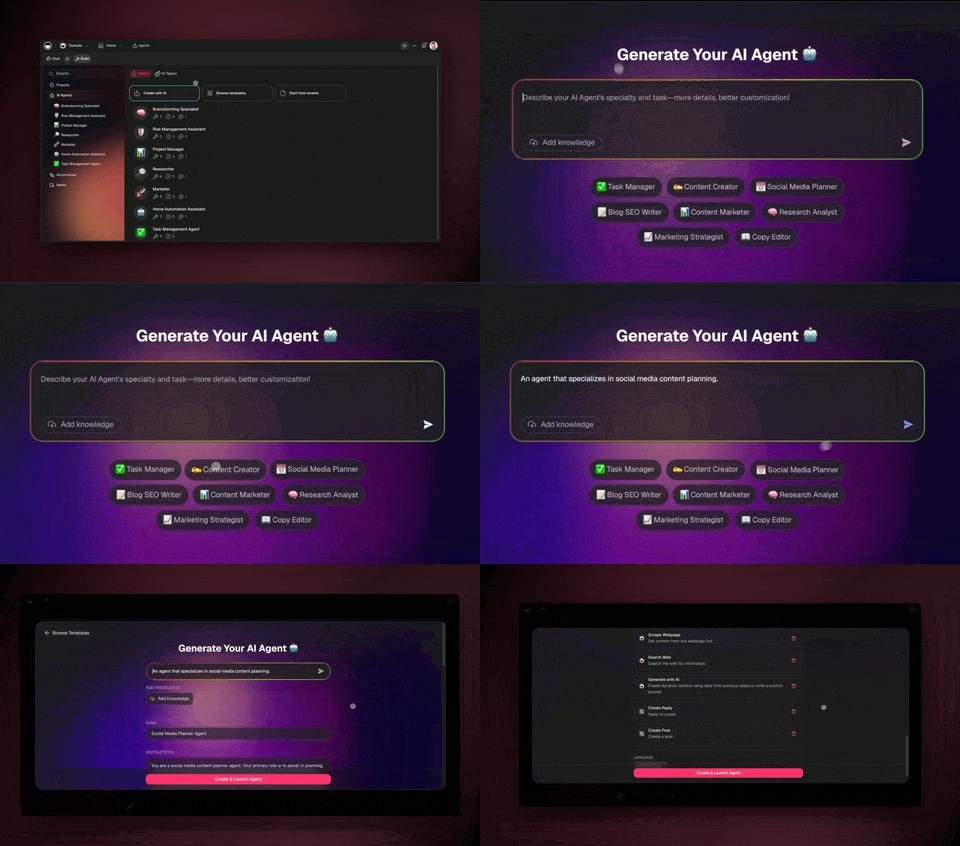 | 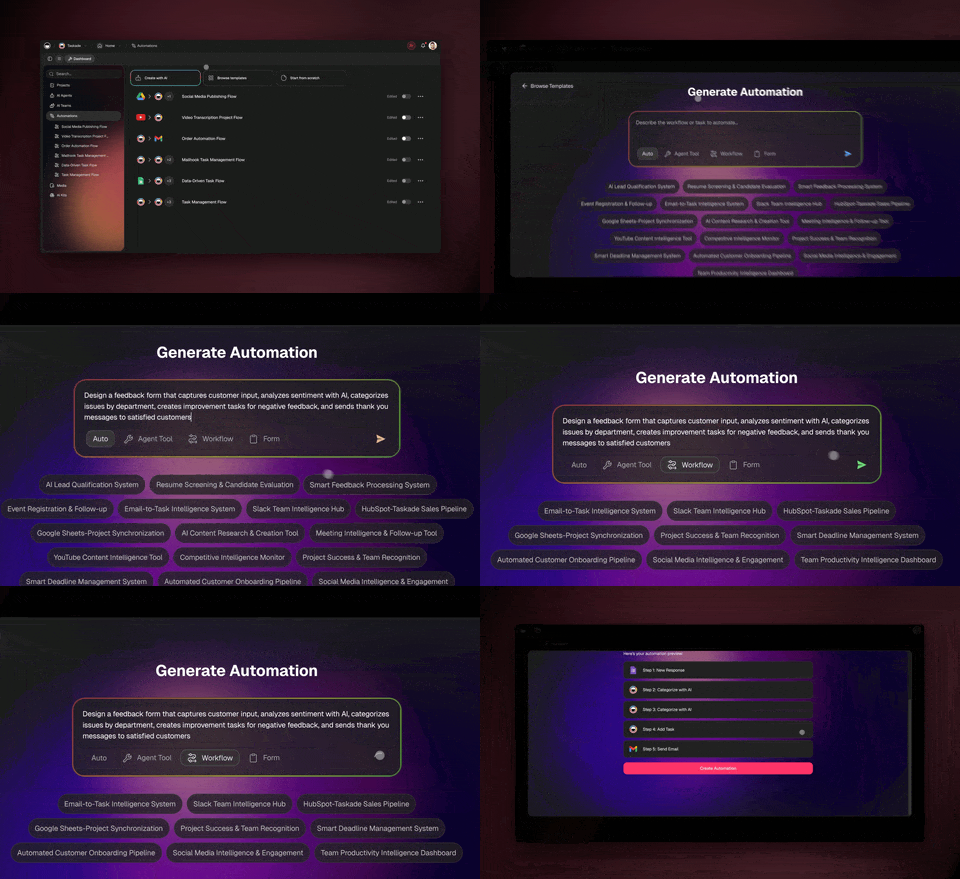 | 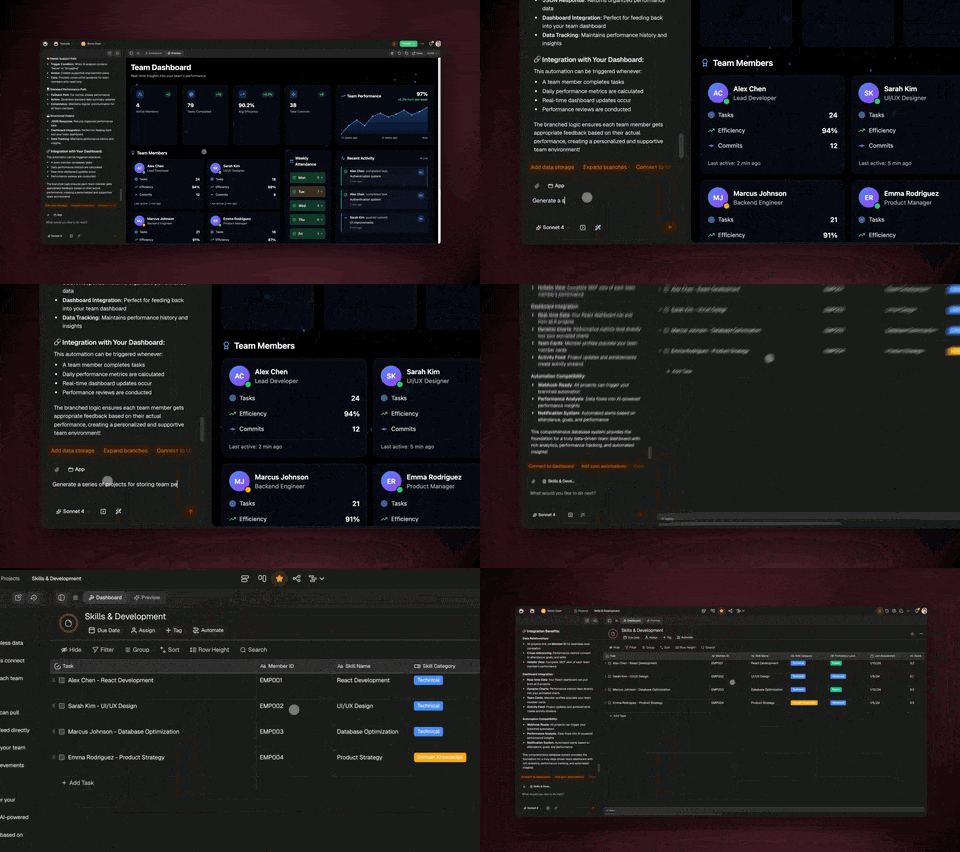 |
| Crea, entrena e implementa agentes de IA desde Claude/Cursor | Construye automatizaciones de varios pasos en más de 100 servicios | Gestión completa del espacio de trabajo desde tu asistente de IA (planes de pago; algunos endpoints restringidos en el plan gratuito) |
Inicio rápido
⚡ ¿Prefieres una opción alojada? Abre
https://www.taskade.com/mcpen un navegador — esa es la página oficial de instalación con OAuth (Claude, Cursor, Claude Code, Windsurf, Zed). Uninitializesin autenticar devuelve 401 por diseño; los clientes completan OAuth 2.0 (PKCE) una sola vez. Las escrituras completas a nivel de tareas siguen viviendo en este paquete local de Workspace MCP. Guía: Taskade MCP alojado.
¿Qué Taskade MCP quiero?
Taskade habla MCP a través de tres superficies — este repositorio es la primera:
| Quiero… | Usar | Dónde / autenticación |
|---|---|---|
| Que mi cliente de IA lea y escriba tareas (completar, asignados, fechas) además de proyectos y agentes | Workspace MCP — este repositorio (@taskade/mcp-server) | stdio local · token personal · cualquier plan |
Conectarme de forma remota — explorar el espacio de trabajo, crear proyectos, enviar instrucciones a agentes, editar el código fuente de Genesis app/ | Taskade MCP alojado | https://www.taskade.com/mcp · OAuth 2.0 (PKCE) · todos los planes de pago |
| Que mis agentes accedan a Slack / Shopify / Gmail | Conectores MCP | Alojado, dentro del producto |
1. Obtén tu clave de API
Ve a Configuración de Taskade > API y crea un token de acceso personal.
2. Claude Desktop
Añade a tu claude_desktop_config.json:
{
  "mcpServers": {
    "taskade": {
      "command": "npx",
      "args": ["-y", "@taskade/mcp-server"],
      "env": {
        "TASKADE_API_KEY": "your-api-key-here"
      }
    }
  }
}
3. Cursor
Añade a la configuración de MCP de Cursor:
{
  "mcpServers": {
    "taskade": {
      "command": "npx",
      "args": ["-y", "@taskade/mcp-server"],
      "env": {
        "TASKADE_API_KEY": "your-api-key-here"
      }
    }
  }
}
4. Windsurf
Añade a ~/.codeium/windsurf/mcp_config.json (o Configuración → Cascade → MCP → Añadir servidor):
{
  "mcpServers": {
    "taskade": {
      "command": "npx",
      "args": ["-y", "@taskade/mcp-server"],
      "env": {
        "TASKADE_API_KEY": "your-api-key-here"
      }
    }
  }
}
5. Cline
En VS Code, abre el panel Servidores MCP de Cline → Configurar servidores MCP y añade:
{
  "mcpServers": {
    "taskade": {
      "command": "npx",
      "args": ["-y", "@taskade/mcp-server"],
      "env": {
        "TASKADE_API_KEY": "your-api-key-here"
      }
    }
  }
}
6. VS Code
Añade un .vscode/mcp.json a tu espacio de trabajo (VS Code usa la clave servers; ${input:…} solicita tu clave en la primera ejecución):
{
  "servers": {
    "taskade": {
      "command": "npx",
      "args": ["-y", "@taskade/mcp-server"],
      "env": {
        "TASKADE_API_KEY": "${input:taskade_api_key}"
      }
    }
  }
}
7. Modo HTTP / SSE (clientes remotos y personalizados)
TASKADE_API_KEY=your-api-key npx @taskade/mcp-server --http
El servidor se inicia en http://localhost:3000 (configurable con la variable de entorno PORT). Conéctate mediante SSE en http://localhost:3000/sse?access_token=your-api-key.
8. MCP remoto alojado (https://www.taskade.com/mcp)
MCP remoto oficial de Taskade. Nada que instalar localmente. Pega la URL en cualquier cliente MCP que admita Streamable HTTP + OAuth.
| Endpoint | https://www.taskade.com/mcp |
| Autenticación | OAuth 2.0 con PKCE. Descubrimiento: https://www.taskade.com/.well-known/oauth-protected-resource/mcp |
initialize sin autenticar | Devuelve 401 a propósito. El GET del navegador es una página de instalación orientada al usuario; los clientes MCP deben completar el inicio de sesión OAuth. |
| Plan | Todos los planes de pago. El plan gratuito puede iniciar el flujo de conexión; el acceso al espacio de trabajo está restringido. |
| Guía | Taskade MCP alojado |
{
  "mcpServers": {
    "taskade": {
      "type": "http",
      "url": "https://www.taskade.com/mcp"
    }
  }
}
Las herramientas alojadas cubren la exploración del espacio de trabajo (list_spaces, inspect_space), la creación de proyectos/agentes y la edición de archivos Genesis app/ mediante write_file. Las escrituras a nivel de tareas (completar, asignados, fechas) siguen siendo de este paquete.
Herramientas (62)
Espacios de trabajo
| Herramienta | Descripción |
|---|---|
workspacesGet | Lista todos los espacios de trabajo |
workspaceFoldersGet | Lista las carpetas de un espacio de trabajo |
workspaceCreateProject | Crea un proyecto en un espacio de trabajo |
Proyectos
| Herramienta | Descripción |
|---|---|
projectGet | Obtiene los detalles de un proyecto |
projectCreate | Crea un nuevo proyecto |
projectCopy | Copia un proyecto a una carpeta |
projectComplete | Marca un proyecto como completado |
projectRestore | Restaura un proyecto completado |
projectMembersGet | Lista los miembros de un proyecto |
projectFieldsGet | Obtiene los campos personalizados de un proyecto |
projectShareLinkGet | Obtiene el enlace de uso compartido |
projectShareLinkEnable | Habilita el enlace de uso compartido |
projectBlocksGet | Obtiene todos los bloques de un proyecto |
projectTasksGet | Obtiene todas las tareas de un proyecto |
folderProjectsGet | Lista los proyectos de una carpeta |
Tareas
| Herramienta | Descripción |
|---|---|
taskGet | Obtiene los detalles de una tarea |
taskCreate | Crea una o más tareas |
taskPut | Actualiza una tarea |
taskDelete | Elimina una tarea |
taskComplete | Marca una tarea como completada |
taskUncomplete | Marca una tarea como incompleta |
taskMove | Mueve una tarea dentro de un proyecto |
taskAssigneesGet | Obtiene los asignados de una tarea |
taskPutAssignees | Asigna usuarios a una tarea |
taskDeleteAssignees | Elimina asignados |
taskGetDate | Obtiene la fecha de vencimiento de una tarea |
taskPutDate | Establece la fecha de vencimiento de una tarea |
taskDeleteDate | Elimina la fecha de vencimiento de una tarea |
taskNoteGet | Obtiene la nota de una tarea |
taskNotePut | Actualiza la nota de una tarea |
taskNoteDelete | Elimina la nota de una tarea |
taskFieldsValueGet | Obtiene todos los valores de campo |
taskFieldValueGet | Obtiene un valor de campo específico |
taskFieldValuePut | Establece un valor de campo |
taskFieldValueDelete | Elimina un valor de campo |
Agentes de IA
Crea, gestiona y publica agentes de IA autónomos con conocimiento y herramientas personalizados.
| Herramienta | Descripción |
|---|---|
folderAgentGenerate | Genera un agente de IA a partir de un prompt de texto |
folderCreateAgent | Crea un agente con configuración personalizada |
folderAgentGet | Lista los agentes de una carpeta |
agentGet | Obtiene los detalles de un agente |
agentUpdate | Actualiza la configuración de un agente |
deleteAgent | Elimina un agente |
agentPublicAccessEnable | Publica un agente públicamente |
agentPublicGet | Obtiene los detalles de un agente público |
agentPublicUpdate | Actualiza la configuración de un agente público |
agentKnowledgeProjectCreate | Añade un proyecto como conocimiento del agente |
agentKnowledgeMediaCreate | Añade medios como conocimiento del agente |
agentKnowledgeProjectRemove | Elimina un proyecto del conocimiento |
agentKnowledgeMediaRemove | Elimina medios del conocimiento |
agentConvosGet | Lista las conversaciones de un agente |
agentConvoGet | Obtiene los detalles de una conversación |
publicAgentGet | Obtiene un agente por ID público |
Plantillas
| Herramienta | Descripción |
|---|---|
folderProjectTemplatesGet | Lista las plantillas de proyecto disponibles |
projectFromTemplate | Crea un proyecto a partir de una plantilla |
Medios
| Herramienta | Descripción |
|---|---|
mediasGet | Lista los archivos multimedia de una carpeta |
mediaGet | Obtiene los detalles de un medio |
mediaDelete | Elimina un archivo multimedia |
Personal
| Herramienta | Descripción |
|---|---|
meProjectsGet | Lista todos tus proyectos |
Chat de agentes y webhooks (API v2, beta)
Capacidades que la API v1 no tiene: mantener una conversación en vivo con un agente de IA y recibir eventos en tiempo real.
| Herramienta | Descripción |
|---|---|
promptAgent | Envía un mensaje a un agente de IA y obtén su respuesta |
listConversations | Lista las conversaciones de un agente |
getConversation | Obtiene los mensajes de una conversación |
subscribeWebhook | Suscríbete a webhooks de eventos de Taskade en tiempo real |
unsubscribeWebhook | Elimina una suscripción a webhook |
¿Por qué Taskade MCP?
Taskade MCP le da a tu asistente de IA acceso a tu espacio de trabajo — proyectos, tareas, agentes, bases de conocimiento, plantillas y automatizaciones (en planes de pago; algunos endpoints como el listado de espacios de trabajo están restringidos para cuentas gratuitas). En lugar de escribir código de API, describe lo que necesitas en lenguaje natural.
┌──────────────────────────────────────────────────────────┐
│                HOW TASKADE MCP WORKS                     │
└──────────────────────────────────────────────────────────┘

  You (in Claude/Cursor/Windsurf):
  "Create a support agent trained on our docs project"
                         ↓
  ┌──────────────────────────────────┐
  │     Taskade MCP Server           │
  │     (62 tools, 8 categories)     │
  └──────────────────────────────────┘
       ↓              ↓            ↓
  folderCreateAgent  agentKnowledge  agentPublicAccess
  (creates agent)    (attaches docs)  (publishes it)
                         ↓
  Result: Live AI chatbot trained on your data
| Lo que dices | Lo que sucede |
|---|---|
| "Muéstrame todas las tareas vencidas" | Lee proyectos → filtra tareas → formatea informe |
| "Crea un agente de soporte entrenado con nuestra documentación" | Crea agente → adjunta conocimiento → publica |
| "Prepara el sprint de la próxima semana desde nuestra plantilla" | Copia plantilla → completa tareas → asigna equipo |
| "Resume el trabajo completado ayer" | Lee historial de tareas → genera resumen diario |
¿Por qué MCP en lugar de API REST?
| API REST | Servidor MCP | |
|---|---|---|
| Configuración | Escribir cliente HTTP, manejar autenticación, analizar JSON | npx @taskade/mcp-server — un solo comando |
| Interfaz | Programar contra endpoints | Lenguaje natural — describe lo que necesitas |
| Encadenamiento | Orquestación manual | La IA encadena herramientas de forma inteligente |
| Manejo de errores | Escribir código de manejo de errores | La IA interpreta errores y reintenta |
¿Por qué Taskade MCP sobre otros servidores MCP?
Taskade es el único servidor MCP que incluye gestión de agentes de IA (crear, entrenar, implementar agentes), entrenamiento de bases de conocimiento (adjuntar documentos, proyectos, medios) y generación de código OpenAPI (generar herramientas MCP desde cualquier especificación de API). 62 herramientas en 8 categorías.
Recetas de agentes
Receta 1: Resumidor diario de standup
Problema: Las notas del standup del equipo están dispersas entre Slack, correo electrónico y documentos.
You: "Check my Taskade workspace for yesterday's completed tasks,
      summarize them as a standup update, then create today's
      priority tasks based on what's still open."

Claude uses:
  1. meProjectsGet → find your active projects
  2. projectTasksGet → pull tasks from each project
  3. taskCreate → create today's priority tasks

Result: A formatted standup summary + fresh task list in Taskade.
Receta 2: Constructor de agentes con base de conocimiento
Problema: Tienes documentos dispersos entre archivos y necesitas un agente de IA entrenado con ellos.
You: "Create an AI support agent called 'Help Bot' in my
      Customer Success folder, train it on our Documentation
      project, and publish it publicly."

Claude uses:
  1. workspaceFoldersGet → find "Customer Success" folder
  2. folderCreateAgent → create "Help Bot" with support instructions
  3. agentKnowledgeProjectCreate → attach Documentation project
  4. agentPublicAccessEnable → publish with shareable link

Result: Live AI chatbot trained on your docs, ready to embed.
Receta 3: Automatización de planificación de sprints
Problema: Crear proyectos de sprint manualmente cada dos semanas.
You: "Create a new sprint project from our 'Sprint Template',
      name it 'Sprint 2026-W15', move the top 10 backlog
      items into it, and assign them to the engineering team."

Claude uses:
  1. folderProjectTemplatesGet → find "Sprint Template"
  2. projectFromTemplate → create "Sprint 2026-W15"
  3. projectTasksGet → get backlog items
  4. taskMove → move top 10 tasks to new sprint
  5. taskPutAssignees → assign engineering team members

Result: Sprint ready to go, fully populated and assigned.
Receta 4: Agente de inteligencia competitiva
Problema: Necesitas un agente que supervise a los competidores y reporte hallazgos.
You: "Generate an AI agent that researches our top 5 competitors.
      Train it on our Competitive Analysis project.
      Name it 'Market Intel Agent'."

Claude uses:
  1. folderAgentGenerate → generate agent from research prompt
  2. agentKnowledgeProjectCreate → connect Competitive Analysis project
  3. agentUpdate → refine instructions for research cadence

Result: AI research agent with domain knowledge, ready for briefings.
Receta 5: Canal de incorporación de clientes
Problema: Cada cliente nuevo necesita la misma estructura de proyecto, tareas y materiales.
You: "For our new client Acme Corp: create a project from
      the 'Client Onboarding' template, add tasks for
      kickoff meeting and SOW review, set due dates for
      the next 2 weeks, then share the project link."

Claude uses:
  1. projectFromTemplate → create "Acme Corp Onboarding"
  2. taskCreate → add kickoff, requirements, SOW tasks
  3. taskPutDate → set dates across next 2 weeks
  4. projectShareLinkEnable → generate share link

Result: Client onboarding project live and shareable in 30 seconds.
Casos de uso
Gestión de proyectos con IA
Pídele a tu asistente de IA que gestione tu espacio de trabajo de Taskade:
- "Muéstrame todos mis proyectos y su estado"
- "Crea un nuevo proyecto llamado Planificación Q1 con tareas para cada equipo"
- "Mueve todas las tareas vencidas al proyecto Backlog"
- "Establece fechas de vencimiento para todas las tareas del proyecto Sprint"
Creación de agentes de IA
Crea e implementa agentes de IA directamente desde tu editor:
- "Crea un agente de IA llamado Bot de soporte al cliente con conocimiento de nuestro proyecto de documentación"
- "Genera un agente para revisión de código usando este prompt: ..."
- "Publica mi agente públicamente y dame el enlace de uso compartido"
- "Añade nuestro proyecto de documentación de API como conocimiento al agente"
Flujos de trabajo con plantillas
Automatiza la creación de proyectos a partir de plantillas:
- "Listar todas las plantillas en mi espacio de trabajo"
- "Crear 5 nuevos proyectos de incorporación de clientes desde la Plantilla de Cliente"
- "Copiar el proyecto de Retrospectiva de Sprint para esta semana"
Generación de código OpenAPI
Usa nuestro generador para construir herramientas MCP desde cualquier especificación OpenAPI — no solo Taskade.
npm install --save-dev @taskade/mcp-openapi-codegen @readme/openapi-parser
import { dereference } from '@readme/openapi-parser';
import { codegen } from '@taskade/mcp-openapi-codegen';

const document = await dereference('your-api-spec.yaml');

await codegen({
  path: 'src/tools.generated.ts',
  document,
});
Funciona con cualquier especificación OpenAPI 3.0+. Genera herramientas MCP para tus propias APIs en minutos.
¿Qué es Taskade?
Taskade (Y Combinator S19) es el espacio de trabajo nativo de IA para construir aplicaciones, implementar agentes y automatizar flujos de trabajo — desde un solo prompt. Más de 150,000 aplicaciones generadas. Confiado por 3M, Nike, Tesla, Netflix, Airbnb, Disney, Adobe. Calificado 4.8/5 en más de 9,300 reseñas.
- Genesis Apps — Construye aplicaciones completas desde prompts. Paneles, CRMs, portales, formularios — implementados al instante. Pruébalo →
- Agentes de IA — Agentes personalizados con herramientas integradas, memoria persistente, equipos multiagente, incrustación pública
- Automatizaciones — Automatización de flujos de trabajo sin código con más de 100 integraciones, ramificaciones, bucles y filtros
- Colaboración en tiempo real — Espacio de trabajo multijugador con chat, video y múltiples vistas de proyecto
- Plantillas — Más de 700 plantillas para gestión de proyectos, ingeniería, marketing y más
- API y MCP — API REST v2, este servidor MCP, API de Agentes, webhooks, OAuth 2.0
Enlaces:
- App: taskade.com
- Crear: taskade.com/create
- Galería de aplicaciones: taskade.com/apps
- Agentes: taskade.com/agents
- Plantillas: taskade.com/templates
- Documentación: taskade.com/docs · docs.taskade.com
- Guía de MCP para espacios de trabajo: https://github.com/taskade/docs/blob/main/apis-living-system-development/workspace-mcp.md
- Guía de MCP alojado: https://github.com/taskade/docs/blob/main/apis-living-system-development/genesis-app-mcp.md
- Blog: taskade.com/blog
Hoja de ruta
Consulta problemas abiertos para características y mejoras planificadas.
Lanzado recientemente (v0.1.0): Chat de agentes (promptAgent) y disparadores de webhooks, disponibles ahora a través de la capa de herramientas de Taskade API v2.
- Herramientas de Automatización y Flujos — Crea, habilita y gestiona automatizaciones de flujos de trabajo a través de MCP
agent.js— Kit de herramientas de agentes autónomos de código abierto (próximamente)- TaskOS — Plataforma de agentes en docs.taskade.com
Privacidad y Seguridad
Tu token de API de Taskade autoriza al servidor MCP a llamar a la API pública de Taskade en tu nombre. El servidor se comunica solo con la API pública de Taskade — https://www.taskade.com/api/v1 y https://www.taskade.com/api/v2 — y no envía tus datos a otros servicios de terceros.
- Privacidad — consulta la Política de Privacidad de Taskade.
- Seguridad y reporte de vulnerabilidades — consulta SECURITY.md.
- Almacena tu token en una variable de entorno; nunca lo confirmes en el repositorio.
Contribuciones
Ayúdanos a mejorar las herramientas MCP, los flujos de trabajo OpenAPI y las capacidades de los agentes.
- Problemas — Reporta errores o solicita características
- Solicitudes de extracción — Las contribuciones son bienvenidas
- Aplicaciones — Explora y clona aplicaciones de la comunidad
- Contacto — hello@taskade.com
Más de Taskade
- Documentación de Taskade (fuente) — documentación para desarrolladores y referencia de API
- Kit de Integración — acciones y disparadores de código abierto para Zapier/n8n
- Taskade — página principal de la plataforma, incluyendo Genesis, el constructor de aplicaciones de IA
Licencia
MIT