s&box MCP Server
Permite que los asistentes de IA interactúen con objetos y componentes del juego s&box a través de comunicación WebSocket.
Documentación
[!IMPORTANT]
Proyecto descontinuado
El desarrollo de esta librería ha sido descontinuado.
Decidí dejar de mantener este proyecto, ya que el ecosistema MCP para s&box empezó a avanzar en una dirección diferente. Al mismo tiempo, Braxen comenzó a desarrollar su propio MCP, y se lanzaron otros múltiples MCPs.
El principal problema de esta librería era que requería construir y ejecutar un servidor puente externo entre el agente de codificación y el motor del juego. Aunque este enfoque funcionaba, no era fácil de configurar, era difícil de mantener y añadía complejidad innecesaria para los usuarios.
Al final, me orienté hacia una solución diferente: sdocs.suiram.dev, un MCP enfocado en proporcionar a los agentes mejor contexto sobre la documentación y API de s&box.
Esto resultó ser más útil que un MCP que se conecta directamente con el motor del juego. El problema mayor no era la comunicación con el motor, sino la falta de documentación confiable y contexto de API disponible para los agentes de codificación.
Este repositorio permanecerá disponible como referencia, pero debe considerarse obsoleto y ya no se desarrolla activamente.
Model Context Protocol para s&box


Un servidor de Model Context Protocol (MCP) que permite a los asistentes de IA interactuar con el editor de s&box mediante comunicación WebSocket en tiempo real.
Este servidor MCP funciona en conjunto con la s&box Adapter Library separada para proporcionar una integración perfecta entre los asistentes de IA y tus proyectos de s&box.
Prerrequisitos
- Docker (recomendado) o .NET SDK (para instalación manual)
- s&box
- Se sugiere un asistente de IA compatible con MCP (por ejemplo, Cursor, Claude Desktop, etc.)
Inicio rápido
Paso 1: Instalar y ejecutar el servidor MCP
Para comenzar, asegúrate de tener Docker instalado en tu sistema. Los usuarios de Cursor pueden simplemente hacer clic en el botón a continuación para instalar y lanzar el servidor MCP automáticamente, o puedes seguir las instrucciones manuales a continuación.
-
Ejecutar el contenedor
docker run -d -p 8080:8080 --name sbox-mcp-server ghcr.io/suiramdev/sbox-mcp-server:latest -
Conecta tu asistente de IA al servidor MCP en ejecución

Instalación manual usando .NET SDK
-
Compilar el servidor
dotnet build -
Ejecutar el servidor
dotnet run -
Conecta tu asistente de IA al servidor MCP en ejecución
Paso 2: Instalar la librería adaptadora en s&box
Para permitir la interacción con s&box, necesitas instalar la librería adaptadora. Esta librería permite que el servidor MCP se comunique con el editor de s&box.
-
Instala la librería adaptadora desde el repositorio sbox-mcp-library
-
Sigue las instrucciones de configuración en el repositorio de la librería adaptadora para:
- Instalar la librería en tu proyecto de s&box a través de la Asset Library
- Conectarse a este servidor MCP
[!IMPORTANT] El servidor debe estar en ejecución para que la librería adaptadora de s&box funcione. Asegúrate de que el servidor esté en ejecución antes de continuar con el siguiente paso.
Uso
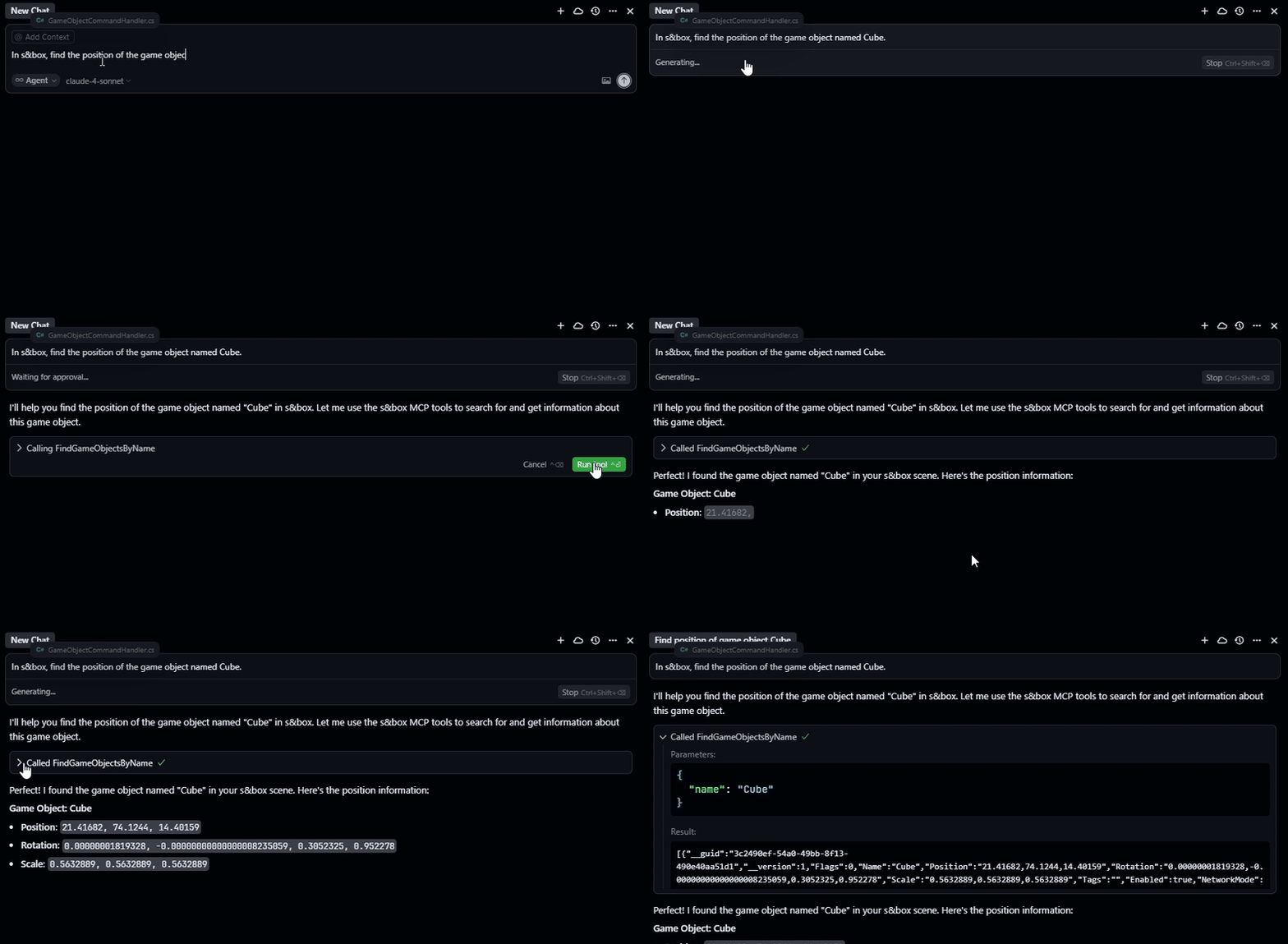
Una vez que este servidor MCP y la librería adaptadora de s&box estén instalados y conectados, puedes interactuar con tu editor de s&box usando lenguaje natural a través de tu asistente de IA:
"Create a ModelRenderer component on the Cube object"
"Find all game objects named 'Player'"
"Set the Scale property of the Transform component on MainCamera to 2,2,2"
"Remove the Rigidbody component from the Ball object"
"Show me all components attached to the Ground object"
Arquitectura
Este servidor MCP actúa como un puente entre:
- Asistente de IA ↔ Este servidor MCP ↔ Librería adaptadora de s&box ↔ Editor de s&box
El servidor MCP:
- Recibe comandos de los asistentes de IA a través del Protocolo de Contexto de Modelo (MCP)
- Traduce las llamadas de herramientas MCP en comandos WebSocket estructurados
- Envía comandos a la librería adaptadora de s&box para su ejecución
- Devuelve las respuestas a los asistentes de IA
Contribuciones
¡Las contribuciones son bienvenidas! No dudes en enviar un Pull Request. Para cambios importantes, abre primero un issue para discutir lo que te gustaría cambiar.
Repositorios relacionados
- Este repositorio: sbox-mcp-server - El componente principal del servidor MCP
- Librería adaptadora: sbox-mcp-library - Librería de integración para s&box
Soporte
- Issues: GitHub Issues
- Discusiones: GitHub Discussions
- Soporte de la librería adaptadora: sbox-mcp-library Issues