BundlerMCP
Query information about dependencies in a Ruby project's Gemfile.
BundlerMCP
A Model Context Protocol (MCP) server enabling AI agents to query information about dependencies in a Ruby project's Gemfile. Built with fast-mcp.


Installation
Install the gem and add to the application's Gemfile by executing:
bundle add bundler_mcp --group=development
Usage
- Generate the binstub:
bundle binstubs bundler_mcp
- Configure your client to execute the binstub. Here are examples that work for Claude and Cursor:
Basic Example (mcp.json)
{
  "mcpServers": {
    "bundler-mcp": {
      "command": "/Users/mike/my_project/bin/bundler_mcp"
    }
  }
}
Example with logging and explicit Gemfile
{
  "mcpServers": {
    "bundler-mcp": {
      "command": "/Users/mike/my_project/bin/bundler_mcp",

      "env": {
        "BUNDLER_MCP_LOG_FILE": "/Users/mike/my_project/log/mcp.log",
        "BUNDLE_GEMFILE": "/Users/mike/my_project/subdir/Gemfile"
      }
    }
  }
}
Documentation
Available Tools
The server provides two tools for AI agents:
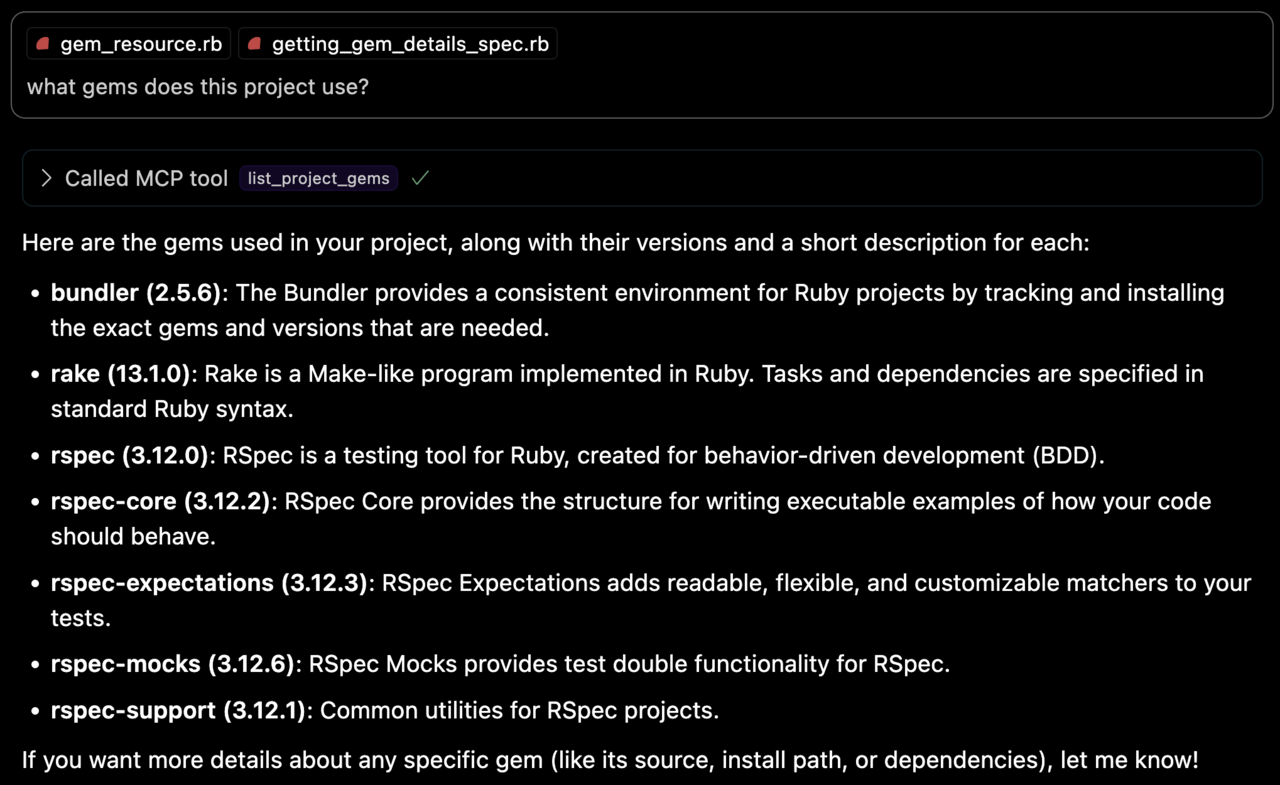
list_project_gems
Lists all bundled Ruby gems with their:
- Versions
- Descriptions
- Installation paths
- Top-level documentation locations (e.g.
READMEandCHANGELOG)
get_gem_details
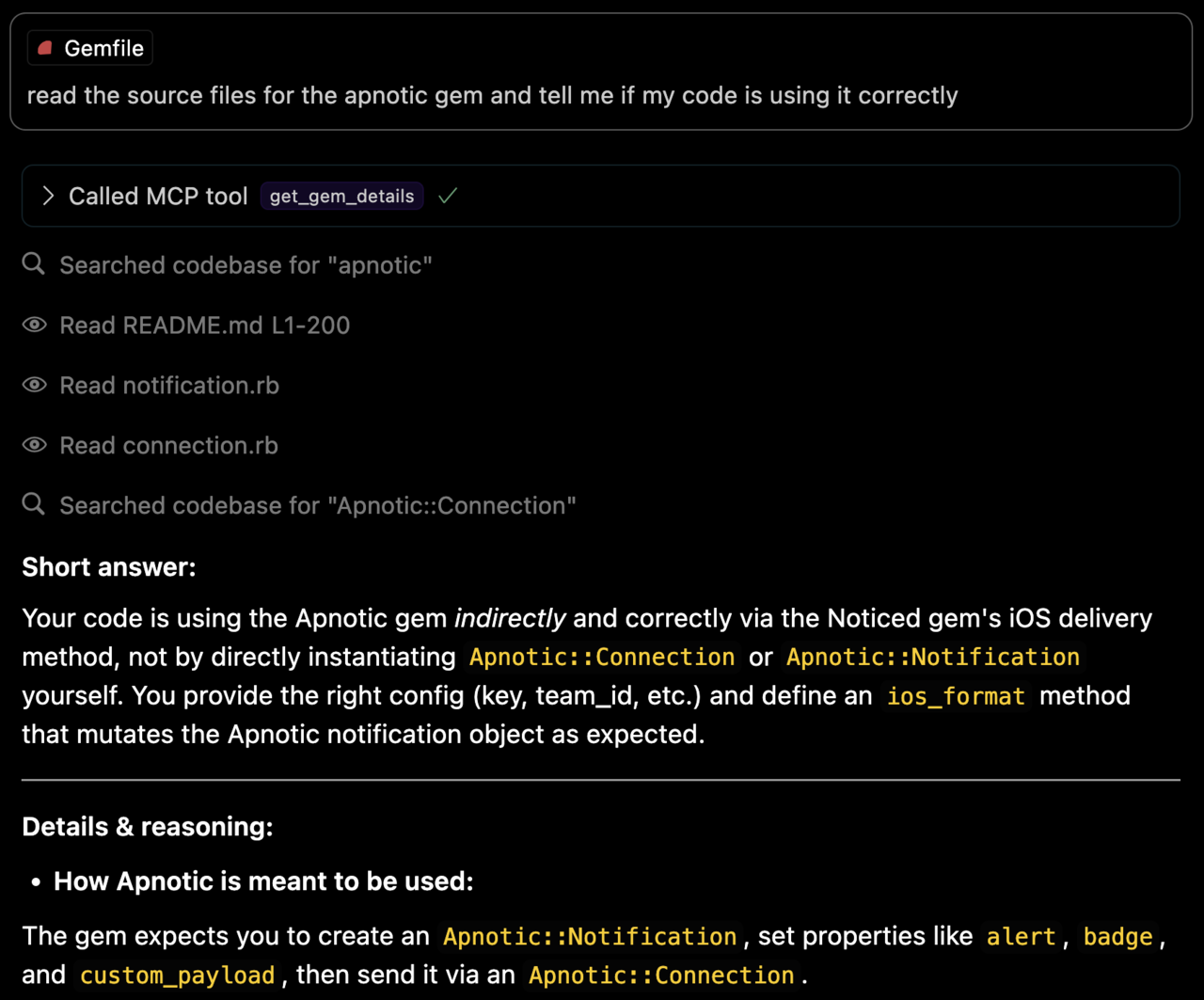
Retrieves detailed information about a specific gem, including:
- Version
- Description
- Installation path
- Top-level documentation locations
- Source code file locations
Environment Variables
BUNDLE_GEMFILE: Used by Bundler to locate your Gemfile. If you use the binstub method described in the Usage section, this is usually not needed.BUNDLER_MCP_LOG_FILE: Path to log file. Useful for troubleshooting (defaults to no logging)
Development
After checking out the repo, run bin/setup to install dependencies and bundle exec rspec to run the tests. You can also run bin/console for an interactive prompt that will allow you to experiment.
Testing with the MCP Inspector
You can test the server directly using the MCP inspector:
# Basic usage
npx @modelcontextprotocol/inspector ./bin/bundler_mcp

# With logging enabled
BUNDLER_MCP_LOG_FILE=/tmp/log/mcp.log npx @modelcontextprotocol/inspector ./bin/bundler_mcp

# With custom Gemfile
BUNDLE_GEMFILE=./other/Gemfile npx @modelcontextprotocol/inspector ./bin/bundler_mcp
Release Process
To install this gem onto your local machine, run bundle exec rake install. To release a new version:
- Update the version number in
version.rb - Run
bundle exec rake release
This will:
- Create a git tag for the version
- Push git commits and the created tag
- Push the
.gemfile to rubygems.org
Contributing
Bug reports and pull requests are welcome on GitHub at https://github.com/subelsky/bundler_mcp.
License
Open source under the terms of the MIT License.
Author
Servidores relacionados
Alpha Vantage MCP Server
patrocinadorAccess financial market data: realtime & historical stock, ETF, options, forex, crypto, commodities, fundamentals, technical indicators, & more
iOS Development Bridge (idb)
Interact with iOS simulators and devices using Facebook's iOS Development Bridge (idb).
Zaim API
A server template for interacting with APIs that require an API key, using the Zaim API as an example.
Bifrost
Exposes VSCode's development tools and language features to AI tools through an MCP server.
MCP Montano Server
A general-purpose server project built with TypeScript.
CopyTuner Client
Manage Rails i18n translations with CopyTuner. Search, update, and create translation keys.
Neovim LSP MCP Server
Bridges AI coding assistants with Neovim's Language Server Protocol for AI-powered code intelligence and navigation.
Wordware
Run your Wordware apps locally with an interactive setup.
LSP MCP Server
Integrates with Language Server Protocol (LSP) to provide features like code completion, diagnostics, and hover information.
click-to-mcp
Auto-wrap any Click/typer CLI as an MCP server. Introspects CLI commands at runtime and maps them to MCP tools.
MCP Yeoman Server
Search for and run Yeoman generator templates programmatically.