Seekstone
Servidor MCP de sistema de archivos directo para bóvedas de Obsidian. Lee archivos de la bóveda directamente desde el disco, sin necesidad de la aplicación Obsidian ni complementos. Cargas útiles 575 veces más pequeñas que las alternativas basadas en REST.
Documentación

El servidor MCP de Obsidian que no necesita plugins, ni una app de Obsidian en ejecución — y no agota tu ventana de contexto.
Acceso directo al sistema de archivos · búsqueda por palabras clave en milisegundos de un solo dígito · ~26 ms semántico · ~2 KB de carga útil · 21 herramientas · macOS · Linux · Windows










| Seekstone | obsidian-mcp-server (#1 por descargas) | Servidores proxy REST | |
|---|---|---|---|
| Plugin de API REST local | No necesario | Requerido | Requerido |
| App de Obsidian en ejecución | No necesario — funciona con Obsidian cerrado | Requerido | Requerido |
| Carga útil de búsqueda @ 10k notas | 2.0 KB | 47 KB | hasta 95 MB |
| Latencia de búsqueda en caliente @ 10k notas | 5.2 ms | 732 ms (~141× más lento) | hasta 1,550 ms |
| Consultas estructuradas de frontmatter | Integradas (query_notes) — predicados de propiedad/fecha/tamaño, respuestas en unos pocos cientos de bytes | JSONLogic vía REST | Varía |
Mismas consultas, mismos vaults confirmados, 20 ejecuciones cada uno, una máquina. Los adaptadores en proceso se re-ejecutaron en el vault fixture-v2 en septiembre de 2026; las filas de proxy REST (rest, obsidian-mcp-server, mcp-obsidian) más obsidian-mcp y obsidian-mcp-pro son capturas de junio de 2026 en fixture v1 — procedencia por fila en benchmarks.json, la fuente de verdad generada contra la que cada número aquí se verifica en CI — resultados completos en ocho servidores y tres tamaños de vault abajo, totalmente reproducibles desde el harness.
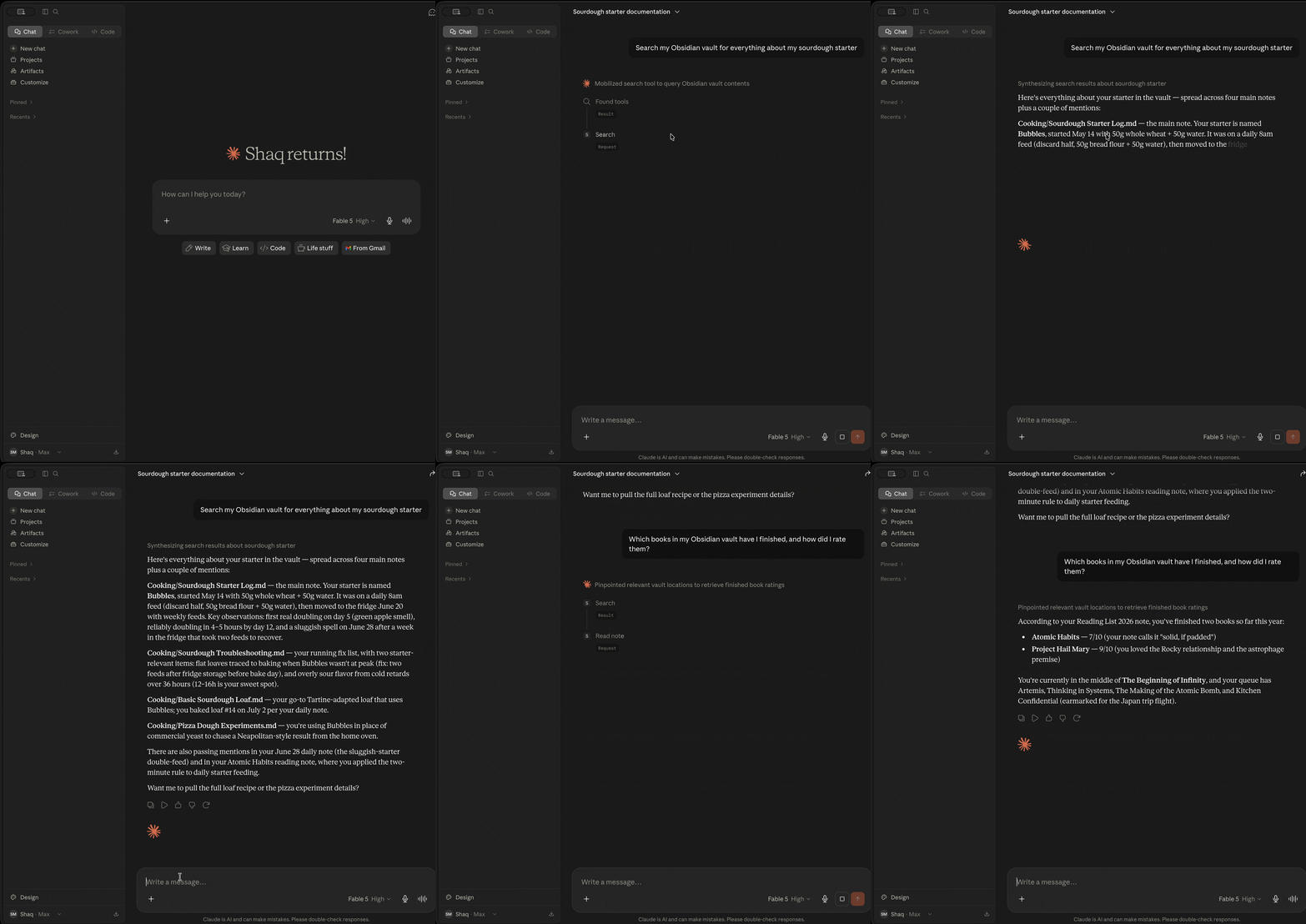
¿Qué es Seekstone?
Seekstone es un servidor MCP de Obsidian — le da a Claude (y a cualquier cliente de Model Context Protocol) acceso directo de lectura y escritura a tu vault de Obsidian. No necesita que la app de Obsidian esté abierta, no requiere plugins y nada sale de tu máquina.
Lee tu vault directamente desde el disco en lugar de enrutar a través del plugin de API REST local de Obsidian, y mantiene un índice de texto completo en caliente en proceso. La diferencia práctica es doble:
- Velocidad. Las búsquedas por palabras clave devuelven resultados en milisegundos de un solo dígito en caliente y las búsquedas semánticas en ~26 ms — hasta ~514× más rápido que cualquier otro servidor MCP de Obsidian que comparamos, porque no hay subproceso que lanzar ni ida y vuelta HTTP por consulta.
- Contexto. Una búsqueda amplia que devuelve decenas de megabytes y millones de tokens a través de un servidor proxy REST devuelve ~2 KB con Seekstone — una reducción de hasta ~47,000× que solo se amplía a medida que tu vault crece.
La búsqueda viene en tres modos: búsqueda de texto completo clasificada (coincidencia difusa y por prefijo), búsqueda semántica local opcional (basada en significado, mediante un pequeño modelo de incrustación en el dispositivo — opcional, sin conexión en tiempo de ejecución después de una descarga única de ~30 MB del modelo) y consultas de metadatos estructurados — query_notes filtros por propiedades de frontmatter (status, due, type, …), etiquetas, carpeta, tiempo de modificación y tamaño, respondiendo preguntas como "¿qué notas de borrador cambiaron esta semana?" en unos pocos cientos de bytes en lugar de un bucle de búsqueda y lectura.
Claude puede buscar y leer toda tu biblioteca de notas, en milisegundos, sin quemar la mayor parte de su ventana de contexto en una sola llamada de herramienta.
Publicado en npm como seekstone — instala con npx -y seekstone. (Anteriormente también publicado como obsidian-mcp-seekstone; ese alias está obsoleto pero las instalaciones existentes siguen funcionando.)
¿Por qué Seekstone? Los números.
La mayoría de los servidores MCP de Obsidian devuelven el contenido completo de la nota para cada resultado de búsqueda. En una consulta amplia, eso son megabytes de texto que tu LLM tiene que procesar — la mayor parte irrelevante, todo quemando ventana de contexto.
Seekstone devuelve extractos cortos clasificados en su lugar (~120 caracteres por defecto, ajustable por consulta). Comparamos Seekstone con otros 7 servidores MCP de Obsidian — 8 servidores en total — en tres tamaños de vault — 1,000 / 5,000 / 10,000 notas (20 ejecuciones cada uno). Cada número abajo es totalmente reproducible: los vaults están confirmados en este repositorio (generados a partir de la Encyclopædia Britannica de 1911 de dominio público), así que puedes clonarlo y ejecutar el mismo benchmark tú mismo.
El punto de probar tres tamaños es que aquí es donde las arquitecturas divergen — un vault real solo crece.
Carga útil de búsqueda — bytes devueltos por consulta (impuesto de contexto; menor es mejor)
| Servidor | Arquitectura | 1k notas | 5k notas | 10k notas |
|---|---|---|---|---|
| 🥇 Seekstone | índice en proceso | 1.6 KB | 1.8 KB | 2.0 KB |
| mcpvault | subproceso de acceso directo a fs | 1.7 KB | 1.9 KB | 2.2 KB |
| obsidian-mcp-rs | acceso directo a fs, escaneo por consulta | 5.4 KB | 5.8 KB | 6.2 KB |
| obsidian-tc | plataforma SQLite | 4.6 KB | 6.8 KB | 7.2 KB |
| obsidian-mcp-server | API REST | 55 KB | 47 KB | 47 KB |
| obsidian-mcp-pro | subproceso de acceso directo a fs | 25 KB | 84 KB | 114 KB |
| obsidian-mcp | subproceso de acceso directo a fs | 18 KB | 105 KB | 201 KB |
| mcp-obsidian | API REST | 9.8 MB | 45 MB | 95 MB |
Seekstone se mantiene plano (~2 KB) sin importar cuán grande sea tu vault, porque siempre devuelve extractos clasificados — y ahora es la carga útil más pequeña de todos los servidores probados, superando a mcpvault en los tres tamaños. Los servidores proxy REST devuelven el contenido completo de la nota para cada coincidencia, así que crecen con el vault — mcp-obsidian alcanza 95 MB a 10k notas, y una sola consulta amplia (the capital of) promedió 370.9 MB / 97.8 millones de tokens por llamada en 20 ejecuciones. A 10k notas eso es una diferencia de impuesto de contexto de ~47,000×.
Latencia de búsqueda — media en caliente, ms (menor es mejor)
| Servidor | 1k notas | 5k notas | 10k notas | vs Seekstone @10k |
|---|---|---|---|---|
| 🥇 Seekstone | 1.0 | 2.7 | 5.2 | — |
| obsidian-mcp-rs | 5.8 | 18 | 35 | ~7× más lento |
| obsidian-mcp-pro | 46 | 213 | 430 | ~83× más lento |
| obsidian-mcp-server | 82 | 356 | 732 | ~141× más lento |
| obsidian-mcp | 82 | 405 | 811 | ~156× más lento |
| mcpvault | 89 | 436 | 897 | ~173× más lento |
| mcp-obsidian | 164 | 740 | 1,550 | ~299× más lento |
| obsidian-tc | 263 | 1,253 | 2,667 | ~514× más lento |
Cada competidor lanza un subproceso o hace idas y vueltas HTTP por consulta, y la mayoría hace trabajo que escala con el tamaño del vault. Seekstone mantiene un índice en proceso en caliente — sin IPC, sin red — así que la búsqueda por palabras clave se mantiene en milisegundos de un solo dígito incluso a 10,000 notas (el pipeline semántico incluido — incrustar, escanear, reordenar MaxSim — aterriza en ~26 ms). Y la brecha se amplía con la escala: de 1k → 10k notas los competidores se ralentizan 5–10×, mientras que Seekstone apenas se mueve. Incluso la alternativa más rápida — obsidian-mcp-rs, que re-escanea el vault en cada consulta — es ~7× más lenta en caliente a 10k notas con 3× la carga útil, y la generación de proxy REST corre ~110–300× más lenta.
Seekstone es el único servidor en nuestro conjunto de benchmarks que entrega tanto cargas útiles de ~2 KB como latencia de palabras clave en milisegundos de un solo dígito en cada tamaño de vault — y, hasta donde sabemos, el único servidor MCP de Obsidian con benchmarks publicados y reproducibles. El harness, los vaults sintéticos y los resultados completos son de código abierto: ver benchmark-scaling.md y el harness. Clona, ejecuta, verifica.
Instalación
Elige el método que mejor se adapte a ti.
¿Usas un agente de IA? Pega este prompt
Si usas Claude Code, Cursor u otro agente de codificación, no necesitas seguir ninguna instrucción tú mismo — pega este prompt y el agente hace la instalación:
Instala el servidor MCP seekstone para este editor. Ejecuta
npx -y seekstone init --client code --write(usadesktop,cursorovscodepara otros clientes). Detecta automáticamente mi vault de Obsidian; si lista varios, pregúntame cuál y vuelve a ejecutar con--vault "<path>". Transmíteme cualquier error, luego dime que reinicie esta sesión para que las herramientas de seekstone se carguen.
seekstone init es totalmente no interactivo — con --write valida el vault y parchea la configuración del cliente de una sola vez (Claude Code vía claude mcp add, otros clientes mediante un parche JSON aditivo con una copia de seguridad con marca de tiempo).
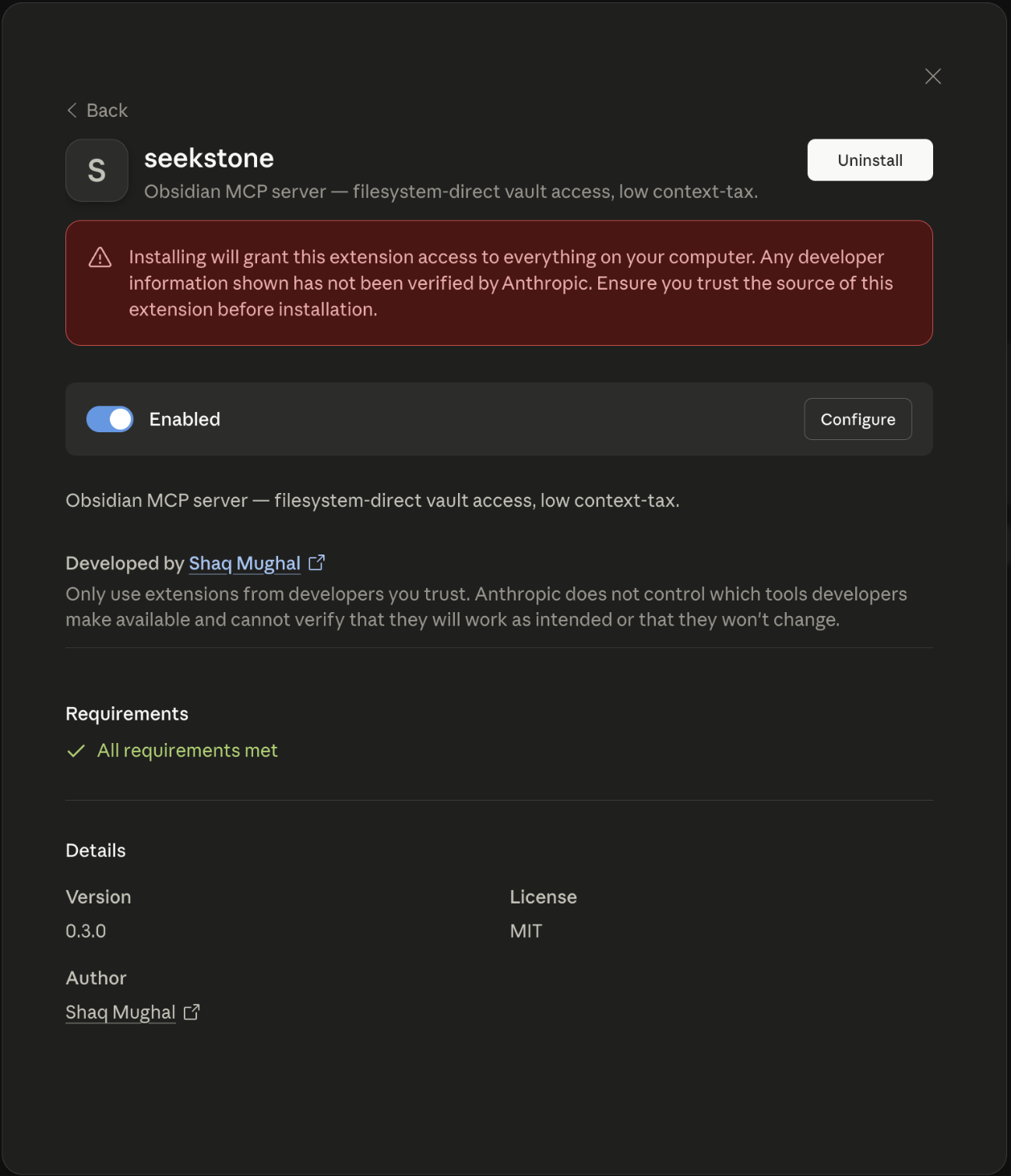
Opción 1 — Un clic (Claude Desktop, sin necesidad de terminal)
- Descarga
seekstone.mcpb(enlace directo, siempre la última versión) - Ábrelo con Claude Desktop — doble clic en Finder, o clic derecho → Abrir con → Claude Desktop
- Elige tu carpeta de vault de Obsidian cuando se te solicite
Sabrás que funcionó cuando seekstone aparezca en la barra de herramientas de Claude. Sin edición de JSON, sin terminal, sin necesidad de Node.js.
¿Quieres búsqueda semántica? Obtén seekstone-semantic.mcpb en su lugar — el mismo servidor con el modelo de incrustación local incluido dentro del paquete (~28 MB más grande), así que la búsqueda basada en significado funciona de inmediato: todavía sin terminal, y nada se descarga en tiempo de ejecución.
Opción 2 — Configuración guiada (recomendada para usuarios de CLI)
Abre Terminal (macOS: Cmd+Space, escribe "Terminal", presiona Enter) y ejecuta:
npx -y seekstone init
Sabrás que funcionó cuando Seekstone aparezca en la barra de herramientas de Claude bajo el ícono de enchufe.
Seekstone lee el registro de vaults de Obsidian para detectar tu vault, lo valida y o imprime el bloque de configuración para pegar o parchea Claude Desktop directamente:
# Auto-detect vault, print config to paste
npx -y seekstone init

# Auto-detect vault, patch Claude Desktop in place (with backup)
npx -y seekstone init --write

# Specify vault explicitly if you have multiple
npx -y seekstone init --vault "/path/to/vault"

# Auto-configure Claude Code in one step (auto-detects vault, runs claude mcp add)
npx -y seekstone init --client code --write

# Or just print the Claude Code command without running it
npx -y seekstone init --client code
Opción 3 — Configuración manual (Claude Desktop)
Añade a claude_desktop_config.json (Configuración → Desarrollador → Editar Config):
{
  "mcpServers": {
    "seekstone": {
      "command": "npx",
      "args": ["-y", "seekstone"],
      "env": { "SEEKSTONE_VAULT": "/absolute/path/to/your/vault" }
    }
  }
}
Opción 4 — Claude Code
Detecta automáticamente tu vault y configura Claude Code en un solo comando:
npx -y seekstone init --client code --write
O manualmente, si prefieres especificar la ruta del vault explícitamente:
claude mcp add seekstone --env SEEKSTONE_VAULT=/absolute/path/to/your/vault -- npx -y seekstone
Opción 5 — Cursor
Un clic: — luego establece SEEKSTONE_VAULT a la ruta absoluta de tu vault en la configuración de MCP de Cursor (el enlace instala un marcador de posición).
O deja que el CLI detecte automáticamente tu vault y parchee ~/.cursor/mcp.json (con una copia de seguridad):
npx -y seekstone init --client cursor --write
O añade el bloque manualmente a ~/.cursor/mcp.json (global) o <project>/.cursor/mcp.json (por proyecto):
{
  "mcpServers": {
    "seekstone": {
      "command": "npx",
      "args": ["-y", "seekstone"],
      "env": { "SEEKSTONE_VAULT": "/absolute/path/to/your/vault" }
    }
  }
}
Opción 6 — VS Code
Un clic: SEEKSTONE_VAULT a la ruta absoluta de tu vault cuando VS Code abra la configuración del servidor (el enlace instala un marcador de posición).
O deja que el CLI detecte automáticamente tu vault y escriba la configuración del espacio de trabajo (.vscode/mcp.json en el directorio actual):
npx -y seekstone init --client vscode --write
O añádelo desde la terminal:
code --add-mcp '{"name":"seekstone","command":"npx","args":["-y","seekstone"],"env":{"SEEKSTONE_VAULT":"/absolute/path/to/your/vault"}}'
O añade el bloque manualmente a .vscode/mcp.json (espacio de trabajo) o mediante la Paleta de Comandos → MCP: Open User Configuration (global de usuario). Ten en cuenta las dos peculiaridades de VS Code: la clave de nivel superior es servers (no mcpServers), y "type": "stdio" es obligatorio:
{
  "servers": {
    "seekstone": {
      "type": "stdio",
      "command": "npx",
      "args": ["-y", "seekstone"],
      "env": { "SEEKSTONE_VAULT": "/absolute/path/to/your/vault" }
    }
  }
}
Requiere VS Code 1.102+; seekstone aparece en el selector de herramientas del modo Agente de Copilot Chat.
Otros clientes MCP (Windsurf, Cline, …)
Seekstone es un servidor MCP stdio estándar: cualquier cliente MCP puede ejecutarlo. Usa el mismo bloque JSON de arriba en la configuración MCP de tu cliente (command: npx, args: ["-y", "seekstone"], env SEEKSTONE_VAULT).
Después de instalar, reinicia el cliente. Al iniciar, Seekstone recorre la bóveda, construye un índice de texto completo en memoria (unos segundos para miles de notas) y lo mantiene actualizado mientras editas. Las 21 herramientas siguientes están entonces disponibles para Claude.
Requiere Node.js ≥ 22 para las opciones de CLI. El paquete .mcpb de un clic no tiene requisitos externos.
Si Seekstone te ahorra contexto, considera ⭐ dar una estrella al repositorio: ayuda a que otros lo encuentren.
¿Qué puede hacer Claude con tu bóveda?
Una vez que Seekstone está conectado, puedes pedirle a Claude cosas como:
- "Busca en mis notas todo sobre [tema] y dame un resumen" — usa
search, devuelve extractos clasificados, no archivos completos - "Encuentra todas las notas etiquetadas con #proyecto y lista sus títulos" — usa
list_notescon un filtro de etiqueta - "Lee solo la sección 'Decisiones' de mi nota [proyecto]" — usa
read_notecon un selector de sección, de modo que solo esa parte entre en el contexto - "¿Qué enlaza a mi nota [tema] y a qué enlaza ella?" — usa
get_backlinksyget_linkspara recorrer tu grafo - "Añade las notas de la reunión de hoy a mi nota diaria" — usa
append_periodic_note, resolviendo la ruta de la nota diaria desde tu configuración de bóveda (Obsidian no necesita estar abierto) - "Corrige cada aparición del nombre antiguo del proyecto en esta nota" — usa
replace_in_note, con una vista previa de prueba antes de escribir - "Añade una sección de resumen al final de [nota]" — usa
append_note, nunca toca el frontmatter - "Mueve todas las notas de /inbox a /archive/[año]" — usa
move_note - "Actualiza el campo de estado en el frontmatter de esta nota a 'hecho'" — usa
patch_frontmatter, preserva el orden de las claves y el estilo de comillas - "Crea una nueva nota de reunión para hoy con una plantilla estándar" — usa
create_note
Claude nunca ve tu bóveda completa de una vez: busca y lee de forma selectiva, por lo que incluso bóvedas grandes (más de 10 000 notas) se mantienen dentro del presupuesto de contexto.
Herramientas
Lectura
| Herramienta | Descripción |
|---|---|
search | Búsqueda de texto completo. Devuelve extractos clasificados (por defecto ~120 caracteres, ajustable mediante excerptLength), no notas completas. Coincidencia difusa y por prefijo; con SEEKSTONE_SEMANTIC=1, mode: "semantic"/"hybrid" busca por significado mediante un modelo de incrustación local (nada sale de tu máquina). |
query_notes | Consulta estructurada de metadatos. Filtra por predicados de clave/valor de frontmatter (eq, ne, contains, exists, missing, gt/gte/lt/lte), etiqueta, carpeta, hora de modificación y tamaño; ordena y selecciona los campos que necesites. Devuelve filas compactas (ruta + título por defecto), no el contenido de la nota. |
context_pack | Contexto listo para responder a una pregunta en lenguaje natural en una sola llamada, con un límite máximo de bytes (por defecto 2 KB): extractos clasificados, notas vecinas enlazadas con resúmenes de una línea y rutas de origen de seguimiento: reemplaza un bucle de búsqueda → lectura → get_backlinks. |
read_note | Lee el contenido completo de una nota por ruta relativa a la bóveda. Admite devolver una sola sección, bloque o rango de líneas. |
list_notes | Lista notas, opcionalmente filtradas por prefijo de carpeta o etiqueta. |
list_tags | Lista todas las etiquetas de la bóveda ordenadas por número de usos (o alfabéticamente). |
outline_note | Devuelve la estructura de encabezados y bloques de una nota sin su contenido completo: navegación económica antes de una lectura dirigida. |
get_backlinks | Encuentra todas las notas que enlazan a una nota determinada. |
get_links | Lista todos los wikilinks salientes y enlaces de Markdown de una nota. |
get_periodic_note | Lee la nota diaria, semanal, mensual, trimestral o anual de hoy (o de cualquier fecha): ruta resuelta desde tu configuración de bóveda, sin necesidad de Obsidian. |
list_writes | Escrituras recientes del diario: secuencia, marca de tiempo, herramienta, rutas tocadas y si cada una aún se puede deshacer. Solo metadatos, nunca contenido de notas. |
Escritura
| Herramienta | Descripción |
|---|---|
create_note | Crea una nota (frontmatter opcional + cuerpo); los directorios padre se crean automáticamente. |
delete_note | Mueve una nota a la carpeta .trash/ de la bóveda (compatible con Obsidian, restaurable). Pasa permanent: true para omitir la papelera: el diario de escritura aún permite que undo_write la restaure. |
move_note | Mueve o renombra una nota: los wikilinks y enlaces de Markdown en otras notas que apuntan a ella se reescriben para que nada se rompa (rewriteLinks: false para optar por no participar); los directorios de destino se crean automáticamente. |
rename_heading | Renombra un encabezado en una nota: cada wikilink [[note#heading]] e incrustación en toda la bóveda se reescribe para que las referencias sigan funcionando (los alias se conservan, los bloques de código delimitados se dejan intactos). |
append_note | Añade texto al cuerpo de una nota sin tocar el frontmatter. |
patch_frontmatter | Establece, actualiza o elimina claves de frontmatter sin reordenar las claves existentes ni cambiar el estilo de comillas. |
patch_note | Añade, antepone o reemplaza texto en un encabezado o referencia de bloque (createIfMissing para añadir la sección): el frontmatter no se toca. |
replace_in_note | Busca y reemplaza texto en el cuerpo de la nota: literal o regex, distingue mayúsculas, coincidencia de palabra completa, limit opcional (reemplaza todas las apariciones por defecto) y vista previa de prueba. |
append_periodic_note | Añade a la nota periódica de hoy, creándola desde una plantilla si aún no existe. |
undo_write | Revierte una escritura registrada en el diario: cada archivo que tocó vuelve a su estado previo a la escritura, idéntico byte a byte (un movimiento de varios archivos o un renombrado de encabezado se restaura completo; una eliminación se restaura incluso si fue permanent). Por defecto revierte la escritura más reciente; se niega con undo_conflict si un archivo cambió desde entonces, a menos que force: true. La reversión en sí misma se registra en el diario: undo_write({ seq }) en la entrada de reversión la rehace. |
Cada herramienta de escritura (append_note, patch_note, patch_frontmatter, replace_in_note, rename_heading, move_note, delete_note, append_periodic_note y create_note con overwrite: true) admite comparar-y-intercambiar opcional: pasa el contentHash que obtuviste de read_note como prevHash y la llamada falla limpiamente si la nota cambió por debajo de ti: sin ediciones concurrentes descartadas silenciosamente, sin mover o eliminar contenido que no has visto. Cada resultado de mutación devuelve el nuevo contentHash, por lo que las ediciones encadenadas no necesitan relecturas.
Cada escritura es reversible. Antes de que cualquier herramienta de escritura cambie un byte, registra en el diario la preimagen de cada archivo que está a punto de tocar bajo <vault>/.seekstone/history/: direccionada por contenido (los estados idénticos se almacenan una vez) y con fsync antes de que la escritura de la bóveda se confirme. list_writes muestra el diario; undo_write restaura byte a byte de forma idéntica: un move_note o rename_heading de varios archivos se restaura completo (la nota y cada reescritura de enlace), y un delete_note vuelve incluso si fue permanent. Una reversión después de una edición externa se rechaza con un undo_conflict estructurado a menos que pases force: true: e incluso entonces, el estado sobrescrito se registra primero en el diario, por lo que nada se pierde jamás. La reversión en sí misma se registra en el diario: las reversiones por defecto repetidas recorren hacia atrás el historial, y undo_write({ seq }) en una entrada de reversión la rehace. .seekstone/ se excluye de la indexación y la búsqueda como .trash/; añádelo al .gitignore de tu bóveda. Esto complementa a git y a la Recuperación de Archivos de Obsidian en lugar de reemplazarlos: es la ruta de recuperación que el agente puede impulsar.
Cada escritura deja un recibo. Establece SEEKSTONE_AUDIT_FILE y cada llamada de herramienta de escritura —exitosa o rechazada— añade una línea JSON: herramienta, rutas relativas a la bóveda, sha-256 antes/después, resultado (ok, hash_conflict, undo_conflict, policy_denied, error) y metadatos de operación como recuentos de reemplazo o el destino .trash/: nunca contenido de notas, valores de frontmatter ni consultas de búsqueda, por lo que el archivo es seguro de adjuntar a un informe de error.
{"v":1,"ts":"2026-08-29T21:02:11.042Z","tool":"replace_in_note","outcome":"ok","durationMs":1.8,"seq":42,"files":[{"path":"notes/a.md","hashBefore":"3f9c…","hashAfter":"b71e…"}],"path":"notes/a.md","replacements":3}
Los hashes son los mismos valores contentHash que devuelve read_note, por lo que cualquier registro se puede verificar contra la bóveda; seq es la entrada del diario que la llamada confirmó, por lo que una fila indexa directamente en list_writes / undo_write. Los registros se añaden y se sincronizan con fsync después de que la escritura de la bóveda se confirme, el archivo rota a <file>.1 más allá de SEEKSTONE_AUDIT_MAX_SIZE, una ruta de auditoría no escribible hace fallar el arranque, y una adición fallida informa la llamada como un error audit_failed estructurado en lugar de un éxito limpio. Algunas recetas jq:
jq -r '[.tool, .outcome] | @tsv' audit.jsonl | sort | uniq -c            # session summary by tool + outcome
jq -c 'select(.files[]?.path == "notes/a.md")' audit.jsonl              # history of one note
jq -c 'select(.ts > "2026-08-29T21:00:00Z" and .outcome == "ok")' audit.jsonl   # what changed since a timestamp
Rápido y completo. Seekstone es el único servidor MCP de Obsidian en nuestro conjunto de referencia que expone list_tags, outline_note, get_backlinks y get_links como herramientas de primera clase. Cuatro capacidades más lo distinguen:
- Búsqueda semántica local, completamente en proceso. Con
SEEKSTONE_SEMANTIC=1,searchganamode: "semantic"y"hybrid": recuperación basada en significado mediante un pequeño modelo de incrustación en el dispositivo (descarga única denpx -y seekstone fetch-model, o el paqueteseekstone-semantic.mcpbque incluye el modelo dentro; el servidor en ejecución nunca toca la red), con un reordenamiento de interacción tardía MaxSim encima desde 0.17.0. En nuestra bóveda de referencia comprometida de 10 000 notas (conjunto dorado de 150 consultas, fixture v2), el modelo predeterminado —medido de extremo a extremo a través de la herramienta de búsqueda real— obtiene 83.3% de hit@5 general, 86.7% en la división reservada (frente a 34.7% solo con búsqueda por palabras clave) a ~26 ms p50 en caliente, y el modelopotion-retrieval-32Mopcional (SEEKSTONE_SEMANTIC_MODEL; ~129 MB) alcanza 86.7% de hit@5 general, 86.7% reservado a ~55 ms. Ningún otro servidor que evaluamos incluye incrustaciones sin conexión y sin dependencias nativas —y medimos las alternativas cara a cara en el mismo conjunto dorado, la misma ejecución, con división dev/holdout comprometida (comparación comprometida, lectura en COMPETITORS-SHA-322): la búsqueda semántica simple respaldada por Ollama de obsidian-tc nos supera en la división reservada (90.0% frente a nuestro 86.7%) a 169 ms/consulta y un índice de 30 minutos frente a nuestros ~28 s, y su modo GraphRAG obtiene la puntuación más alta de todo lo que evaluamos (95.0% reservado), pagándolo con latencia de segundos por consulta (2.9 s p50, 4.2 s p95 — frente a nuestros 26–55 ms), ~8× la carga útil (16 KB frente a ~2 KB por consulta) y un segundo servidor (Ollama + un modelo de 137M de parámetros) que debes instalar y ejecutar. Pre-registramos una puerta para reclamar el puesto #1 (GATE-V2-SHA-316, ejecutada en fixture v1) y no la alcanzamos: ese veredicto se publica con la misma prominencia que habría tenido una victoria; no se ejecutó ninguna puerta nueva en v2, y las mismas cláusulas se recalculan con el mismo fallo. obsidian-mcp-pro no pudo indexar la bóveda de 10 000 notas en absoluto (su almacén de vectores JSON supera el límite de cadenas de JavaScript después de ~17 minutos de incrustación). Elige tu equilibrio: los números están todos comprometidos. - Notas periódicas, directas al sistema de archivos.
get_periodic_noteyappend_periodic_noteresuelven rutas de notas diarias, semanales, mensuales, trimestrales y anuales leyendo la propia configuración de tu bóveda (.obsidian/daily-notes.jsony el plugin Periodic Notes) — con Obsidian cerrado. Todo servidor basado en REST solo puede hacer esto mientras la aplicación está en ejecución. - Frontmatter idéntico byte a byte, garantizado.
patch_frontmatteredita YAML en su lugar — preservando el orden de las claves, el estilo de comillas y los comentarios — y la seguridad de escritura está probada byte por byte por el arnés de pruebas. Ningún otro servidor que hayamos evaluado ofrece esta garantía. - Cero acoplamiento. Sin la aplicación Obsidian, sin el plugin Local REST API, sin desviaciones de versiones de plugins. Solo tus archivos en disco.
Configuración
| Variable | Requerida | Descripción |
|---|---|---|
SEEKSTONE_VAULT | Sí | Ruta absoluta a tu bóveda de Obsidian. |
SEEKSTONE_LOG_LEVEL | No | error | warn | info (predeterminado) | debug. |
SEEKSTONE_LOG_FILE | No | Ruta absoluta; cuando se establece, los registros en líneas JSON se añaden aquí (rotados por tamaño). |
SEEKSTONE_LOG_MAX_SIZE | No | Umbral de rotación de registros para SEEKSTONE_LOG_FILE (p. ej. 10mb; predeterminado 5 MB). |
SEEKSTONE_WATCH_POLL | No | Establecer a 1 para sondeo estadístico de cambios en lugar de eventos nativos del sistema operativo — más lento pero confiable en unidades de red, WSL y algunos contenedores. |
SEEKSTONE_WATCH_POLL_INTERVAL | No | Intervalo de sondeo estadístico en ms (predeterminado 10000). Solo se usa con SEEKSTONE_WATCH_POLL=1. Menor = detección más rápida de ediciones externas, mayor CPU; auméntalo en montajes de red/9p lentos. |
SEEKSTONE_READ_ONLY | No | Establecer a 1 para ejecutar en modo solo lectura: las 10 herramientas de escritura se eliminan por completo de la lista de herramientas (y se rechazan si se llaman de todos modos), por lo que la sesión no puede modificar tu bóveda de manera demostrable. |
SEEKSTONE_WRITE_PATHS | No | Globs separados por comas relativos a la bóveda (p. ej. journal/**,inbox/*.md). Las escrituras solo se permiten bajo rutas coincidentes; el resto de la bóveda permanece en solo lectura. |
SEEKSTONE_HISTORY | No | Establecer a 0 para deshabilitar el diario de escritura (predeterminado activado). Con él activado, cada herramienta de escritura almacena la preimagen de cada archivo que toca bajo <vault>/.seekstone/history/ para que undo_write pueda restaurarlo byte por byte. |
SEEKSTONE_HISTORY_MAX_SIZE | No | Límite en preimágenes almacenadas (p. ej. 100mb; predeterminado 50 MB). Las entradas más antiguas se eliminan primero y luego muestran undoable: false en list_writes — nunca en silencio. |
SEEKSTONE_HISTORY_MAX_ENTRIES | No | Límite en entradas del diario (predeterminado 1000); las más antiguas se descartan al superarlo. |
SEEKSTONE_AUDIT_FILE | No | Ruta absoluta; desactivado a menos que se establezca. Añade un registro de auditoría en líneas JSON por cada llamada a herramienta de escritura — aceptada o rechazada — con la herramienta, rutas, sha-256 antes/después, resultado y metadatos de operación. Nunca contenido de notas. |
SEEKSTONE_AUDIT_MAX_SIZE | No | Rota el archivo de auditoría a <file>.1 al superar este tamaño (p. ej. 10mb; predeterminado 10 MB). |
SEEKSTONE_SEMANTIC | No | Establecer a 1 para habilitar la búsqueda semántica (search gana mode: "semantic" y "hybrid"). Requiere el modelo de incrustación local — descárgalo una vez con npx -y seekstone fetch-model; el servidor en ejecución nunca toca la red. El paquete seekstone-semantic.mcpb lo establece automáticamente e incluye el modelo dentro. |
SEEKSTONE_SEMANTIC_MODEL | No | Qué modelo local cargar: potion-base-8M (predeterminado, ~30 MB, 256-dim) o potion-retrieval-32M (~129 MB, 512-dim — más preciso en consultas de estilo descriptivo a aproximadamente 2× la latencia de consulta). Descárgalo primero con npx -y seekstone fetch-model --model potion-retrieval-32M. |
SEEKSTONE_MODEL_PATH | No | Directorio que contiene el modelo de incrustación Model2Vec (predeterminado: donde fetch-model coloca el modelo seleccionado, bajo el directorio de caché). |
SEEKSTONE_CACHE_DIR | No | Raíz de caché para el modelo descargado y cachés de incrustación por bóveda (predeterminado ~/.cache/seekstone). |
SEEKSTONE_BUNDLED_MODEL_DIR | No | Establecido por el manifiesto del paquete seekstone-semantic.mcpb — apunta a los archivos de modelo fragmentados incluidos dentro de la extensión, que el servidor reensambla en el directorio del modelo al arrancar (solo disco, verificado contra los hashes SHA-256 fijados). Normalmente no se establece a mano. |
Cómo funciona
Seekstone recorre la bóveda con fast-glob, analiza el frontmatter de cada nota (consciente de bytes, para que las escrituras puedan probar que la región del frontmatter es idéntica byte a byte antes y después de la escritura), y construye un índice de texto completo MiniSearch en memoria. La búsqueda devuelve extractos cortos clasificados en lugar de notas completas — ese diseño de extracto-no-documento es de donde proviene la ventaja en el impuesto de contexto. Un observador de archivos multiplataforma (chokidar) mantiene el índice actualizado mientras editas en Obsidian.
Las escrituras son conservadoras por diseño: append_note nunca toca el frontmatter, y patch_frontmatter edita el documento YAML en su lugar en lugar de re-serializarlo, preservando el orden de las claves, el estilo de comillas y los comentarios.
Está construido para permanecer activo. Seekstone se prueba en macOS, Linux y Windows en CI en cada commit, sus herramientas de escritura están endurecidas contra entradas patológicas (ReDoS), y un rechazo de promesa no manejado se registra en lugar de provocar un bloqueo — para que tu sesión MCP de larga duración mantenga su índice cálido en lugar de caerse a mitad de conversación.
Para un recorrido capa por capa del código — paquetes, internos del servidor, flujo de solicitudes de extremo a extremo y el arnés de medición — consulta docs/ARCHITECTURE.md.
Seguridad y privacidad
Seekstone lee — y, a través de las herramientas de escritura, modifica — archivos bajo SEEKSTONE_VAULT en tu disco local. El servidor en ejecución hace ninguna llamada de red y envía ninguna telemetría (la única ruta de red en el paquete es el subcomando explícito npx -y seekstone fetch-model — una descarga única verificada con SHA-256 del modelo opcional de búsqueda semántica que sale antes de que comience el servicio; el paquete seekstone-semantic.mcpb omite incluso eso al incluir el modelo dentro y reensamblarlo desde el disco al arrancar, verificado contra los mismos hashes fijados). Los registros son solo metadatos por predeterminado (los contenidos de notas solo aparecen en el nivel debug). Nada se escribe fuera de la bóveda excepto un archivo de registro opcional que configures y, con SEEKSTONE_SEMANTIC=1, la caché de incrustación por bóveda bajo ~/.cache/seekstone (vectores derivados de tus notas — nunca enviados a ningún lugar).
El Contrato de Seguridad de Escritura
Dar a una IA acceso de escritura a tus notas merece más que "confía en nosotros." Seekstone incluye un contrato nombrado y probado — docs/WRITE-SAFETY.md — de diez garantías, cada una vinculada al código que la aplica y la prueba que la demuestra, verificado byte por byte por la suite de seguridad del arnés en CI en cada commit y lanzamiento: cero red, sandbox de bóveda, frontmatter idéntico byte a byte en ediciones de cuerpo, escrituras atómicas (sin archivos rotos), creaciones que nunca sobrescriben, eliminaciones recuperables (.trash/), comparar-y-intercambiar opcional en cada herramienta de escritura, alcance de escritura configurable / modo solo lectura, un diario de escritura que hace reversible cada escritura (undo_write), y un registro de auditoría verificable por hash — cada llamada de escritura deja un recibo. La misma suite se ejecuta sin cabeza contra otros servidores directos al sistema de archivos — la tabla de comparación está en el contrato.
Preguntas frecuentes
¿Necesita estar en ejecución la aplicación Obsidian? No. Seekstone lee la carpeta de la bóveda directamente desde el disco. Obsidian puede estar abierto o cerrado.
¿Necesito el plugin Local REST API? No. Seekstone lo omite por completo — esa es la fuente de la reducción de carga útil de hasta 47,000×. No se requieren plugins.
¿Qué clientes de IA soporta? Cualquier cliente que soporte el Model Context Protocol (MCP) sobre stdio — Claude Desktop, Claude Code, Cursor, Windsurf, Continue y otros.
¿Es seguro usarlo en mi bóveda?
Seekstone nunca modifica archivos excepto cuando invocas explícitamente una de sus herramientas de escritura (las diez en la tabla anterior — create_note, append_note, patch_note, patch_frontmatter, replace_in_note, move_note, rename_heading, delete_note, append_periodic_note, undo_write). Cada una de ellas registra primero la preimagen de cada archivo que toca, para que undo_write pueda restaurarlo byte por byte — consulta la nota del diario de escritura anterior — y con SEEKSTONE_AUDIT_FILE establecido, cada llamada de escritura deja un registro de auditoría verificable por hash (incluidos los intentos rechazados). El servidor en ejecución no hace solicitudes de red (el modelo de búsqueda semántica se obtiene una vez, fuera de banda, por el subcomando explícito fetch-model). La ruta de la bóveda está en sandbox — ninguna herramienta puede leer o escribir fuera de ella. Y puedes ajustarlo aún más: SEEKSTONE_READ_ONLY=1 elimina las herramientas de escritura de la sesión por completo, y SEEKSTONE_WRITE_PATHS restringe las escrituras a las carpetas que permitas (digamos, solo journal/**). Ambos se aplican en la capa de despacho, no por herramienta, para que ninguna herramienta pueda olvidar la verificación.
¿Funciona en Windows? Sí. Seekstone se prueba en macOS, Linux y Windows en CI en cada commit.
¿Qué tamaños de bóveda de Obsidian maneja? Seekstone se ha perfilado contra bóvedas con miles de notas. En el punto de referencia comprometido de 10,000 notas, la construcción del índice en frío toma decenas de segundos y el RSS del proceso se mantiene bajo ~100 MB; las bóvedas personales típicas se indexan en unos pocos segundos. El modo semántico se incrusta en segundo plano después del arranque (~30 s a 10k notas, luego se almacena en caché por bóveda para que los reinicios se recarguen en menos de un segundo).
¿Cómo encuentra seekstone init mi bóveda automáticamente?
Lee el registro de bóvedas de Obsidian (obsidian.json) — el mismo archivo que Obsidian usa para rastrear tus bóvedas conocidas. Si tienes una bóveda, se selecciona automáticamente. Si tienes varias, las lista y te pide elegir con --vault.
¿Qué es el archivo .mcpb?
Un MCP Bundle — un zip autocontenido con el servidor y su manifiesto. Para instalar: haz doble clic en Finder (o clic derecho → Abrir con → Claude Desktop), elige tu bóveda, y listo. No se requiere terminal ni Node.js. Dos variantes se incluyen con cada lanzamiento: seekstone.mcpb (estándar) y seekstone-semantic.mcpb (mismo servidor con el modelo de incrustación local dentro, búsqueda semántica activada de fábrica).
Contribución y desarrollo
Las contribuciones son bienvenidas. Consulta CONTRIBUTING.md para pautas, o salta directamente:
npm install                                          # install all workspace deps
npm test                                             # run all tests
npm run lint                                         # biome check
npm run build -w seekstone                           # tsup → dist/
npm run build:mcpb                                   # build seekstone.mcpb bundle

npx vitest run packages/server/src/tools/search.test.ts  # single test file
npx vitest run -t 'parses a typical frontmatter'         # single test by name
npx tsc -p packages/server/tsconfig.json --noEmit        # typecheck
Estructura del repositorio
| Paquete | Propósito |
|---|---|
packages/server | El servidor MCP seekstone publicado (21 herramientas, stdio, índice MiniSearch, observador chokidar). |
packages/core | Primitivas compartidas de bóveda — recorrido, analizador de frontmatter, extractor de enlaces/etiquetas, esquema, percentiles, pmap y el incrustador Model2Vec. Incluido en la compilación del servidor. |
packages/harness | Perfilador + punto de referencia + arnés de seguridad de escritura (REST vs sistema de archivos) que produjo los números de carga útil anteriores. Solo desarrollo; no publicado. |
El servidor tiene una compilación real (tsup → dist/) y se publica en npm. El arnés se ejecuta desde el código fuente a través de tsx. Los lanzamientos están automatizados — consulta docs/RELEASING.md.
El arnés de medición
El arnés existe para reproducir los números de punto de referencia que motivaron el diseño directo al sistema de archivos. La ruta de reproducción predeterminada (backends fs/seekstone contra la bóveda sintética comprometida) no necesita nada extra; solo los backends respaldados por REST (rest, mcp-obsidian, obsidian-mcp-server) necesitan Obsidian en ejecución con el plugin Local REST API.
export SEEKSTONE_VAULT="/absolute/path/to/your/vault"

npx tsx packages/harness/src/cli.ts profile --vault "$SEEKSTONE_VAULT"
npx tsx packages/harness/src/cli.ts bench \
  --queries packages/harness/queries/default.json \
  --stats reports/vault-stats.json
npx tsx packages/harness/src/cli.ts safety --vault "$SEEKSTONE_VAULT"
Variables de entorno del arnés: SEEKSTONE_REST_API_KEY (del plugin Local REST API) y SEEKSTONE_REST_URL (predeterminado a https://127.0.0.1:27124).
Soporte
Seekstone es gratuito y de código abierto. Si te ahorra contexto (y dinero), puedes invitarme un café.
Licencia
MIT © Shaq Mughal