Runway API
Genera imágenes y videos usando la API de Runway.
Documentación
[!WARNING]
Este repositorio ha sido archivado.
- Si eres un desarrollador que busca integrarse con la Runway API, consulta: https://dev.runwayml.com/agents
- Para otros casos de uso, consulta: https://runway.com/mcp
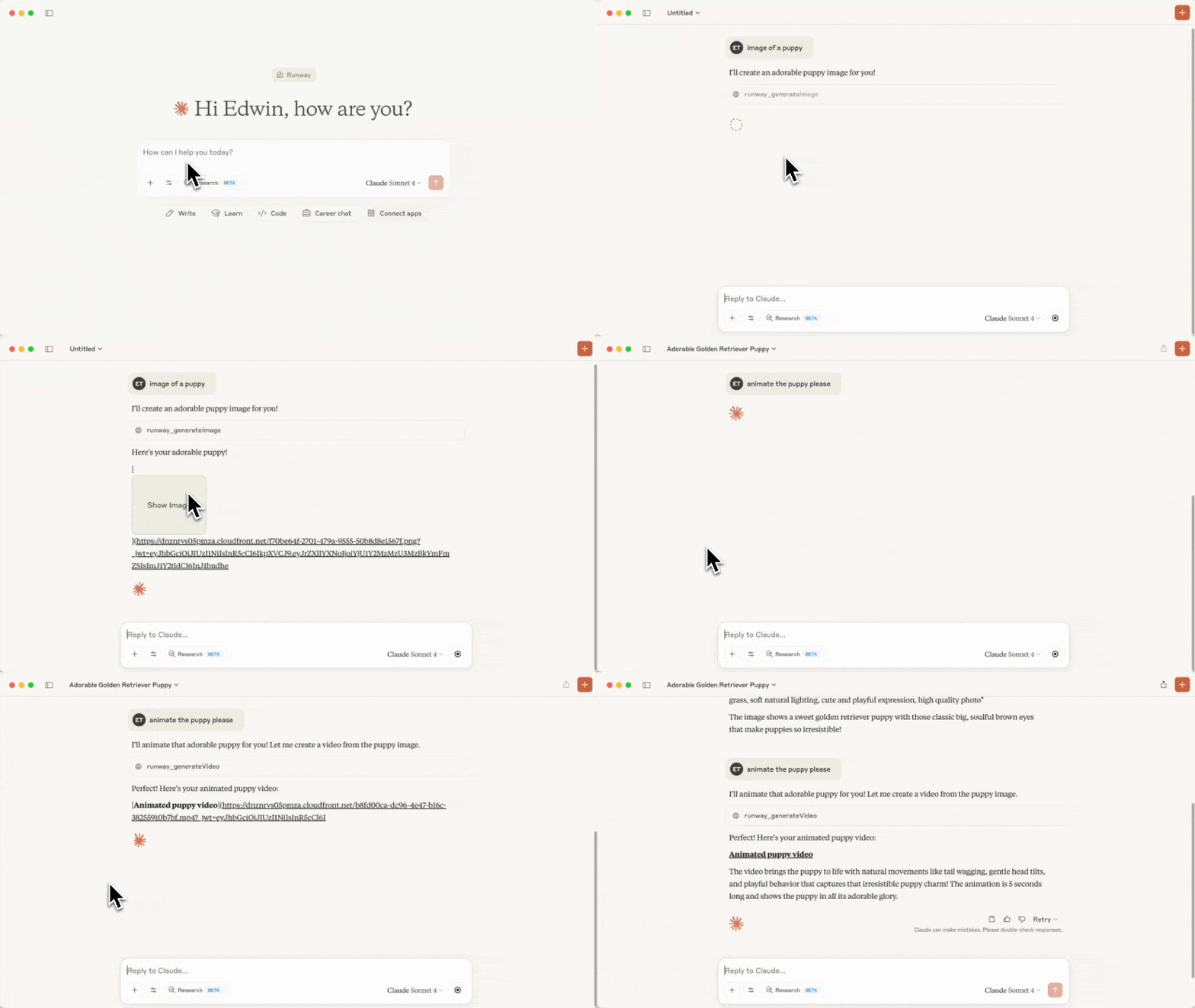
Video acelerado para fines de demostración
Servidor MCP de Runway API
Este repositorio contiene el código de un servidor MCP que llama a la API de Runway.
Herramientas
Las siguientes herramientas están disponibles en este MCP:
| Nombre de la herramienta | Descripción | Parámetros |
|---|---|---|
runway_listModels | Lista los modelos disponibles por capacidad y el predeterminado recomendado para cada una | (ninguno) |
runway_generateVideo | Genera un video a partir de una imagen y un prompt de texto | - promptImage - promptText (opcional) - ratio - duration - model (opcional) |
runway_generateImage | Genera una imagen a partir de un prompt de texto e imágenes de referencia | - promptText - referenceImages (ten en cuenta que las imágenes subidas no funcionarán como referencias, solo las generadas previamente o las URLs de imágenes funcionarán.) - ratio - model (opcional) |
runway_upscaleVideo | Mejora la resolución de un video | - videoUri - model (opcional) |
runway_editVideo | Edita un video, opcionalmente proporciona imágenes de referencia. | - videoUri, referenceImages, promptText - model (opcional) |
runway_generateAudio | Genera audio hablado (texto a voz) a partir de texto | - promptText - voice (opcional) - model (opcional) |
runway_getTask | Obtiene los detalles de una tarea | - taskId |
runway_cancelTask | Cancela o elimina una tarea | - taskId |
runway_getOrg | Obtiene información de la organización | |
Las herramientas de generación aceptan un parámetro opcional model para anular el
predeterminado recomendado. Modelos recomendados: Nano Banana Pro (gemini_image3_pro) para imágenes, Seedance
(seedance2) para video y Aleph (aleph2) para edición de video. Los valores válidos de ratio,
duration y otros parámetros son específicos del modelo, por lo que runway_listModels devuelve
los valores válidos exactos y los parámetros requeridos para cada modelo: llámalo antes de elegir un
ratio/duration.
Antes de enviar cualquier solicitud de generación a la API de Runway, el servidor valida la carga útil contra restricciones por modelo derivadas de OpenAPI (enums permitidos, rangos numéricos, longitudes de cadenas, campos obligatorios). Las cargas útiles inválidas fallan localmente con un error legible y nunca llegan a la red.
Requisitos previos
Antes de comenzar, necesitarás haber configurado tu cuenta de desarrollador en la Runway API, configurar la facturación y también haber creado una clave de API.
También necesitarás tener Node.js configurado.
Configuración
-
Clona este repositorio y guárdalo en una carpeta de tu computadora. Recuerda dónde guardaste esta carpeta porque la necesitarás en un paso posterior.
-
Ejecuta
npm installen la carpeta y luegonpm run build. Ahora deberías ver una nueva carpeta llamadabuildcon un archivoindex.jsdentro. Si más adelante modificas algún archivo fuente, ejecutanpm run buildnuevamente para recoger los cambios.
Usar el MCP como extensión de Claude Desktop (recomendado)
Esto instala el servidor como una extensión desempaquetada de Claude Desktop, por lo que no tienes que editar ningún archivo de configuración manualmente.
-
Inicia Claude Desktop y abre Configuración.
-
Ve a Extensiones y luego a Configuración avanzada.
-
Haz clic en Instalar extensión desempaquetada y selecciona la carpeta que clonaste en el paso 1 (por ejemplo,
/Users/edwin/runway-api-mcp-server). Haz clic en Instalar en el mensaje. -
Obtén tu clave de API desde https://dev.runwayml.com, pégala en la configuración de la extensión instalada y luego Habilita la extensión.
-
Ahora, ¡intenta pedirle a Claude que genere una imagen!
Usar el MCP con Claude Desktop (archivo de configuración)
Alternativamente, registra el servidor manualmente a través del archivo de configuración de Claude.
- Sigue las instrucciones de inicio rápido de MCP para configurar un archivo de configuración para Claude. Si ya lo tienes, ábrelo ejecutando:
MacOS
open ~/Library/Application\ Support/Claude/claude_desktop_config.json
Windows
notepad %APPDATA%\Claude\claude_desktop_config.json
- Agrega el
runway-api-mcp-servera la configuración, asegúrate de reemplazar la ruta del archivo y la clave de API de Runway.
{
  "mcpServers": {
    "runway-api-mcp-server": {
      "command": "node",
      "args": [
        "<ABSOLUTE_PATH_TO_YOUR_CLONED_REPO_FROM_STEP_1>/build/index.js"
      ],
      "env": {
        "RUNWAYML_API_SECRET": "<YOUR_RUNWAY_API_KEY_HERE>",
        "MCP_TOOL_TIMEOUT": "1000000"
      }
    }
  }
}
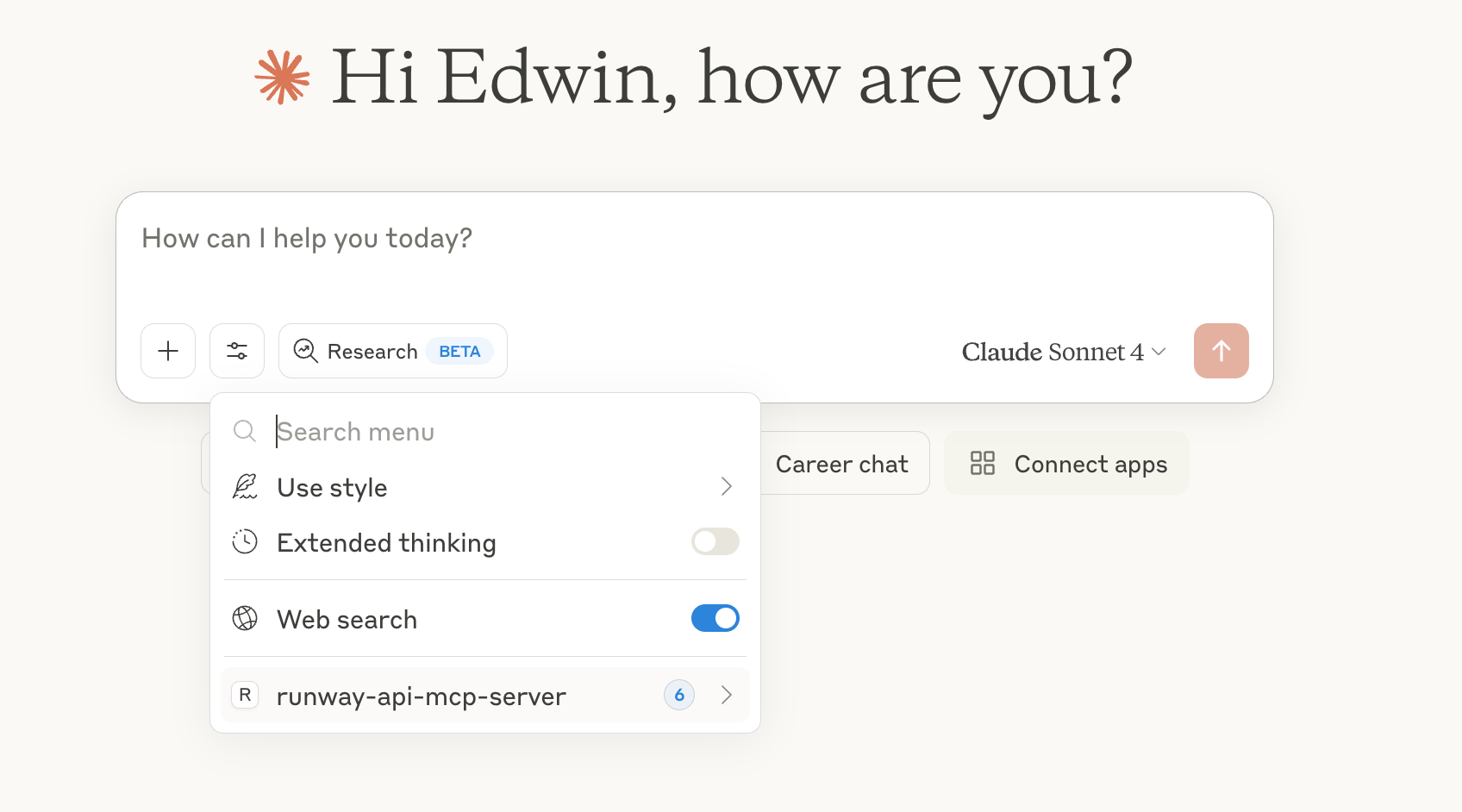
- Ahora reinicia Claude Desktop y deberías ver el
runway-api-mcp-serveren las herramientas de Claude:
- Ahora, ¡intenta pedirle a Claude que genere imágenes o videos!
[!NOTE]
Las imágenes generadas por la API de Runway solo viven durante 24 horas en el enlace generado. No hay forma de recuperarlas después de que este enlace expire. Asegúrate de descargar las imágenes antes de que expiren.
Implementar como servidor MCP remoto
El mismo código puede ejecutarse como un servidor MCP HTTP, lo que permite que clientes como claude.ai web, Cursor, Zed y Windsurf se conecten a una URL alojada única en lugar de instalar la extensión localmente.
Desarrollo HTTP local
RUNWAYML_API_SECRET=key_xxx npm run start:http
# server listens on http://0.0.0.0:3000/mcp
curl http://127.0.0.1:3000/healthz   # → {"ok":true}
Para probar desde clientes web (claude.ai) sin implementar, usa un túnel que
devuelva HTTPS. Cloudflared funciona; ngrok está actualmente bloqueado por el
backend de conectores de Anthropic:
cloudflared tunnel --url http://127.0.0.1:3000
Usa el https://<random>.trycloudflare.com/mcp impreso como la URL del conector.
Implementar en Railway
Railway implementa el servidor HTTP con configuración cero.
npm i -g @railway/cli           # one-time
railway login
railway init                    # create a new project, link this folder
railway up                      # builds & deploys
railway domain                  # provisions https://<your-app>.up.railway.app
Configura las variables de entorno en el panel de Railway (o railway variables):
| Variable | Requerida | Propósito |
|---|---|---|
RUNWAYML_API_SECRET | opcional | Clave de API del lado del servidor. Se usa como respaldo cuando REQUIRE_AUTH=false. No la configures para implementaciones públicas. |
REQUIRE_AUTH | sí | Configúrala en true para cualquier implementación pública/multiusuario. Obliga a los clientes a enviar su clave como Authorization: Bearer <key>. |
PORT | automática | Inyectada por Railway. El servidor lee process.env.PORT. |
Conéctate desde claude.ai web:
- Configuración → Conectores → Agregar conector personalizado
- URL:
https://<your-app>.up.railway.app/mcp - Deja los campos OAuth en blanco (flujo de clave Bearer)
Modelo de autenticación para implementación pública
Para alojamiento público y multiusuario, cada usuario proporciona su propia clave de API de Runway:
curl -X POST https://<your-app>.up.railway.app/mcp \
  -H "Content-Type: application/json" \
  -H "Accept: application/json, text/event-stream" \
  -H "Authorization: Bearer <user_runway_key>" \
  -d '{"jsonrpc":"2.0","id":1,"method":"tools/list"}'
Cuando REQUIRE_AUTH=true, las solicitudes sin un encabezado Bearer reciben un 401.
Las claves Bearer tienen prioridad sobre RUNWAYML_API_SECRET incluso cuando ambas están configuradas.