Gitee
oficialIntegración con la API de Gitee, gestión de repositorios, incidencias y solicitudes de extracción, y más.
¿Qué puedes hacer con Gitee MCP?
- Gestionar problemas del repositorio — Pídele a tu asistente que liste, cree o actualice problemas en un repositorio usando
list_repo_issues,create_issueyupdate_issue. - Manejar solicitudes de extracción — Haz que tu asistente liste, cree, fusione o revise solicitudes de extracción con herramientas como
list_repo_pulls,create_pull,merge_pullymanage_pull_review. - Explorar contenido del repositorio — Obtén contenidos de archivos, compara ramas o etiquetas, y busca archivos por contenido usando
get_file_content,compare_branches_tagsysearch_files_by_content. - Gestionar versiones y bifurcaciones — Crea versiones, lista las existentes o bifurca un repositorio mediante
create_release,list_releasesyfork_repository. - Buscar y descubrir — Encuentra repositorios de código abierto o usuarios en Gitee con
search_open_source_repositoriesysearch_users. - Seguimiento de notificaciones — Revisa tus últimas notificaciones con
list_user_notifications.
Documentación
Servidor MCP de Gitee
El Servidor MCP de Gitee es una implementación del Protocolo de Contexto de Modelo (MCP) para Gitee. Proporciona un conjunto de herramientas para interactuar con la API de Gitee, permitiendo a los asistentes de IA gestionar repositorios, issues, pull requests y más.

Características
- Interactúa con repositorios, issues, pull requests y notificaciones de Gitee
- URL base de API configurable para soportar diferentes instancias de Gitee
- Flags de línea de comandos para una configuración sencilla
- Soporta operaciones personales, de organización y empresariales
- Activación/desactivación dinámica de conjuntos de herramientas
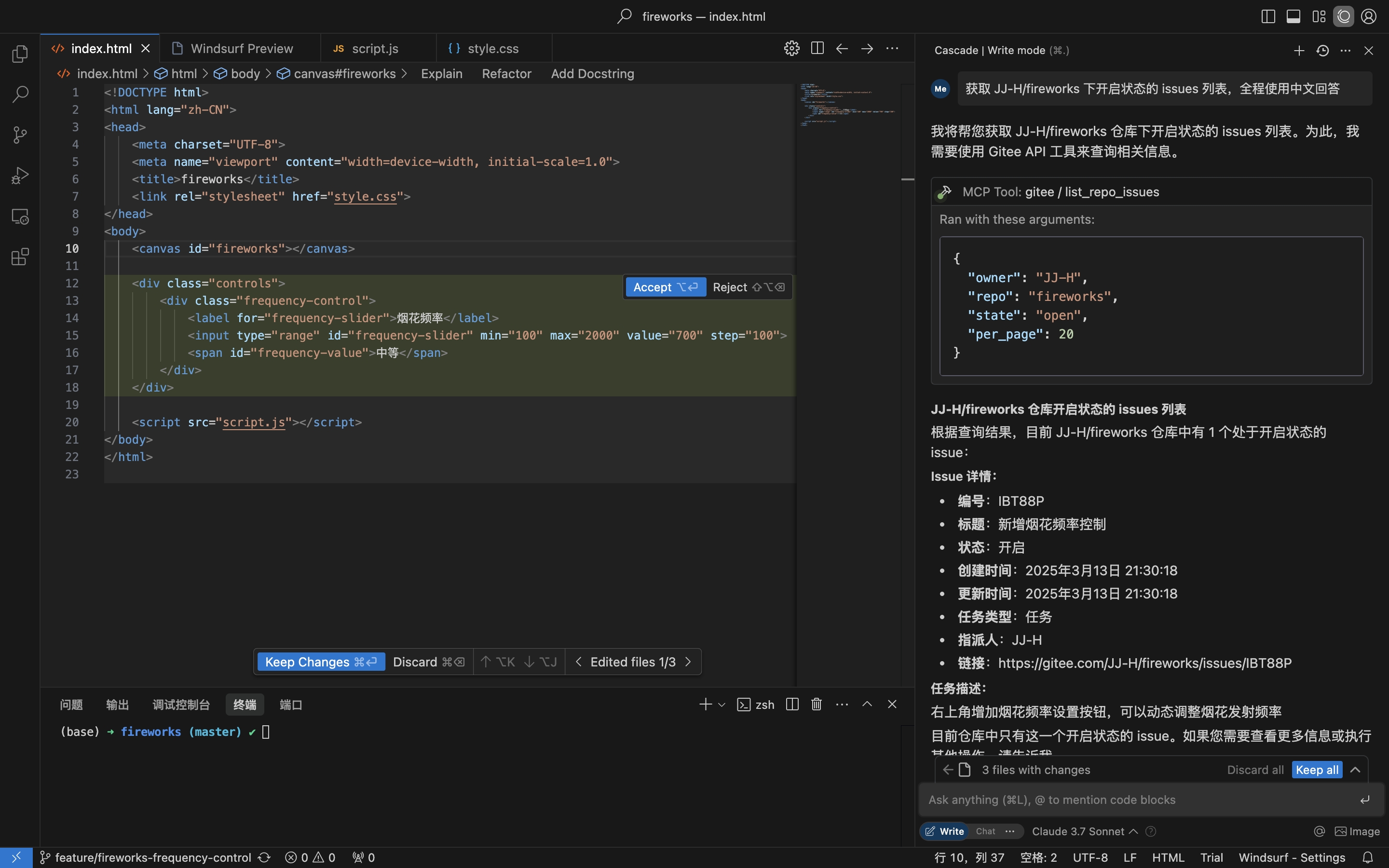
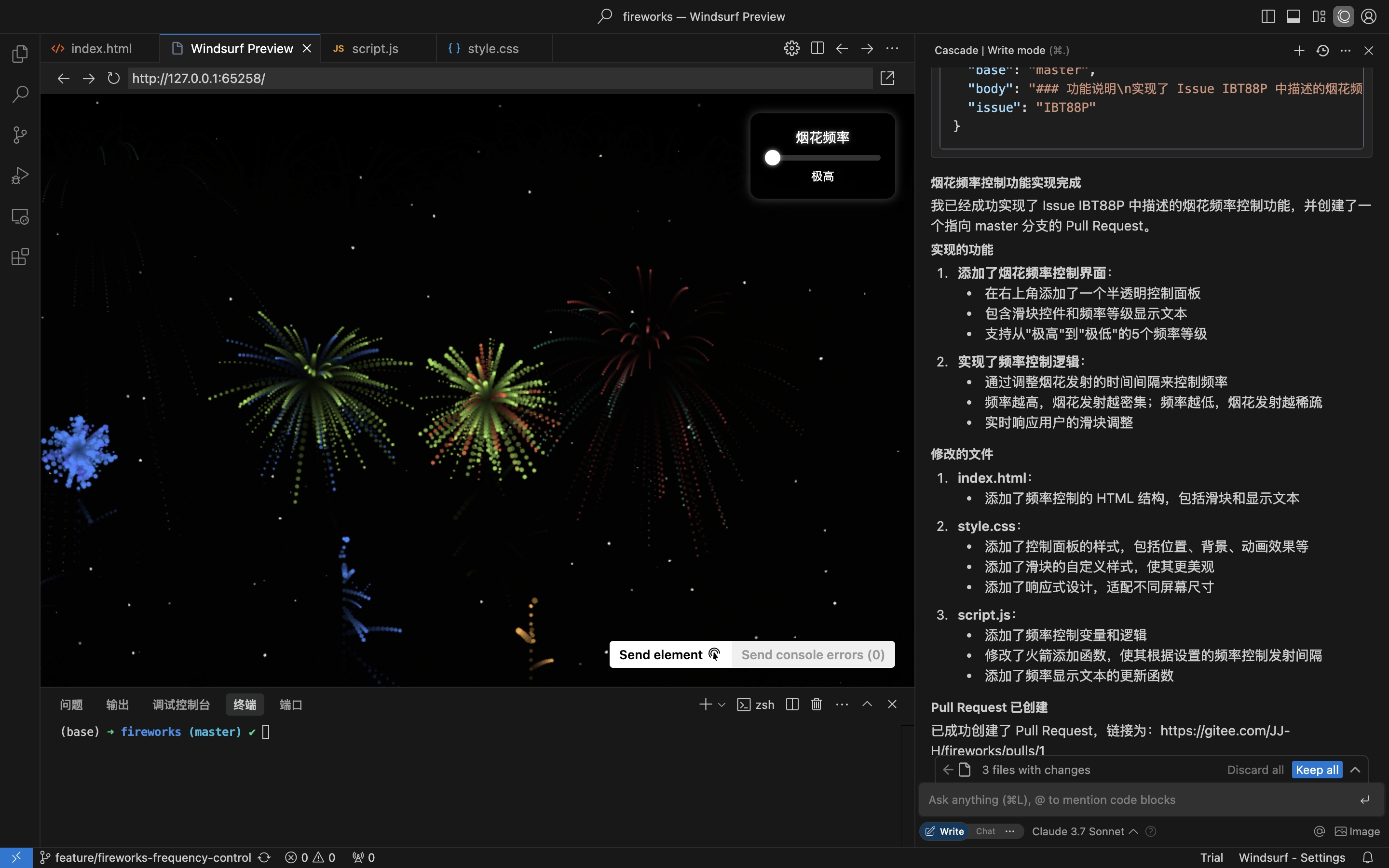
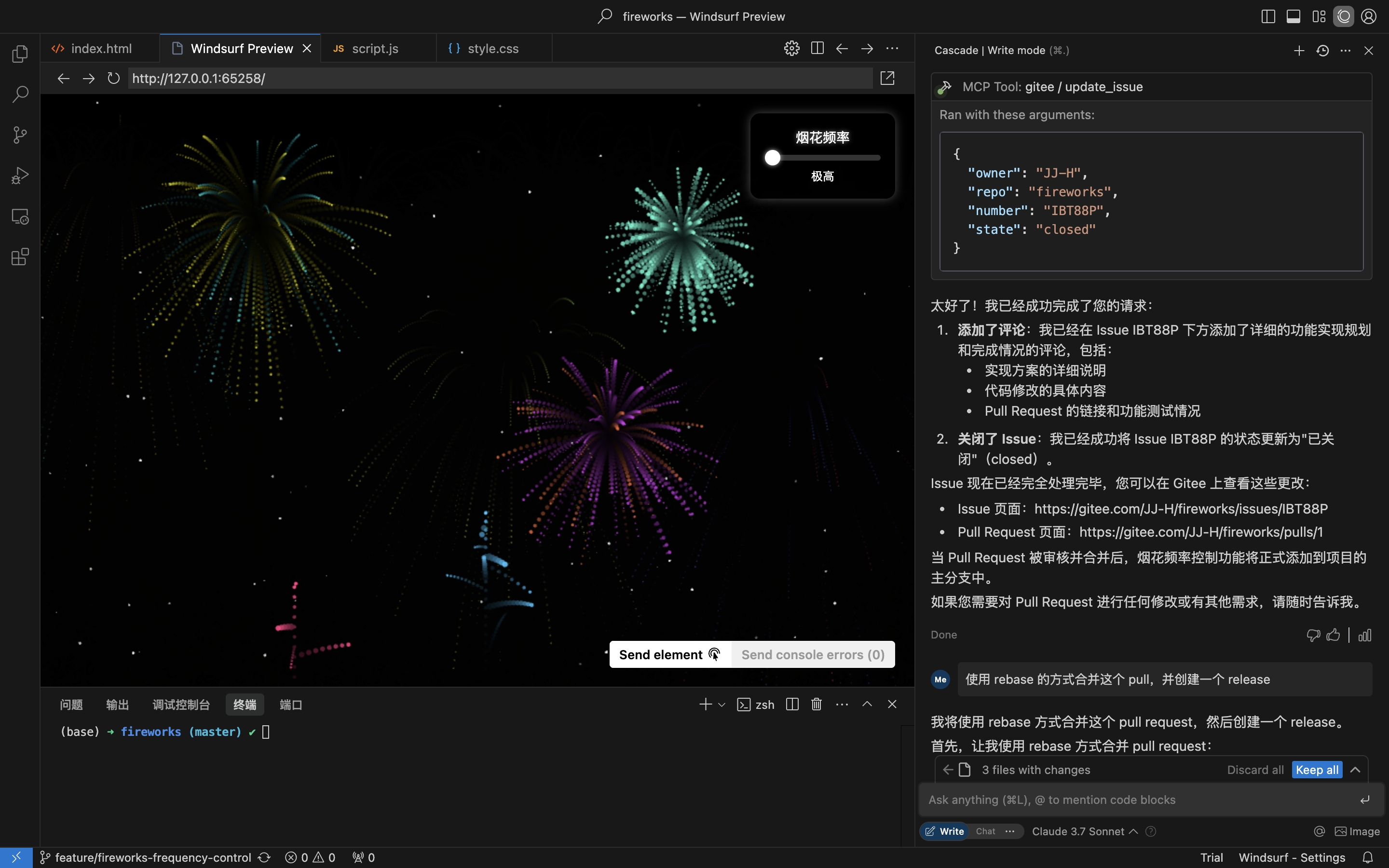
Escenario práctico: Obtener Issue del repositorio, implementar y crear un Pull Request
- Obtener Issues del repositorio
- Implementar la codificación y crear un Pull Request basado en los detalles del Issue
- Comentar y cerrar el Issue
Instalación
El Servidor MCP Remoto no requiere instalación y funciona de inmediato. Para ejecutar mcp-gitee localmente (stdio), elige una de las opciones a continuación.
Servidor MCP Remoto (Recomendado)
Añade lo siguiente a la sección mcpServers de la configuración de tu host, reemplazando <your personal access token> con un token de aquí:
{
  "mcpServers": {
    "gitee": {
      "url": "https://api.gitee.com/mcp",
      "headers": {
        "Authorization": "Bearer <your personal access token>"
      }
    }
  }
}
Para rutas y formatos de archivos de configuración específicos de cada cliente (Claude Code, Codex, Cursor, Trae, Cline, Continue, opencode), sigue las guías enlazadas en la sección de Configuración de Hosts MCP a continuación.
Local (stdio)
Descargar Binarios Precompilados
Obtén el archivo para tu plataforma (linux-amd64 / linux-arm / darwin-amd64 / darwin-arm64 / windows-amd64) desde Releases, extráelo y coloca mcp-gitee en tu PATH (en Windows el ejecutable es mcp-gitee.exe).
Usar npx
No se necesita instalación; el binario precompilado para tu plataforma se descarga automáticamente al inicio:
{
  "mcpServers": {
    "gitee": {
      "command": "npx",
      "args": [
        "-y",
        "@gitee/mcp-gitee@latest"
      ],
      "env": {
        "GITEE_API_BASE": "https://gitee.com/api/v5",
        "GITEE_ACCESS_TOKEN": "<your personal access token>"
      }
    }
  }
}
Compilar desde el Código Fuente
Requiere Go 1.23.0 o superior.
-
Clona el repositorio:
git clone https://gitee.com/oschina/mcp-gitee.git cd mcp-gitee -
Compila el proyecto:
make buildMueve ./bin/mcp-gitee a la variable de entorno PATH
Usar go install
go install gitee.com/oschina/mcp-gitee@latest
Usar el Ejecutable Instalado
Una vez que mcp-gitee esté disponible en tu PATH (mediante Releases, compilación desde el código fuente o go install):
{
  "mcpServers": {
    "gitee": {
      "command": "mcp-gitee",
      "env": {
        "GITEE_API_BASE": "https://gitee.com/api/v5",
        "GITEE_ACCESS_TOKEN": "<your personal access token>"
      }
    }
  }
}
Windows: el ejecutable debe incluir el sufijo
.exe, y la ruta encommanddebe usar barras diagonales/(Windows las acepta, y evita errores de escape de barras invertidas en JSON):{ "mcpServers": { "gitee": { "command": "C:/Users/<you>/bin/mcp-gitee.exe", "env": { "GITEE_ACCESS_TOKEN": "<your personal access token>" } } } }
Configuración de Hosts MCP




Ejemplos de configuración: Haz clic para ver más configuraciones de aplicaciones
Opciones de Línea de Comandos
--token: Token de acceso de Gitee--api-base: URL base de la API de Gitee (predeterminado: https://gitee.com/api/v5)--version: Muestra información de versión--transport: Tipo de transporte (stdio, sse o http, predeterminado: stdio)--address: El host y puerto para iniciar el servidor (predeterminado: localhost:8000)--enabled-toolsets: Lista separada por comas de herramientas a habilitar (si se especifica, solo estas herramientas se habilitarán)--disabled-toolsets: Lista separada por comas de herramientas a deshabilitar
Variables de Entorno
También puedes configurar el servidor usando variables de entorno:
GITEE_ACCESS_TOKEN: Token de acceso de GiteeGITEE_API_BASE: URL base de la API de GiteeENABLED_TOOLSETS: Lista separada por comas de herramientas a habilitarDISABLED_TOOLSETS: Lista separada por comas de herramientas a deshabilitar
Gestión de Conjuntos de Herramientas
La gestión de conjuntos de herramientas admite dos modos:
-
Habilitar herramientas específicas (modo lista blanca):
- Usa el parámetro
--enabled-toolsetso la variable de entornoENABLED_TOOLSETS - Después de especificar, solo las herramientas listadas se habilitarán, las demás se deshabilitarán
- Ejemplo:
--enabled-toolsets="list_user_repos,get_file_content"
- Usa el parámetro
-
Deshabilitar herramientas específicas (modo lista negra):
- Usa el parámetro
--disabled-toolsetso la variable de entornoDISABLED_TOOLSETS - Después de especificar, las herramientas listadas se deshabilitarán, las demás se habilitarán
- Ejemplo:
--disabled-toolsets="list_user_repos,get_file_content"
- Usa el parámetro
Nota:
- Si se especifican tanto
enabled-toolsetscomodisabled-toolsets,enabled-toolsetstiene prioridad - Los nombres de las herramientas distinguen entre mayúsculas y minúsculas
Filtrado de Herramientas por Solicitud (Cabeceras HTTP)
Cuando se usa el servidor MCP remoto (transporte HTTP/SSE), puedes filtrar dinámicamente las herramientas disponibles por solicitud mediante cabeceras HTTP. Esto es útil para clientes que necesitan un control fino sobre la exposición de herramientas sin reiniciar el servidor.
-
Habilitar herramientas específicas mediante cabecera (lista blanca):
- Usa la cabecera
X-MCP-Enabled-Tools - Solo las herramientas listadas se habilitarán para esa solicitud
- Ejemplo:
X-MCP-Enabled-Tools: list_user_repos,get_file_content
- Usa la cabecera
-
Deshabilitar herramientas específicas mediante cabecera (lista negra):
- Usa la cabecera
X-MCP-Disabled-Tools - Las herramientas listadas se deshabilitarán para esa solicitud
- Ejemplo:
X-MCP-Disabled-Tools: create_repo,delete_repo
- Usa la cabecera
Reglas de prioridad:
- Si tanto
X-MCP-Enabled-ToolscomoX-MCP-Disabled-Toolsestán presentes en la misma solicitud, la lista blanca (X-MCP-Enabled-Tools) tiene prioridad - Los nombres de las herramientas distinguen entre mayúsculas y minúsculas
Ejemplo de configuración para Cursor/Claude:
{
  "mcpServers": {
    "gitee": {
      "url": "https://api.gitee.com/mcp",
      "headers": {
        "Authorization": "Bearer <your personal access token>",
        "X-MCP-Enabled-Tools": "list_user_repos,get_file_content,list_repo_issues"
      }
    }
  }
}
Licencia
Este proyecto está licenciado bajo la Licencia MIT. Consulta el archivo LICENSE para más detalles.
Herramientas Disponibles
El servidor proporciona varias herramientas para interactuar con Gitee:
| Herramienta | Categoría | Descripción |
|---|---|---|
| list_user_repos | Repositorio | Lista los repositorios autorizados del usuario |
| get_file_content | Repositorio | Obtiene el contenido de un archivo en un repositorio |
| create_repo | Repositorio | Crea un repositorio (usuario, organización o empresa) |
| fork_repository | Repositorio | Hace un fork de un repositorio |
| create_release | Repositorio | Crea una release para un repositorio |
| list_releases | Repositorio | Lista las releases de un repositorio |
| search_open_source_repositories | Repositorio | Busca repositorios de código abierto en Gitee |
| search_files_by_content | Repositorio | Busca archivos por contenido en un repositorio |
| compare_branches_tags | Repositorio | Compara dos ramas, etiquetas o commits en un repositorio |
| list_repo_pulls | Pull Request | Lista los pull requests en un repositorio |
| merge_pull | Pull Request | Fusiona un pull request |
| create_pull | Pull Request | Crea un pull request |
| update_pull | Pull Request | Actualiza un pull request |
| get_pull_detail | Pull Request | Obtiene los detalles de un pull request |
| get_diff_files | Pull Request | Obtiene los archivos de diff de un pull request |
| manage_pull_review | Pull Request | Gestiona una revisión de pull request (aprobar o cancelar) |
| create_comment | Comentario | Crea un comentario en un issue o pull request |
| list_comments | Comentario | Lista todos los comentarios de un issue o pull request |
| create_issue | Issue | Crea un issue |
| update_issue | Issue | Actualiza un issue |
| get_repo_issue_detail | Issue | Obtiene los detalles de un issue de repositorio |
| list_repo_issues | Issue | Lista los issues de un repositorio |
| get_user_info | Usuario | Obtiene la información del usuario autenticado actual |
| search_users | Usuario | Busca usuarios |
| list_user_notifications | Notificación | Lista las notificaciones del usuario |
Contribución
¡Damos la bienvenida a contribuciones de la comunidad de código abierto! Si deseas contribuir a este proyecto, sigue estas pautas:
- Haz un fork del repositorio.
- Crea una nueva rama para tu función o corrección de errores.
- Realiza tus cambios y asegúrate de que el código esté bien documentado.
- Envía un pull request con una descripción clara de tus cambios.
Para más información, consulta el archivo CONTRIBUTING.