Skills-ContextManager
No contamines el contexto de tu agente de IA con 1,000 habilidades. Usa Skills-ContextManager, una interfaz web autogestionada para gestionar habilidades y flujos de trabajo de IA, proporcionando habilidades a un agente de IA a través de MCP solo cuando sea necesario. Simplemente agrega habilidades a tu biblioteca y actívalas o desactívalas con un interruptor. Elige si una habilidad se carga siempre en el contexto o se activa dinámicamente cuando el agente de IA determina que es necesaria.
Documentación
Skill-ContextManager & Servidor MCP

Una aplicación web autoalojada para gestionar habilidades de IA, flujos de trabajo y contextos con integración completa de MCP (Model Context Protocol). Organiza, gestiona y carga dinámicamente bases de conocimiento especializadas en cualquier Agente de IA simplemente activando o desactivando tus Habilidades en una interfaz web local sencilla.
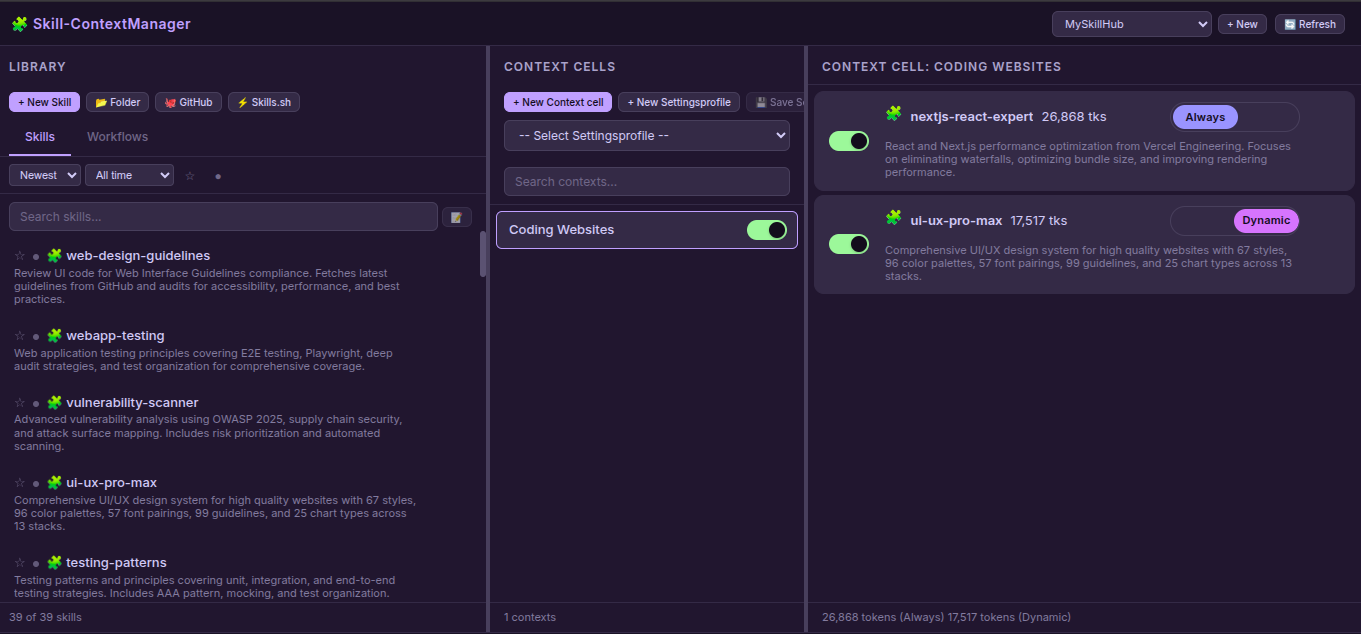
Características
Aplicación Web
- Gestión de Habilidades y Flujos de Trabajo: Crea, edita, elimina y organiza habilidades y flujos de trabajo
- Soporte Multi-Hub: Crea espacios de trabajo aislados con habilidades/contextos separados
- Celdas de Contexto: Organiza habilidades/flujos de trabajo en grupos lógicos con interruptores de activación/desactivación
- Modo Dual: Elige habilidades siempre cargadas (auto-cargadas) o dinámicas (bajo demanda) mediante un interruptor de encendido/apagado
- Editor de Archivos: Editor integrado con árbol de archivos, crear/eliminar archivos y carpetas
- Fuentes de Importación:
- 📂 Carpeta: Subir desde el sistema de archivos local
- 🐙 GitHub: Clonar desde repositorios de GitHub
- ⚡ Skills.sh: Importar desde el registro de Skills.sh
- Generación de Descripciones con IA: Genera automáticamente descripciones de habilidades usando APIs de IA
- Almacenamiento Seguro de Claves API: Claves API almacenadas con modo de archivo 0600 (solo propietario)
- Perfiles de Configuración: Guarda y carga ajustes preestablecidos
- Búsqueda y Filtrado: Búsqueda inteligente, ordenación, favoritos, filtros activos/inactivos
- Conteo de Tokens: Realiza un seguimiento del tamaño del contexto en tokens
- Arrastrar y Soltar: Mueve habilidades/flujos de trabajo a contextos
Servidor MCP
- 3 Herramientas Esenciales para Agentes de IA:
get_default_skills()- Cargar habilidades con modo"always_loaded"list_available_skills()- Listar todas las habilidades habilitadas con modosload_full_skill_context(name)- Cargar habilidad dinámica bajo demanda
- Consciente del Hub: Funciona con el hub activo de múltiples espacios de trabajo
- Soporte de Modo:
"always_loaded"vs"dynamic"carga de habilidades - Soporte de Tipos: Tanto Habilidades como Flujos de Trabajo
Inicio Rápido
# Clone the repository
git clone https://github.com/One-Man-Company/Skills-ContextManager.git
cd Skills-ContextManager

# Make setup script executable and run it
chmod +x setup.sh
./setup.sh

# Start web application
cd Skill-ContextManager && npm start
Acceso: http://localhost:3000
Configuración de MCP guardada en mcp_settings.json - añade esto a la configuración de MCP de tu Agente de IA.
⚠️ Importante: Copia el contenido de
MCP_instructions.mdal prompt del sistema o a la configuración de reglas de tu Agente de IA.
Configuración de MCP
El script setup.sh genera mcp_settings.json con las rutas correctas. Añádelo al archivo de configuración de MCP de tu Agente de IA:
{
  "Skills-ContextManager": {
    "command": "/absolute/path/Skills-MCP/.venv/bin/python3",
    "args": ["-u", "/absolute/path/Skills-MCP/mcp_server.py"],
    "env": {}
  }
}
Herramientas MCP
Los Agentes de IA solo necesitan estas 3 herramientas. Los detalles de uso están en MCP_instructions.md (prompt del sistema):
| Herramienta | Descripción |
|---|---|
get_default_skills() | Cargar todas las habilidades con modo "always_loaded" en el contexto |
list_available_skills() | Listar todas las habilidades habilitadas con descripciones y modos |
load_full_skill_context(name) | Cargar una habilidad específica bajo demanda (para el modo "dynamic") |
Envío a mcpservers.org
| Campo | Valor |
|---|---|
| Nombre | Skills-ContextManager |
| Descripción | Interfaz web para gestionar habilidades de IA con integración MCP |
| Repositorio | https://github.com/One-Man-Company/Skills-ContextManager |
| Comando | [path]/Skills-MCP/.venv/bin/python3 |
| Argumentos | -u [path]/Skills-MCP/mcp_server.py |
Habilidades y Flujos de Trabajo Incluidos
El repositorio incluye contenido inicial en MySkillsHUB/:
Habilidades (39): architecture, behavioral-modes, clean-code, code-review-checklist, documentation-templates, frontend-design, game-development, i18n-localization, mobile-design, nextjs-react-expert, nodejs-best-practices, parallel-agents, performance-profiling, python-patterns, seo-fundamentals, server-management, skill-creator, systematic-debugging, ui-ux-pro-max, vulnerability-scanner, webapp-testing, api-patterns, y más.
Flujos de Trabajo (3):
- best-standard-autonomous-coding
- elite-cognitive-operator-system
- plan-mode
Todo el contenido se copia automáticamente a tu biblioteca en la primera configuración.
Licencia
Licencia MIT
Creado: Febrero de 2026