Flow Studio - Power Automate MCP Server
Depura, construye y administra flujos en la nube de Microsoft Power Automate con agentes de IA. 15 herramientas para detalles de errores a nivel de acción, creación de flujos, historial de ejecuciones y operaciones multiinquilino.
Documentación
FlowStudio MCP — Habilidades de Power Automate para Agentes de IA
Dale a tu agente de IA la misma visibilidad que tienes en el portal de Power Automate, y un poco más. La API de Graph solo devuelve el estado de ejecución de nivel superior: los agentes no pueden ver entradas de acciones, iteraciones de bucles o fallos anidados. FlowStudio MCP expone todo eso.
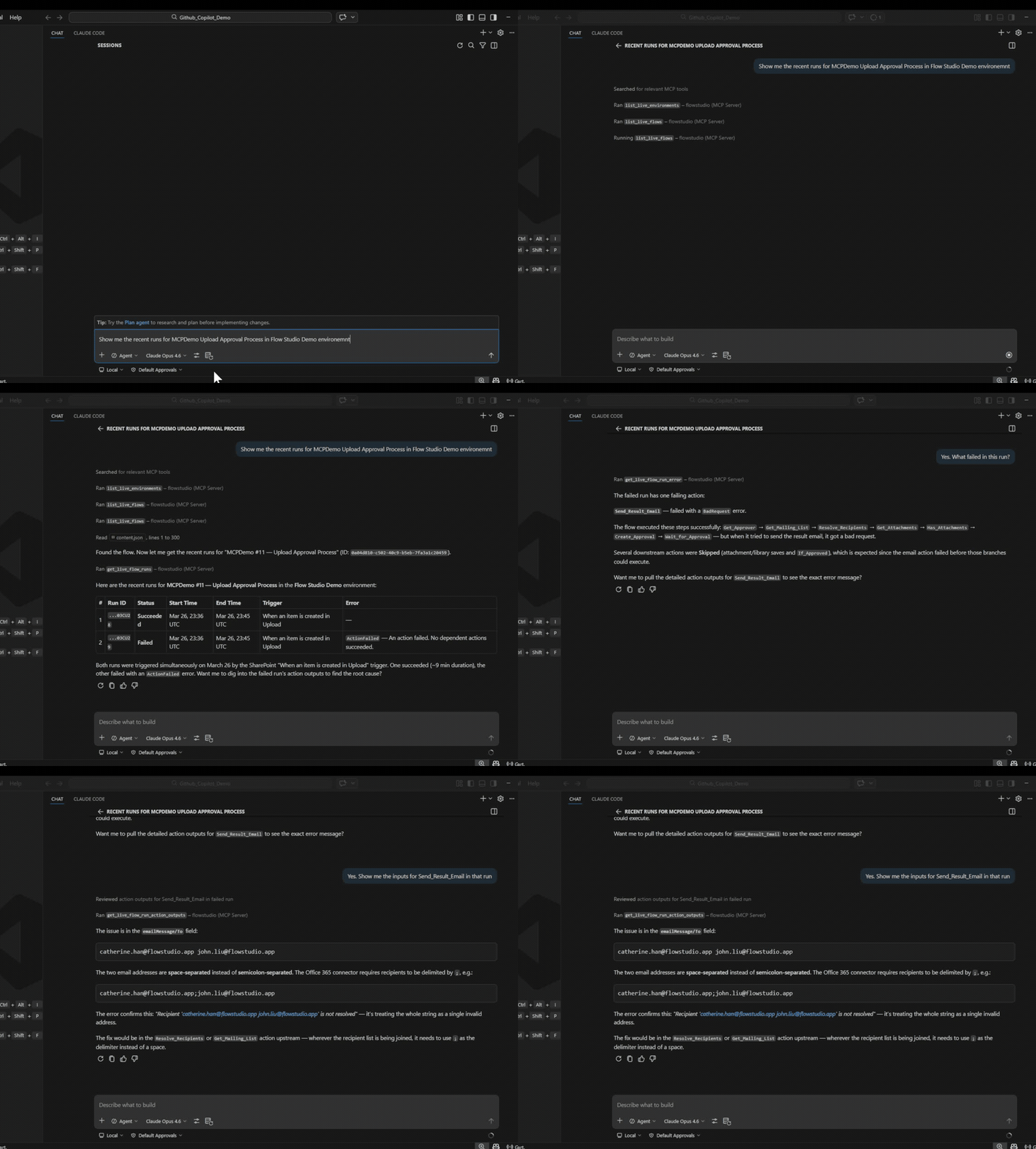
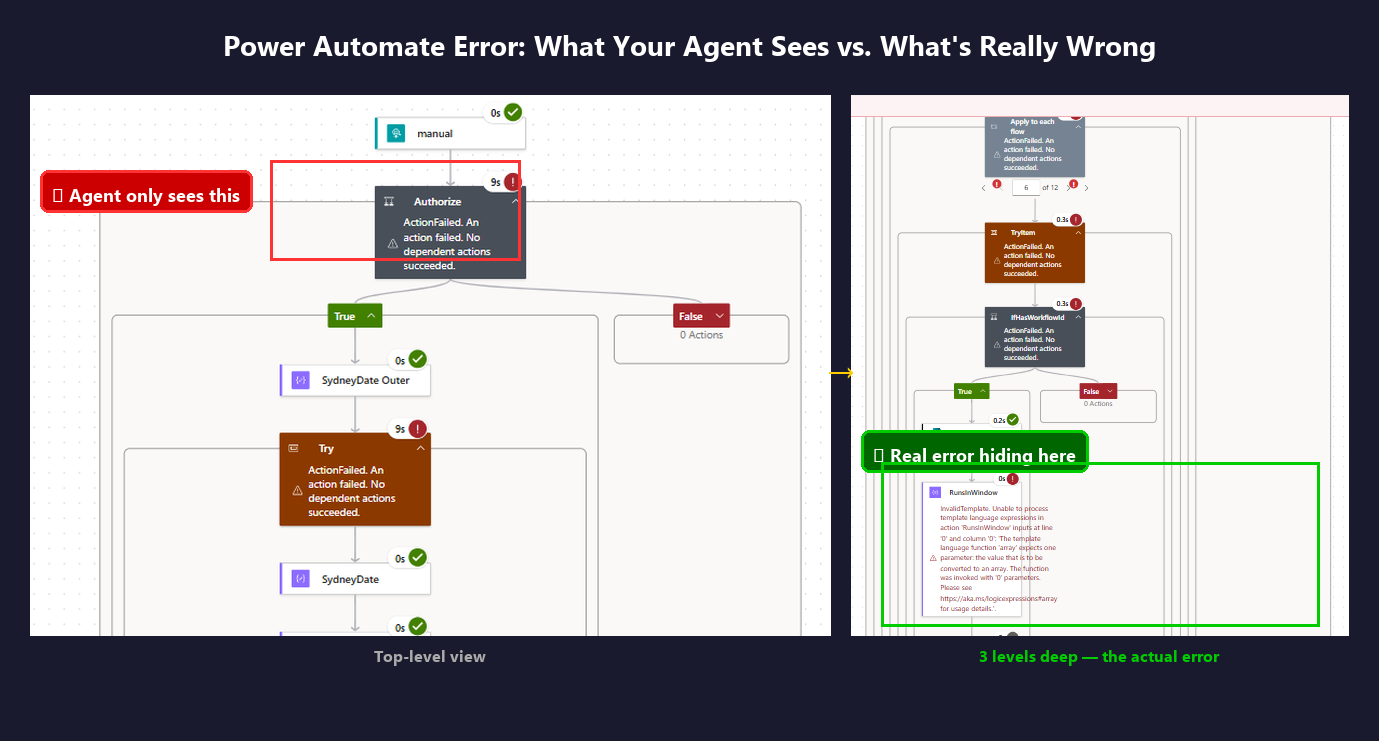
Puedes navegar por el portal y encontrar la causa raíz. Tu agente no puede, a menos que tenga MCP.
Cuándo lo necesitas
- Tu agente puede ver que un flujo falló, pero no por qué — la API de Graph solo devuelve códigos de estado
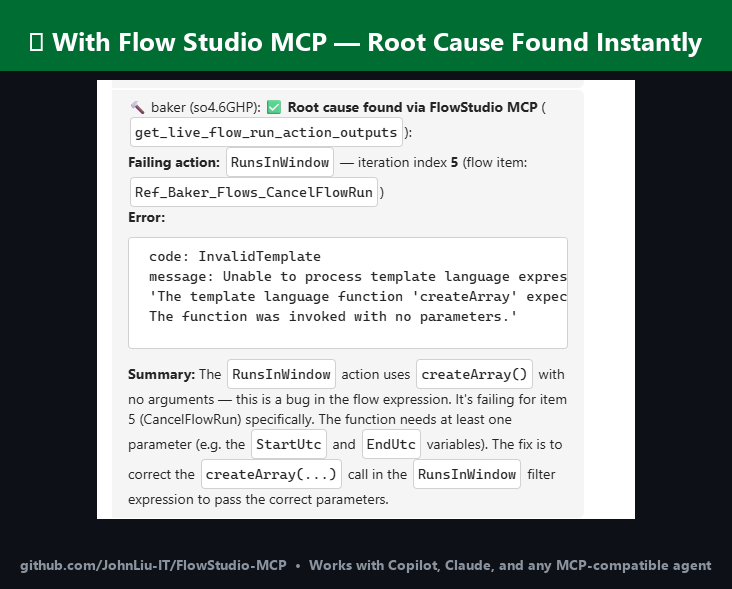
- Quieres que tu agente vea entradas y salidas a nivel de acción, como tú puedes en el portal
- Un bucle tiene cientos de iteraciones y algunas produjeron salidas incorrectas — en el portal tendrías que hacer clic en cada una, pero el agente puede escanear todas las entradas y salidas de iteración a la vez
- Quieres verificar la salud de los flujos, tasas de fallos y actividad de creadores en todo tu inquilino sin abrir el centro de administración
- Necesitas clasificar flujos, detectar recursos huérfanos o auditar conectores a escala — sin instalar el CoE Starter Kit
- Estás cansado de ser el intermediario entre tu agente y el portal
API de Graph vs FlowStudio MCP
La diferencia clave: la API de Graph le da a tu agente el estado de ejecución. MCP le da a tu agente las entradas y salidas de cada acción.
| Lo que ve el agente | API de Graph | FlowStudio MCP |
|---|---|---|
| Ejecución aprobada o fallida | Sí | Sí |
| Entradas y salidas de acciones | No | Sí |
| Detalles de error más allá del código de estado | No | Sí |
| Detalles de ejecución de flujos secundarios | No | Sí |
| Datos de iteraciones de bucles | No | Sí |
| Definición de flujo (lectura + escritura) | Limitado | JSON completo |
| Reenviar / cancelar ejecuciones | Limitado | Sí |
| Salud de flujos y tasas de fallos en caché | No | Sí |
| Inventario de creadores / Power Apps / conexiones | No | Sí |
| Metadatos de gobernanza (etiquetas, impacto, propietario) | No | Sí |
Habilidades
| Habilidad | Descripción |
|---|---|
power-automate-mcp | Conectarse y operar flujos en la nube de Power Automate — listar flujos, leer definiciones, verificar ejecuciones, reenviar, cancelar |
power-automate-debug | Proceso de diagnóstico paso a paso para investigar flujos con fallos |
power-automate-build | Construir, estructurar e implementar definiciones de flujos de Power Automate desde cero |
power-automate-monitoring | Salud de flujos, tasas de fallos, inventario de creadores, Power Apps, recuentos de entornos y conexiones |
power-automate-governance | Clasificar flujos por impacto, detectar huérfanos, auditar conectores, gestionar notificaciones, calcular puntuaciones de archivo |
Las tres primeras habilidades usan llamadas en vivo a la API de Power Automate. Las habilidades de monitoreo y gobernanza usan el almacén en caché — una instantánea diaria con estadísticas agregadas, sugerencias de remediación y metadatos de gobernanza. Requiere una suscripción FlowStudio for Teams o MCP Pro+ para las herramientas del almacén.
Cada habilidad sigue la especificación de Agent Skills y funciona con cualquier agente compatible.
Agentes compatibles
Copilot, Claude Code, ChatGPT, Codex, OpenClaw, Gemini CLI, Cursor, Goose, Amp, OpenHands
Guías
Tutoriales completos en learn.flowstudio.app:
- Primeros pasos — instala FlowStudio MCP para cualquier agente
- Crea flujos con agentes de IA — un ejemplo práctico en 3 pasos
- Vibe code Power Automate — describe el flujo, el agente lo construye
- Power Automate en VS Code — trabaja en flujos desde tu editor
- Depura un flujo con fallos — encuentra la causa raíz a partir de datos a nivel de acción
- Por agente: ChatGPT · Claude · GitHub Copilot · Copilot Studio · Codex
Inicio rápido
Conéctate desde ChatGPT o claude.ai
Inicia sesión con tu cuenta de Microsoft en lugar de pegar una clave. Agrega
https://mcp.flowstudio.app/mcp/oauth como conector en ChatGPT (modo Developer
activado) o en claude.ai, y luego sigue el aviso de inicio de sesión. Tutorial:
ChatGPT para Power Automate.
Instalar como plugin de Claude Code
Disponible a través del marketplace de plugins de Claude después de la aprobación. Para probar localmente:
git clone https://github.com/ninihen1/power-automate-mcp-skills.git
claude --plugin-dir ./power-automate-mcp-skills
Luego conecta el servidor MCP:
claude mcp add --transport http flowstudio https://mcp.flowstudio.app/mcp \
  --header "x-api-key: <YOUR_TOKEN>"
Obtén tu token en mcp.flowstudio.app.
Instalar en Codex
Dentro de una sesión de Codex, instala las habilidades directamente:
$skill-installer install https://github.com/ninihen1/power-automate-mcp-skills/tree/main/skills/power-automate-mcp
$skill-installer install https://github.com/ninihen1/power-automate-mcp-skills/tree/main/skills/power-automate-debug
$skill-installer install https://github.com/ninihen1/power-automate-mcp-skills/tree/main/skills/power-automate-build
$skill-installer install https://github.com/ninihen1/power-automate-mcp-skills/tree/main/skills/power-automate-monitoring
$skill-installer install https://github.com/ninihen1/power-automate-mcp-skills/tree/main/skills/power-automate-governance
Luego conecta el servidor MCP en ~/.codex/config.toml:
[mcp_servers.flowstudio]
url = "https://mcp.flowstudio.app/mcp"

[mcp_servers.flowstudio.http_headers]
x-api-key = "<YOUR_TOKEN>"
Instalar vía skills.sh
Busca flowstudio en skills.sh, o:
npx skills add github/awesome-copilot -s flowstudio-power-automate-mcp
npx skills add github/awesome-copilot -s flowstudio-power-automate-debug
npx skills add github/awesome-copilot -s flowstudio-power-automate-build
npx skills add github/awesome-copilot -s flowstudio-power-automate-monitoring
npx skills add github/awesome-copilot -s flowstudio-power-automate-governance
Instalar vía ClawHub
npx clawhub@latest install power-automate-mcp
Instalar vía Smithery
npx smithery skill add flowstudio/power-automate-mcp
Instalación manual
Copia las carpetas de habilidades en el directorio .github/skills/ de tu proyecto
(o donde tu agente descubra habilidades).
Conecta el servidor MCP
Claude Code:
claude mcp add --transport http flowstudio https://mcp.flowstudio.app/mcp \
  --header "x-api-key: <YOUR_TOKEN>"
Codex (~/.codex/config.toml):
[mcp_servers.flowstudio]
url = "https://mcp.flowstudio.app/mcp"

[mcp_servers.flowstudio.http_headers]
x-api-key = "<YOUR_TOKEN>"
Copilot / VS Code (.vscode/mcp.json):
{
  "servers": {
    "flowstudio": {
      "type": "http",
      "url": "https://mcp.flowstudio.app/mcp",
      "headers": { "x-api-key": "<YOUR_TOKEN>" }
    }
  }
}
Obtén tu token en mcp.flowstudio.app.
Ejemplos reales de depuración
Estos provienen de investigaciones de producción reales, no de demostraciones.
-
Error de expresión en flujo secundario —
contains(string(...))falló en una propiedad anidada. El agente rastreó el flujo principal, entró al secundario, recorrió las iteraciones del bucle y encontró la entrada que fallaba. El portal mostraba "ExpressionEvaluationFailed" sin contexto. -
Error de entrada de datos, no un bug del flujo — El usuario reportó dos "bugs" seguidos. El agente demostró que ambos eran errores de entrada de datos (coma faltante en un correo, dirección única en el campo CC). El flujo era correcto. Diagnosticado en segundos.
-
Valor nulo bloquea flujo secundario —
split(Name, ', ')falló cuando el 38% de los registros tenían nombres nulos. El agente rastreó desde el flujo principal al secundario, al bucle, a la acción, encontró la causa raíz e implementó una corrección víaupdate_live_flow.
Requisitos previos
- Una suscripción MCP de FlowStudio (todas las herramientas en vivo)
- Para herramientas del almacén (monitoreo, gobernanza): FlowStudio for Teams o MCP Pro+
- Endpoint MCP:
https://mcp.flowstudio.app/mcp - Clave de API / token JWT (pasado como encabezado
x-api-key)
Estructura del repositorio
skills/
  power-automate-mcp/          core connection & operation skill
  power-automate-debug/        debug workflow skill
  power-automate-build/        build & deploy skill
  power-automate-monitoring/   flow health & tenant inventory skill
  power-automate-governance/   compliance & governance skill
examples/                      real debugging walkthroughs
README.md
LICENSE                        MIT
Disponible en GitHub
Funciona con Copilot, Claude, ChatGPT y cualquier agente compatible con MCP.
- awesome-copilot (fusionado)
- skills.sh (más de 3K instalaciones)
- Smithery (publicado)
- ClawHub (v1.1.0)
Contribuciones
Las contribuciones son bienvenidas. Cada carpeta de habilidad debe contener un SKILL.md con el
frontmatter requerido. Consulta las habilidades existentes para ver el formato.
Licencia
Palabras clave: depuración de Power Automate, historial de ejecución de flujos, error de evaluación de expresión, fallo de flujo secundario, errores de acciones anidadas, salida de iteraciones de bucle, MCP de automatización de agentes, IA de Power Platform, implementación de definiciones de flujo, reenviar ejecución fallida, monitoreo de flujos, gobernanza, CoE, detección de huérfanos, auditoría de conectores, puntuación de archivo, inventario de creadores