Teukhos
Genera servidores MCP listos para producción a partir de un único archivo YAML
Documentación
Teukhos




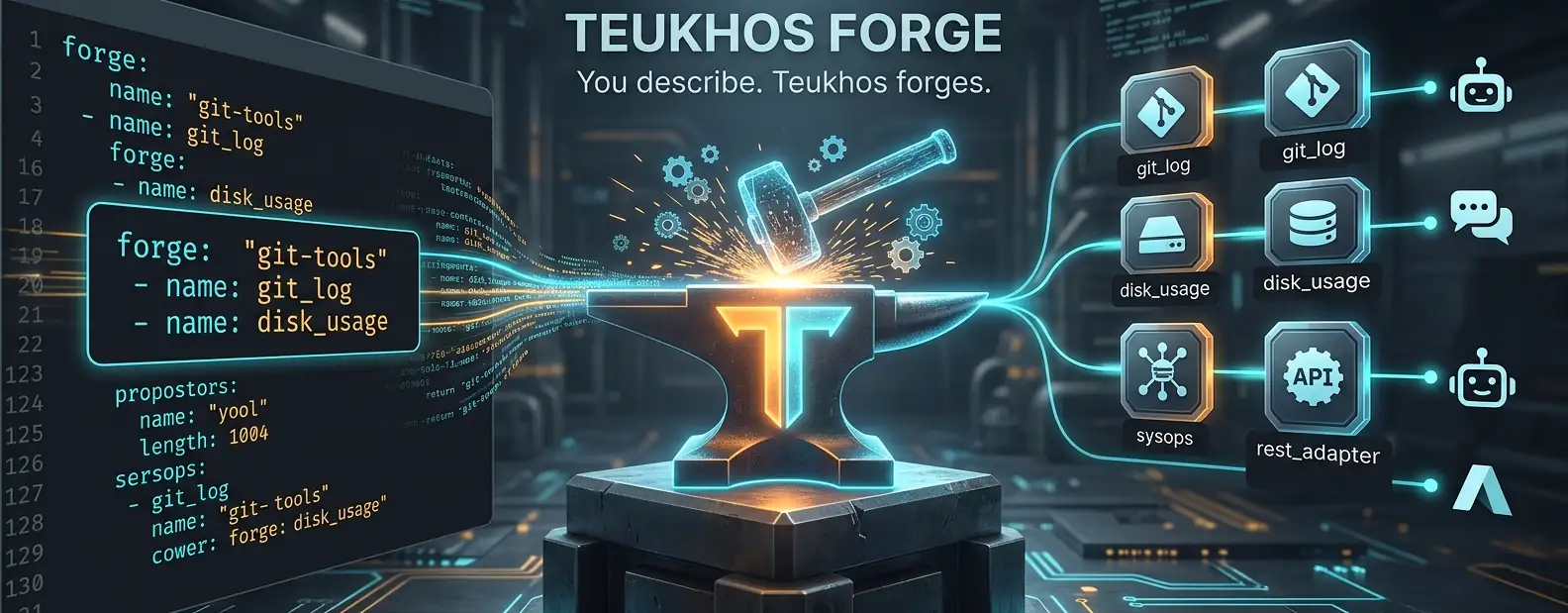
Tú describes la herramienta. Teukhos la forja como MCP.
Genera servidores MCP listos para producción a partir de un único archivo YAML. Sin necesidad de programar en Python.
Estado: Beta — Las funciones principales son estables y están probadas. La API puede cambiar antes de v1.0.
pip install teukhos
teukhos serve git-tools.yaml
Eso es todo. Tus herramientas CLI ahora son invocables por cualquier agente de IA.
El Problema
El ecosistema MCP tiene una brecha crítica:
| Lo que existe | Lo que falta |
|---|---|
| FastMCP puro — escribir Python | Config-como-código → servidor MCP en ejecución |
any-cli-mcp-server — extrae --help | Mapeo estructurado y tipado de CLI → herramienta |
| Pasarelas empresariales (Bifrost, MCPX) | Ligero, propiedad del desarrollador, código abierto |
| Constructores visuales (Langflow, n8n) | Runtime compatible con CI/CD y GitOps |
Teukhos llena esta brecha. Define tus herramientas en YAML. Ejecuta un comando. Listo.
Inicio Rápido en 30 Segundos
Instalación:
pip install teukhos
# or: uvx teukhos
Crea teukhos.yaml:
forge:
  name: "my-tools"

tools:
  - name: git_log
    description: "Show recent git commits"
    adapter: cli
    cli:
      command: git
      subcommand: [log, --oneline]
    args:
      - name: count
        type: integer
        flag: "-n"
        default: 10
    output:
      type: stdout
Regístrate con tu cliente de IA:
teukhos install teukhos.yaml                           # auto-detect & prompt
teukhos install teukhos.yaml --client cursor            # specific client
teukhos install teukhos.yaml --client claude-code --project  # project-level
teukhos install teukhos.yaml --dest .github/mcp.json   # any JSON file
Pregúntale a Claude: "Muéstrame los últimos 5 commits" — usará la herramienta.
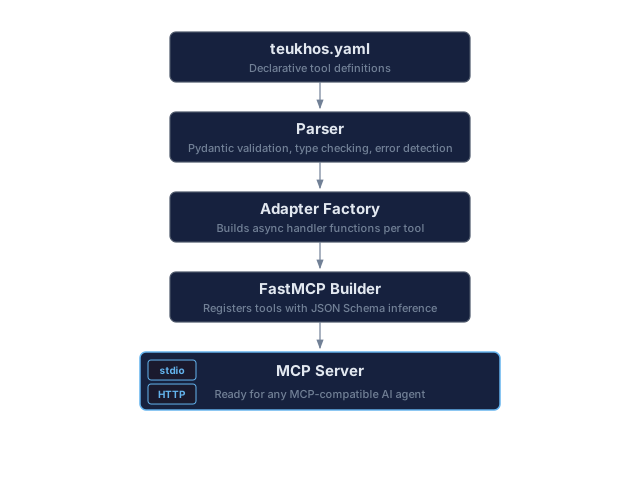
Cómo Funciona
Referencia de CLI
teukhos serve [config]            Start the MCP server
teukhos validate [config]         Validate config, exit 0/1 — use in CI
teukhos install [config]          Register with MCP client(s)
teukhos uninstall <server-name>   Remove from MCP client(s)
teukhos clients                   List supported clients & detection status
teukhos wait-ready                Poll /health until ready — use in CI
teukhos version                   Print version
teukhos discover <binary>         Auto-generate config from --help
Opciones para serve:
--transport  -t    Override transport: stdio | http  (default: from config)
--port       -p    Override HTTP port                (default: 8765)
Opciones para install:
--client  -c    Target a specific client by slug (e.g., cursor, claude-code)
--all           Install for all detected clients
--project       Use project-level config (e.g., .cursor/mcp.json in cwd)
--url           Remote server URL — enables HTTP mode
--key           API key for HTTP mode (default: "env:TEUKHOS_API_KEY"; --key "" for a server without auth)
--dest          Write to an arbitrary JSON config file (bypasses client detection)
--config-key    JSON key for server entries: "mcpServers" (default) or "servers"
Opciones para uninstall:
--client  -c    Target a specific client by slug
--all           Remove from all detected clients
--project       Target project-level config
Opciones para discover:
--output        -o    Output file path (default: <binary-name>.yaml)
--dry-run             Print generated YAML to stdout instead of writing a file
--max-depth     -d    Max recursion depth for subcommands (default: 2)
--timeout       -t    Timeout in seconds for each --help call during discovery [default: 15]
--exec-timeout  -e    Timeout in seconds for tool execution; sets timeout_seconds in generated YAML
--filter        -f    Only discover subcommands under this prefix (e.g. "vm" for "az vm")
Nombres de archivos de configuración: Teukhos busca teukhos.yaml por defecto. El mcp-forge.yaml heredado se acepta automáticamente con una nota de obsolescencia.
Clientes Compatibles
Teukhos puede registrarse con estos clientes de IA compatibles con MCP:
| Cliente | Slug | Alcance del Proyecto | Formato de Configuración |
|---|---|---|---|
| Claude Desktop | claude-desktop | — | JSON (solo stdio; sin --url) |
| Claude Code | claude-code | Sí | JSON |
| Cursor | cursor | Sí | JSON |
| GitHub Copilot / VS Code | github-copilot | Sí | JSON |
| Gemini CLI | gemini-cli | Sí | JSON |
| Codex | codex | Sí | TOML |
| Windsurf | windsurf | Sí | JSON |
| Cline | cline | — | JSON |
| Roo Code | roo-code | Sí | JSON |
| Continue.dev | continue | Sí | JSON |
| Kiro | kiro | Sí | JSON |
| Augment Code | augment | — | JSON |
| CodeBuddy | codebuddy | Sí | JSON |
| OpenCode | opencode | Sí | JSON (clave mcp) |
| Trae | trae | Sí | JSON |
teukhos clients              # see which are detected on your system
teukhos install --all         # register with all detected clients
El archivo de configuración de Claude Desktop solo acepta servidores locales (stdio), por lo que install --url lo rechaza; un servidor HTTPS público se puede agregar en Claude Desktop en Personalizar > Conectores. Las entradas de OpenCode usan su propio formato ("mcp", type: local/remote, {env:VAR} en los encabezados).
serve vs install — Cuándo Usar Cada Uno
teukhos install es el comando principal para la mayoría de los usuarios. Registra tu configuración con un cliente de IA (Cursor, Claude Code, etc.). El cliente entonces inicia teukhos serve automáticamente vía stdio cuando necesita tus herramientas. No ejecutas teukhos serve tú mismo.
teukhos serve se usa en dos escenarios:
- Pruebas/depuración — verifica que tu configuración YAML se inicie sin errores antes de registrarla
- Modo servidor HTTP — ejecuta un servidor MCP persistente accesible por red al que se conectan clientes remotos
# Most users: just install, the client handles the rest
teukhos install git-tools.yaml --client cursor

# Testing: verify config works
teukhos serve git-tools.yaml

# HTTP server: run persistently for remote access
teukhos serve git-tools.yaml --transport http --port 8765
Instalación en Rutas Personalizadas (--dest)
Usa --dest para escribir la configuración MCP en cualquier archivo JSON, omitiendo por completo la detección de clientes. Esto es útil para .github/mcp.json, configuraciones personalizadas o clientes que Teukhos aún no conoce.
# Write to .github/mcp.json (uses "mcpServers" key by default)
teukhos install git-tools.yaml --dest .github/mcp.json

# Use "servers" key (GitHub Copilot / VS Code format)
teukhos install git-tools.yaml --dest .vscode/mcp.json --config-key servers

# HTTP mode to custom path
teukhos install --dest /path/to/config.json --url http://host:8765/mcp

# Absolute path
teukhos install git-tools.yaml --dest C:\projects\myapp\.cursor\mcp.json
La opción --config-key controla la clave JSON utilizada para las entradas del servidor:
mcpServers(predeterminado) — utilizado por Claude Desktop, Claude Code, Cursor y la mayoría de los clientesservers— utilizado por GitHub Copilot / VS Code
Ejecutar Múltiples Servidores
Puedes ejecutar varios servidores Teukhos en paralelo en la misma máquina. Cada configuración obtiene un nombre de servidor único derivado de su forge.name, por lo que no se sobrescriben entre sí en las configuraciones del cliente.
stdio (sin conflictos — cada uno es un subproceso separado iniciado por el cliente):
teukhos install git-tools.yaml --client cursor       # registers teukhos-git-tools
teukhos install dev-tools.yaml --client cursor        # registers teukhos-dev-tools
# Cursor now has two independent MCP servers, each spawned as its own process
La configuración del cliente contendrá entradas separadas:
{
  "mcpServers": {
    "teukhos-git-tools": {
      "command": "teukhos",
      "args": ["serve", "C:/path/to/git-tools.yaml"]
    },
    "teukhos-dev-tools": {
      "command": "teukhos",
      "args": ["serve", "C:/path/to/dev-tools.yaml"]
    }
  }
}
HTTP (usa puertos diferentes):
teukhos serve git-tools.yaml --transport http --port 8765 &
teukhos serve dev-tools.yaml --transport http --port 8766 &
teukhos serve media-tools.yaml --transport http --port 8767 &

# Connect clients to each
teukhos install --client cursor --url http://localhost:8765/mcp
teukhos install --client cursor --url http://localhost:8766/mcp
Referencia Completa de Configuración
forge:
  name: "my-toolset"          # MCP server identity
  version: "1.0.0"
  description: "What this server does"

server:
  transport: stdio             # stdio | http
  host: "127.0.0.1"           # use 0.0.0.0 for remote (add auth!)
  port: 8765
  cors_origins: ["http://localhost:6274"]  # browser origins allowed over HTTP (default: none); "*" only with auth

auth:
  mode: none                   # none | api_key
  api_keys:
    - "env:TEUKHOS_API_KEY"    # reads from environment variable (recommended)
    - "env:MY_CUSTOM_KEY"      # any env var name with env: prefix
    - "literal-key-here"       # or use a literal string directly

tools:
  - name: tool_name            # snake_case — used as MCP tool ID
    description: "What the LLM reads to decide when to call this tool"
    adapter: cli               # cli is the only adapter in v0.2

    cli:
      command: "mybinary"      # must be on PATH or absolute path
      subcommand: []           # e.g. ["log", "--oneline"] for git
      timeout_seconds: 30
      working_dir: null        # defaults to the server's cwd (chosen by the MCP client); ~ is expanded
      env: {}                  # extra env vars, added to the server's environment
      max_output_bytes: 1000000  # stdout/stderr beyond this are truncated (default 1 MB)

    args:
      - name: arg_name
        type: string           # string | integer | number | boolean
        description: "Shown to the LLM"
        required: false
        flag: "--flag"         # CLI flag: -f or --flag
        positional: false      # true = append at end of command
        default: null
        enum: []               # allowed values: shown to the LLM and enforced
        secret: false          # with a default: hidden from the LLM and redacted from output

    output:
      type: stdout             # stdout | stderr | json_field | exit_code
      field: null              # for json_field: dot-notation path e.g. "data.items"
      exit_codes:              # for exit_code type: map codes to messages
        0: "Success"
        1: "Not found"
Las claves desconocidas se rechazan, por lo que un error tipográfico como secert: true falla en teukhos validate en lugar de ignorarse silenciosamente.
Modelo de Seguridad
Un teukhos.yaml es configuración ejecutable: decide qué binarios se ejecutan. Lee una configuración descargada antes de install o serve. Los valores de los argumentos provienen del LLM y se tratan como no confiables:
- Sin shell. Los comandos se ejecutan como una lista de argumentos, por lo que
;,|y$(...)se pasan literalmente. - Sin inyección de opciones
-. Un valor posicional o sin bandera que comience con-se rechaza, por lo que el LLM no puede convertirpathen--output=/etc/x. Los valores de enumeración y el valor predeterminado configurado están exentos. Pasa la entrada con prefijo de guion a través de unflag:. Las herramientas de Windows que aceptan modificadores/X(robocopy, findstr, reg) no están cubiertas; dalesenumo argumentos vinculados a banderas. enumse aplica. Los valores permitidos se publican en el esquema de la herramienta y cualquier otra cosa se rechaza antes de que se ejecute el comando. Cita palabras YAML como"on"/"yes", que de otro modo serían booleanos.- Los intérpretes necesitan su propio modo seguro. Un argumento de forma libre para
sqlite3,psql,python -conode -ees código.examples/database-tools.yamlejecutasqlite3 -safe -readonlyy fija los comandos de punto conenum;psqlno tiene modo seguro, por lo que solo se exponen consultas fijas. - Los valores predeterminados de
secretpermanecen con el operador. Un argumento secreto con undefaultno se ofrece al LLM, y un valor predeterminado de cadena se reemplaza con[REDACTED]en la salida de la herramienta. La redacción coincide solo con el valor literal, por lo que prefierecli.envpara credenciales reales. - Los errores se devuelven tal cual. En una salida distinta de cero, el stderr (o stdout) de la herramienta vuelve al LLM.
json_field/stderr/exit_codesolo dan forma a un resultado exitoso; no confíes en ellos para retener campos. - La salida está limitada a
max_output_bytespor flujo.json_fieldnecesita el JSON completo, así que aumenta el límite para herramientas con salida JSON grande. - Archivos por lotes de Windows. Un nombre simple como
npxoazque no tiene.exerecurre a su shim.cmd/.bat. Debido a quecmd.exevuelve a analizar los argumentos del lote, los valores que contienen" % ! ^ & | < > ( ) , ; =o saltos de línea se rechazan para esas herramientas; apuntacommandal.exereal (por ejemplo,nodemás la ruta del script) si los necesitas. - Búsqueda de comandos de Windows. Los nombres de comandos simples nunca se resuelven desde el directorio actual del servidor. Los procesos de las herramientas heredan esto (
NoDefaultCurrentDirectoryInExePath=1), por lo que los archivos por lotes de una herramienta deben llamar a los ayudantes por ruta ("%~dp0helper.cmd"). Las herramientas MSYS/Cygwin obtienennoglob, por lo que*llega a ellas literalmente.
Configuraciones de Ejemplo
Herramientas Git
forge:
  name: "git-tools"

tools:
  - name: git_log
    description: "Show recent git commits"
    adapter: cli
    cli:
      command: git
      subcommand: [log, --oneline]
    args:
      - name: count
        type: integer
        flag: "-n"
        default: 10
    output:
      type: stdout

  - name: git_status
    description: "Show working tree status"
    adapter: cli
    cli:
      command: git
      subcommand: [status, --short]
    output:
      type: stdout

  - name: git_diff
    description: "Show diff of current changes"
    adapter: cli
    cli:
      command: git
      subcommand: [diff]
    args:
      - name: staged
        type: boolean
        description: "Show staged changes only"
        flag: "--staged"
    output:
      type: stdout
Herramientas del Sistema (Multiplataforma)
forge:
  name: "sysops"

tools:
  - name: disk_usage
    description: "Show disk usage for a path"
    adapter: cli
    cli:
      command: python
      subcommand:
        - "-c"
        - "import shutil,sys,os; p=sys.argv[1] if len(sys.argv)>1 else '.'; p=os.path.abspath(p); u=shutil.disk_usage(p); print(f'Total: {u.total/1024/1024:.0f} MB  Used: {u.used/1024/1024:.0f} MB  Free: {u.free/1024/1024:.0f} MB')"
    args:
      - name: path
        type: string
        positional: true
        default: "."
    output:
      type: stdout

  - name: ping_host
    description: "Check if a host is reachable"
    adapter: cli
    cli:
      command: python
      subcommand:
        - "-c"
        - "import subprocess,platform,sys; h=sys.argv[1]; flag='-n' if platform.system()=='Windows' else '-c'; r=subprocess.run(['ping',flag,'3',h],capture_output=True,text=True); print(r.stdout); exit(r.returncode)"
      timeout_seconds: 15
    args:
      - name: host
        type: string
        required: true
        positional: true
    output:
      type: exit_code
      exit_codes:
        0: "Host is reachable"
        1: "Host is unreachable"
Salida JSON
  - name: get_video_info
    description: "Get video metadata as JSON"
    adapter: cli
    cli:
      command: ffprobe
      subcommand: ["-v", "quiet", "-print_format", "json", "-show_format"]
    args:
      - name: input_file
        type: string
        required: true
        positional: true
    output:
      type: json_field
      field: "format.duration"   # extract a specific field
Servidor Remoto / Transporte HTTP
Ejecuta Teukhos como un servidor accesible por red:
# remote-server.yaml
server:
  transport: http
  host: "0.0.0.0"
  port: 8765

auth:
  mode: api_key
  api_keys:
    - "env:TEUKHOS_API_KEY"
# Start the server
export TEUKHOS_API_KEY="your-secret-key"
teukhos serve remote-server.yaml

# Connect a client (from any machine)
teukhos install --client cursor --url http://server-ip:8765/mcp
Resolución de Claves API
Las claves en la configuración usan la convención de prefijo env::
| Valor de Configuración | Resuelto A |
|---|---|
"env:TEUKHOS_API_KEY" | Valor de la variable de entorno $TEUKHOS_API_KEY |
"env:MY_CUSTOM_KEY" | Valor de la variable de entorno $MY_CUSTOM_KEY |
"my-literal-key" | Se usa tal cual (no recomendado para producción) |
Con mode: api_key, cada ruta HTTP excepto /health necesita Authorization: Bearer <key>. Si ninguna de las claves configuradas se resuelve (por ejemplo, la variable de entorno no está establecida), serve se niega a iniciar en lugar de ejecutarse sin autenticación.
Acceso desde Navegador (CORS y Origen)
Las solicitudes que llevan un encabezado Origin (es decir, desde un navegador) se rechazan con 403 a menos que el origen esté listado en server.cors_origins. Esto bloquea el DNS-rebinding y otros sitios web que llaman a un servidor local; los clientes MCP que no son navegador no envían Origin y no se ven afectados. "*" permite todos los orígenes y desactiva esa verificación, por lo que necesita autenticación api_key: sobre HTTP con auth.mode: none, serve se niega a iniciar.
Implementación Detrás de un Proxy Inverso
Para producción, ejecuta detrás de nginx o Caddy para la terminación TLS:
# nginx example
server {
    listen 443 ssl;
    server_name mcp.example.com;

    ssl_certificate /etc/letsencrypt/live/mcp.example.com/fullchain.pem;
    ssl_certificate_key /etc/letsencrypt/live/mcp.example.com/privkey.pem;

    location / {
        proxy_pass http://127.0.0.1:8765;
        proxy_set_header Host $host;
    }
}
Integración CI/CD
GitHub Actions
- name: Install Teukhos
  run: pip install teukhos

- name: Validate config
  run: teukhos validate teukhos.yaml

- name: Start MCP server
  run: |
    teukhos serve teukhos.yaml --transport http --port 8765 &
    teukhos wait-ready --timeout 30

- name: Run agent tasks
  run: |
    claude --mcp http://localhost:8765/mcp \
      "Analyse the git log and summarise what changed this week"

- name: Teardown
  if: always()
  run: pkill -f "teukhos serve" || true
Docker
FROM python:3.12-slim
RUN pip install teukhos
# teukhos.yaml needs server.host: "0.0.0.0" to be reachable through -p, and api_key auth
COPY teukhos.yaml .
EXPOSE 8765
HEALTHCHECK CMD teukhos wait-ready --timeout 5
CMD ["teukhos", "serve", "--transport", "http"]
Ejecútalo con la clave establecida, por ejemplo docker run -e TEUKHOS_API_KEY=... -p 8765:8765 my-mcp-server; sin ella, el servidor se niega a iniciar.
Configuración Manual del Cliente
Si prefieres la configuración manual, agrega a la configuración MCP de tu cliente:
stdio (local):
{
  "mcpServers": {
    "teukhos-my-tools": {
      "command": "teukhos",
      "args": ["serve", "/path/to/teukhos.yaml"]
    }
  }
}
HTTP (remoto):
{
  "mcpServers": {
    "teukhos-remote": {
      "url": "http://server:8765/mcp",
      "headers": {
        "Authorization": "Bearer ${TEUKHOS_API_KEY}"
      }
    }
  }
}
O usa el comando de instalación: teukhos install teukhos.yaml --client cursor
Recetas
Ejemplos de copiar y pegar para tareas comunes. Ajusta rutas y nombres a tu configuración.
Instalar y Registrar
# Install Teukhos
pip install teukhos

# Register git-tools with Cursor (global)
teukhos install git-tools.yaml --client cursor

# Register git-tools with Claude Code (project-level, in current folder)
teukhos install git-tools.yaml --client claude-code --project

# Register with Claude Desktop
teukhos install git-tools.yaml --client claude-desktop

# Register with GitHub Copilot in VS Code (project-level)
teukhos install git-tools.yaml --client github-copilot --project

# Register with Gemini CLI
teukhos install git-tools.yaml --client gemini-cli

# Register with Windsurf
teukhos install git-tools.yaml --client windsurf

# Register with all detected clients at once
teukhos install git-tools.yaml --all

# Auto-detect clients and pick interactively
teukhos install git-tools.yaml
Destino Personalizado (--dest)
# Write to .github/mcp.json for GitHub Copilot in a repo
teukhos install git-tools.yaml --dest .github/mcp.json --config-key servers

# Write to .vscode/mcp.json with "servers" key
teukhos install git-tools.yaml --dest .vscode/mcp.json --config-key servers

# Write to .cursor/mcp.json in another project
teukhos install git-tools.yaml --dest /home/user/myproject/.cursor/mcp.json

# Write to any path with default "mcpServers" key
teukhos install git-tools.yaml --dest /etc/mcp/shared-tools.json
Múltiples Servidores en una Máquina
# Register two different configs with the same client (stdio, no conflicts)
teukhos install git-tools.yaml --client cursor
teukhos install dev-tools.yaml --client cursor

# Run two HTTP servers on different ports
teukhos serve git-tools.yaml --transport http --port 8765 &
teukhos serve dev-tools.yaml --transport http --port 8766 &

# Connect a client to both remote servers
teukhos install --client cursor --url http://localhost:8765/mcp
teukhos install --client cursor --url http://localhost:8766/mcp
Servidor Remoto / HTTP
# Start an HTTP server on localhost (for testing)
teukhos serve git-tools.yaml --transport http

# Start on all interfaces (for network access; set the key first, serve refuses to start without it)
export TEUKHOS_API_KEY="my-secret-key-abc123"
teukhos serve remote-server.yaml

# Connect a client to a remote server
teukhos install --client claude-code --url http://192.168.1.50:8765/mcp

# Connect with a custom API key
teukhos install --client cursor --url http://myserver:8765/mcp --key "env:MY_SERVER_KEY"

# Connect with a literal key (not recommended for production)
teukhos install --client cursor --url http://myserver:8765/mcp --key "s3cret-t0ken"

# Write remote config to a custom file
teukhos install --dest .vscode/mcp.json --config-key servers --url http://myserver:8765/mcp
Validar y Probar
# Validate a config (exits 0 if valid, 1 if not — good for CI)
teukhos validate git-tools.yaml

# Test-run a server locally (Ctrl+C to stop)
teukhos serve git-tools.yaml

# Start HTTP server and wait until ready (CI pipelines)
teukhos serve git-tools.yaml --transport http --port 8765 &
teukhos wait-ready --port 8765 --timeout 30
Desinstalar
# Remove from a specific client
teukhos uninstall teukhos-git-tools --client cursor

# Remove from a specific client (project-level config)
teukhos uninstall teukhos-git-tools --client claude-code --project

# Remove from all detected clients
teukhos uninstall teukhos-git-tools --all
Descubrir Herramientas desde un Binario
# Auto-generate a config (writes <binary-name>.yaml by default, e.g., my-tool.yaml)
teukhos discover my-tool.exe

# Preview without writing a file
teukhos discover my-tool --dry-run

# Scope to a subtree for large CLIs (e.g., Azure CLI)
teukhos discover az.cmd --filter vm

# Limit recursion depth
teukhos discover az.cmd --filter vm --max-depth 1

# Discover, then install in one flow
teukhos discover my-tool -o my-tool.yaml
teukhos install my-tool.yaml --client claude-desktop
Listar y Descubrir
# See all supported clients and which are installed on your system
teukhos clients

# Print Teukhos version
teukhos version

# Enable shell tab-completion (PowerShell)
teukhos --show-completion >> $PROFILE

# Enable shell tab-completion (bash)
teukhos --show-completion >> ~/.bashrc

# Enable shell tab-completion (zsh)
teukhos --show-completion >> ~/.zshrc
Docker
# Build
docker build -t my-mcp-server .

# Run with API key
docker run -e TEUKHOS_API_KEY=my-secret -p 8765:8765 my-mcp-server

# Connect a local client to the container
teukhos install --client cursor --url http://localhost:8765/mcp
Hoja de Ruta
v0.3 — Actual
- Instalador multicliente: 15 clientes MCP compatibles
- Alcance de instalación a nivel de proyecto y global
teukhos installcon detección automática,--client,--all,--project,--urlteukhos install --destpara escribir en cualquier archivo de configuración JSON arbitrarioteukhos install --config-keypara elegir el formato JSONmcpServersoserversteukhos uninstallpara eliminar registrosteukhos clientspara listar clientes compatibles- Transporte HTTP Streamable con banner de inicio
- Resolución de claves API con prefijo
env: - Configuración CORS para transporte HTTP
- Middleware de autenticación completo (token Bearer)
- Configuraciones de ejemplo multiplataforma (Windows, Linux, macOS)
- Herramienta de verificación de salud ping en todos los servidores de ejemplo
- Suite integral de pruebas de integración (62 pruebas en 20 servidores)
teukhos discover <binary>— genera automáticamente la configuración desde--helpcon opciones--max-depth,--filtery--timeout
v0.4 — Listo para Producción
- Adaptador
rest(envuelve cualquier endpoint HTTP) - Adaptador
shell(scripts bash/pwsh en línea) - Recarga en caliente — guarda YAML, las herramientas se actualizan sin reiniciar
- Soporte de salida en streaming
- Archivo de bloqueo (
teukhos.lock) para implementaciones reproducibles
v0.5 — La Plataforma
- Autenticación OAuth 2.1 + JWT
- Soporte mTLS para implementaciones empresariales
- RBAC a nivel de herramienta
- Registro de auditoría de solo anexión
- Interfaz web integrada — vidrio oscuro, visualización de llamadas a herramientas en tiempo real
- Sincronización bidireccional YAML a editor visual
- Adaptador de importación automática OpenAPI
- Composición de herramientas / mini pipelines
- Métricas Prometheus en
/metrics - Registro público:
teukhos install registry://community/git-tools
¿Por Qué Teukhos?
Tú proporcionas la especificación MCP. Teukhos hace la forja.
Contribuciones
git clone https://github.com/MihaiCiprianChezan/teukhos
cd teukhos
python -m venv .venv
Activa el entorno virtual:
# Windows
.venv\Scripts\activate

# Linux / macOS
source .venv/bin/activate
Instala en modo de desarrollo y ejecuta las pruebas:
pip install -e ".[dev]"

# Run all tests (stdio + cross-transport, skips HTTP subprocess tests if no servers running)
pytest tests/ -v

# Run only stdio server tests (fast, no external dependencies)
pytest tests/test_all_servers.py::TestStdioServers -v

# Run only unit tests
pytest tests/ -v -k "not all_servers"
La suite de pruebas cubre:
- Pruebas unitarias — carga de configuración, adaptador CLI, mapeo de salida, autenticación, instaladores
- Pruebas de protocolo MCP — recorridos completos JSON-RPC vía FastMCP Client
- Pruebas de integración — las 11 configuraciones de ejemplo: ping, listado de herramientas, validación de esquemas, concurrencia
Las solicitudes de extracción son bienvenidas.
Contribuyentes
Licencia
MIT — consulta LICENCIA.
Consulta CHANGELOG para el historial de versiones.
Creado por Mihai Ciprian Chezan