Spotify
Controla la reproducción de Spotify y gestiona tus canciones favoritas usando LLMs.
GitHubPrueba este MCPPatrocinado
Documentación
Servidor MCP de Spotify
Un servidor MCP simple para controlar la reproducción de Spotify y gestionar tus canciones favoritas mediante LLM.
Características
- Reproducir y pausar la reproducción de Spotify
- Obtener información sobre la pista actual
- Añadir la pista actual a tus canciones favoritas
Configuración
-
Clona el repositorio:
git clone https://github.com/yourusername/spotify-mcp-server.git cd spotify-mcp-server -
Crea y activa un entorno virtual:
python3 -m venv .venv source .venv/bin/activate -
Instala las dependencias:
pip install uv pip install -r requirements.txt -
Crea un archivo
.env:SPOTIPY_CLIENT_ID=your_spotify_client_id SPOTIPY_CLIENT_SECRET=your_spotify_client_secret SPOTIPY_REDIRECT_URI=http://localhost:8888/callback -
Ejecuta el servidor:
python main.py
Integración con Claude Desktop (Servidor MCP)
Para usar este servidor como servidor MCP con Claude, añade la siguiente entrada a tu archivo de configuración de Claude (normalmente ubicado en ~/Library/Application Support/Claude/claude_desktop_config.json en macOS):
{
  "mcpServers": {
    "spotify-mcp-server": {
      "command": "uv",
      "args": [
        "--directory",
        "/ABSOLUTE/PATH/TO/PROJECT/spotify-mcp-server",
        "run",
        "main.py"
      ]
    }
  }
}
- Reemplaza
/ABSOLUTE/PATH/TO/PROJECT/spotify-mcp-servercon la ruta real a tu proyecto - Si el comando
uvno se reconoce, proporciona la ruta absoluta del ejecutableuv(se puede encontrar conwhich uven MacOS) - Asegúrate de que tus variables de entorno estén configuradas ya sea en la configuración o mediante un archivo
.env. - Reinicia Claude después de editar el archivo de configuración.
Notas
- Necesitas registrar tu aplicación en el Spotify Developer Dashboard para obtener tu ID de cliente y secreto.
Ejemplo de sesión
A continuación se muestra un ejemplo de sesión usando Claude con el servidor MCP de Spotify:
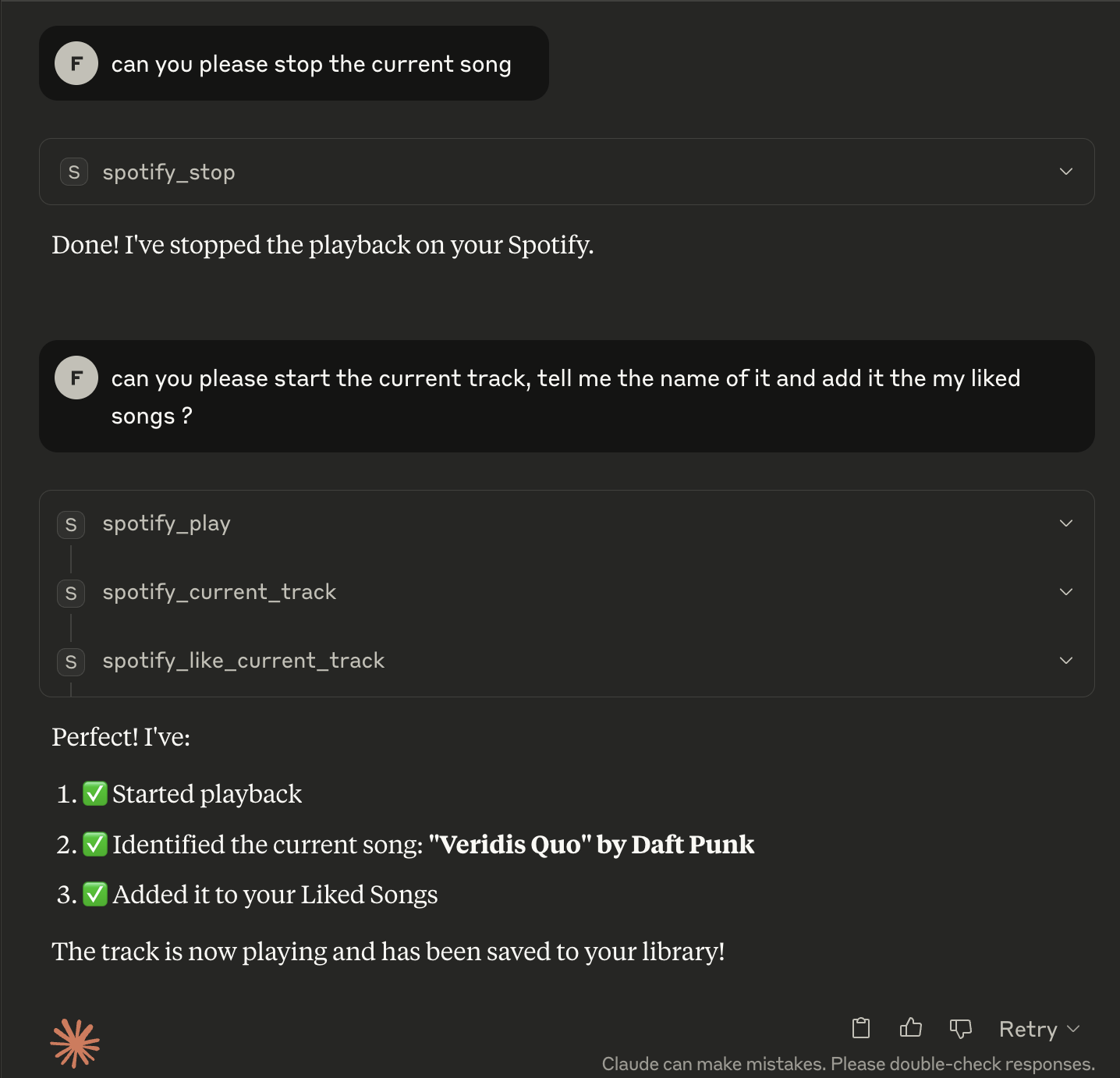
Interacción de ejemplo:
User: Play the current track using Spotify MCP server
Claude: Playback started successfully

User: What song is playing?
Claude: Currently playing: Shape of You by Ed Sheeran

User: Like this song
Claude: Added 'Shape of You' to your Liked Songs.