Lokalise MCP Tool
Añade claves de traducción a proyectos de Lokalise. Requiere una clave de API de Lokalise.
Documentación
Lokalise MCP Tool
Un servidor de Programa de Línea de Comandos (MCP) mínimo para añadir claves de traducción a tus proyectos de Lokalise, diseñado para integración con Cursor o uso independiente.
📦 Instalación
# For MCP usage (global installation)
npm install -g lokalise-mcp-server

# For library usage (project dependency)
npm install lokalise-mcp-server
Paquete NPM: https://www.npmjs.com/package/lokalise-mcp-server
🖼️ Diagrama de Flujo MCP
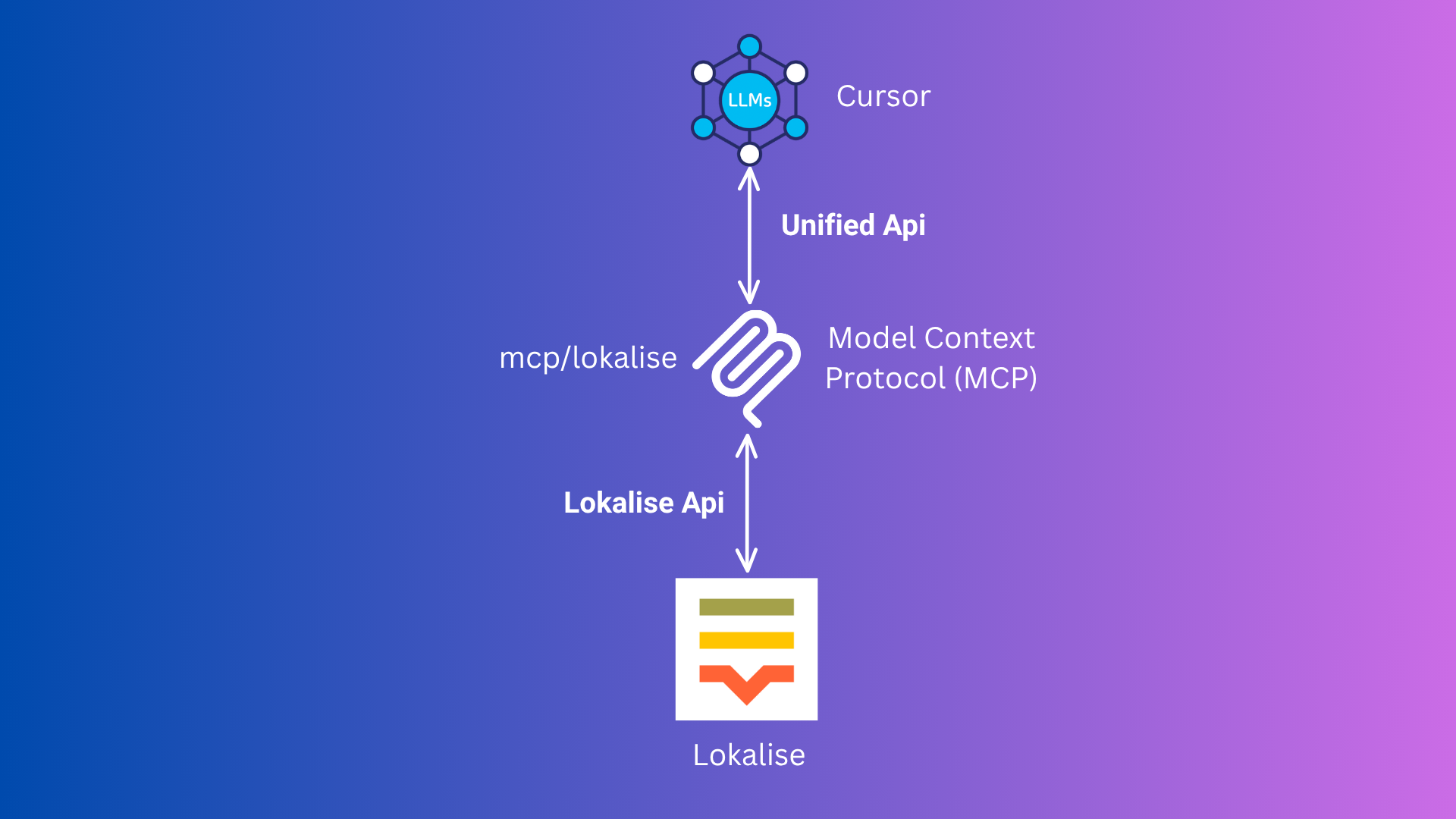
Este diagrama ilustra el flujo del Protocolo de Contexto de Modelo (MCP) entre Cursor, tu servidor MCP y Lokalise.
⚡️ Uso (Inicio Rápido con Cursor MCP)
Opción 1: Paquete NPM (Recomendado)
🛠️ Añade esto a tu mcp.json (o configúralo a través de la interfaz de Cursor):
{
  "mcpServers": {
    "lokalise": {
      "command": "npx",
      "args": ["-y", "lokalise-mcp-server"],
      "env": {
        "LOKALISE_API_KEY": "your_actual_api_key"
      }
    }
  }
}
- 🔄 Recarga la ventana. Usará automáticamente el paquete npm.
Opción 2: Docker (Alternativa)
¡No necesitas ejecutar Docker o Podman manualmente!
-
🐳 Asegúrate de que Docker o Podman esté instalado y en ejecución.
-
🛠️ Añade esto a tu
mcp.json(o configúralo a través de la interfaz de Cursor):{ "mcpServers": { "lokalise": { "command": "docker", // podman "args": [ "run", "--rm", "-i", "-e", "LOKALISE_API_KEY", "rafee03/mcp-lokalise:latest" ], "env": { "LOKALISE_API_KEY": "your_actual_api_key" } } } }- Puedes usar
podmanen lugar dedockersi lo prefieres. - Cursor descargará y ejecutará la imagen automáticamente cuando sea necesario.
- Puedes usar
-
🔄 Reinicia Cursor. Se encargará de todo por ti.
📝 Cómo Usarlo en Cursor
Esta herramienta acepta estas entradas:
- projectName (obligatorio): El nombre de tu proyecto de Lokalise (p. ej.,
SpaceX). - keys (obligatorio): Un array de objetos, cada uno con:
- keyName (obligatorio): La clave de traducción (p. ej.,
hello) - defaultValue (opcional): El valor de traducción predeterminado (p. ej.,
Hello) - platforms (opcional): Las plataformas a las que se aplica esta clave (p. ej.,
web,ios)
- keyName (obligatorio): La clave de traducción (p. ej.,
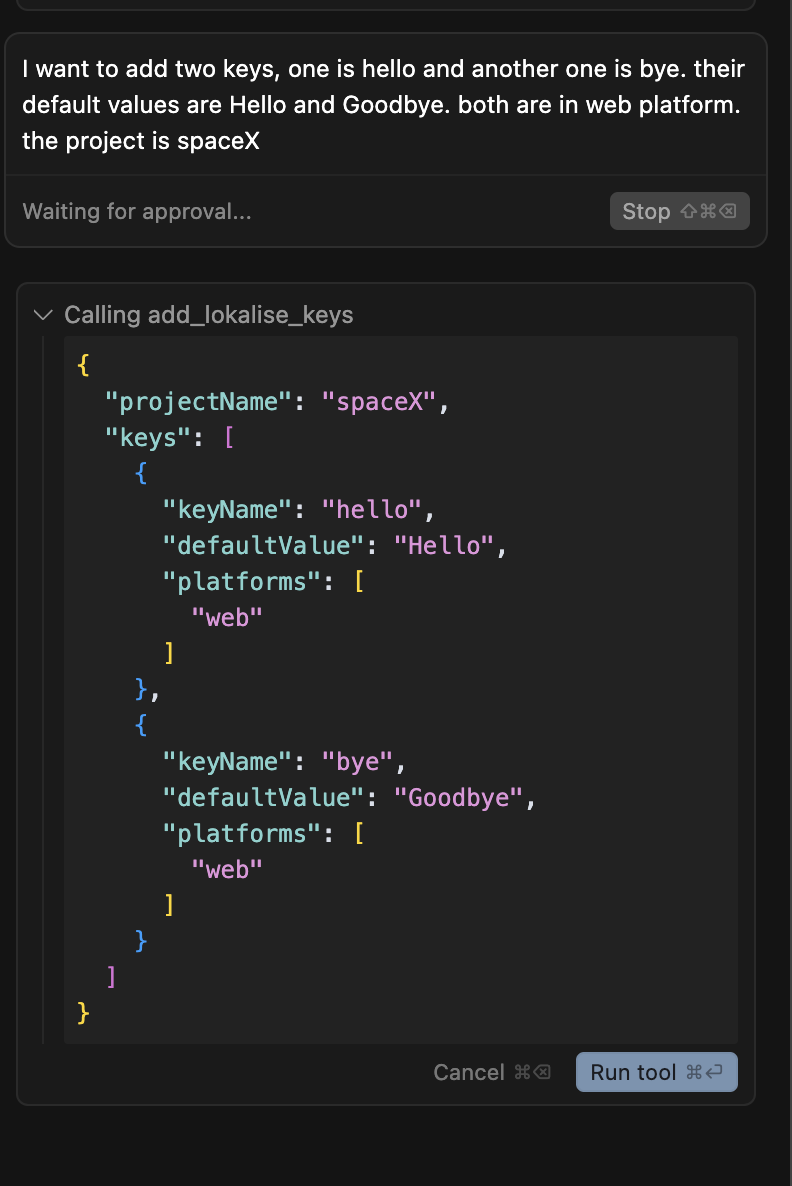
Ejemplo:
Quiero añadir dos claves, una es hello y otra es bye. Sus valores predeterminados son Hello y Goodbye. Ambas están en la plataforma web. El proyecto es spaceX.
Cursor convertirá automáticamente esto a la entrada correcta para la herramienta MCP.
📁 Archivos del Proyecto
Archivos fuente de TypeScript (src/):
- src/mcp-server.ts: El punto de entrada principal del servidor MCP para la integración con Cursor.
- src/mcp.ts: Lógica compartida para interactuar con la API de Lokalise (usada por el servidor).
- src/server.ts: (Opcional) Versión del servidor HTTP (no requerida para Cursor).
- src/add-key.ts: (Opcional) Herramienta CLI para añadir una clave de forma interactiva (no requerida para Cursor).
Archivos JavaScript compilados (dist/):
- dist/mcp-server.js: Servidor MCP compilado.
- dist/mcp.js: Lógica de API compilada.
- dist/server.js: Servidor HTTP compilado.
- dist/add-key.js: Herramienta CLI compilada.
Otros archivos:
- tsconfig.json: Configuración de TypeScript.
- Dockerfile: Para construir la imagen Docker del servidor MCP.
- package.json: Dependencias y scripts del proyecto.
- README.md: Este archivo de documentación.
🛠️ Configuración (Para Desarrollo Local o Personalización)
1. 📥 Clona el Repositorio
git clone https://github.com/mdrafee03/mcp-lokalise.git
cd mcp-lokalise
2. 📦 Instala las Dependencias
npm install
3. 🔨 Compila el Proyecto
npm run build
4. 🔑 Establece tu Clave de API de Lokalise
En tu configuración de MCP (recomendado para Cursor)
{
  "mcpServers": {
    "lokalise": {
      "command": "node",
      "args": ["{directory-of-the-project}/dist/mcp-server.js"],
      "env": {
        "LOKALISE_API_KEY": "your_actual_api_key"
      }
    }
  }
}
Scripts Disponibles
npm run build- Compila TypeScript a JavaScriptnpm run dev- Ejecuta el servidor MCP en modo de desarrollo con tsxnpm run server- Ejecuta el servidor HTTP en modo de desarrollo con tsxnpm run add-key- Ejecuta la herramienta CLI en modo de desarrollo con tsxnpm start- Ejecuta el servidor MCP compilado desde dist/
Requisitos
- Node.js 22+ recomendado
- TypeScript 5.8+
- Protocolo MCP mediante @modelcontextprotocol/sdk
Licencia
MIT