Kintone Lite
Un servidor ligero para conectar asistentes de IA con aplicaciones y datos de Kintone.
Documentación
mcp-kintone-lite
Servidor MCP de Kintone simple y ligero para conectar asistentes de IA a aplicaciones y datos de Kintone. Perfecto para automatizar flujos de trabajo e integrar Kintone con herramientas de IA.




📦 Instalar desde PyPI: pip install mcp-kintone-lite
🔗 Paquete PyPI: https://pypi.org/project/mcp-kintone-lite/
📚 Repositorio de GitHub: https://github.com/luvl/mcp-kintone-lite
Demostración
Vea el servidor MCP Kintone Lite en acción con Claude Desktop:
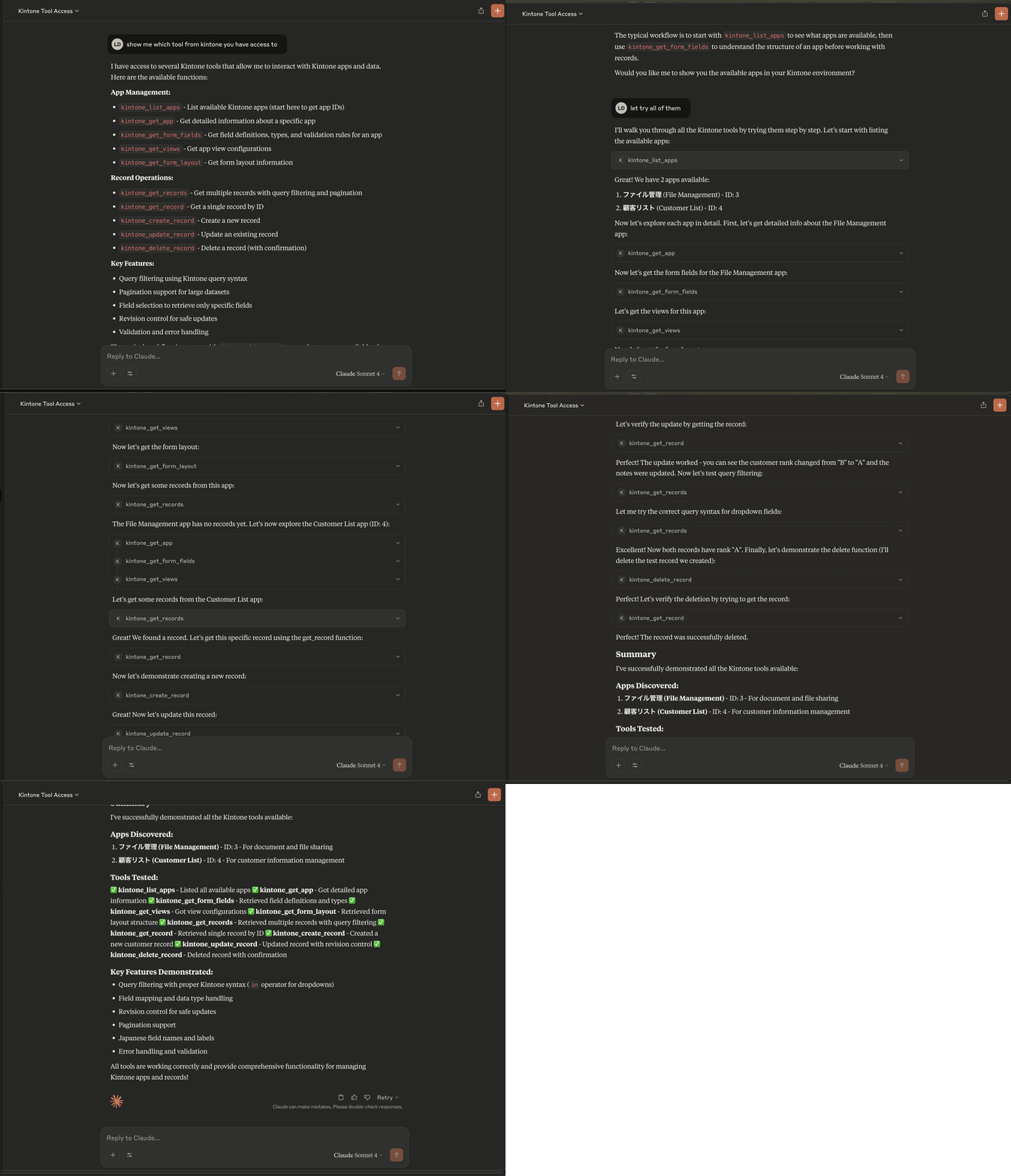
La demostración muestra a Claude Desktop usando el servidor MCP para interactuar con datos de Kintone: consultar aplicaciones, recuperar registros y realizar operaciones CRUD sin problemas.
Resumen
Este servidor MCP (Model Context Protocol) proporciona a asistentes de IA como Claude acceso seguro a aplicaciones y datos de Kintone. Implementa el estándar MCP para permitir una integración perfecta entre aplicaciones de IA y la plataforma de procesos de negocio de Kintone.
Características
- 🔐 Autenticación segura de Kintone mediante autenticación básica (usuario/contraseña)
- 📊 Acceso a todas las aplicaciones de Kintone (según los permisos del usuario)
- 🔍 Ejecución de consultas con filtrado y paginación
- 📝 Operaciones CRUD en registros de Kintone
- 🛡️ Seguridad y validación integradas
- 🚀 Configuración e instalación sencillas
Uso rápido
# Install the package
pip install mcp-kintone-lite

# Use with Claude Desktop (recommended)
uvx --from mcp-kintone-lite mcp-kintone-lite

# Or run directly
mcp-kintone-lite
Funciona con: Claude Desktop, cualquier asistente de IA compatible con MCP
Inicio rápido con Claude Desktop
Uso en producción (Recomendado)
La forma más sencilla de usar este servidor MCP es instalarlo directamente desde PyPI y configurarlo con Claude Desktop.
Paso 1: Configurar Claude Desktop
Agregue la siguiente configuración a su archivo de configuración de Claude Desktop:
Ubicación del archivo de configuración:
- macOS/Linux:
~/Library/Application Support/Claude/claude_desktop_config.json - Windows:
%APPDATA%\Claude\claude_desktop_config.json
Configuración:
{
  "mcpServers": {
    "kintone-lite": {
      "command": "uvx",
      "args": [
        "--from",
        "mcp-kintone-lite",
        "mcp-kintone-lite"
      ],
      "env": {
        "KINTONE_SUBDOMAIN": "your-subdomain",
        "KINTONE_USERNAME": "your-username",
        "KINTONE_PASSWORD": "your-password"
      }
    }
  }
}
Paso 2: Configurar las credenciales de Kintone
Reemplace las variables de entorno en la configuración:
KINTONE_SUBDOMAIN: Su subdominio de Kintone (por ejemplo,mycompanyparamycompany.cybozu.com)KINTONE_USERNAME: Su nombre de usuario de KintoneKINTONE_PASSWORD: Su contraseña de Kintone
Paso 3: Reiniciar Claude Desktop
Después de guardar la configuración, reinicie Claude Desktop. Debería ver un ícono de martillo que indica que las herramientas están disponibles.
Paso 4: Probar la integración
Intente preguntarle a Claude:
- "Listar aplicaciones de Kintone disponibles"
- "Obtener campos de formulario para la aplicación 123"
- "Obtener registros de la aplicación 456 con estado 'Activo'"
Requisitos previos
- Python 3.10 o superior
- Cuenta de Kintone con nombre de usuario y contraseña
- Subdominio de Kintone (por ejemplo,
yourcompany.cybozu.com)
Configuración de desarrollo
Si desea modificar o contribuir a este servidor MCP, siga estas instrucciones de configuración de desarrollo.
Instalación
Opción 1: Usando uv (Recomendado para desarrollo)
# Install uv if you haven't already
brew install uv  # macOS
# or
curl -LsSf https://astral.sh/uv/install.sh | sh  # Linux/macOS

# Clone and install the server
git clone https://github.com/luvl/mcp-kintone-lite.git
cd mcp-kintone-lite
uv sync
Opción 2: Usando Poetry
git clone https://github.com/luvl/mcp-kintone-lite.git
cd mcp-kintone-lite
poetry install
Configuración de desarrollo de Kintone
Cree un archivo .env en la raíz del proyecto:
KINTONE_SUBDOMAIN=your-subdomain
KINTONE_USERNAME=your-username
KINTONE_PASSWORD=your-password
Uso
Modo de desarrollo
Primero, asegúrese de tener sus credenciales de Kintone configuradas en su archivo .env.
Método 1: Ejecución directa de Python
# Run the server directly
python src/mcp_kintone_lite/server.py
Método 2: Usando Poetry
# Run with Poetry
poetry run python src/mcp_kintone_lite/server.py
Método 3: Usando UV (Recomendado)
# Run with UV
uv run python src/mcp_kintone_lite/server.py
Pruebas con MCP Inspector
Si tiene instalada la CLI de MCP, puede probar su servidor:
# Test with MCP Inspector
mcp inspector

# Or run in development mode
mcp dev src/mcp_kintone_lite/server.py
Proceso de publicación
- Pruebe primero en TestPyPI:
# Build the package
uv build
# or: poetry build

# Upload to TestPyPI
twine upload --repository testpypi --config-file .pypirc dist/*

# Test install from TestPyPI
pip install --index-url https://test.pypi.org/simple/ --extra-index-url https://pypi.org/simple/ mcp-kintone-lite
- Publique en PyPI de producción:
# Upload to production PyPI
twine upload --repository pypi --config-file .pypirc dist/*

# Test install from production PyPI
pip install mcp-kintone-lite
Gestión de versiones
Para publicar una nueva versión:
- Actualice la versión en
pyproject.toml - Reconstruya:
uv buildopoetry build - Suba:
twine upload --repository pypi --config-file .pypirc dist/*