MCP YouTube Transcript Server
Recupera transcripciones de videos de YouTube para análisis y procesamiento de contenido.
Documentación
MCP YouTube Transcript Server
Un servidor de Model Context Protocol que permite la recuperación de transcripciones de videos de YouTube. Este servidor proporciona acceso directo a las transcripciones de video a través de una interfaz simple, lo que lo hace ideal para el análisis y procesamiento de contenido.
Tabla de Contenidos
Características
✨ Capacidades clave:
- Extraer transcripciones de videos de YouTube
- Soporte para múltiples idiomas
- Formatear texto en modo continuo o por párrafos
- Recuperar títulos y metadatos de videos
- Segmentación automática de párrafos
- Normalización de texto y decodificación de entidades HTML
- Manejo robusto de errores
- Detección de marcas de tiempo y superposiciones
Primeros Pasos
Requisitos Previos
- Node.js 18 o superior
Instalación
Proporcionamos dos métodos de instalación:
Opción 1: Configuración Manual (Recomendada para Producción)
-
Cree o edite el archivo de configuración de Claude Desktop:
- macOS:
~/Library/Application Support/Claude/claude_desktop_config.json - Windows:
%APPDATA%\Claude\claude_desktop_config.json
- macOS:
-
Agregue la siguiente configuración:
{
  "mcpServers": {
    "youtube-transcript": {
      "command": "npx",
      "args": [
        "-y",
        "@sinco-lab/mcp-youtube-transcript"
      ]
    }
  }
}
Script de configuración rápida para macOS:
# Create directory if it doesn't exist
mkdir -p ~/Library/Application\ Support/Claude

# Create or update config file
cat > ~/Library/Application\ Support/Claude/claude_desktop_config.json << 'EOL'
{
  "mcpServers": {
    "youtube-transcript": {
      "command": "npx",
      "args": [
        "-y",
        "@sinco-lab/mcp-youtube-transcript"
      ]
    }
  }
}
EOL
Opción 2: Vía Smithery (Solo Desarrollo)
npx -y @smithery/cli install @sinco-lab/mcp-youtube-transcript --client claude
⚠️ Nota: Este método no se recomienda para uso en producción, ya que depende de los servicios proxy de Smithery.
Uso
Configuración Básica
Para usar con Claude Desktop / Cursor / cline, asegúrese de que su configuración coincida:
{
  "mcpServers": {
    "youtube-transcript": {
      "command": "npx",
      "args": ["-y", "@sinco-lab/mcp-youtube-transcript"]
    }
  }
}
Pruebas
Con la Aplicación Claude
- Reinicie la aplicación Claude después de la instalación
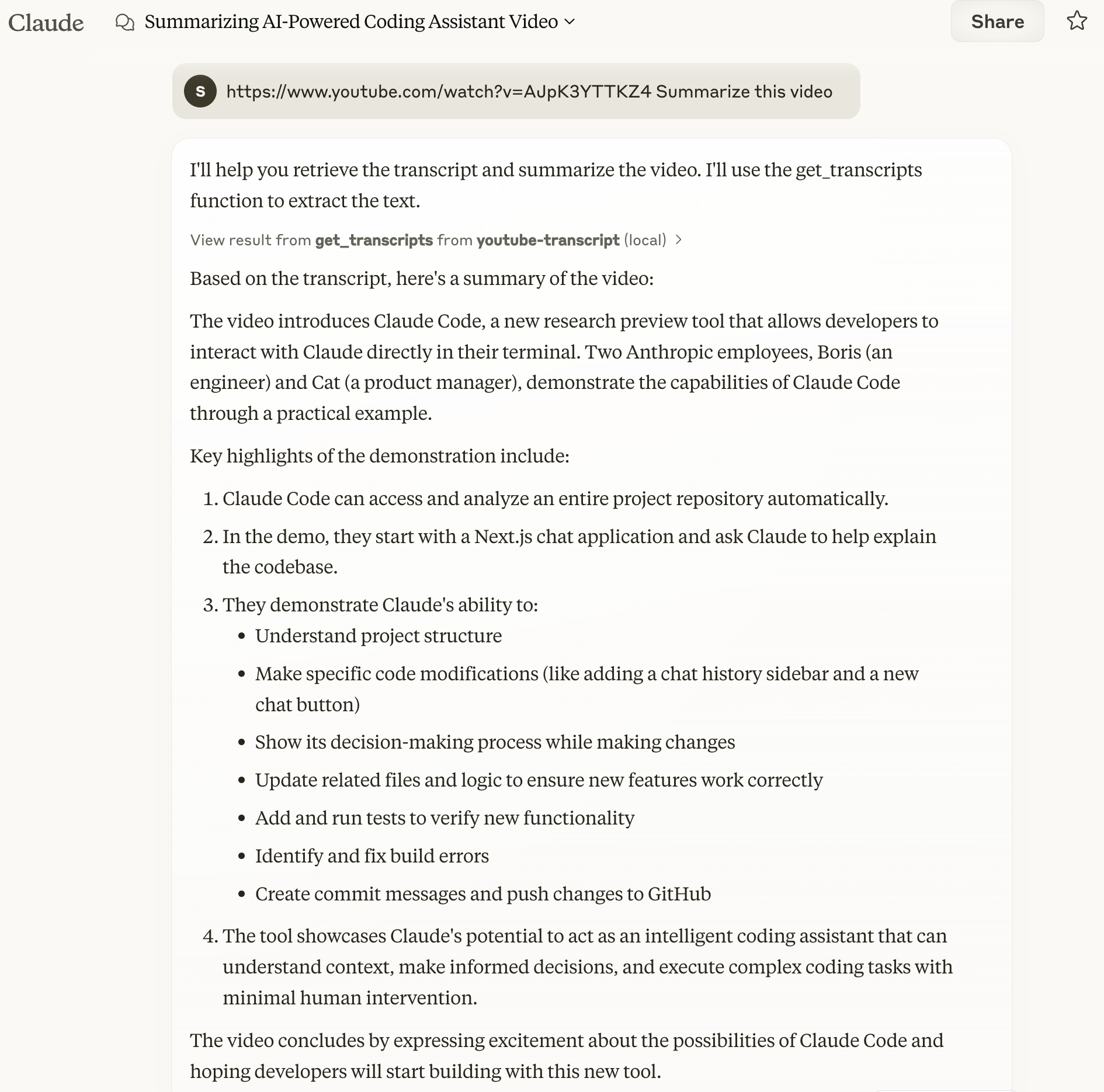
- Pruebe con un comando simple:
https://www.youtube.com/watch?v=AJpK3YTTKZ4 Summarize this video
Ejemplo de salida:
Con MCP Inspector
# Clone and setup
git clone https://github.com/sinco-lab/mcp-youtube-transcript.git
cd mcp-youtube-transcript
npm install
npm run build

# Launch inspector
npx @modelcontextprotocol/inspector node "dist/index.js"

# Access http://localhost:6274 and try these commands:
# 1. List Tools: clink `List Tools`
# 2. Test get_transcripts with:
#    url: "https://www.youtube.com/watch?v=AJpK3YTTKZ4"
#    lang: "en" (optional)
#    enableParagraphs: false (optional)
Solución de Problemas y Mantenimiento
Revisión de los Registros de Claude
Para monitorear los registros de Claude, puede usar el siguiente comando:
tail -n 20 -f ~/Library/Logs/Claude/mcp*.log
Esto mostrará las últimas 20 líneas del archivo de registro y continuará mostrando nuevas entradas a medida que se agreguen.
Nota: La aplicación Claude agrega automáticamente el prefijo
mcp-server-a los archivos de registro del servidor MCP. Por ejemplo, los registros de nuestro servidor se escribirán enmcp-server-youtube-transcript.log.
Limpieza de la Caché de npx
Si encuentra problemas relacionados con la caché de npx, puede limpiarla manualmente usando:
rm -rf ~/.npm/_npx
Esto eliminará los paquetes en caché y le permitirá comenzar de nuevo.
Referencia de la API
get_transcripts
Obtiene transcripciones de videos de YouTube.
Parámetros:
url(cadena, obligatorio): URL o ID del video de YouTubelang(cadena, opcional): Código de idioma (predeterminado: "en")enableParagraphs(booleano, opcional): Habilitar modo de párrafos (predeterminado: false)
Formato de Respuesta:
{
  "content": [{
    "type": "text",
    "text": "Video title and transcript content",
    "metadata": {
      "videoId": "video_id",
      "title": "video_title",
      "language": "transcript_language",
      "timestamp": "processing_time",
      "charCount": "character_count",
      "transcriptCount": "number_of_transcripts",
      "totalDuration": "total_duration",
      "paragraphsEnabled": "paragraph_mode_status"
    }
  }]
}
Desarrollo
Estructura del Proyecto
├── src/
│ ├── index.ts            # Server entry point
│ ├── youtube.ts          # YouTube transcript fetching logic
├── dist/                 # Compiled output
└── package.json
Componentes Clave
YouTubeTranscriptFetcher: Funcionalidad principal de obtención de transcripcionesYouTubeUtils: Procesamiento de texto y utilidades
Características y Capacidades
-
Manejo de Errores:
- URLs/IDs inválidos
- Transcripciones no disponibles
- Disponibilidad de idiomas
- Errores de red
- Límite de velocidad
-
Procesamiento de Texto:
- Decodificación de entidades HTML
- Normalización de puntuación
- Normalización de espacios
- Detección inteligente de párrafos
Contribuciones
¡Agradecemos las contribuciones! No dude en enviar problemas y solicitudes de extracción.
Licencia
Este proyecto está licenciado bajo la Licencia MIT - consulte el archivo LICENCIA para más detalles.